Timezones
Overview
To learn more about datetime objects, please see Dates and Times in Python.
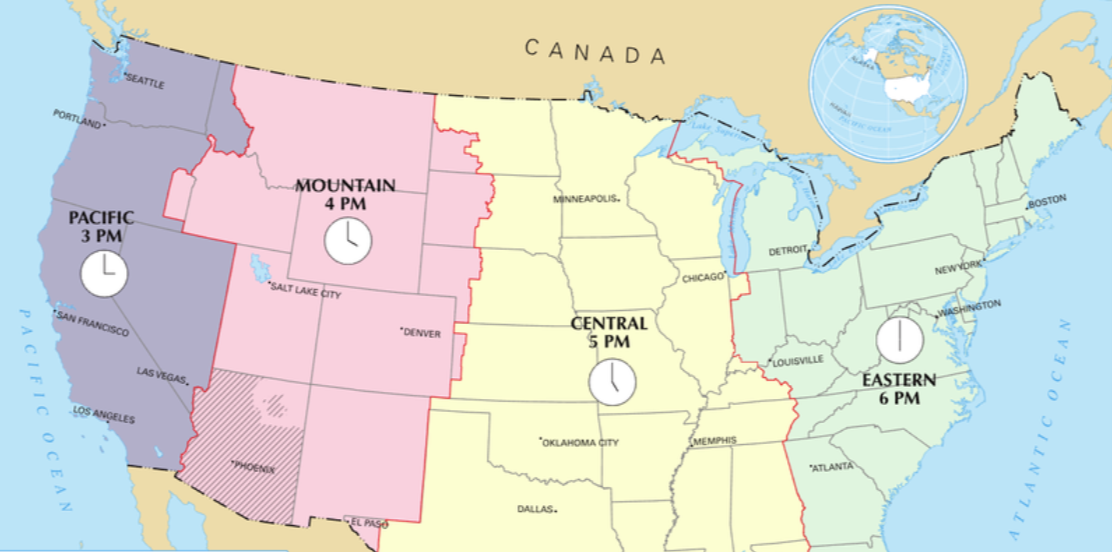
Python datetime objects can track exact moments when you include a time zone. Without it, datetimes are "naive" and cannot be compared across different locations.
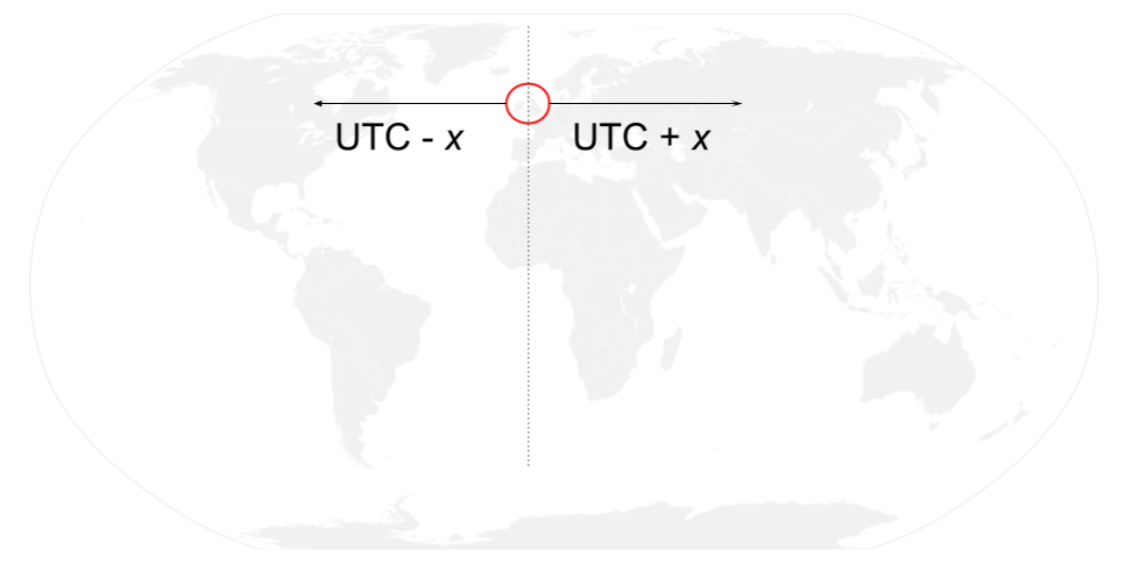
UTC is the global standard for comparing times worldwide. Its reference point is the Prime Meridian in Greenwich, UK, which originally established Greenwich Mean Time (GMT).
Countries east of the UK are ahead of UTC, while countries west of the UK are behind UTC.
Creating a Timedelta
You can make a datetime aware of its time zone using the timezone class and a timedelta for the offset.
In this example, tzinfo sets the UTC offset for the datetime. UTC-5 means the local time is 5 hours behind UTC.
from datetime import datetime, timezone, timedelta

ET = timezone(timedelta(hours=-5))
ride_start = datetime(2017, 12, 30, 20, 39, 3, tzinfo=ET)
print(ride_start)
Output:
2017-12-30 20:39:03-05:00
Converting a Timezone
You can convert a datetime to a different time zone using the astimezone() method. This shifts both the clock and UTC offset to the new zone.
Example: Convert to India Standard Time (UTC+5:30)
IST = timezone(timedelta(hours=5, minutes=30))
ride_start_ist = ride_start.astimezone(IST)
print(ride_start_ist)
Output:
2017-12-31 07:09:03+05:30
Adjusting vs Replacing Timezone
Python lets you handle time zones in two ways: replace() and astimezone().
-
replace()changes only the UTC offset without changing the clock timeride_utc_replace = ride_start.replace(tzinfo=timezone.utc)print(ride_utc_replace)# Clock stays 20:39:03, offset is now +00:00 -
astimezone()adjusts both the clock and the offset to match the new time zoneride_utc = ride_start.astimezone(timezone.utc)print(ride_utc)# Clock changes to 01:39:03, offset +00:00
When to use:
- Use
replace()when you just want to mark a datetime as a different zone without shifting the time. - Use
astimezone()when you want the actual time adjusted to the new zone.
Timezone Database
Working with time zones can be tricky because they vary across countries and even within the same country.
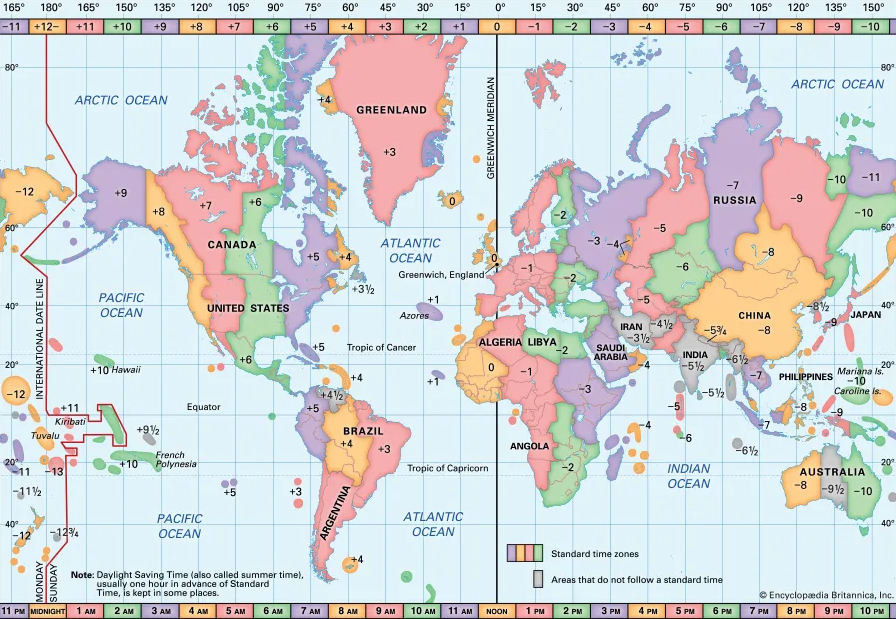
Computers handle this using a time zone database called tz, which is updated several times a year. Python can use the dateutil package to access this database and apply the correct UTC offsets, including adjustments for daylight savings.
Instead of manually calculating offsets, you can create a timezone object using tz.gettz() and pass the zone string like 'America/New_York'. This object automatically knows the correct UTC offset and adjusts for changes like daylight savings.
In the example below, we assign the Eastern US time zone to a datetime:
from datetime import datetime
from dateutil import tz

# Get  Eastern Time zone
ET = tz.gettz('America/New_York')

ride_start = datetime(2017, 12, 30, 20, 39, 3, tzinfo=ET)
print(ride_start)
Output:
2017-12-30 20:39:03-05:00
The same timezone object adjusts automatically for other dates. UTC offsets may change due to daylight savings, which ensures all datetime data aligns to a common scale without manually checking offsets.
Starting Daylight Saving Time
Some places shift their clocks twice a year to create longer summer evenings. This is called daylight saving time. Handling it can be tricky because the UTC offset changes when the clocks move forward or back.
- Clocks move forward in spring to start daylight saving time
- Clocks move back in fall to end daylight saving
Instead of calculating offsets manually, you can use Python’s dateutil()`` package. It uses the tz()` database to know the correct UTC offset for any date, including changes for daylight saving time.
In the example below, we create two datetimes for Washington, DC on the day clocks spring forward, first without time zones:
from datetime import datetime

# Timestamps without tzinfo
spring_ahead_159am = datetime(2017, 3, 12, 1, 59, 59)
spring_ahead_3am = datetime(2017, 3, 12, 3, 0, 0)

print(spring_ahead_159am.isoformat())
print(spring_ahead_3am.isoformat())
Output:
2017-03-12T01:59:59
2017-03-12T03:00:00
Calculating the elapsed time between these two timestamps gives:
elapsed = (spring_ahead_3am - spring_ahead_159am).total_seconds()
print(elapsed)
Output:
3601.0 # 1 hour and 1 second
Now, we make these datetimes timezone-aware by manually adding the UTC offsets for Eastern Standard Time (EST) and Eastern Daylight Time (EDT):
from datetime import datetime, timezone, timedelta

spring_ahead_159am = datetime(2017, 3, 12, 1, 59, 59)
spring_ahead_3am = datetime(2017, 3, 12, 3, 0, 0)

EST = timezone(timedelta(hours=-5))  # Eastern Standard Time
EDT = timezone(timedelta(hours=-4))  # Eastern Daylight Time

# Assign timezones
spring_ahead_159am = spring_ahead_159am.replace(tzinfo=EST)
spring_ahead_3am = spring_ahead_3am.replace(tzinfo=EDT)

print(spring_ahead_159am.isoformat())
print(spring_ahead_3am.isoformat())
Output:
2017-03-12T01:59:59-05:00
2017-03-12T03:00:00-04:00
Now we check the elapsed time between the two timestamps. Even though the clock jumps from 1:59:59 AM to 3:00:00 AM, the actual elapsed time is only 1 second.
elapsed = (spring_ahead_3am - spring_ahead_159am).total_seconds()
print(elapsed)
Output:
1.0
Automatic Daylight Saving with dateutil
You can also let dateutil manage daylight saving automatically by using tz.gettz():
from datetime import datetime
from dateutil import tz

# Get Eastern timezone from tz database
ET = tz.gettz('America/New_York')

spring_ahead_159am = datetime(2017, 3, 12, 1, 59, 59, tzinfo=ET)
spring_ahead_3am = datetime(2017, 3, 12, 3, 0, 0, tzinfo=ET)

print(spring_ahead_159am.isoformat())
print(spring_ahead_3am.isoformat())
Output:
2017-03-12T01:59:59-05:00
2017-03-12T03:00:00-04:00
Ending Daylight Saving Time
In the fall, clocks are set back one hour to return to standard time. This can create ambiguity because the same local time occurs twice. Using UTC ensures accurate calculations and avoids confusion. In Python, you can handle this with dateutil.
In the example below, we create a datetime for 1 AM in the Eastern time zone on the day daylight saving ends. This time is ambiguous because it happens twice.
- The first 1 AM maps to the earlier UTC offset
- The second 1 AM maps to the later UTC offset.
The datetime_ambiguous() function confirms this, and enfold() marks the second occurrence.
from datetime import datetime
from dateutil import tz
from dateutil.tz import datetime_ambiguous
from dateutil.tz import enfold

# Get Eastern Time zone
ET = tz.gettz('US/Eastern')

# First occurrence of 1 AM (before clocks fall back)
first_1am = datetime(2017, 11, 5, 1, 0, 0, tzinfo=ET)
print(datetime_ambiguous(first_1am))
print(enfold(first_1am))

# Mark second occurrence of 1 AM using fold:
second_1am = datetime(2017, 11, 5, 1, 0, 0, tzinfo=ET)
print(enfold(second_1am))
Output:
True                        # First occurence, "True" because 1 AM occurs twice
2017-11-05 01:00:00-05:00   # First occurence
2017-11-05 01:00:00-05:00   # Second occurence
If you subtract these two local datetimes directly, Python returns zero because the wall-clock time is the same.
elapsed = (first_1am - second_1am).total_seconds()
print(elapsed)
Output:
0.0
This happens because the ambiguity has not been resolved yet.
To calculate the real elapsed time, convert both datetimes to UTC before subtracting them. UTC does not repeat, so the difference is clear.
first_utc = first_1am.astimezone(tz.UTC)
second_utc = second_1am.astimezone(tz.UTC)

elapsed = (second_utc - first_utc).total_seconds()
print(elapsed)
Output:
3600.0
Even though the clock shows 1 AM twice, one full hour actually passes. Converting to UTC is the reliable way to handle time calculations that cross daylight saving boundaries.