Virtual Private Network
Overview
A Virtual Private Network or VPN extends a private network over a public one, and allows secure access to remote networks. This enables users to securely send and receive data.
- Communication tunnel for point-to-point transmission.
- With VPN, users can work from remote or different locations.
- Secures authentication and data traffic over untrusted networks.
Tunneling Protocols
Tunneling protocols encapsulate and encrypt data to ensure confidentiality, integrity, and authentication during transmission.
-
IPSec
- Operates at the network layer (Layer 3).
- Supports two modes: Transport mode and Tunnel mode.
- For more information, please see IPSec
-
Layer 2 Tunneling Protocol (L2TP)
- Operates at the data link layer (Layer 2).
- Combines features of PPTP and L2F.
- Often used with IPSec for secure VPN connections.
-
Secure Sockets Layer (SSL)
- Establishes secure connections between browsers and servers.
- Secures HTTP traffic, forming HTTPS.
- Operates above the transport layer (Layer 4).
- No longer used.
-
Transport Layer Security (TLS)
- Upgraded, more secure version of SSL.
- Operates above the transport layer (Layer 4).
- Used in HTTPS and other secure protocols like FTPS and IMAPS.
TLS VPNs are least susceptible to firewall interference because they typically use port 443, which is the same port used for HTTPS web traffic. This port is commonly allowed full outbound access through firewalls, which makes it more likely that the VPN connection will be successful.
VPN Types
Different VPN types suit different needs for remote access, site-to-site connectivity, or mobile users.
-
SSL VPN
- Often another name for TLS VPN (TLS replaced SSL).
- Provides secure browser or lightweight client access.
-
WireGuard VPN
- Lightweight, modern VPN protocol.
- Fast, simple, uses strong cryptography.
-
OpenVPN
- Open-source VPN solution.
- Supports TCP/UDP, TLS, and pre-shared keys.
-
MPLS VPN
- Managed by service provider for connecting multiple sites.
- Encryption not end-to-end by default.
-
Clientless VPN
- Access via browser only, no installed client.
- For temporary or limited access to internal apps.
-
Mobile VPN
- Designed for devices moving across networks.
- Keeps sessions active when switching Wi-Fi to cellular.
-
IPSec VPNs
- Secure traffic at the network layer using IPSec.
- Tunnel mode (site-to-site) or transport mode (host-to-host).
- See IPSec Modes
-
TLS VPNs
- Secure traffic at the transport layer using TLS (like HTTPS).
- TLS portal VPN (web app) and TLS tunnel VPN (full network).
- See TLS VPNs.
IPSec vs. TLS VPNs
| Feature | IPSec VPN | TLS VPN |
|---|---|---|
| Protocol Layer | Network layer | Transport layer |
| Typical Use | Site-to-site or host-to-host VPN | Remote access via browser or client |
| Encryption | IPSec (ESP/AH) | TLS/SSL (HTTPS) |
| Client Requirement | Usually VPN client needed | Browser or lightweight client |
| Access Type | Full network access | Web apps(TLS portal VPN) and full network (TLS tunnel VPN) |
| Configuration | Can be complex | Simpler for end users |
| Examples | Branch office site-to-site VPN | Securely access internal apps from anywhere |
IPSec is strong for network links while TLS VPNs are flexible for users.
TLS VPNs
TLS VPNs use standard web protocols to securely connect users to network resources. There are two types of TLS VPNs: TLS Portal and TLS Tunnel.
This table makes it easy to see that portal VPNs are simpler and more limited, while tunnel VPNs offer broader, more secure network access.
| Feature | TLS Portal VPN | TLS Tunnel VPN |
|---|---|---|
| Access Scope | Specific web apps | Full network access |
| Traffic Coverage | Browser traffic only | All client-to-network traffic |
| User Experience | Simple, quick setup | Requires client, more flexible |
| Security Level | Limited to web sessions | Encrypts all traffic |
| Typical Use | Accessing internal apps remotely | Remote access for multiple services |
Tunnel Configurations
Both tunnel configurations can be used for site-to-site or client-to-site VPNs.
-
Full Tunnel
- All network traffic is routed through the VPN.
- Ensures all internet activity is monitored and controlled.
- Maximum security, but slower internet speeds due to traffic routing.
- Ideal for environments requiring strict security.
- Most organizations used this by default.
-
Split Tunnel
- Only specific traffic is routed through the VPN.
- Non-critical traffic uses the local internet connection.
- Improves internet speed by reducing VPN load.
- Useful for accessing local resources and internet simultaneously.
- Requires careful configuration to avoid security risks.
VPN Configurations
VPN configurations ensure secure connections over public networks and come in various forms, including site-to-site, client-to-site, and clientless VPNs.
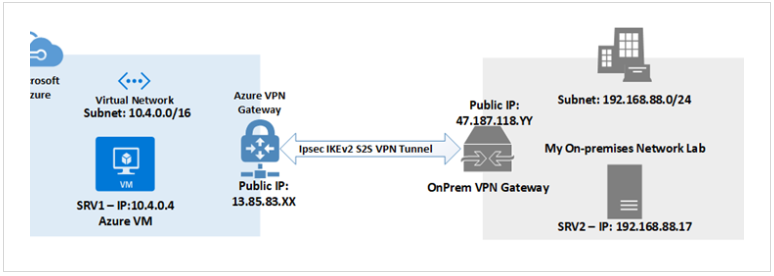
Site-to-site
Site-to-site VPN connects entire networks, such as branch offices to a central headquarters, providing secure communication between them.
- Requires a compatible VPN appliance at each site.
- Commonly used for linking branch offices to headquarters.
- Secures traffic, but can slow down users due to extra network hops.
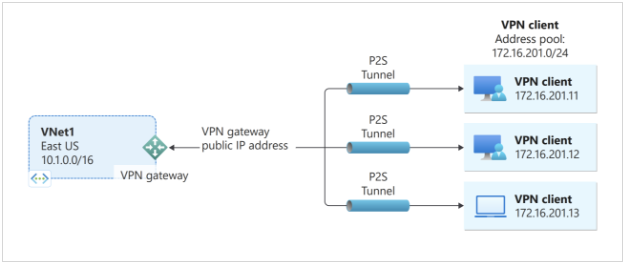
Client-to-site
Client-to-site VPN allows individual devices to connect to a remote network securely, often used by remote workers.
- Requires VPN client software on the user's device.
- Connects individual devices to a remote network.
- Ideal for remote or mobile workers.
- Uses strong authentication and encryption methods.
Clientless
Clientless VPN provides secure access through a web browser without the need for VPN software installation.
- Provides secure access via a web browser.
- No need for VPN software installation on client devices.
- Ideal for temporary or unmanaged devices.
- Access is typically limited to specific web applications.
VPN Endpoints
VPNs need an endpoint on the remote network to establish and accept VPN connections. Various devices can function as VPN endpoints.
-
Firewalls
- Secure the network by filtering traffic and enforcing VPN connections.
- Often used as a VPN endpoint for added security.
-
Routers
- Direct traffic between networks and can establish VPN connections.
- Commonly used in small to medium-sized networks as VPN endpoints.
-
Servers
- Provide remote access by hosting VPN software or services.
- Suitable for networks needing dedicated resources for VPN management.
-
VPN Concentrators
- Specialized devices designed to manage multiple VPN connections.
- Ideal for large-scale environments with high VPN traffic.