Azure ExpressRoute
Overview
Microsoft ExpressRoute is a powerful solution for extending on-premises networks into Azure, providing a private connection facilitated by third-party connectivity providers.
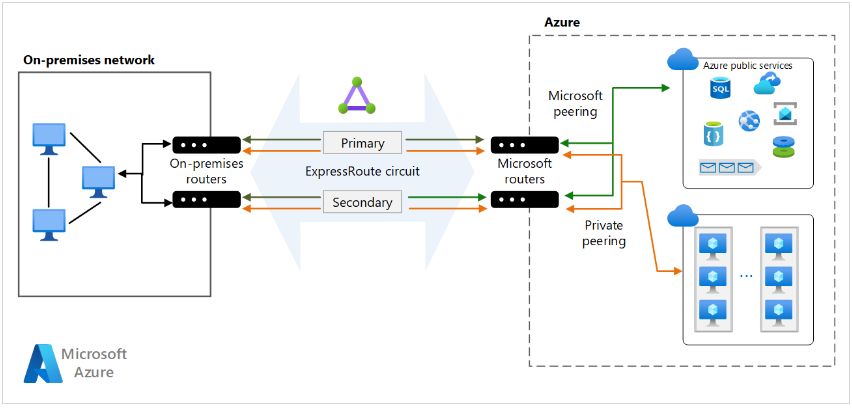
Unlike traditional site-to-site connections that traverse the public internet, ExpressRoute ensures enhanced security, reliability, and speed.
Connectivity Options
-
Any-to-Any Network
- Establish connectivity from any network to Azure.
-
Point-to-Point Ethernet Network
- Direct, dedicated connection between on-premises and Azure.
-
Virtual Cross-Connection
- Facilitated through a connectivity provider at a co-location facility.
Connecting to ExpressRoute
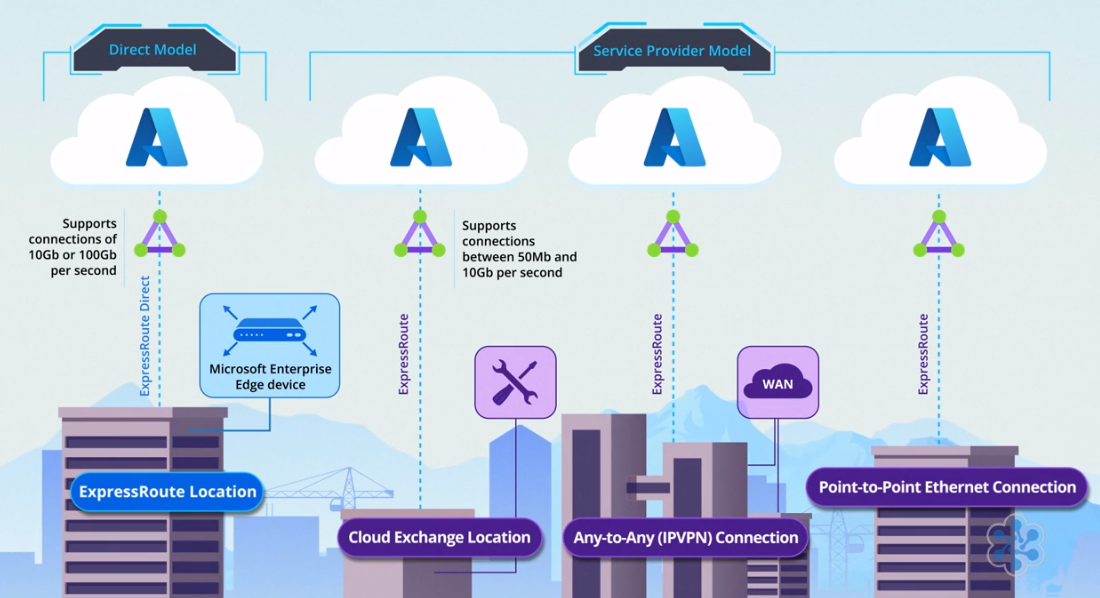
There are four ways to connect to Azure using ExpressRoute. It all comes down to where you have your IT infrastructure.
-
ExpressRoute Location
- Known as ExpressRoute Direct.
- Many organizations put at least some of their IT systems in a colocation facility, which is a datacenter that rents space to multiple customers.
- Microsoft has designated some of these colocation facility as an ExpressRoute location
- Connect directly to Microsoft's network via a Microsoft Enterprise Edge device.
- Supports high bandwidths of 10 or 100 gigabits per second.
-
Cloud Exchange Location
- Connect through a Service Provider.
- If you are in a peering location or a “cloud exchange”, but you need less than 10 gigabits per second of bandwidth,
- Offers bandwidth options between 50 megabits and 10 gigabits per second, with the service provider managing certain aspects of the connection.
- The service provider can also take care of some of the management tasks involved
- If not in an ExpressRoute location, connect to Microsoft's network through a service provider.
-
IPVPN Provider
- Some organizations use an IPVPN provider to connect their branch offices and datacenters to their core network.
- This is called any-to-any connectivity.
-
Leased Line
- Rent a leased line from a point-to-point Ethernet provider to connect your datacenter to an ExpressRoute location.
Additional Features
-
Connecting to Microsoft 365
- ExpressRoute can also be used to connect to Microsoft 365, although direct connection needs are less common than for Azure.
-
ExpressRoute Global Reach
- Connect branch offices worldwide through the Microsoft network, bypassing the internet.
- Additional costs apply for this feature.
Key Benefits
-
Enhanced Security
- Connections bypass the public internet.
-
Global Connectivity
- Access Microsoft cloud services across all regions with the ExpressRoute premium add-on.
-
Dynamic Routing with BGP
- Enables dynamic routing between on-prem networks and Microsoft.
-
Built-in Redundancy
- Ensures higher reliability with a 99.95% connection uptime SLA for dedicated circuits.
Bandwidth Options
Choose from a range of ExpressRoute circuit bandwidths:
- 50 Mbps
- 100 Mbps
- 200 Mbps
- 500 Mbps
- 1 Gbps
- 2 Gbps
- 5 Gbps
- 10 Gbps
Scalability Bonus Increase bandwidth without tearing down existing connections.
Billing Models
-
Unlimited Data Billing
- Monthly fee offering unlimited inbound and outbound transfer.
-
Metered Data Billing
- Monthly fee with free inbound data transfer; outbound data transfer charged on a per-GB basis.
ExpressRoute Premium Add-On
-
Route Limits
- Increases Azure public and private peering route limits from 4,000 to 10,000.
-
Global Connectivity
- Expands connectivity globally (excluding national clouds).
-
vNet Links
- Raises the default limit of 10 vNet links per circuit based on circuit bandwidth.
For more information, please see ExpressRoute FAQ