Search as you type
Using match_phrase_prefix
The match_phrase_prefix query helps to match phrases at the prefix level, which allows partial matching in multi-word phrases. It is similar to match_phrase but works on the phrase level to handle prefix matching.
Consider an index of films. We can use match_phrase_prefix to match partial phrases in the title.
Store the Elasticsearch endpoint and credentials in variables:
ELASTIC_ENDPOINT="https://your-elasticsearch-endpoint"
ELASTIC_USER="your-username"
ELASTIC_PW="your-password"
curl -s -u $ELASTIC_USER:$ELASTIC_PW \
-H 'Content-Type: application/json' \
-XGET "$ELASTIC_ENDPOINT:9200/movies/_search?pretty" -d '
{
  "query": {
    "match_phrase_prefix": {
      "title": {
        "query": "the terminator",
        "slop": 10
      }
    }
  }
}' | jq
Search-as-you-type
Search-as-you-type enables real-time, incremental searches as users type. It is optimized for autocomplete and prefix search functionality.
- Fast, partial matching during user input.
- Optimized using special field types like
search_as_you_typein mappings.
Lab: Autocomplete
In this example, we will test the autocomplete search functionality in Elasticsearch.
-
Install
jqUtility to handle JSON output formatting.sudo apt-get install jq -
Download the
movies.jsondataset, which contains movie data that we will import into Elasticsearch. -
Create a Mapping for the
moviesIndex.curl -s -u $ELASTIC_USER:$ELASTIC_PW \-H 'Content-Type: application/json' \-XPUT $ELASTIC_ENDPOINT:9200/movies -
Import the Data into Elasticsearch.
curl -s -u $ELASTIC_USER:$ELASTIC_PW \-H 'Content-Type: application/json' \-XPUT $ELASTIC_ENDPOINT:9200/_bulk?pretty \--data-binary @movies.json | jq -
Analyze the Text with a Custom Tokenizer
curl -s -u $ELASTIC_USER:$ELASTIC_PW \-H 'Content-Type: application/json' \-XPOST $ELASTIC_ENDPOINT:9200/movies/_analyze?pretty \-d '{"tokenizer" : "standard","filter": [{"type":"edge_ngram", "min_gram": 1, "max_gram": 5}],"text" : "Harry"}' | jqThis command will analyze the text using a tokenizer and apply an "edge ngram" filter. Edge ngrams are useful for autocomplete functionality because they allow partial token matches, which enables a user to type a few characters and see suggestions as they type.
-
Create the
autocompleteindex with search-as-you-type functionality for thetitleandgenrefields.curl -s -u $ELASTIC_USER:$ELASTIC_PW \-H 'Content-Type: application/json' \-XPUT $ELASTIC_ENDPOINT:9200/autocomplete \-d '{"mappings": {"properties": {"title": {"type": "search_as_you_type"},"genre": {"type": "search_as_you_type"}}}}' | jqThe
search_as_you_typetype is optimized for autocomplete and provides an efficient way to index text fields that will be used for real-time search. Using this allows Elasticsearch to return search results as the user types.Output:
{"acknowledged": true,"shards_acknowledged": true,"index": "autocomplete"} -
Reindex Data from
moviestoautocompletefor faster searches.curl -s -u $ELASTIC_USER:$ELASTIC_PW \-H 'Content-Type: application/json' \-XPOST $ELASTIC_ENDPOINT:9200/_reindex?pretty -d '{"source": {"index": "movies"},"dest": {"index": "autocomplete"}}' | grep "total\|created\|failures"Reindexing the data ensures that we are using the
autocompleteindex, which is optimized for the search-as-you-type functionality.The command should return:
"total" : 50,"created" : 50,"failures" : [ ] -
Check the Mappings of the
autocompleteIndex.curl -s -u $ELASTIC_USER:$ELASTIC_PW \-H 'Content-Type: application/json' \-XGET "$ELASTIC_ENDPOINT:9200/autocomplete/_mapping?pretty=true" | jqWe can see the mappings confirm the fields
titleandgenreare set tosearch_as_you_type, ensuring that Elasticsearch is optimized for autocomplete.{"autocomplete": {"mappings": {"properties": {"genre": {"type": "search_as_you_type","doc_values": false,"max_shingle_size": 3},"id": {"type": "text","fields": {"keyword": {"type": "keyword","ignore_above": 256}}},"title": {"type": "search_as_you_type","doc_values": false,"max_shingle_size": 3},"year": {"type": "long"}}}}} -
Perform a Search Using the
multi_matchQuerycurl -s -u $ELASTIC_USER:$ELASTIC_PW \-H 'Content-Type: application/json' \-XGET $ELASTIC_ENDPOINT:9200/autocomplete/_search?pretty -d'{"size": 5,"query": {"multi_match": {"query": "Harry","type": "bool_prefix","fields": ["title","title._2gram","title._3gram","title._4gram","title._5gram"]}}}'This will search for titles starting with "Harry" using a
bool_prefixquery. Thebool_prefixquery works well for autocomplete, as it allows partial matches and returns results that begin with the typed string. -
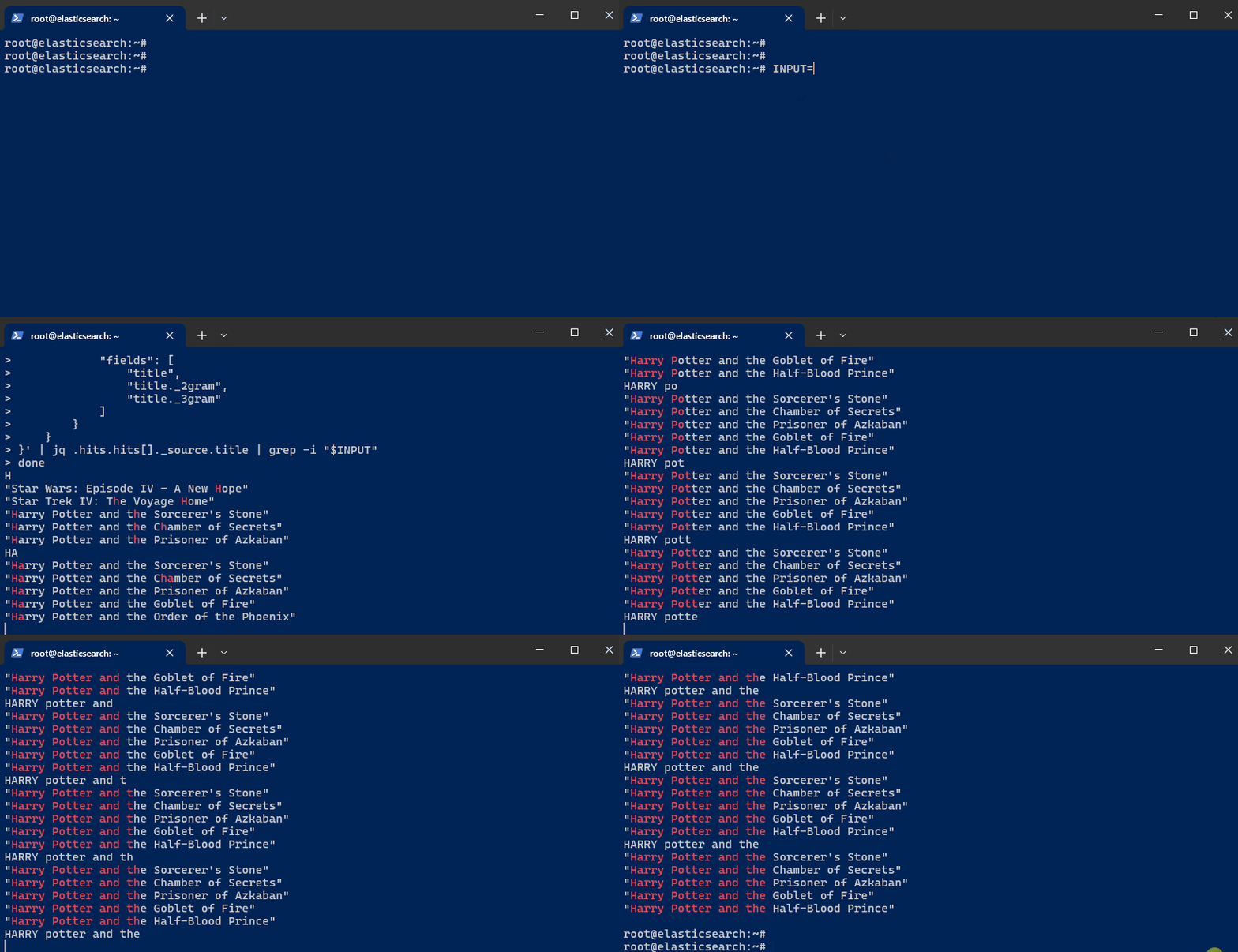
Set Up an Interactive Autocomplete Search. Initialize the
INPUTvariable to hold user input:INPUT='' -
Next, set up an infinite loop to simulate real-time autocomplete searches as you type:
while truedoIFS= read -rsn1 charINPUT=$INPUT$charecho $INPUTcurl -s -u $ELASTIC_USER:$ELASTIC_PW \-H 'Content-Type: application/json' \-XGET $ELASTIC_ENDPOINT:9200/autocomplete/_search \-d '{"size": 5,"query": {"multi_match": {"query": "'"$INPUT"'","type": "bool_prefix","fields": ["title","title._2gram","title._3gram"]}}}' | jq .hits.hits[]._source.title | grep -i "$INPUT"doneThis loop captures each character typed by the user, appends it to the
INPUTvariable, and sends a search query to Elasticsearch. The results are updated in real-time based on the input. -
Begin typing the film title. Keep in mind that the previous steps are set to display only "Harry Potter" films in the autocomplete. To test for other films, modify steps 5 and 9.