Go Structure
Overview
A basic Go program usually starts like this:
package main

import "fmt"

func main() {
    fmt.Print("Hello, World!")
}
This program prints text to the terminal.
package mainmarks this package as an executable applicationimport "fmt"loads thefmtpackage from the Go standard libraryfunc main()defines the function that Go runs firstfmt.Print()writes text to standard output
Packages
Every Go file must belong to a package.
package main
A package is a way to group related Go code.
- A project must have at least one package
- A package can be split across multiple files
- A project can contain multiple packages
- Code from one package can be imported into another package
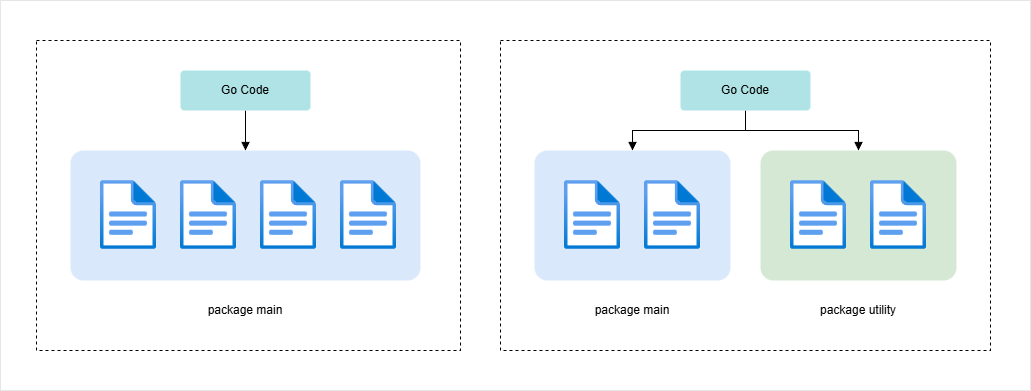
The package name goes at the top of the file before imports and functions.
If a Go file does not start with a package clause, Go will report an error because it does not know which package the file belongs to.
Imports
Imports let your code use features from another package.
import "fmt"
The fmt package is part of the Go standard library. It provides functions for formatted input and output.
For example:
fmt.Print("Hello, World!")
This calls the Print function from the fmt package.
When importing more than one package, use the common multi-line import style:
import (
    "fmt"
    "math"
)
Note: Go imports do not use commas or semicolons between package names.
Main Package
The name main is special in Go.
package main
This tells Go that it should build an executable application rather than a reusable library. When the program starts, Go looks for a function named main inside the main package and begins execution there.
func main() {
    fmt.Print("Hello, World!")
}
For a Go program to be executable:
- The package must be named
main - The entry point must be a function named
main - There should be exactly one
mainfunction in themainpackage
If you change the package name to something else, Go treats it like a normal library package. It can still be useful code, but it is not the application entry point.
If two files in the same main package both define func main(), Go will report that main was redeclared.
Unlike some languages, Go does not run normal statements directly from the top of the file. Most executable code belongs inside functions.
Modules
A module describes a Go project.
Create one with:
go mod init /path/to/first-app
The module path can also be a URL.
go mod init example.com/first-app
This creates a go.mod file. This file tells Go that the current folder and its subfolders belong to the module.
| Term | Meaning |
|---|---|
| File | A single .go source file. |
| Package | A group of Go files that belong together. |
| Module | A Go project that can contain one or more packages. |
go.mod | The file that defines the module path. |
Run And Build
During development, run the program with:
go run .
This compiles and runs the module immediately.
To create an executable file, run:
go build
On Windows, the result is usually an .exe file. On macOS and Linux, the result is usually an executable without a file extension.
Run the built program on macOS or Linux:
./first-app
Run the built program on Windows:
.\first-app.exe
Print Results
There are multiple ways to print results in Go. The simplest is fmt.Println().
fmt.Println(results)
fmt.Println() prints the result with a new line.
fmt.Print() also writes output, but it does not automatically add a new line.
| Function | Behavior |
|---|---|
fmt.Print() | Prints output without adding a new line. |
fmt.Println() | Prints output and adds a new line. |
fmt.Printf() | Prints formatted output using placeholders. |
For simple terminal output, fmt.Println() is usually the easiest choice.
File Naming
Go file names should be simple and descriptive.
- Use
.goas the file extension - Avoid spaces in file names
- Use underscores for longer names
- Use lowercase file names when possible
Examples:
main.goinvestment_calculator.gohttp_client.go
Note: Module paths commonly use dashes, while longer Go file names commonly use underscores.