Configuration, Errors, and References
Adding more on the ansible.cfg
[defaults]
# E: variables for my personal lab
inventory = ~/proj-ansible/one/inventories/edendev.inv
remote_user = eden
private_key_file = ~/.ssh/id_rsa
host_key_checking = False
retry_files_enabled = False
Errors Encountered
Proxy error. Reason: DNS lookup failure
Read more...
Got this particular error when I was trying to check if the loadbalancer is proxying the requests to the four backend webservers.
Proxy Error

The proxy server received an invalid response from an upstream server.
The proxy server could not handle the request GET /app1.

Reason: DNS lookup failure for: tstsvr1
Findings:
- When I try to refresh the page, it's still the same error but I see that tstsvr1 change from tstsvr2, then tstsvr3, athen tstsvr4.
- This means it's going through the list correctly.
- Tried clearing the cache of my browser and reopening it but still same error
- Checked the IP inside the browser in my mobile phone and it's still returning the same error
Steps I did:
- Logged-in to the loadbalancer and checked the logs. Had the same error. Copied this AHxxxx plus the error messaged and searched Google.

- Checked the config copied from controller (my PC) to the /etc/httpd/conf.d/lb.conf of the loadbalancer. The hostnames of the webservers were auto-populate there.
ProxyRequests off
<Proxy balancer://webcluster >
      BalancerMember http://tstsvr1
      BalancerMember http://tstsvr2
      BalancerMember http://tstsvr3
      BalancerMember http://tstsvr4
      ProxySet lbmethod=byrequests
</Proxy>
- Checked status of httpd service
[root@tstlb1 eden]# systemctl status httpd
● httpd.service - The Apache HTTP Server
   Loaded: loaded (/usr/lib/systemd/system/httpd.service; enabled; vendor preset: disabled)
   Active: active (running) since Thu 2022-01-13 11:34:54 UTC; 5h 7min ago

# Got this error:
httpd[12274]: AH00558: httpd: Could not reliably determine the server's fully qualified domain name, using
-
Solved this one (details in the next section) but there's still Proxy Error
-
Changed the inventory file to use IPs instead of hostnames and ran the setup-lb.yml again. It now returned a new error:
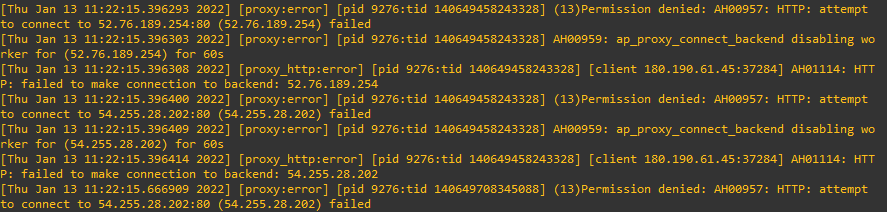
- Solved this one (details in the next section) and Proxy Error have disappeared. Yay!
Conclusion
I think the real issue here is the inventory file using hostnames instead of the public IP addresses. Note that I'm using EC2 instances for the Nodes and these Nodes are not Contained inside a VPC, so they are not aware of each other and are relying to the public IP addresses. Now, i don't have a proper DNS resolution setup. I'm not using DNS servers not Route53, thus even if I've changed the hostnames of the Nodes and added them to the /etc/hosts file in the testlb1 (which I've read should not be done), they would still resolve back to their original public DNS names.
The rest of the other errors encountered along the way were probably irrelevant but it is still good to resolve them early on adn possibly add the solution to the Ansible automation.
AH00558: httpd: Could not reliably determine the server's fully qualified domain name
Read more...
Checked the other servers and they had the same error. Googled this, found a solution form this link. Modified the config file, then reloaded httpd
# RHEL and CentOS
sudo vim /etc/httpd/conf/httpd.conf
sudo systemctl reload httpd
echo "ServerName 127.0.0.1" >> /etc/httpd/conf/httpd.conf
To test this,
$ sudo apachectl configtest

Output
Syntax OK
This eliminated the AH00558 error but not the Proxy error. Still good. One problem at a time.
(13)Permission denied: AH00957: HTTP: attempt to connect to (ip-address) failed
Read more...
Searched this online, and found this.
Prior to this, I've changed the inventory to use the elastic IPs instead of the hostnames. When I did that, plus the solution below, it solved the problem.
$ setsebool -P httpd_can_network_connect 1
Failed to connect to repository : Error performing command
Read more...
Got this error on on the maven-project lab.
Failed to connect to repository : Error performing command: C:\Git\bin ls-remote -h https://github.com/jleetutorial/maven-project.git HEAD
Another one:
Failed to connect to repository : Error performing command: C:\Users\mks7kor\AppData\Local\Programs\Git\cmd ls-remote -h https://github.com/jleetutorial/maven-project.git HEAD
Solution:
-
Step 1: Find out where GIT is installed on your laptop (For Linux/Mac Users, you can run which git to find out the full path of GIT)
-
Step 2: In the Path to Git executable field on the below Global Tool Configuration section, put the full path to GIT.
If you are using Windows, you might need to add exe extension to the end of git as well ( use git.exe instead of git )
Cannot run program "mvn" (in directory : error=2, No such file or directory
Read more...
Another issue I encountered when running the maven project lab was that the build was failing with the error message (from the console output)
[test-maven-project] $ mvn clean package
FATAL: command execution failed
java.io.IOException: error=2, No such file or directory
	at java.base/java.lang.ProcessImpl.forkAndExec(Native Method)
	at java.base/java.lang.ProcessImpl.<init>(ProcessImpl.java:340)
	at java.base/java.lang.ProcessImpl.start(ProcessImpl.java:271)
	at java.base/java.lang.ProcessBuilder.start(ProcessBuilder.java:1107)
Caused: java.io.IOException: Cannot run program "mvn" (in directory "/var/lib/jenkins/workspace/test-maven-project"): error=2, No such file or directory
After some researc, I found this.
First, I made sure that maven is installed in Jenkins server.. To test, log-in to your Jenkins server, switch to jenkins user (it is required that you have changed /bin/false to /bin/bash for the jenkins user in /etc/passwd to allow login and that you have set the password for the jenkins user beforehand) and check the maven version.
$ mvn -v
Apache Maven 3.6.3 (cecedd343002696d0abb50b32b541b8a6ba2883f)
Maven home: /opt/maven
Java version: 11.0.14, vendor: Red Hat, Inc., runtime: /usr/lib/jvm/java-11-openjdk-11.0.14.0.9-2.el8_5.x86_64
Default locale: en_US, platform encoding: UTF-8
OS name: "linux", version: "4.18.0-348.12.2.el8_5.x86_64", arch: "amd64", family: "unix"
Next, I configured the Jenkins server by going to Manage Jenkins > Global Tool Configuration, or going to this link:
http://13.228.99.157:8080/configureTools/
At the maven installation section at the bottom, I added this.
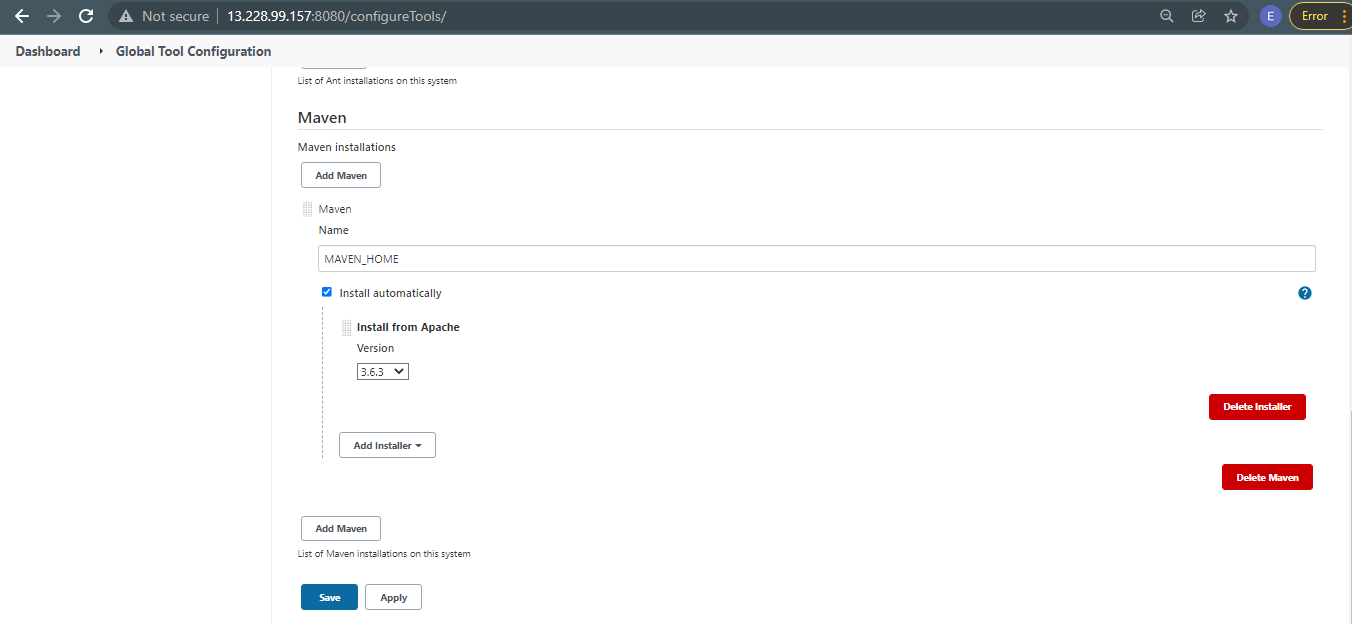
Going back to the failing job in the dashboard, click Configure. In the Build section, select the variable you set in the Maven version field.
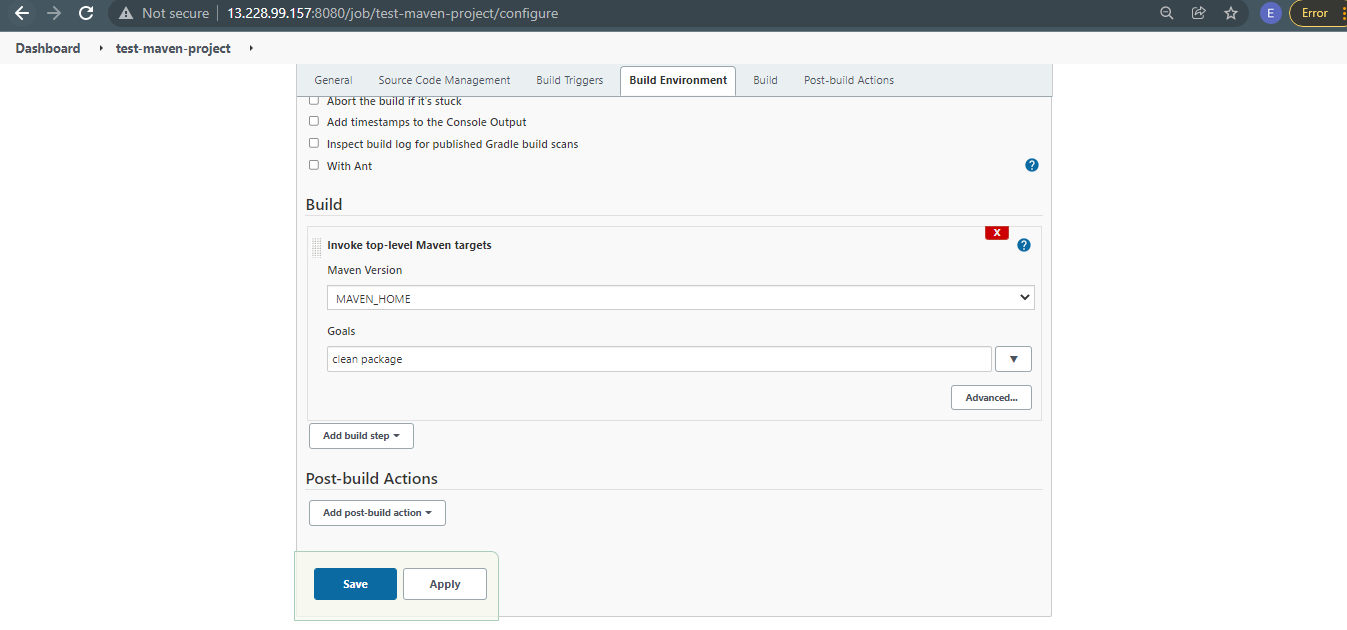
Run the Build Now again. This time it showed a new error, but that's okay. It means the first issue is resolved. The new error message in the console output is:
/var/lib/jenkins/tools/hudson.tasks.Maven_MavenInstallation/MAVEN_HOME on Jenkins
[test-maven-project] $ /var/lib/jenkins/tools/hudson.tasks.Maven_MavenInstallation/MAVEN_HOME/bin/mvn clean package
The JAVA_HOME environment variable is not defined correctly
This environment variable is needed to run this program
NB: JAVA_HOME should point to a JDK not a JRE
Build step 'Invoke top-level Maven targets' marked build as failure
Finished: FAILURE
NB: JAVA_HOME should point to a JDK not a JRE
Read more...
Found this link online..
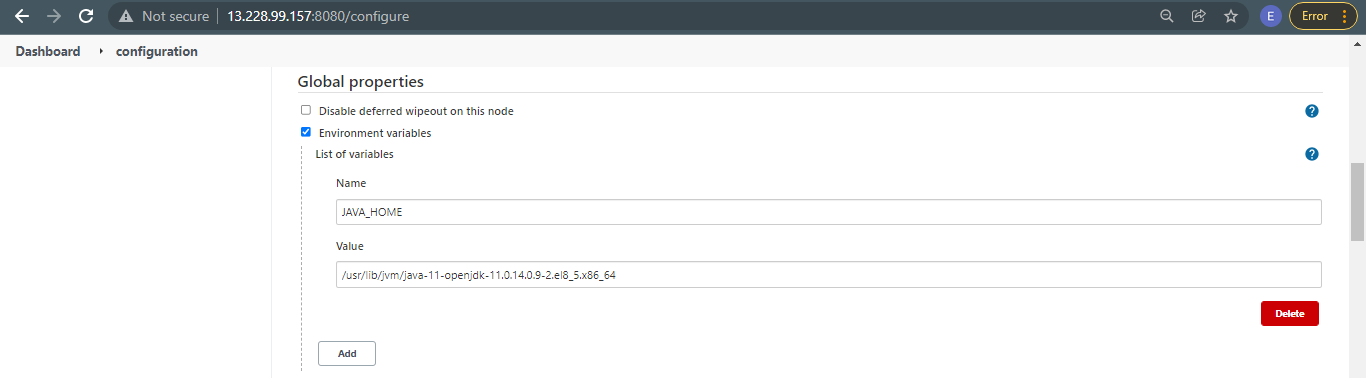
First, I went to Manage Jenkins > Configure System. You can also go to this link:
http://13.228.99.157:8080/configure
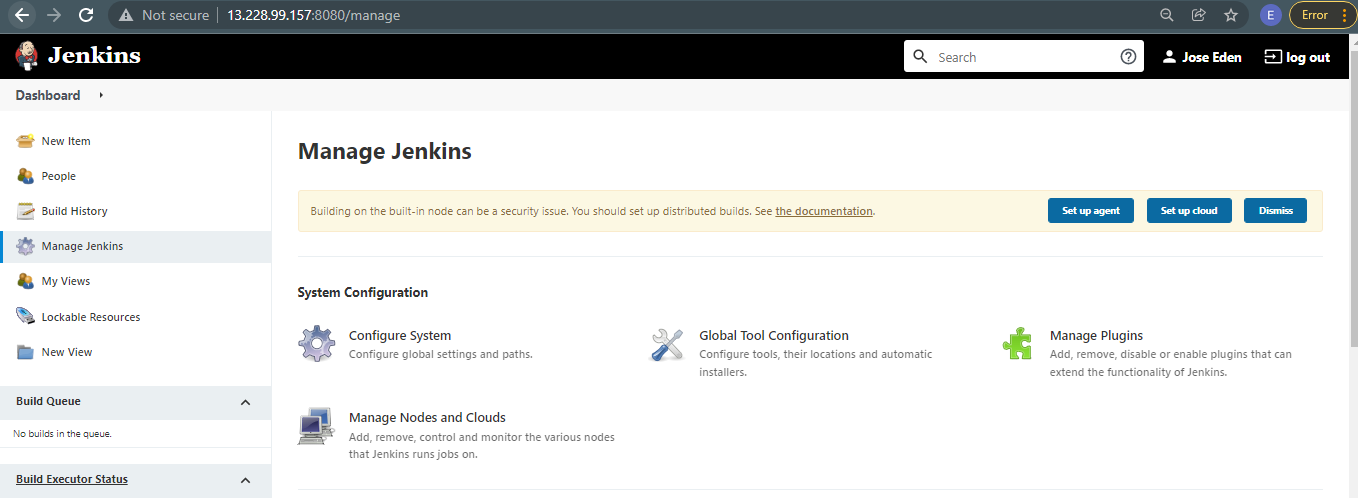
In the Global properties section, add a JAVA_HOME variable. Hit Save afterwards.
To know where JDK is installed in RHEL 8
Read more...
$ readlink -f $(which java)

/usr/lib/jvm/java-11-openjdk-11.0.14.0.9-2.el8_5.x86_64/bin/java