Ansible Inventory Yaml
Overview
To do some repetitive tasks, we can resolve to using scripts to do these tasks for us. However, you will some coding skills to do this. You'll also have to maintain this scripts over time. This is where Ansible comes into play.

Ansible is a radically simple IT automation platform that makes easier deployments. The main features of Ansible includes:
- simple
- powerful
- agentless
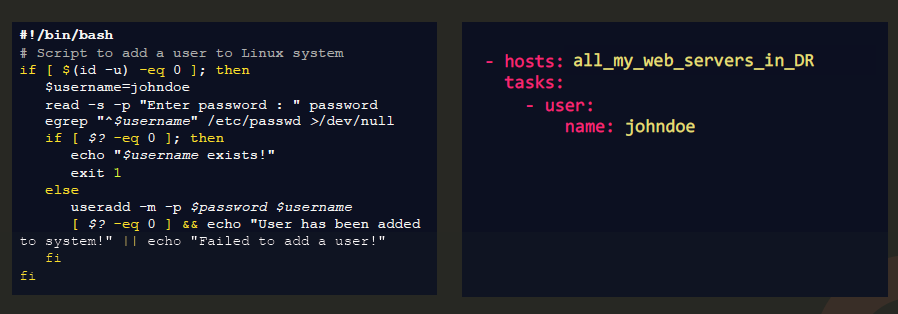
A typical comparison of scripts versus an ansible playbook:
Setting up your Lab and Installing Ansible
In my own setup, chose to leverage AWS and spin up 3 EC2 Instances (CentOS) in a VPC in ap-southeast-1.

The steps I followed in setting up the EC2 instances and installing ansible on master are:
Open to read more...
- First created a VPC, a subnet, route table, and internet gateway where I'll be putting my instances. Also created a Security Group allowing SSH Access only from my IP address. This will be used by the instances. (Yeah, it's more work, but it's a way to practice AWS as well) If you're using VirtualBox or VMware Workstation, please skip to Step 4.
Note: Do not forget to attach IGW to VPC. Routing won't work if there's no IGW on the VPC.
-
Launched three CentOS instances from the AWS Marketplace. The AMI ID of the CentOS images I used is ami-0adfdaea54d40922b. You can check out the other available CentOS images in their wiki.
-
In the Step 3-Configure Instance, you can setup the user data to include the script below. What the script does
- Changes the default username. Read more about it here.
- This is to have the same user account with sudo privileges across all your linux machines
- Ansible will use same username when logging in to ther server machines.
#cloud-config# This is the script for the ansible-controller# Change the username to our preferred usernamesystem_info:default_user:name: edenruncmd:- sudo hostnamectl set-hostname ansible-controller- sudo sed -i "s/localhost/localhost ansible-controller/" /etc/hosts- echo "PS1=\"\u@\H:\W $ \"" >> .bashrc#cloud-config# This is the script for the ansible-server-1# Change the username to our preferred usernamesystem_info:default_user:name: edenruncmd:- sudo hostnamectl set-hostname ansible-server-1- sudo sed -i "s/localhost/localhost ansible-server-1/" /etc/hosts- echo "PS1=\"\u@\H:\W $ \"" >> .bashrc#cloud-config# This is the script for the ansible-server-2# Change the username to our preferred usernamesystem_info:default_user:name: edenruncmd:- sudo hostnamectl set-hostname ansible-server-2- sudo sed -i "s/localhost/localhost ansible-server-2/" /etc/hosts- echo "PS1=\"\u@\H:\W $ \"" >> .bashrc -
When all the three instances are in running state, SSH into each one and make sure they can ping one another's private IP address. Set also your default user password on each instance.
passwd <user-name># Set new password when prompted. -
On the master, add the ip and hostnames of the server machines to the /etc/hosts file. Do the same for server1 and server2.
[eden@master ~]$ sudo vi /etc/hosts127.0.0.1 localhost master::1 localhost master10.0.0.246 server110.0.0.161 server2[eden@server1 ~]$ sudo vi /etc/hosts127.0.0.1 localhost server1::1 localhost server110.0.0.136 master10.0.0.161 server2[eden@server2 ~]$ sudo vi /etc/hosts127.0.0.1 localhost server2::1 localhost server210.0.0.136 master10.0.0.246 server1 -
You can disable the checking of host-key on the server machines so that they won't require ansible to enter a password everytime ansible connects to them by using the command below, but note that THIS IS NOT RECOMMENDED
sed -i "s/#host_key_checking/host_key_checking/" /etc/ansible/ansible.cfg
-
A better way to ensure that the master can log in to both server machines without entering a password is to generate an SSH key in the master and copy it to the server machines.
this is done in the master
ssh-keygen ssh-copy-id -i .ssh/id_rsa.pub ansible-server1 ssh-copy-id -i .ssh/id_rsa.pub ansible-server2
If you encountered this error: Permission denied (publickey,gssapi-keyex,gssapi-with-mic), you might need to modify the /etc/ssh/sshd_config in both the server machines. You also need to ensure that you have set the password for your username on the server machines.
This is done on both server 1 and server2
Verify that PasswordAuth is set to no
sudo grep PasswordAuth /etc/ssh/sshd_config
Change to yes
sudo sed -i "s/PasswordAuthentication no/PasswordAuthentication yes/" /etc/ssh/sshd_config
Check again to make sure it is changed.
sudo grep PasswordAuth /etc/ssh/sshd_config
Reboot sshd
sudo systemctl restart sshd
Here's a link which you can check out. You might also want to read this one.
-
Install Ansible on the master machine by running:
sudo yum install -y ansible
If you get this error: No package ansible available. Error: Nothing to do, you might need to install the epel-release first.
sudo yum install -y epel-release
You can also install ansible using pip:
install pip if it's not present
sudo yum install -y epel-release sudo yum install -y pip
Install ansible
sudo pip install -y ansible
Install specific version of ansible
sudo pip install -y ansible==2.4
Upgrade ansible using pip
sudo pip install --upgrade -y ansible
You can check out the Ansible documentation for more details on installing Ansible on other operating systems.
-
Lastly, verify Ansible is installed and running.
$ ansible --versionansible 2.9.25config file = /etc/ansible/ansible.cfgconfigured module search path = [u'/home/eden/.ansible/plugins/modules', u'/usr/share/ansible/plugins/modules']ansible python module location = /usr/lib/python2.7/site-packages/ansibleexecutable location = /usr/bin/ansiblepython version = 2.7.5 (default, Oct 14 2020, 14:45:30) [GCC 4.8.5 20150623 (Red Hat 4.8.5-44)]You can also use the ping module to ping localhost
eden@master ~$ ansible -m ping localhostlocalhost | SUCCESS => {"changed": false,"ping": "pong"} -
(OPTIONAL) This part is optional if you already have python and nano. Personally I prefer to have both nano and vi readily available in my Linux machines. There are some instances where I can edit a file faster using nano. but there's also instances where shortcuts in vi become more useful.
# To install python and test afterwards:sudo yum install -y python# See what version is installedpython -Vpython --version# To install nano editor:sudo yum install -y nano
Inventory file

Recall that Ansible is agentless - this means you don't have to install any additional software on the target machines to work with Ansible.
The information about these target machines are stored in an inventory file. If you don't create a new inventory file, Ansible will use the default /etc/ansible/hosts file.
You're /etc/ansible/hosts file could look like this:
# You can set up aliases by using the "ansible_host" parameter.

mail1   ansible_host=server1.company.com
mail2   ansible_host=server2.company.com
db1     ansible_host=server3.company.com
db2     ansible_host=server4.company.com

# You can also group the target machines

[mailservers]
mail1
mail2

[dbservers]
db1
db2

# You can also nest groups by using ':children'

[linuxservers:children]
mail
db
The ansible_host is an inventory parameter which you can use to specify the FQDN or IP address of the server. Other ansible parameters we can use are:
-
ansible_connection - ssh/winrm/localhost This defines how ansible will connect to the target server.
mail1 ansible_host=server1.company.com ansible_connection=sshmail2 ansible_host=server2.company.com ansible_connection=winrmdb1 ansible_connection=sshdb2 ansible_connection=winrmYou can also set it to localhost to indicate that you're working on a local host and not a remote host.
localhost ansible_connection=localhost -
ansible_port - 22/5986 This defines which port to connect to. It is set to 22 for SSH by default but you can change it to other port numbers.
mail1 ansible_port=25 -
ansible_user - root/administrator Defines the user making the remote connections. This is set to root by default on Linux machines but you can change it to any other user.
web ansible_user=rootmail ansible_user=admin -
ansible_ssh_pass - password Can be used to define the passwords for Linux. Note that storing passwords in plain-text is not a good practice.
web ansible_ssh_pass=adMin123The best way is to set password-less, ssh-key-based authentication on your servers.
As practice, you can begin by connecting to the master machine. We will first update the default /etc/ansible/hosts file to include the server machines at the bottom. Open the hosts file with vi or nano then add our server machines
127.0.0.1   localhost
server1
server2
We will first create a directory called ansible-lab which will contain all our files. Then we will create another inventory.txt where we will group the server machines.
eden@master ~$ mkdir ansible-lab
eden@master ~$ cd ansible-lab/
eden@master ansible-lab$ sudo nano inventory.txt

server1
server2

[linuxservers]
server1
server2
Currently, we have two inventory files where Ansible can go to check the target machines. We can test this my running the ping module against the hosts using the '-m' flag.
# This pings all the hosts specified in the default inventory file.
ansible -m ping server1
ansible -m ping server2
ansible -m ping all

# This pings the linuxservers group.
# Note that this will fail because it is checking the default hosts file.
ansible -m ping linuxservers

# This tells ansible to use the custom inventory file.
# This will now succeed.
ansible -m ping linuxservers -i inventory.txt
Output:
eden@master ansible-lab$ ansible -m ping server1
server1 | SUCCESS => {
    "ansible_facts": {
        "discovered_interpreter_python": "/usr/bin/python"    },
    "changed": false,
    "ping": "pong"
}
eden@master ansible-lab$ ansible -m ping server2
server2 | SUCCESS => {
    "ansible_facts": {
        "discovered_interpreter_python": "/usr/bin/python"    },
    "changed": false,
    "ping": "pong"
}
eden@master ansible-lab$ ansible -m ping all
server1 | SUCCESS => {
    "ansible_facts": {
        "discovered_interpreter_python": "/usr/bin/python"    },
    "changed": false,
    "ping": "pong"
}
server2 | SUCCESS => {
    "ansible_facts": {
        "discovered_interpreter_python": "/usr/bin/python"    },
    "changed": false,
    "ping": "pong"
}
eden@master ansible-lab$ ansible -m ping linuxservers
[WARNING]: Could not match supplied host pattern, ignoring: linuxservers
[WARNING]: No hosts matched, nothing to do
Notice that when we try to ping the group linuxservers, it failed. The group is not defined in the default /etc/ansible/hosts file which Ansible is checking. We only defined it in the inventory.txt.
Now if we tell Ansible to use the custom inventory.txt using the -i flag, the ping will now succeed.
eden@master ansible-lab$ ansible -m ping linuxservers -i inventory.txt
server1 | SUCCESS => {
    "ansible_facts": {
        "discovered_interpreter_python": "/usr/bin/python"    },
    "changed": false,
    "ping": "pong"
}
server2 | SUCCESS => {
    "ansible_facts": {
        "discovered_interpreter_python": "/usr/bin/python"    },
    "changed": false,
    "ping": "pong"
}

eden@master ansible-lab$ pwd
/home/eden/ansible-lab
NOTE: Make sure that you're on the same directory as the custom inventory file when you specify the -i flag and the inventory file.
What is YAML

All ansible playbooks are written in YAML. But before that, what are ansible playbooks?
Ansible Playbooks are plain-text files written in YAML, which stands for YAML Ain't Markup Lanugage. It is used to represent data. Here is a comparison of the same data in three formats: YAML, XML, and JSON.
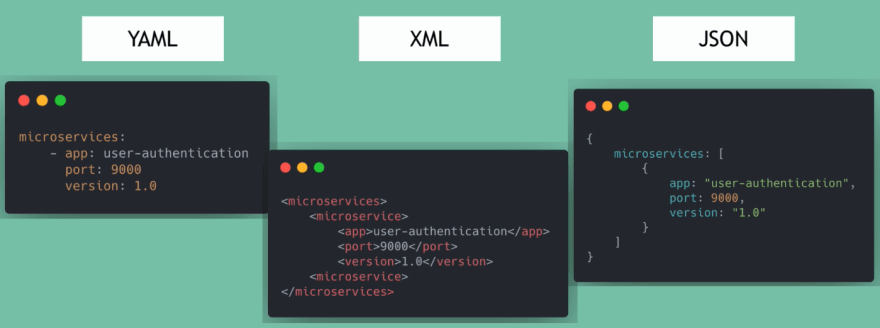
In it's simplest form, YAML are just key-value pairs. Anything that begins with a hash is a comment and is then ignored when YAML is run.
These are the Key: Value
Fruit: Apple Fish: Salmon Meat: Chicken Liquid: Water Flavored: Soda Hot drink: Coffee
We can also arrange them in arrays, which is similar to lists. Here you should take note of the space after the dash "-".
Edible:
- Apple
- Salmon
- Chicken
Beverages:
- Water
- Soda
- Coffee
We can also set the values in maps, which is similar to dictionaries. Here you should take note of the indentation which indicates that the indented pairings are attributes of the non-indented value.
Apple: Calories: 105 Fat: 0.4 g Carbs: 27 g
Salmon: Calories: 62 Fat: 0.3 g Cabs: 16 g
We can have nested dictionaries.
Fruits: Apple Nutrition: Calories: 105 Fat: 0.4 g Carbs: 27 g
Fish: Salmon Nutrition: Calories: 62 Fat: 0.3 g Cabs: 16 g
We can also next the key-value, dictionary, and lists altogether.
Edibles:
-
Apple: Calories: 105 Fat: 0.4 g Carbs: 27 g
-
Salmon: Calories: 62 Fat: 0.3 g Cabs: 16 g
So what's the difference between lists and dictionaries?
Lists are ordered - this means each item has a specific index and you can access that item be indicating their index.
List A is not equal with List B
List_A: List_B:
- Chicken - Chicken
- Carrots - Fish
- Apple - Apple
- Fish - Carrots
On the other hand, order is not important in dictionaries as you can access values through their keys.
Dict_A is equal to Dict_B
Dict_A: Dict_B: color: black brand: aston martin year: 2020 color: red model: vantage year: 2020 brand: aston martin model: vantage