Networking Fundamentals
Network
A network connects devices so they can communicate and share data.
- Devices include computers, phones, and printers
- Network devices include switches and routers
- Connections can be wired or wireless
Devices connect using a network interface card (NIC). Wired NICs use Ethernet cables and ports. Wireless NICs use radio signals, usually on 2.4 GHz or 5 GHz.
Network Types
LAN
A Local Area Network (LAN) is a network that connects devices within a small, localized area.
- Covers a small area like a home, office, or campus
- High-speed connectivity for local devices
- uses Ethernet or Wi-Fi for fast and reliable communication
- Typically owned and managed by a single organization
MAN
A Metropolitan Area Network (MAN) connects multiple LANs across a city or metropolitan area.
- Covers a city or metropolitan region
- Larger than a LAN but smaller than a WAN
- Used by service providers to connect businesses or campuses
- Provides higher-speed connectivity than WANs for urban areas
Metropolitan area network architectures are commonly built upon the following layers:
-
Access
- Connects customer devices to the provider’s network
- May include routers, switches, or optical interfaces
-
Aggregation/Distribution
- Collects and forwards traffic from the access layer
- Optimizes traffic flow and performs load balancing
-
Metro
- Intermediate layer, routes traffic across the metropolitan area
- Provides redundancy and high-capacity backbone connections
-
Core
- Routes traffic to destination aggregation network efficiently
- Connects to WAN or other MANs for long-distance communication
WAN
A Wide Area Network (WAN) connects networks across large geographic distances.
- Connects networks over cities, countries, or even continents
- Often uses leased lines, MPLS, VPNs, or satellite links
- Enterprise connectivity, remote office access, and internet backbones
- Managed by service providers rather than individual organizations
Protocol Suites
A protocol suite is a set of protocols that work together to provide comprehensive network communication services. There have been several different protocol suites, some developed by a standards organization and others developed by various vendors.
-
Internet protocol suite (TCP/IP)
- Transmission Control Protocol/Internet Protocol (TCP/IP)
- Handles communication between different networks
- Created in the 1970s, main protocol used today
- Open standard protocol suite maintained by IETF
-
Open systems interconnection (OSI)
- Protocol family developed in 1977 by ISO and ITU
- Uses a 7-layer model called the OSI model.
- Helps explain how networks work
- Used as reference model, not a practical suite
-
AppleTalk
- Apple proprietary protocol released in 1985
- Replaced by TCP/IP in 1995, no longer used in modern networks.
- In 1995, Apple adopted TCP/IP to replace AppleTalk.
-
Novell NetWare
- Short-lived protocol suite released in 1983 by Novell
- Used IPX protocol for communication
- In 1995, Novell adopted TCP/IP to replace IPX.
Today, the OSI model and the TCP/IP model are used to describe network operations. Both models organize networking into layers to keep things simple and structured.
Ethernet
Ethernet is the standard for wired networking that defines how devices communicate over a local area network (LAN) using cables and switches.
- Defines how data is sent over cables
- Ensures devices can communicate reliably
- Based on IEEE 802.3
Connecting devices within a LAN requires a collection of technologies. The most common LAN technology is Ethernet. Ethernet is not just a type of cable or protocol. It is a network standard published by the IEEE. Ethernet is a set of guidelines and rules that enable various network components to work together. These guidelines specify cabling and signaling at the physical and data link layers of the OSI model. For example, Ethernet standards recommend different types of cable and specify maximum segment lengths for each type.
There are several types of media that the Ethernet protocol works with: coaxial cable, twisted copper pair cable, single mode and multimode fiber optics.
Bits that are transmitted over an Ethernet LAN are organized into frames. The Ethernet frame format is shown in the figure.
The figure shows the parts of the ethernet frame: preamble, S F D, destination mac address, source mac address, EtherType, payload, and F C S.
Ethernet Frame

In Ethernet terminology, the container into which data is placed for transmission is called a frame. The frame contains header information, trailer information, and the actual data that is being transmitted.
The figure above shows the most important fields of the Ethernet frame:
- Preamble - This field consists of seven bytes of alternating 1s and 0s that are used to synchronize the signals of the communicating computers.
- Start of frame delimiter (SFD) – This is a 1-byte field that marks the end of the preamble and indicates the beginning of the Ethernet frame.
- Destination MAC Address - The destination address field is six bytes (48 bits) long and contains the address of the NIC on the local network to which the encapsulated data is being sent.
- Source MAC Address - The source address field is six bytes (48 bits) long and contains the address of the NIC of the sending device.
- Type - This field contains a code that identifies the network layer protocol. For example, if the network layer protocol is IPv4 then this field has a value of 0x0800 and for IPv6 it has a value of 0x086DD.
- Data - This field contains the data that is received from the network layer on the transmitting computer. This data is then sent to the same protocol on the destination computer. If the data is shorter than the minimum length of 46 bytes, a string of extraneous bits is used to pad the field.
- Frame Check Sequence (FCS) - The FCS field includes a checking mechanism to ensure that the packet of data has been transmitted without corruption.
MAC addresses are used in transporting a frame across a shared local media. These are NIC-to-NIC communications on the same network. If the data (encapsulated IP packet) is for a device on another network, the destination MAC address will be that of the local router (default gateway). The Ethernet header and trailer will be de-encapsulated by the router. The packet will be encapsulated in a new Ethernet header and trailer using the MAC address of the router's egress interface as the source MAC address. If the next hop is another router, then the destination MAC address will be that of the next hop router. If the router is on the same network as the destination of the packet, the destination MAC address will be that of the end device.
Device Address
Devices use two main types of addresses to identify themselves on a network:
-
Media Access Control (MAC) Address
- Assigned to every network device
- Example:
00-13-02-1F-58-F5 - First 3 bytes (24 bits) indicate the device manufacturer
- Must be unique within the same local network
-
Internet Protocol (IP) Address
- Logical address tied to a network interface
- Assigned by software or network configuration, not hardware
- Ensures communication continues even if devices are replaced
- Examples:
192.168.1.1(IPv4),2001:db8::ffff:0:1(IPv6)
MAC addresses identify the physical device, while IP addresses help locate and communicate with devices across networks.
IP Addressing
IP addresses is a logical address that is used identify devices on a network. There are two main types:IPv4 and IPv6.
| Feature | IPv4 | IPv6 |
|---|---|---|
| Address length | 32 bits | 128 bits |
| Address space | ~4.3 billion addresses | 340 undecillion addresses |
| Notation | Dotted decimal (e.g., 192.168.1.1) | Hexadecimal (e.g., 2001:db8::1) |
| Header complexity | Simple | More complex with additional features |
| Deployment | Widely used, older | Increasingly used, supports modern needs |
| Features | Basic routing and addressing | Built-in security, auto-configuration, and better routing |
IPv4 is still common but limited in address space. IPv6 solves this by providing far more addresses and additional features for modern networks.
Wifi
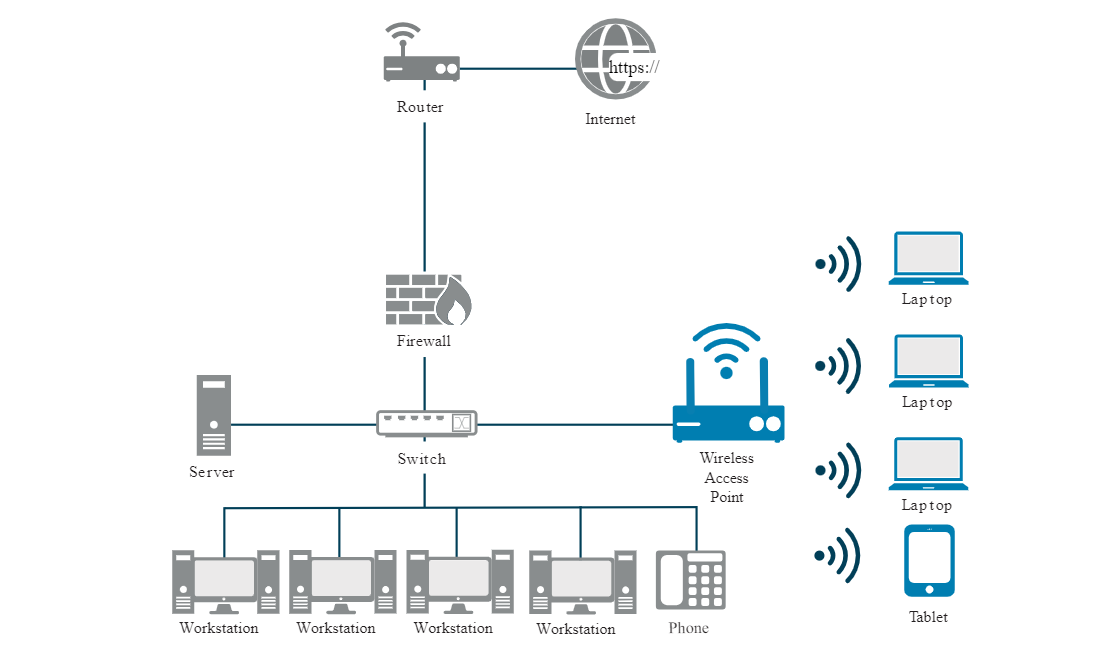
Wireless networking allows devices to connect without cables, which makes deployment and use easier. Devices can move freely within the signal range, and this adds convenience. However, wireless networks are more vulnerable than wired networks because attackers can access them remotely and without physical access.
For more information, please see Wireless Networking.
Quality of Service
Quality of Service (QoS) refers to the technology that allows the network to prioritize certain types of traffic over others.
- Prioritize critical traffic like VoIP or video conferencing.
- Uses classes of service (CoS), packet classification, and traffic shaping.
Traffic shaping refers to controlling network traffic to allow for the optimization or the guarantee of certain performance levels
Networking Tools
These tools make it easier to monitor networks, find problems, and understand how data moves across the network.
-
Ping sweep
- Sends ping messages (ICMP Echo Requests) to a range of IP addresses
- Identifies which hosts are online and reachable
- Useful for mapping active devices on a network
-
Geolocation
- Finds the physical location of a device or user
- Uses IP addresses or MAC addresses to determine location
-
Traceroute
- Tracks the path packets take from a source to a destination
- Helps identify routing issues and network topology
-
Wireshark
- Captures and analyzes network traffic
- Shows packet contents, IP addresses, and host information