Wireless Networking
Overview
Wireless networking connects devices like laptops, phones, and tablets without using cables. It relies on wireless access points (WAPs) that transmit data via radio waves.
- WAPs broadcast signals to let devices connect
- Devices have built-in wireless adapters to join the network
- Data moves through the air using radio frequencies
To protect the data being transmitted, wireless networks use encryption methods such as WPA2 or WPA3. This ensures that only authorized devices can connect and that data remains private.
WI-FI
Wi-Fi lets devices access the internet wirelessly using radio waves.
- Devices connect without cables using routers or access points
- Encryption methods like WPA2/WPA3 secure data
- Coverage can be affected by distance and obstacles
- Modern routers support multiple frequency bands
Common Wi-Fi standards:
| Standard | Name | Frequency | Max Speed | Typical Use |
|---|---|---|---|---|
| 802.11b | Wi-Fi 1 | 2.4 GHz | 11 Mbps | Basic browsing |
| 802.11g | Wi-Fi 2 | 2.4 GHz | 54 Mbps | Faster access |
| 802.11n | Wi-Fi 4 | 2.4/5 GHz | 600 Mbps | Dual-band coverage |
| 802.11ac | Wi-Fi 5 | 5 GHz | 1.3 Gbps | High-speed internet |
| 802.11ax | Wi-Fi 6 | 2.4/5 GHz | 9.6 Gbps | Crowded area performance |
| 802.11be | Wi-Fi 7 | 2.4/5/6 GHz | 30 Gbps | Ultra-fast low-latency |
WAPs
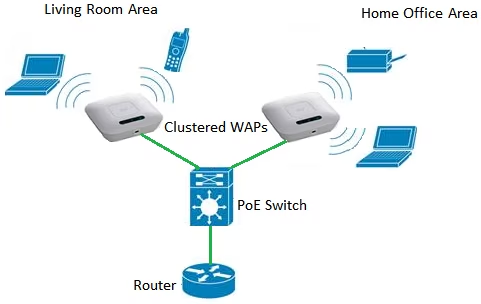
Wireless Access Points (WAPs) extend a wireless network's coverage by broadcasting a signal from a wired connection.
- Connect devices like laptops and phones
- Improve coverage in large spaces
- Can be standalone or part of routers
- Support encryption and dual-band frequencies
- Modern WAPs use mesh networks for seamless connectivity
These WAPs are connected to switches and create Wi-Fi networks, sending and receiving signals to and from mobile devices.
SSID
SSID stands for Service Set Identifier and is the name of a wireless network.
- Identifies the network to nearby devices
- Can be customized for different networks
- Public or hidden; hidden networks require manual input
- Multiple SSIDs can exist in mesh networks
There an option to disable SSID broadcasting to "hide" network in plain sight. In private networks, you can configure your devices to connect to the network automatically and skip the entire SSID broadcasting process. This is not fool-proof, but it prevents casual observers from seeing your network.
MAC Filtering
MAC filtering restricts network access based on a device's unique MAC address. A MAC (Media Access Control) address is a 12-digit identifier assigned to network devices.
- Checks MAC before granting access
- Blocks unknown devices
- Enhances security, but can be bypassed with MAC spoofing
- Managing large lists can be time-consuming
- Works best with encryption like WPA3
MAC filtering adds security by allowing only approved devices, but it has some limits.
-
Time-consuming
- Continuously adding new devices can be a hassle
- Frequent changes in devices make management harder
-
Ineffective
- Skilled attackers can spoof MAC addresses
- Cannot fully prevent unauthorized access
While MAC filtering adds a layer of protection, it should be combined with encryption and other security measures for stronger network security.
Wireless Encryption
Wireless encryption and cryptographic protocols protect wireless networks and safeguards it from unauthorized access by securing data from interception.
-
WEP (Wired Equivalent Privacy)
- Old security standard, vulnerable to attacks.
- Uses a fixed 64-bit or 128-bit key
- Insecure due to weak 24-bit initialization vector.
-
WPA (Wi-Fi Protected Access)
- Improved over WEP with TKIP for better security.
- Still considered weak compared to WPA2 and WPA3.
-
WPA2
- Uses AES encryption with CCMP for stronger security.
- Secure but being replaced by WPA3.
-
WPA3
- Latest standard with AES GCMP encryption.
- Introduces SAE and enhanced cryptographic protocols.
For more information, please see Wireless Encryption.
Wireless Authentication
Wireless authentication verifies the identity of users before allowing them to connect to a network.
- Ensures only authorized users can access the network
- Protects against unauthorized access and security breaches
There are three primary mechanisms to authenticate the users in a wireless networks:
- Preshared Keys (PSK)
- Enterprise Authentication
- Captive Portals
Preshared Keys (PSK)
Preshared Keys (PSK) uses a shared password to authenticate all devices on a network. It provides a simple way to secure small networks like home Wi-Fi.
- All users share the same key
- Uses need to enter a paassword (8–16 characters)
- Network uses PBKDF2 to converted PSK to 256-bit key
- Vulnerable to attacks if the key is exposed or shared widely.
Limitations:
- Changing keys requires reconfiguring devices
- Hard to track individual users
Enterprise Authentication
Enterprise Authentication uses unique credentials for each user, verified through a central authentication server like RADIUS. It offers stronger security for larger networks.
- Each user has a username and password
- Supports role-based access and accountability
- Can include encryption and multifactor authentication
For more information, please see EAP.
Captive Portals
Captive portals require users to log in via a web page before accessing the network, often used in public spaces like airports or hotels.
- Used in public spaces like hotels and airports
- Controls guest access and tracks usage
- Can integrate payment or terms acceptance
Wireless Signal Propagation
Wireless signal propagation refers to how wireless signals travel through the air from one point to another. The strength and quality of the signal can be affected by obstacles, distance, and interference.
- Distance and barriers reduce signal strength
- Environmental factors like metal or water can interfere
Antenna
The type of antenna used can influence signal patterns and coverage areas.
- Omnidirectional: broadcasts in all directions for wide coverage
- Directional: focuses signal in one direction for longer range
Beamforming
Beamforming improves wireless signal strength by focusing the signal toward a specific device rather than broadcasting it in all directions.
- Reduces interference and improves signal quality
- Often used to enhance performance in crowded environments
Site Survey
A site survey assesses the environment to optimize wireless signal placement and coverage.
- Identify weak areas and obstacles
- Helps place WAPs effectively
- Minimizes interference
For more information, please see Site Surveys