Overview
OpenStack
OpenStack is an open-source cloud platform that lets you build and manage your own cloud using standard building blocks. It orchestrates pools of compute, storage, and networking resources through APIs and a web dashboard.
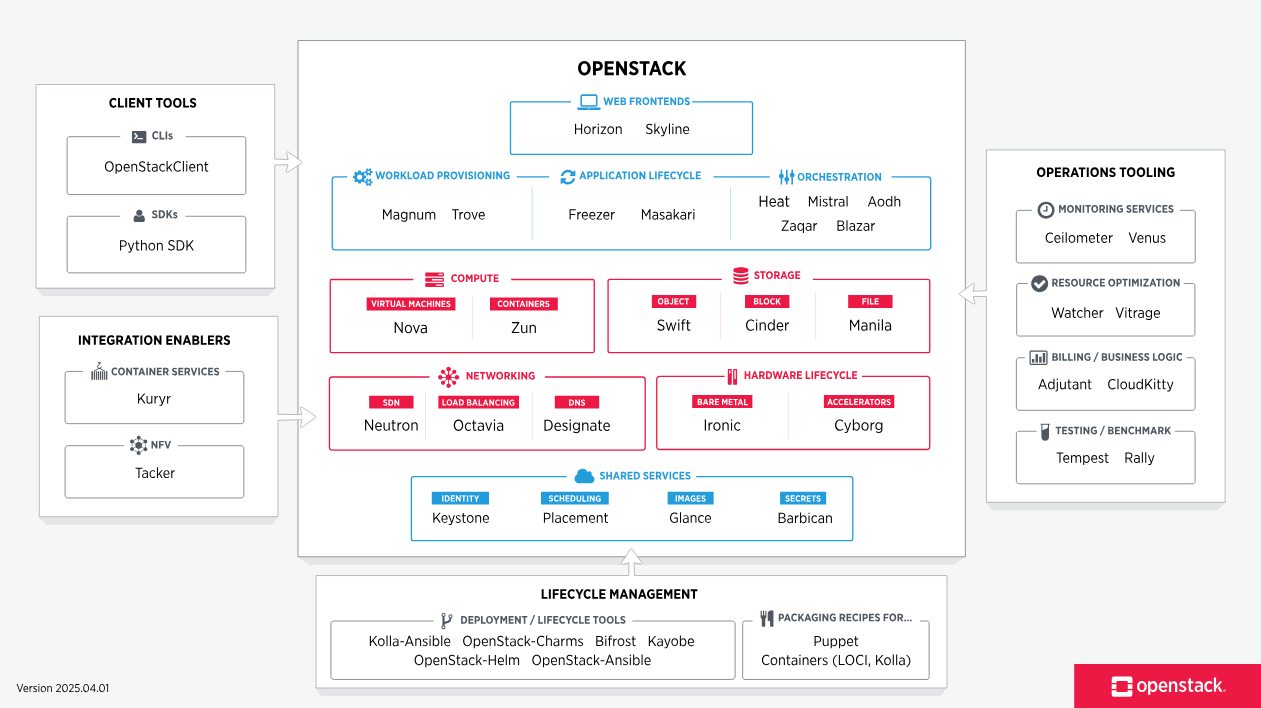
OpenStack exposes infrastructure through simple, consistent abstractions so users do not need to care about the underlying technology.
- Compute resources such as virtual machines and bare metal servers
- Storage resources such as block storage, object storage, and file shares
- Network resources such as networks, subnets, routers, and load balancers
These abstractions keep the user experience the same while allowing the backend to change freely. OpenStack turns different hypervisors, storage systems, and network devices into shared resource pools.
- Compute (Nova) orchestrates hypervisors
- Block storage (Cinder) provides persistent disks
- Object storage (Swift) provides scalable object storage
- Networking (Neutron) manages virtual networks
This approach reduces complexity while keeping infrastructure flexible and consistent.
How Users Interact with OpenStack
Users manage their cloud resources through self-service tools provided by OpenStack.
- Web dashboard (Horizon) for graphical access
- Command line tools for scripting and automation
- APIs for integration with other platforms
All of these tools talk to OpenStack services using the same APIs, which keeps behavior consistent and predictable. Additionally, all three access methods rely on Keystone for authentication.
Modular Design
OpenStack is not a single application. It is a collection of many independent projects. It is modular, with core and optional projects. Core projects are commonly deployed, while optional projects depend on the use case.
- Core projects handle essential cloud services
- Optional projects provide additional features if needed
Using the Project Navigator website, you can see all OpenStack projects, their status, maturity, and sample configurations for real-world scenarios like web hosting, e-commerce, or big data.
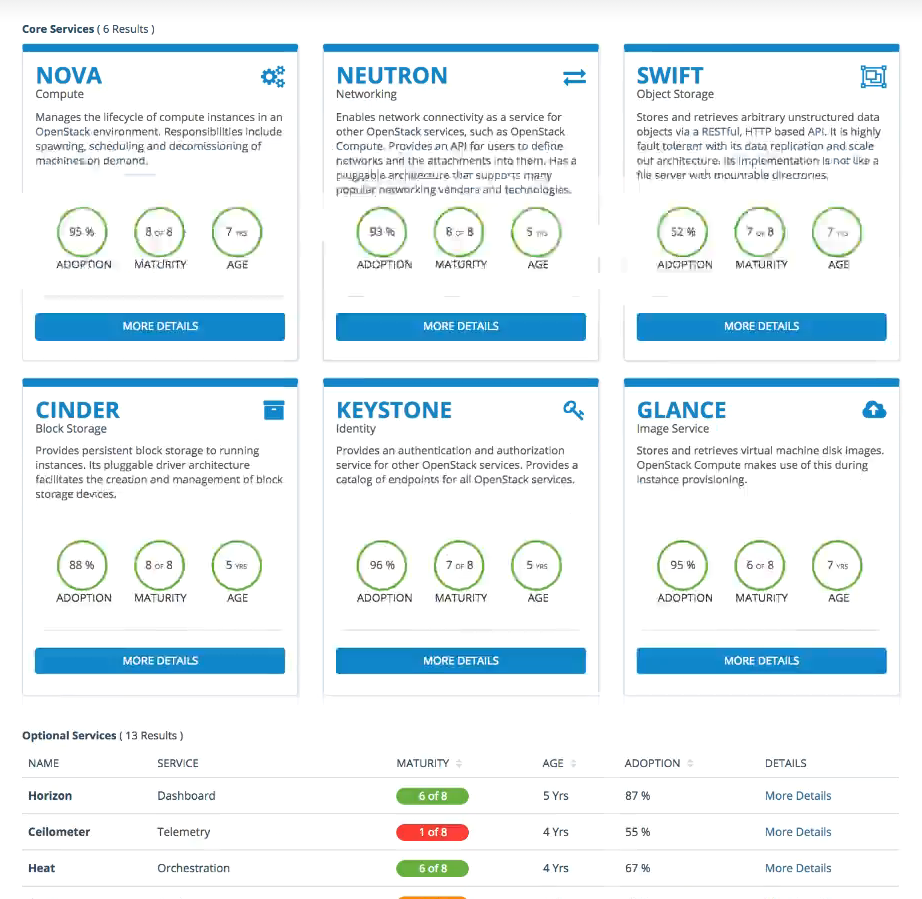
Core OpenStack Services
There are several core services that most deployments include.
- Identity service for authentication and authorization
- Compute service for virtual machines
- Networking service for virtual networks
- Block storage service for persistent disks
- Image service for VM images
- Object storage service for scalable storage
These services provide the basic functionality needed to run a cloud.
Optional OpenStack Services
Many deployments also use optional services to extend functionality.
- Data processing services
- Workflow and automation services
- Container and application platforms
These services are added only when needed, which keeps the cloud flexible and customizable.
Control and Data Planes
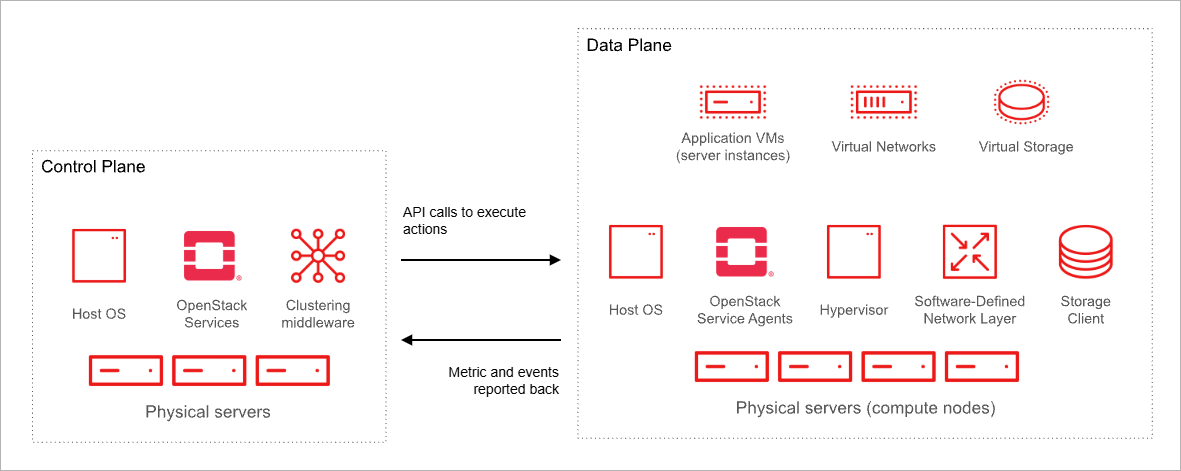
OpenStack separates control and data planes to manage resources efficiently.
- Control plane handles requests and scheduling
- Data plane executes tasks on compute and storage hosts
Separating these planes ensures workloads keep running even when controllers are restarted. It also allows network traffic to be segmented for security and performance.
For more information, please see OpenStack Architecture.
Regions and Availability Zones
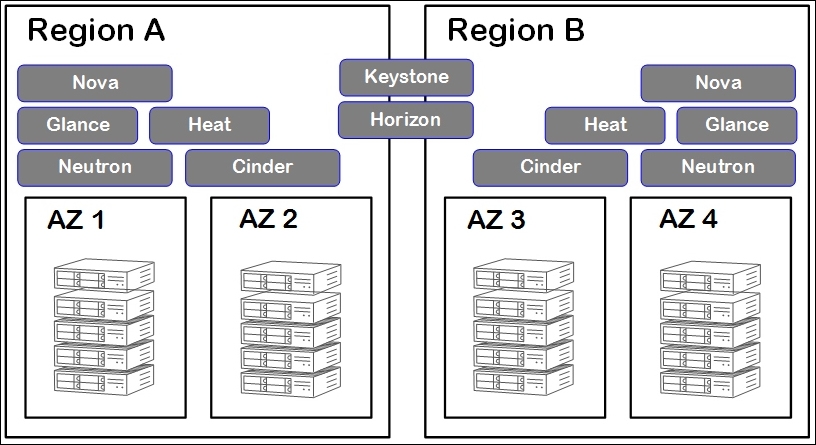
OpenStack supports multiple Regions and Availability Zones for scale, isolation, and resilience.
-
Regions
- Independent OpenStack deployments sharing a Keystone catalog
- Users choose regions for latency or disaster recovery
-
Availability Zones (AZs)
- User-visible fault domains within a region
- Spread redundant instances across AZs to survive hardware failures
Regions and AZs allow admins to upgrade independently, meet data laws, and provide high SLAs without complex clustering.
Host Aggregates and Cells
OpenStack uses host aggregates and cells to organize resources, scale efficiently, and enforce policies automatically.
Host Aggregates
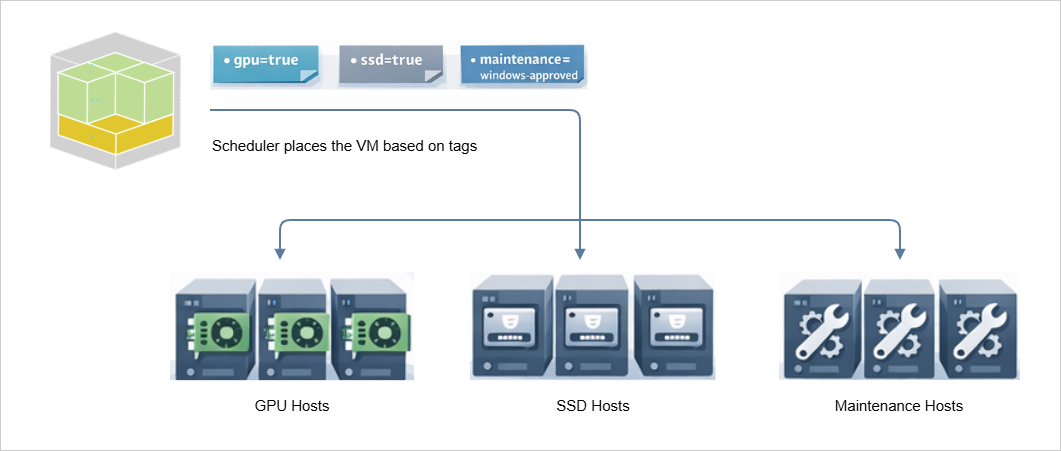
Host aggregates group hosts by metadata such as GPU, SSD, or maintenance windows. The scheduler uses these tags to place VMs on hosts that match requested traits.
Example metadata:
gpu=true
ssd=true
maintenance=windows-approved
Host aggregates make it easy to manage special hardware, such as GPUs or SSDs, while keeping VM placement automatic and consistent.
Cells v2
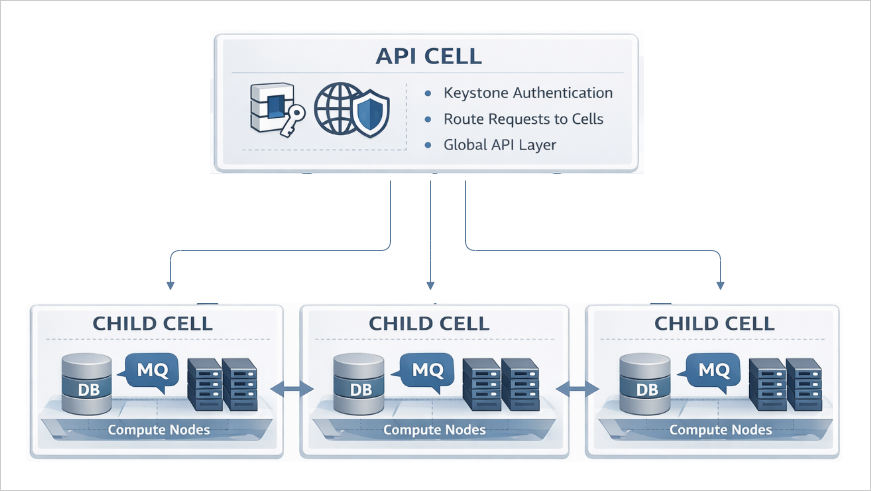
Cells partition OpenStack deployments into smaller, manageable units to improve scalability and avoid database bottlenecks.
- Each cell has its own database and message queue
- The top-level API cell manages global requests and authentication
- Child cells manage local resources and compute nodes
The API cell and child cells work together to make this structure effective:
-
API Cell
- Authenticates incoming requests via Keystone
- Routes requests to the correct child cell
- Keeps tenants unaware of internal cell structure
-
Child Cells
- Manage a subset of compute nodes, databases, and message queues
- Handle local scheduling, networking, and storage operations
- Failures in one child cell do not affect others
- Operate independently but follow global policies from the API cell
Example Workflow
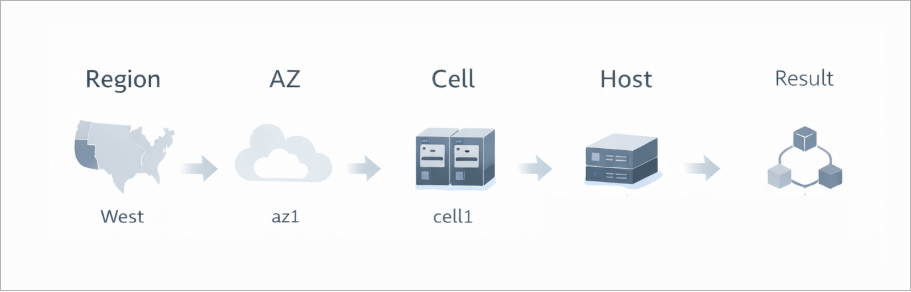
A user in Region West deploys a three-tier app with Heat:
- Nova API authenticates through Keystone and forwards requests to the right cell
- Scheduler picks hosts in the chosen AZs and combines resources
- Neutron and Cinder agents manage networking and storage within each cell
Typical flow:
Region -> AZ -> Cell -> Host
Outcome: The app runs resiliently and efficiently, following placement policies automatically.
Node Roles
OpenStack runs on Linux servers that assume one or more roles depending on the deployment size.
| Node Type | Purpose | Typical Services |
|---|---|---|
| Controller |
|
|
| Compute |
|
|
| Storage |
|
|
| Network |
|
|
Small labs may combine roles on a single host, while production clouds scale each role horizontally for performance and compliance.
OpenStack Distributions
Community releases
Community OpenStack is developed and released openly.
- New versions are available as soon as they are released
- Documentation includes installation guides
- Some features may be marked as not production-ready
This option is ideal for learning, testing, and environments that need the latest features.
Vendor-supported releases
Vendor distributions package OpenStack with additional tooling and support.
- Tested and supported configurations
- Deployment and architecture assistance
- Easier path to production environments
The trade-off is higher cost and sometimes fewer available services.