Troubleshooting
Testing route
To test if the routes are in place and that landing page is loading correctly, we can use the following config for the src/pages/index.tsx.
import React from 'react';

const HomePage = () => {
  return <div>Welcome to the homepage!</div>;
};

export default HomePage;
ESLint
In some instances, you may need to install several ESLint-related packages to ensure everything works correctly. Here's a list of the packages you need to install and the command to install them using npm or yarn
| Package | Description |
|---|---|
| eslint | The core ESLint package. |
| @typescript-eslint/parser | Parses TypeScript code so ESLint can understand it. |
| @typescript-eslint/eslint-plugin | A plugin that contains rules for TypeScript code. |
| eslint-config-prettier | Disables ESLint rules that might conflict with Prettier. |
| eslint-plugin-prettier | (optional but recommended): Runs Prettier as an ESLint rule. |
Install using npm.
npm install --save-dev eslint @typescript-eslint/parser @typescript-eslint/eslint-plugin eslint-config-prettier eslint-plugin-prettier
Install using yarn.
yarn add --dev eslint @typescript-eslint/parser @typescript-eslint/eslint-plugin eslint-config-prettier eslint-plugin-prettier
Sample script
You can also want to add some scripts to your package.json to easily run ESLint:
{
  "scripts": {
    "lint": "eslint . --ext .js,.ts,.tsx",
    "lint:fix": "eslint . --ext .js,.ts,.tsx --fix"
  }
}
After installing the packages, you can run ESLint on your project:
-
To check for linting issues:
npm run lintor
yarn lint -
To automatically fix linting issues:
npm run lint:fixor
yarn lint:fix
Dependencies lock file is not found
If your Github action deployment failed and you got this error:
Dependencies lock file is not found...
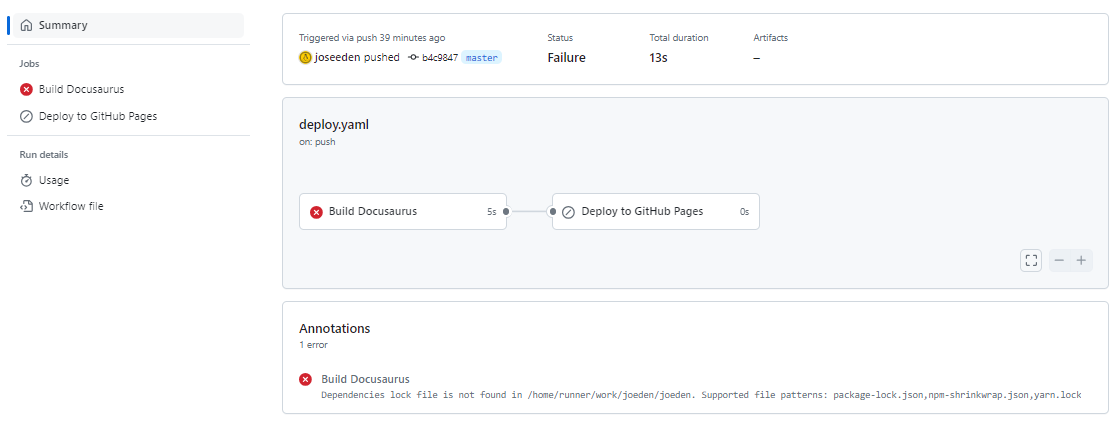
Try running install command. This will create the package-lock.json.
npm install
Expected closing tag for <img>
If you are using markdown (.md) pages for your Docusaurus documentation pages and you embedded an image like this:
<div class="img-center">

<img src="/img/docs/Screenshot-2025-04-17-031725.png" alt="DocSearch confirmation screenshot" />

</div>
You might get an error even though this HTML syntax is correct.
Cause: Unexpected closing tag `</div>`, expected corresponding closing tag for `<img>` (40:1-40:95)
Details:
{
  "column": 1,
  "message": "Unexpected closing tag `</div>`, expected corresponding closing tag for `<img>` (40:1-40:95)",
  "line": 41,
  "name": "41:1-41:7",
  "place": {
    "start": {
      "_bufferIndex": 0,
      "_index": 10,
      "line": 41,
      "column": 1,
      "offset": 1298
    },
    "end": {
      "_bufferIndex": -1,
      "_index": 11,
      "line": 41,
      "column": 7,
      "offset": 1304
    }
  },
  "reason": "Unexpected closing tag `</div>`, expected corresponding closing tag for `<img>` (40:1-40:95)",
  "ruleId": "end-tag-mismatch",
  "source": "mdast-util-mdx-jsx"
}
The error is caused by using raw HTML (<div>, <img>) in an MDX file, and MDX is treating your <img> as a JSX tag, which requires it to be self-closing (like <img ... />).
<img ... /> (must be self-closed)
Note that even though your file ends in .md, Docusaurus treats all Markdown files as MDX under the hood, which means it parses JSX/HTML inside them as JSX, not raw HTML.
So even in .md files, you still need to follow JSX rules for tags like <img> and <br>, which includes:
- Tags must be properly closed (e.g.,
<img ... />) - Only one root JSX tag is allowed if you're embedding JSX
- No syntax errors like missing closing slashes or invalid nesting
To fix the issue, change the <img> tag to be self-closing like this:
<div class="img-center">
  <img src="/img/docs/Screenshot-2025-04-17-031725.png" alt="DocSearch confirmation screenshot" />
</div>
You can also write the image in pure Markdown (but you'd lose the img-center styling unless styled via Markdown image styling):

Or wrap it in a Markdown-style center (via a plugin or CSS targeting img[src*="Screenshot"]).
Build warning: onBrokenMarkdownLinks deprecation
Issue: During npm run build with Docusaurus, the build shows:
The `siteConfig.onBrokenMarkdownLinks` config option is deprecated and will be removed in Docusaurus v4.
Please migrate and move this option to `siteConfig.markdown.hooks.onBrokenMarkdownLinks` instead.
Cause: The current project version still supports the top-level onBrokenMarkdownLinks, but newer Docusaurus versions have marked it as deprecated.
- Current builds continue to work.
- Future upgrade to Docusaurus v4 may require config changes.
Current config (supported now):
onBrokenMarkdownLinks: "throw",
Solution: For the current installed Docusaurus version, keep the existing setting:
onBrokenMarkdownLinks: "throw",
Do not move it yet if TypeScript shows:
'hooks' does not exist in type 'DeepPartial<MarkdownConfig>'
That means the installed version does not yet support the newer schema.
Build failure: reading-time
Issue: GitHub Actions build failed with:
Module not found: Error: Can't resolve 'reading-time/lib/reading-time'
Cause: A project component imported an outdated internal path from reading-time.
import readingTime from "reading-time/lib/reading-time";
Fix: Use the package entrypoint instead:
import readingTime from "reading-time";
Validation: Make sure the dependency exists:
npm install reading-time
Notes:
- This issue is related to missing
streammodule. - After fixing the import path, the build may still fail because the package itself pulls in Node-only modules during browser bundling.
Client build failure: missing stream module
Issue: After fixing the reading-time import (see reading-time/lib/reading-time), the client build failed with:
Module not found: Error: Can't resolve 'stream'
Cause: Webpack 5 no longer automatically polyfills Node.js core modules.
The reading-time package depends on Node’s stream, which is unavailable in the browser bundle used by Docusaurus.
Fix: Install the browser polyfill:
npm install stream-browserify
Add a webpack fallback plugin in docusaurus.config.ts:
plugins: [
  function streamPolyfill() {
    return {
      name: "stream-polyfill",
      configureWebpack() {
        return {
          resolve: {
            fallback: {
              stream: require.resolve("stream-browserify"),
            },
          },
        };
      },
    };
  },

  "docusaurus-plugin-sass",
  "@datalayer/jupyter-docusaurus-plugin",
],
Important: A customFields.webpack section does not affect webpack bundling.
For example, this does not solve the problem:
customFields: {
  webpack: {
    resolve: {
      fallback: {
        process: require.resolve("process/browser")
      }
    }
  }
}