API Rate Limits
Overview
Rate limiting controls how many API requests a user or application can make within a set time. It helps keep APIs stable and secure.
- Prevents server overload
- Improves response time for all users
- Protects against DoS attacks
Clients should understand rate limits and handle them properly to avoid failures. This keeps API usage smooth and reliable.
Rate Limit Algorithms
Different algorithms are used to control request limits. Each one handles traffic in a slightly different way.
- Leaky bucket processes requests at a fixed rate
- Token bucket allows bursts using stored tokens
- Fixed window uses a strict time window
- Sliding window checks requests over a moving time range
Choosing the right algorithm depends on how the API wants to control traffic and handle bursts.
Leaky Bucket
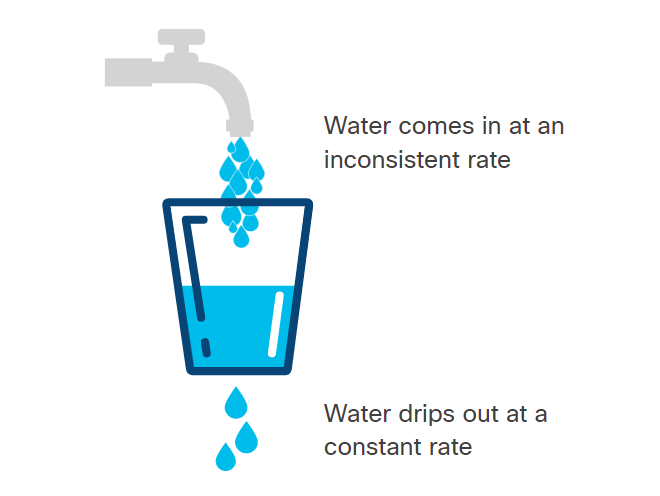
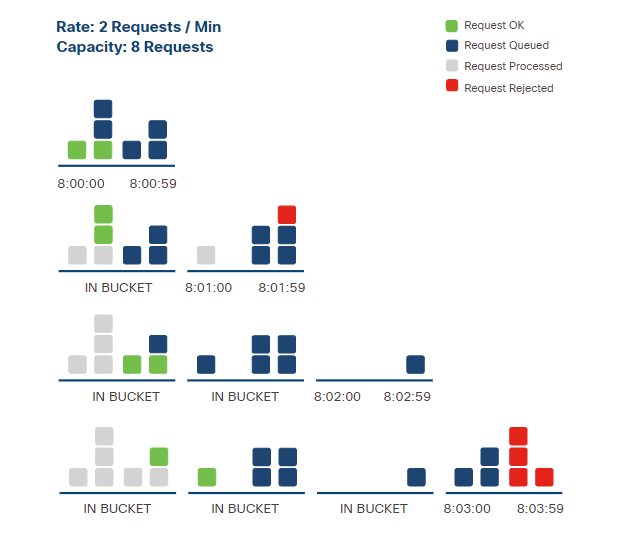
Requests are placed into a queue and processed at a constant rate.
- Requests are queued in order
- Processing happens at a fixed speed
- Extra requests are rejected if the queue is full
With this algorithm, the client must be prepared for delayed responses or rejected requests.
Token Bucket
The token bucket algorithm allows requests based on available tokens. Tokens are added over time and used when making requests.
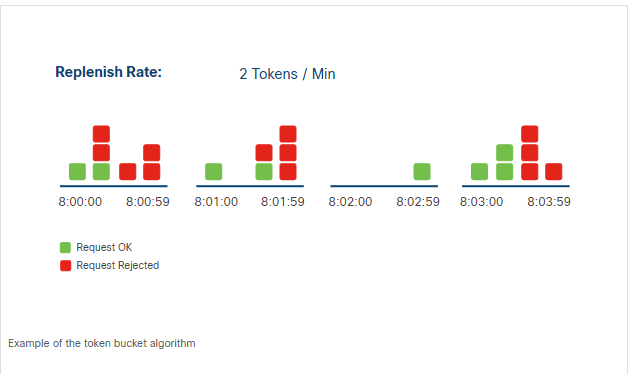
When a request is made, the server checks if there is at least one token available. If yes, the request is processed and a token is removed. If not, the request is rejected.
- Tokens accumulate if unused
- Each request uses one token
- Requests fail when no tokens are left
- Tokens are replenished over time
In the example below, TOKEN_LIMIT defines the maximum tokens allowed per hour, and REQUESTS_MADE represents total requests.
TOKEN_LIMIT=10
REQUESTS_MADE=11
Expected result: the 11th request is rejected because no tokens are available.
If no requests are made for some time, tokens build up. This allows short bursts of requests later. This keeps the system flexible while still controlling the request rate.
Fixed Window Counter
The fixed window counter algorithm limits requests using a counter for a fixed time period. Unlike the token bucket, it does not accumulate unused requests.
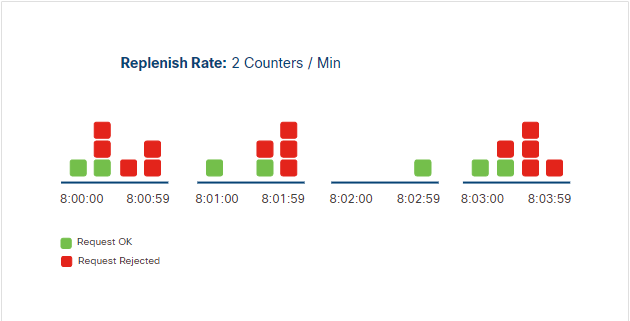
When a request is received, the server checks the counter. If there are requests left, it processes the request and reduces the counter. Once the limit is reached, all additional requests in that window are rejected. The counter resets at the next window, which will allow requests again.
In the example below, LIMIT is 10 requests per hour.
LIMIT=10
REQUESTS_MADE=11
Expected result: the 11th request is rejected, and unused requests do not carry over.
With this algorithm, the client must track when the time window starts and ends to know how many requests are allowed. Like the token bucket, the client should also include a retry mechanism to try requests again after the window resets.
Sliding Window Counter
The sliding window counter allows a set number of requests over a rolling time period. This duration of time is not a fixed window and the counter is not replenished when the window begins again.
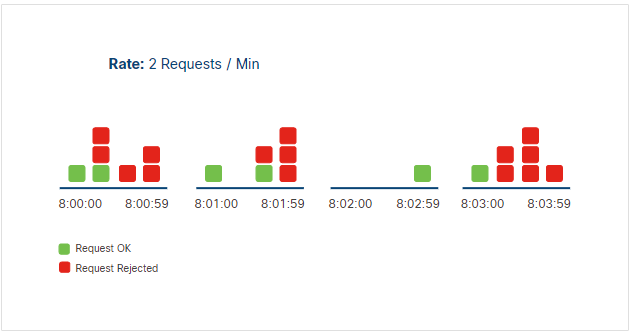
In this algorithm, the server tracks request timestamps to control the rate.
- Server stores the time each request is made
- Counts requests in the current rolling window before processing a new one
- Rejects the request if the limit for the time period is reached
In the example below, RATE is 5 requests per 60 seconds.
RATE=5
TIME_WINDOW=60
Expected result: if 5 requests were made in the last 60 seconds, the next request is rejected.
This method is more flexible and avoids sudden spikes. Clients only need to ensure they stay within the limit at any given time.
Knowing the Rate Limit
APIs usually provide rate limit details in documentation or response headers. Because there isn't a standard, the key-value pair used in the header may differ between APIs.
Some commonly used keys include:
| Header | Description |
|---|---|
| X-RateLimit-Limit | Maximum requests allowed in a time window |
| X-RateLimit-Remaining | Remaining requests in the current window |
| X-RateLimit-Reset | Time when the limit resets |
The client can use this information to track how many API requests remain in the current window and to prevent exceeding the rate limit.
Exceeding the Rate Limit
When the limit is exceeded, the server automatically rejects the request and returns an HTTP response informing the user. Unfortunately, because there isn't a standard for this interaction, the server can choose which status code to send.
The most commonly used HTTP status codes are:
| Status Code | Meaning |
|---|---|
| 429 | Too Many Requests |
| 403 | Forbidden |