Requests and Responses
Overview
A REST API (Representational State Transfer) is a web service interface that communicates over HTTP following REST principles.
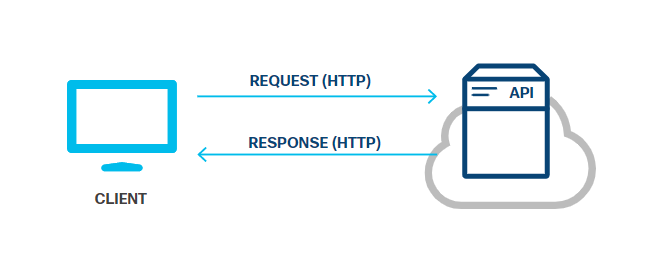
Because REST APIs communicate over HTTP, they use the same concepts as the HTTP protocol:
- HTTP requests/responses
- HTTP verbs
- HTTP status codes
- HTTP headers/body
REST API Requests
REST API requests are HTTP requests that follow REST principles. They allow a client application to ask the server to perform predefined actions.
A REST request has four main components:
- Uniform Resource Identifier (URI)
- HTTP method
- Header
- Body
Uniform Resource Identifier (URI)
Also known as Uniform Resource Locator (URL), the URI identifies the resource the client wants to access or modify.
A URI is essentially the same format as the URL you use in a browser to go to a webpage. The syntax consists the following components in this particular order:
| Component | Description | Example / Notes |
|---|---|---|
| Scheme | Specifies the protocol to use | http or https |
| Authority | Hostname or server IP address, with optional port | example.com or example.com:8080 |
| Path | Resource location on the server | /update/person |
| Query | Optional parameters for filtering or extra info | id=42&email=person%40example.com |
If the query is present, it is preceded with a question mark ( ? ). There isn't a specific syntax for query parameters, but it is typically defined as a set of key-value pairs that are separated by an ampersand (&). For example:
http://example.com/update/person?id=42&email=person%40example.com
When you piece the components together, a URI will look like this :
scheme:[//authority][/path][?query]

HTTP Method
REST APIs use standard HTTP methods (also known as HTTP verbs) to tell the web service which action is being requested for the given resource.
| Method | Action | Description |
|---|---|---|
| POST | Create | Add a new resource |
| GET | Read | Retrieve a resource |
| PUT | Update | Replace a resource |
| PATCH | Partial Update | Update part of a resource |
| DELETE | Delete | Remove a resource |
Request Header
Headers provide extra information about the request or response. They are optional and formatted as:
Name: Value
There are two types of headers:
| Type | Description | Example |
|---|---|---|
| Request headers | Information not related to the body content | Content-Type: Basic dmFncmFudDp2YWdyYW50 |
| Entity headers | Describe the content of the body | Content-Type: application/json |
Request Body
The body contains the data for the resource. It is typically used with POST, PUT, and PATCH methods.
- Optional depending on the HTTP method
- Data type must be specified in the header using
Content-Type - Some APIs accept multiple data types in the body
REST API Responses
REST API responses are HTTP responses from the server. They show the result of the request. The response may contain the data that was requested, or even inform the client that there was a problem with their request.
REST API responses are similar to the requests, but are made up of three major components:
- HTTP status
- Header
- Body
HTTP Status
HTTP status codes indicate if a request was successful or failed. These code are always three digits. The first digit is the category of the response. The other two digits do not have meaning, but are typically assigned in numerical order.
There are five different categories:
- 1xx – Informational
- 2xx – Success
- 3xx – Redirection
- 4xx – Client error
- 5xx – Server error
Common codes:
| Code | Message | Description |
|---|---|---|
| 200 | OK | Request successful, body may contain data |
| 201 | Created | Resource created successfully |
| 202 | Accepted | Request accepted, processing not complete |
| 400 | Bad Request | Invalid request |
| 401 | Unauthorized | Missing or invalid authentication |
| 403 | Forbidden | Request understood but denied |
| 404 | Not Found | Resource not found |
| 500 | Internal Server Error | Server failed to process request |
| 503 | Service Unavailable | Server temporarily unavailable |
You can get details about each HTTP status code from the official registry of HTTP status codes, which is maintained by the Internet Assigned Numbers Authority (IANA). The registry also indicates which values are unassigned.
Response Header
Just like the request, the response's header also uses the standard HTTP header format and is also optional. The response header provides additional information between the server and the client.
-
Response headers – Extra information not related to content, e.g.,
Set-Cookie,Cache-ControlKey Example Value Description Set-Cookie JSESSIONID=30A9DN810FQ428P; Path=/ Used to send cookies from the server Cache-Control Cache-Control: max-age=3600, public Directives that must be obeyed by all caching mechanisms -
Entity headers – Describe the content, e.g.,
Content-TypeKey Example Value Description Content-Type application/json Specify the format of the data in the body
Response Body
The response body contains the data returned by the server. It is optional. If data is present, the format is specified in the headers using the Content-Type key.
- Returned data – Contains the resource or information requested by the client.
- Error details – Explains why a request failed and what the client can do to correct it.
- Optional – Some responses, like
204 No Content, may not include a body.
If the REST API request was unsuccessful, the body may provide additional details or instructions to help the client resolve the issue.
Response Handling
Response Pagination
Some APIs, such as a search API, may return a large amount of data. To reduce the bandwidth usage on the network, these APIs may break the response into smaller chunks.
- Allows the client to specify how many items to receive per response
- Allows the client request a specific page or chunk
There isn't a standard way for an API to implement pagination, but most implementations use the query parameter to specify which page to return in the response.
Compressed Response Data
When the server needs to send very large amounts of data that cannot be paginated, compressed data is another way to reduce the bandwidth. To request a data compression, the client request must add the Accept-Encoding field to the request header.
The supported values are:
gzipcompressdeflatebridentity- '*'
If the server cannot provide the requested compression, it responds with a 406 Not Acceptable.
If compression is applied, the server sends back the compressed data, including a Content-Encoding header to indicate the type of compression used, so the client can decompress the data.
Using Sequence Diagrams with REST API
Sequence diagrams show the order of interactions between system elements. They are also called event diagrams.
- Represent a sequence of requests and responses
- Help visualize synchronous and asynchronous activity
- Show which components interact and in what order
- Useful for understanding complex workflows
Sequence diagrams are part of the Unified Modeling Language (UML). UML provides standardized ways to diagram interfaces, objects, classes, and interactions. Sequence diagrams specifically focus on how elements communicate over time.
In a standard sequence diagram:
-
Y-axis (time)
- Unscaled; t = 0 at the top
- Arrows lower in the diagram occur later in time
-
X-axis (lifelines)
- Vertical lines represent elements that can send or receive messages
- Horizontal arrows represent messages or interactions
-
Placement of elements
- Left: Front-end initiators (users, clients, browsers)
- Middle: Intermediate services (webservers, API endpoints)
- Right: Persistent systems (databases, storage, messaging systems)
Users can focus on the interaction between just two lifelines while understanding the overall context.
The sample diagram below shows a simplified REST API flow.
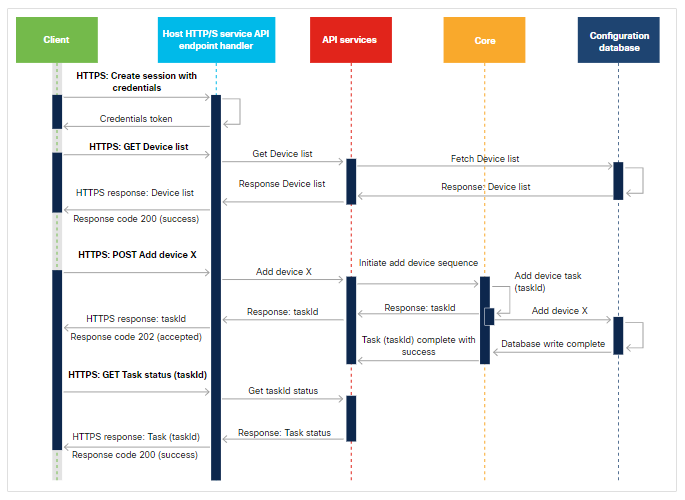
Where:
-
Client (on the left)
- Can be a Python script or POSTMAN test environment
- Can also be any application sending API requests
- Sends HTTPS requests to API Services handler (front-end)
-
API Services
- Receives requests from the front-end
- Handles some requests directly
- Forwards others to Core for further processing
-
Core
- Main processing logic
- Handles complex operations
- Interacts with persistent storage or other systems
-
Configuration Database
- Stores data for Core and API Services
- Can be a database, file system, or messaging system
In this example, there are three separate sequences shown:
-
Create Session
- Client sends credentials to create a session
- Front-end handles the request
- Responds with session creation success
-
Get Devices
- Client requests a list of devices
- API Services queries the Configuration Database
- Returns the list to the front-end
- Front-end sends HTTPS response with success status to client
-
Create Device
- Client sends a POST request to create a device
- API Services forwards the request to Core
- Core starts processing and returns a
TaskIdto the client - Response includes
202 Acceptedstatus, indicating the request is in progress - Client can later query task status
- API Services provides updates on completion and success/failure
These first two sequences demonstrate synchronous exchanges:
- A request is sent
- A response is received
- The task is fully completed with
SuccessorFailure
The Core continues processing after responding to the client:
- Updates the Configuration Database.
- Informs API Services when the task is complete.
At some later time, the client may choose to confirm that the task completed.
- Client sends a Task Status query.
- API Services responds with the completion status.
- Response Includes whether the task succeeded or failed.
Because the actual work requested was not completed prior to the response back to the client (it may continue after the initial response), this interaction is considered asynchronous.