Python Concurrency
Overview
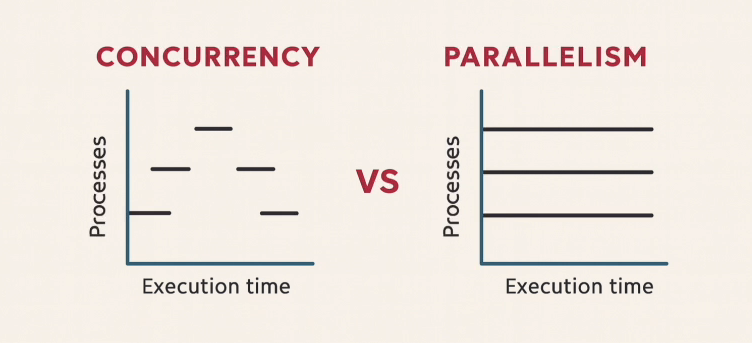
Concurrency and parallelism both deal with running multiple tasks, but they solve different problems.
- Concurrency is about switching between tasks quickly
- Parallelism is about running tasks at the same time.
At first, parallelism looks like the better option, but in real systems both are useful depending on the workload.
The code files used in this page can be found here: Github
Concurrency
Concurrency means doing multiple tasks by switching between them quickly.
A single CPU core handles all tasks but keeps switching so they appear to run together.
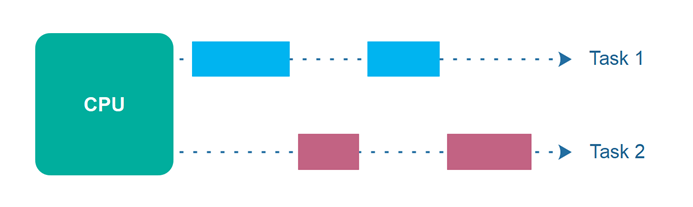
This works well when tasks spend time waiting (like file or database access), because the CPU can switch to another task instead of staying idle.
Concurrency with Threads
Python uses threads for concurrency. Threads let multiple tasks run in overlapping time, but still on one core (in most cases).
In the example below, one thread takes orders and another prepares tea. Both run together using switching.
Before the code, two functions are defined: take_orders() and brew_tea(). Each simulates delay using sleep().
import threading
import time

def take_orders():
    for i in range(1, 4):
        print(f"Taking order {i}")
        time.sleep(2)

def brew_tea():
    for i in range(1, 4):
        print(f"Brewing tea {i}")
        time.sleep(3)

order_thread = threading.Thread(target=take_orders)
brew_thread = threading.Thread(target=brew_tea)

order_thread.start()
brew_thread.start()

order_thread.join()
brew_thread.join()

print("All orders taken and tea brewed")
To run this file:
python threading-example.py
Expected output (order may interleave):
Taking order 1
Brewing tea 1
Taking order 2
Brewing tea 2
Taking order 3
Brewing tea 3
All orders taken and tea brewed
Notice that the there is some interval between the outputs, which shows that there is switching between the threads in the background.
Handling Concurrency
Python provides two common ways to handle concurrency: threads and asyncio. Both help you run multiple tasks, but they work in very different ways.
| Tool | What It Does | Best For |
|---|---|---|
threading.Thread | Runs functions concurrently using multiple threads in the same process | I/O tasks like file handling or network calls |
asyncio | Runs tasks in a single thread using cooperative multitasking (tasks voluntarily pause when they are waiting, so other tasks can run.) | High-volume I/O tasks like APIs or web requests |
threading.Thread is the main way to create threads in Python. Each thread runs a function concurrently, but they share the same memory space.
Parallelism
Parallelism means running multiple tasks at the same time using multiple CPU cores. Each process runs independently without sharing the same execution thread.
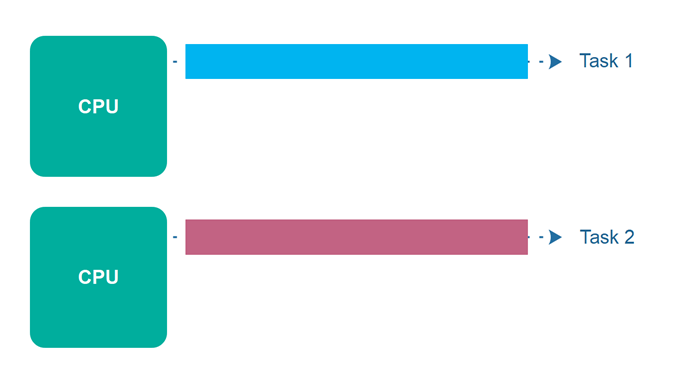
Unlike concurrency, parallelism reduces total execution time when tasks are independent and compute-heavy.
- Multiple cores are used
- Tasks run at the same time
- Best for CPU-heavy work
Important concepts:
multiprocessing.Process: Creates separate processes that run in parallel.multiprocessing.Pool: Manages a pool of worker processes for parallel execution.concurrent.futures.ProcessPoolExecutor: High-level interface for parallel execution using processes.
Parallel Processing Tools
These are the main ways Python runs tasks in parallel using multiple CPU cores. Each one works at a different level of abstraction, but all are used for CPU-heavy workloads.
| Tool | What It Does | When To Use |
|---|---|---|
multiprocessing.Process | Creates separate processes that run independently in parallel | When you need full control over each process |
multiprocessing.Pool | Manages a group of worker processes and distributes tasks automatically | When you want simple parallel execution over many tasks |
concurrent.futures.ProcessPoolExecutor | High-level interface for running functions in parallel using processes | When you want clean, modern, and easy parallel code |
All three use multiple processes, but they differ in how much control vs simplicity you want when designing parallel programs.
Multiprocessing
Python uses multiprocessing for parallelism. Each process runs on a separate CPU core, so tasks truly execute at the same time.
In the example below, multiple tea processes are created using Process. Each process brews tea independently.
# multiprocessing-example.py
from multiprocessing import Process
import time

def brew_tea(name):
    print(f"Start brewing {name}")
    time.sleep(3)
    print(f"End brewing {name}")

if __name__ == "__main__":
    processes = []

    for i in range(3):
        p = Process(target=brew_tea, args=(f"tea-{i+1}",))
        processes.append(p)
        p.start()

    for p in processes:
        p.join()

    print("All tea served")
To run this file:
python multiprocessing-example.py
Expected output (order may vary):
Start brewing tea-1
Start brewing tea-2
Start brewing tea-3
End brewing tea-1
End brewing tea-2
End brewing tea-3
All tea served
Here, multiple processes run at the same time, so tasks complete faster when CPU work is heavy.