Prototype to Production
Overview
Building an AI agent that works in development is only the first step. Production systems must be reliable, safe, and observable.
- Validate real-world behavior
- Test across multiple layers
- Add safety and monitoring
- Deploy gradually
Shipping an agent is not just calling a model API. It is about building a complete and responsible application around the model.
Understand What You Are Deploying
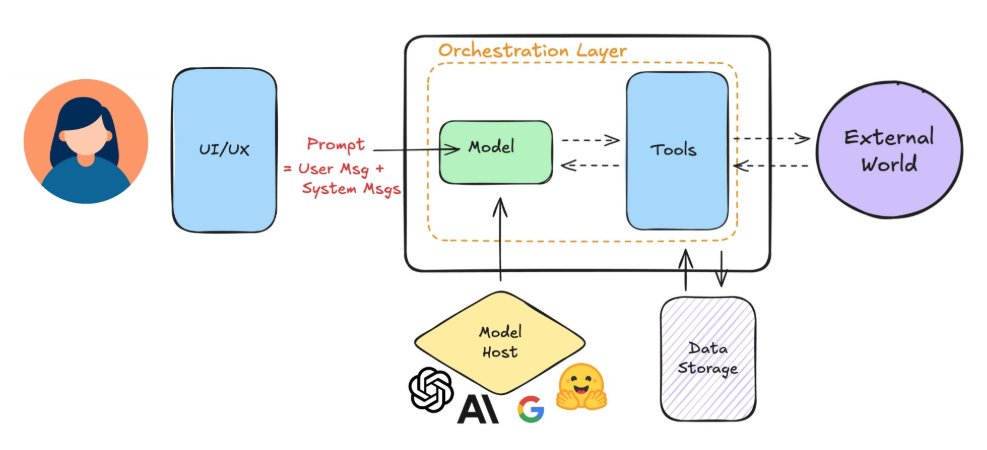
Most teams do not train models from scratch. They connect their application to a hosted model through an API.
- Application logic matters
- Prompts must be controlled
- Tool integrations must be reliable
Your responsibility includes the user interface, system prompts, memory, and external tools. The model is only one part of the system, so production readiness depends on everything around it.
Step 1: Validate Real Interactions
Before deployment, test how the agent handles real user behavior.
Test the following:
- Messy inputs
- Sudden topic changes
- Edge cases and abuse
Users may type slang, incomplete sentences, or unrelated questions. Your agent should handle these gracefully. If you do not have real user data, simulate realistic and extreme scenarios. Production systems must work beyond ideal inputs.
Step 2: Test Everything
Production systems require testing at multiple levels. You are not just checking if the model responds, but whether the entire application works reliably.
| Test Type | Description | What To Check |
|---|---|---|
| Unit tests | Focus on small components in isolation. Ensure each function, prompt template, or tool connector behaves correctly before integration. |
|
| Integration tests | Simulate real user journeys. Ensure all parts of the system work together correctly. |
|
| Prompt evaluations | Use golden datasets as benchmarks to detect regressions when prompts change. |
|
| Subjective reviews | Assess response quality beyond exact matches. Evaluate user experience and safety alignment. |
|
| Latency and cost checks | Ensure the system is responsive and cost-efficient at scale. |
|
Step 3: Add Guardrails and Observability
Safety and monitoring must be built in before release.
| Safeguard | Description |
|---|---|
| Input and output filters | Block unsafe, harmful, or irrelevant inputs and outputs before they affect the system or reach the user. |
| Fallback responses | Provide safe default replies when the model or external tools fail, ensuring the system degrades gracefully instead of breaking. |
| Usage limits | Apply token limits and API caps to prevent abuse and control operational costs. |
| Logging and transparency | Log user interactions to improve observability and debugging, while clearly informing users about what data is collected to maintain trust and privacy balance. |
Step 4: Shadow Deployment
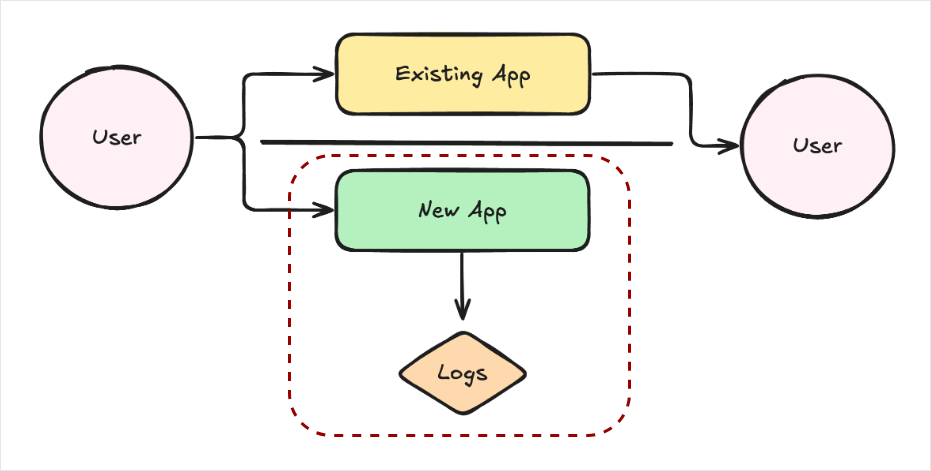
Before going fully live, run the system in shadow mode.
- Process real inputs
- Log outputs internally
- Review for issues
In shadow mode, users do not see the AI outputs. Instead, the outputs are logged internally. This allows teams to detect hallucinations, logic errors, or unsafe responses without risk. It is a safe bridge between testing and full release.
Step 5: Deploy Gradually
When launching your AI system, release it in controlled stages instead of exposing it to all users at once.
-
Use A/B test features
- Compare AI behavior against a control or baseline version
- Measure impact on quality, engagement, and error rates
- Use results to decide whether to expand or roll back
-
Roll out by user group
- Release to a small percentage of users first
- Expand gradually by region, team, or account type
- Monitor performance and fix issues before wider release
-
Keep humans in the loop for high-risk cases
- Critical in sensitive domains such as finance or healthcare
- Allow human review before final decisions are made
- Escalate uncertain or high-impact outputs for supervision
Final Checklist
Before launch, confirm the following:
- Handles messy and edge-case inputs
- Tested at unit and integration levels
- Guardrails and logging are active
- Deployment plan is gradual and monitored
Deploying AI is not just sending prompts to a model. It is about building reliable, safe, and observable software systems.
Real-Time Data Matters
Agents work best when they have access to fresh and relevant information. Up-to-date data allows them to make better decisions and perform the right actions.
- Access to real-time information
- Shared context across agents
- Faster and more accurate decisions
Without current data, agents may rely on outdated assumptions. Multi-agent systems also require constant information sharing. Each agent may handle a different responsibility, but they must stay aligned.
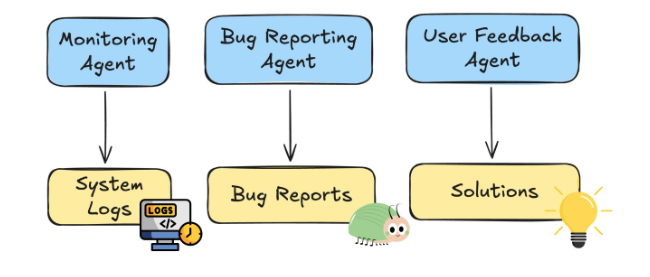
For example, imagine an IT support system with separate agents for:
- Log monitoring
- Bug reporting
- User support
If one agent detects and resolves an issue, the others must know immediately. Otherwise, they may repeat work or send outdated responses. Real-time data keeps all agents synchronized and consistent.
Event-Driven Architecture
A common solution is to use an event-driven architecture. This creates a shared communication layer where agents exchange updates instantly.
- Publish events
- Subscribe to relevant events
- Maintain shared awareness
Agents can publish events when something important happens. Other agents subscribe only to the events relevant to their tasks. This ensures efficient and targeted communication.
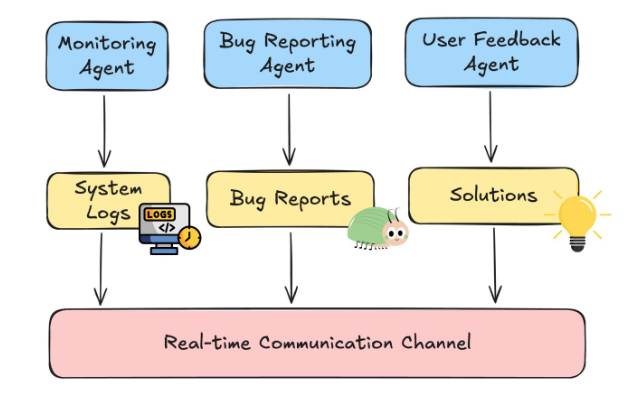
For example, an agent detecting a system anomaly might publish an event named AnomalyDetected.
In the example below, the variable event_type represents the name of the event, and payload contains the related details.
{
  "event_type": "AnomalyDetected",
  "payload": {
    "system": "payment-service",
    "severity": "high",
    "timestamp": "2026-02-27T10:15:00Z"
  }
}
Result:
Other subscribed agents immediately receive the event and update their state. The reporting agent may generate a ticket, and the support agent may pause troubleshooting messages if the issue is already being handled.
This shared event flow prevents duplication and keeps actions consistent.
Using an Event Bus
The shared communication layer is often called an event bus. It acts as a central hub for updates.
- Unified event channel
- Supports live and stored data
- Enables scalable coordination
The event bus can integrate streaming data sources, databases, and vector stores. Agents must maintain high-throughput and low-latency connections to keep updates fast.
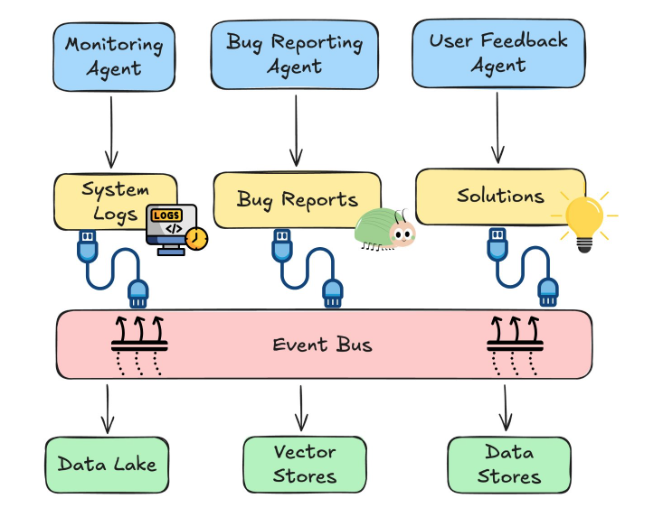
Data should also be preprocessed for quality and transmitted efficiently using compression and real-time protocols. Clean and fast data pipelines ensure agents operate with accurate context.