Starter Notes
The Dive In Problem
Asking Claude to build something immediately without context leads to weak or inconsistent results. The model has to guess the structure, which often creates incorrect patterns.
Claude works best when it understands the project before generating anything.
Structured Workflow
A simple workflow improves results by guiding Claude through the task step by step.
- Initialize the project
- Explore the codebase
- Plan before coding
- Review the plan
- Write code after review
- Test the changes and iterate
This approach helps ensure the output aligns with existing structure instead of introducing random or conflicting changes.
Project Memory with CLAUDE.md
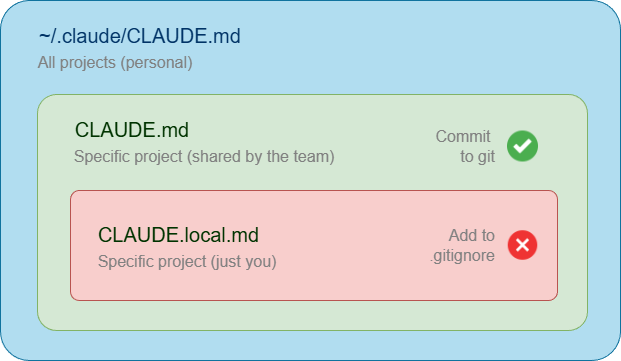
Claude can store project context in a file called CLAUDE.md. This file helps it remember structure, rules, and conventions across sessions.
To initialize it:
/init
Claude scans the project and generates the CLAUDE.md file automatically based on the existing codebase. This file should only contain the core project information that Claude can reference in future interactions:
- Project Name And Purpose
- Common Commands
- Key Conventions
CLAUDE.md should evolve as the project changes or when mistakes are discovered. Each update improves future behavior and prevents repeated issues.
Good results depend on what is inside CLAUDE.md, not just the file existing. Too little context reduces accuracy while too much creates noise, so the goal is balance.
Plan Mode
Plan Mode forces Claude to think before writing code. It reviews the project and creates a structured plan first.
To swithch to plan mode, use the shortcut Shift + Tab or type:
/plan
Then enter your prompt. For example:
How to add a new authentication method to the system?
If you skip planning, Claude may generate code immediately without understanding the full context. This can result to a working solution that does not match the project design.
Levels of Thinking
Adding think to a prompt encourages deeper reasoning before responding. This helps Claude produce more thoughtful and structured responses.
Sample prompt:
think how to optimize the database query for better performance?
There are four levels of thinking:
| Command | Reasoning Depth |
|---|---|
think | Basic reasoning |
think more | Extended analysis |
think a lot | Comprehensive reasoning |
think longer | Extended time reasoning |
ultrathink | Maximum reasoning depth |
Context Window Limits
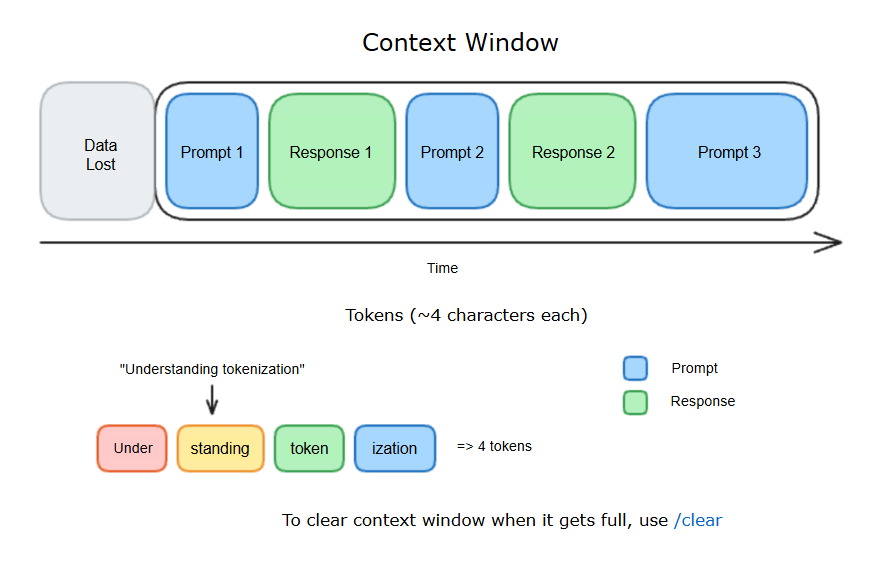
Claude has a limited memory for each session. When this limit is reached, older context may be dropped. Keep sessions focused to maintain better output quality.
To clear the context and start fresh, use:
/clear
File References and Context Layers
File references point Claude directly to source files instead of copying content into prompts, which keeps interactions accurate and up to date.
@routes.py
Claude Code also separates context into three layers:
| Context Level | Location | Purpose |
|---|---|---|
Project CLAUDE.md | In git repository | Shared with the team. Contains test commands, conventions, and project structure |
CLAUDE.local.md | Not tracked in git | Personal settings like local paths and shortcuts |
Global CLAUDE.md | Home directory | Applies to all projects and defines global defaults like coding habits (for example, using type hints) |