Prompt Engineering Basics
Overview
A prompt works best when it is clear, specific, and still allows useful variation. Good prompts guide the model without over-restricting it, which helps produce better results.
- Clarity removes confusion and makes intent easier to follow
- Specificity narrows the output to what is actually needed
- Open-endedness allows creativity when it is useful
Consider this example:
- A basic idea like making a peanut butter sandwich sets the context.
- Adding specific ingredients makes the request more precise.
- Asking for improvements encourages creativity and refinement.
The same idea applies when writing prompts in general, because clearer intent and better structure usually lead to higher quality results.
Detailed Prompts Matter
Good prompts are clear, focused, and detailed enough for the model to understand exactly what you want. When prompts are too vague or too complex, it leaves too much room for interpretation, and the output becomes less reliable because the model has to guess the intent.
- Missing intent leads to unclear answers
- Too much information reduces focus
- Clear constraints improve accuracy
- More detail leads to better results
For example, the prompt below is too general because it does not explain what needs to be fixed or how the function should behave.
Fix this code.
A better version gives clear instructions, defines the issue, and adds constraints so the expected behavior is unambiguous.
Fix this Python function to handle division by zero errors.
Keep the structure the same and only modify the exception handling block.
Use a try-except block to catch the error.
Return "Error: Division by zero" instead of crashing.
Follow Python PEP 8 style guidelines for formatting.
Adding more detail also improves results when creating new functions or logic from scratch. It helps the model produce more complete and reliable solutions.
For example, this is a valid prompt, but it is still quite basic.
Write a Python function to check if a number is prime.
It becomes much stronger when you include constraints and edge cases, because it reduces ambiguity and improves correctness.
Write a Python function to check if a number is prime.
It should return True only if the number is greater than 1 and has no divisors other than 1 and itself.
Handle edge cases such as negative numbers, zero, and one.
Use an efficient approach that stops checking once the square root of the number is reached.
Follow Python PEP 8 style guidelines for clean and readable code.
Components of a Strong Prompt
Strong prompts usually include these three parts:
- An instruction tells the model what to do
- The context helps the model understand the situation
- Constraints set limits on how the task should be completed

For example, a prompt asking for a Python function to calculate the factorial of a number would include:
- Instruction (write a function)
- Context (what factorial is)
- Constraints (use recursion, handle edge cases)
The prompt would look like this:
Write a Python function to calculate the factorial of a number using recursion.
Factorial is the product of all positive integers up to a given number.
Handle edge cases such as 0 and negative inputs by returning an appropriate message or value.
Ensure the function is clear, readable, and follows Python PEP 8 style guidelines.
Additional Elements of a Prompt
Beyond the core three parts, prompts can also include extra elements to make responses more useful and aligned with expectations.
- Persona defines the role the model should take
- Output format defines how the response should be structured
Persona helps shape tone and perspective, such as asking the model to act like a teacher or a senior engineer.
You are a senior software engineer.
Explain how recursion works in simple terms with a real-world example.
Output format ensures the response is delivered in a usable structure, such as bullet points, steps, or a checklist.
Explain recursion in 3 bullet points.
Then provide one simple example.
Then give one real-world analogy.
Refinement and Iteration
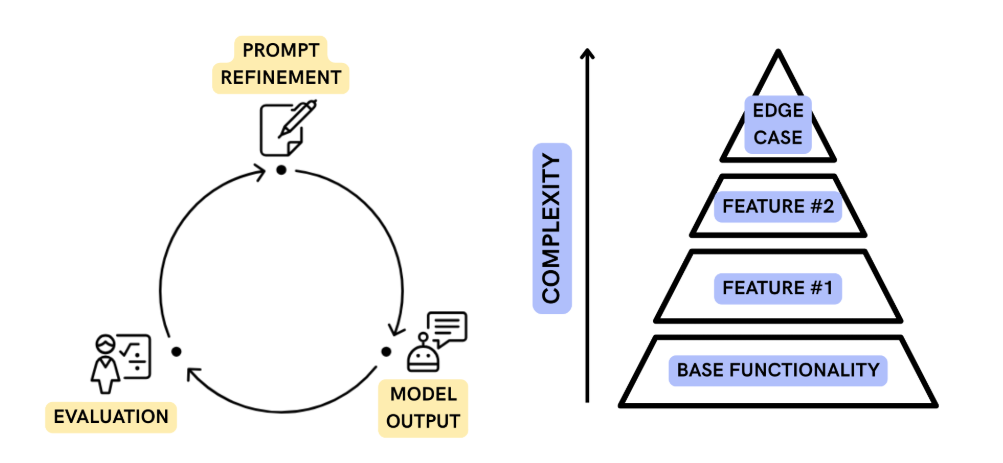
Prompting is not a one-time step because it improves through iteration. A first version of a prompt is often refined based on the response it produces, and this cycle continues until the output matches expectations.
- Start with an initial prompt
- Review the model’s response
- Refine the prompt based on results
This process is useful when building more complex solutions, especially in coding tasks where new requirements such as validation or error handling are added gradually. Over time, each iteration improves both clarity and performance.
Contextual Prompting
Context helps the model understand the full situation so it can produce more accurate and relevant results. Without context, the model has to make assumptions, which can lead to incorrect answers.
This is known as the Contextual prompting, where you provide all necessary information upfront.
- Include relevant code or examples
- Provide error messages when debugging
- Focus only on necessary information for large tasks
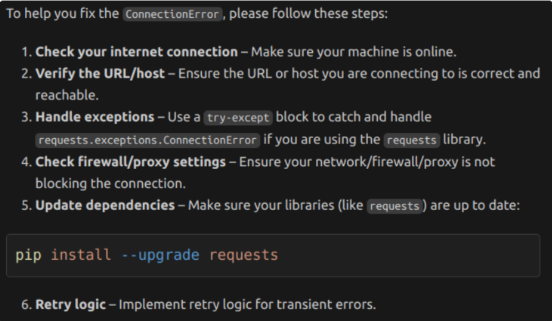
For example, a vague error question like a connection issue in Python leads to general guesses.
My Python script is returning a ConnectionError. How to fix?
Model response:
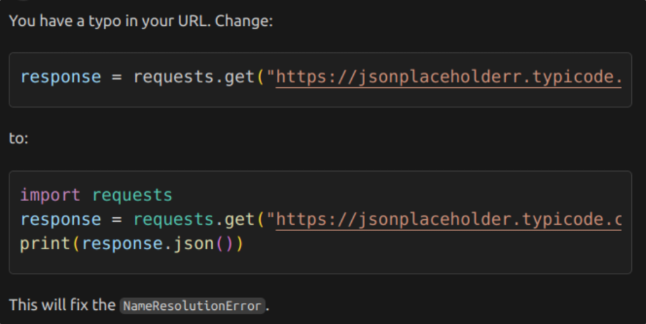
The best contextual prompt would include the code snippet and the exact error message:
My Python script is returning a ConnectionError when I try to call a web API.
Here is the code snippet:

response = requests.get("http://jsonplaceholderr.typicode.com/posts/1")

The error message is:

requests.exceptions.ConnectionError: HTTPSConnectionPool(host='jsonplaceholderr.typicode.com', port=443): Max retries exceeded with url: /posts/1 (Caused by NameResolutionError("<urllib3.connection.HTTPSConnection object at 0x000001F3A2B4C1D0>: Failed to resolve 'jsonplaceholderr.typicode.com' ([Errno 11001] getaddrinfo failed)"))

How can I fix this?
Model response:
Code Injectin and Call Graphs
In coding, one of the most effective ways to improve prompts is code context injection. This means adding relevant existing code into the prompt, such as function signatures, helper classes, or config files. It helps the model understand your real setup and reduces mistakes caused by missing context.
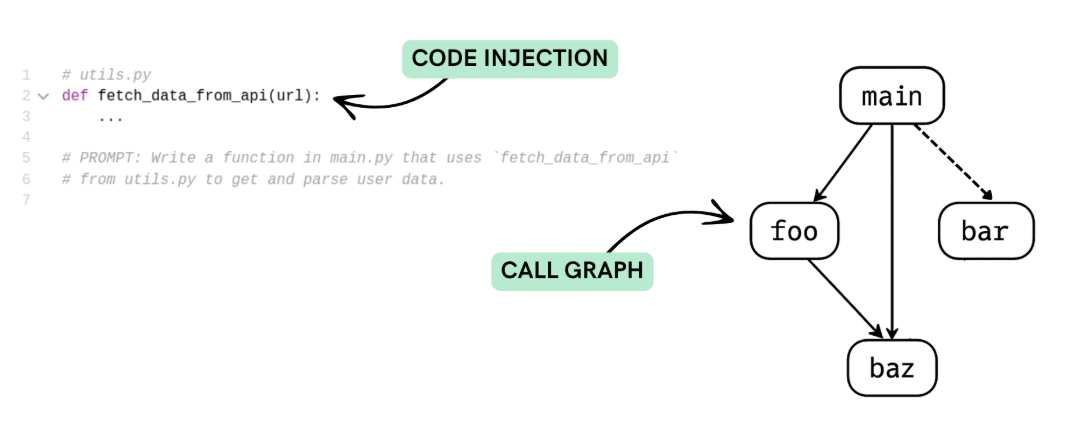
When working with large codebases, you can create a call graph for the function you are focusing on. This shows what parts are connected and helps you include only the code that is actually needed at runtime.
SALT Framework for Prompting
The SALT framework helps structure prompts so they are easier to understand and follow.
| Element | Purpose |
|---|---|
| Style | Defines how the response is formatted |
| Audience | Sets who the content is for |
| Length | Controls how detailed the response should be |
| Tone | Shapes the mood of the response |
Style
Style defines how the response is structured and presented. It helps control whether the output is easy to read, compare, or follow step by step.
-
Paragraph style is used when you want a continuous explanation.
Describe the solar system in paragraph form. -
List style is used when information needs to be organized clearly.
List the planets in the solar system. -
Table style is used when you want to compare items across different categories in a structured way.
Compare Earth and Mars in a table showing their size, distance from the Sun, and atmosphere.
Audience
Audience defines who the content is intended for, which ensures relevance and comprehension.
Examples:
-
Simple and engaging explanations for kids.
Explain machine learning like I’m 5. -
Technical details for professionals.
Explain the intricacies of neural network optimization techniques.
Length
Length controls how short or detailed the response should be. It helps you decide whether you want a quick answer or a more complete explanation.
- Short responses give quick, focused answers
- Long responses provide more detail and explanation
For example, you can ask for a very short answer like a haiku.
Write a haiku about prompt engineering with ChatGPT.
Or you can ask for a more detailed explanation if you need deeper understanding.
Explain prompt engineering with ChatGPT in detail and include examples of good and bad prompts.
Tone
Tone controls the mood of the response. It helps decide how the message should feel while still delivering the same information.
- Formal tone is used for professional or structured writing
- Casual tone is used for simple and friendly explanations
- Playful tone adds humor or a light style to the response
For example, you can ask for a formal recommendation letter while still adding a small humorous touch.
Write a formal recommendation letter for Lauren applying for a senior data science position.
At the end of each paragraph, add a light humorous sentence about Mike’s car dealership having the lowest prices in the country.
This shows how tone can mix professionalism with humor while still keeping the main message clear and structured.