Generators
Clone the Repository
To try out the examples in the succeeding sections, clone the project repository from GitHub.
- Github repo: joseeden/labs-kustomize
Clone the repository:
git clone https://github.com/joseeden/labs-kustomize.git
You will need a Kubernetes cluster to try out the examples.
To setup a basic cluster, you can use k3d.
Before Generators
In Kubernetes, updating a ConfigMap or Secret won’t automatically update a running pod.
To test it out, we'll set up a simple deployment that uses a ConfigMap for a database password. Later, we'll update the ConfigMap and see that the app doesn't reflect the change unless we manually restart it.
Start by navigating to the directory:
cd labs-kustomize/code-samples/05-before-generators
You'll find two manifest files:
-
configmap.yaml defines a ConfigMap with a password:
apiVersion: v1kind: ConfigMapmetadata:name: db-credentialsdata:password: password1 -
deployment.yaml references that ConfigMap as an environment variable:
apiVersion: apps/v1kind: Deploymentmetadata:name: nginx-deploymentspec:replicas: 1selector:matchLabels:app: nginxtemplate:metadata:labels:app: nginxspec:containers:- name: nginximage: nginxenv:- name: DB_PASSWORDvalueFrom:configMapKeyRef:name: db-credentialskey: password
The container reads DB_PASSWORD from the ConfigMap, but this value won't automatically change if the ConfigMap is updated later.
Apply the manifests:
kubectl apply -f .
Verify that everything is running:
kubectl get all
Output:
NAME                                    READY   STATUS    RESTARTS   AGE
pod/nginx-deployment-6cc58477b8-blz8d   1/1     Running   0          101s

NAME                               READY   UP-TO-DATE   AVAILABLE   AGE
deployment.apps/nginx-deployment   1/1     1            1           101s

NAME                                          DESIRED   CURRENT   READY   AGE
replicaset.apps/nginx-deployment-6cc58477b8   1         1         1       101s
You should see a running pod under the nginx-deployment. Now check that the environment variable was picked up correctly:
kubectl exec nginx-deployment-6cc58477b8-blz8d -- printenv | grep DB
You’ll get:
DB_PASSWORD=password1
Now, simulate a password update. Edit configmap.yaml to change the password to:
data:
  password: password2
Apply the change:
kubectl apply -f configmap.yaml
Notice that the pod is still the same pod seen previously:
kubectl get pods
Output:
NAME                                    READY   STATUS    RESTARTS   AGE
nginx-deployment-6cc58477b8-blz8d       1/1     Running   0          101s
Check the pod again:
kubectl exec nginx-deployment-6cc58477b8-blz8d -- printenv | grep DB
You’ll still see:
DB_PASSWORD=password1
Even though the ConfigMap has changed, the running pod still uses the old value. That’s because Kubernetes doesn't restart pods when a referenced ConfigMap or Secret changes.
To see the update take effect, manually restart the deployment:
kubectl rollout restart deployment nginx-deployment
A new pod should now replace the old NGINX pod:
kubectl get pods
Output:
NAME                                    READY   STATUS    RESTARTS   AGE
nginx-deployment-6cc58477b8-mblwh   1/1     Running   0          101s
Then re-check the new pod:
kubectl exec nginx-deployment-6cc58477b8-mblwh -- printenv | grep DB
This time you’ll see:
DB_PASSWORD=password2
This example shows a core problem:
ConfigMap updates do not trigger pod restarts automatically.
This is where Kustomize generators come in. They help automate restarts by generating new resource names whenever content changes.
Enter Generators
Generators are used to create new Kubernetes resources automatically.
- Used to create config maps and secrets
- Can be written inline or defined in a YAML file
- Support advanced settings like behavior and naming
Kustomize mainly uses two types of generators:
- ConfigMapGenerator creates one or more ConfigMaps
- SecretGenerator creates Kubernetes Secrets
Defining Generators/Transformers
Generators are defined just like transformers. You can set them up in a few simple ways:
- Use a separate configuration file
- Write them as inline YAML
- Use convenience fields provided by Kustomize
You can use all three of these methods when setting up generators too.
For more information, please see Defining Transformers/Generators.
Common Generators
ConfigMap Generators
ConfigMap generators help automate config updates by generating unique names. This ensures Kubernetes detects changes and restarts pods automatically.
- Generator name stays the same, but output name gets a random suffix
- Any change in values or files creates a new ConfigMap
- New ConfigMap name is used in the deployment automatically
- Pods are redeployed without running
kubectl rollout restart
Here’s a simple config map generator:
configMapGenerator:
  - name: app-config
    behavior: create
    files:
      - app.properties
    literals:
      - mode=dev
This will create a ConfigMap named app-config with values from both file and literal inputs.
namesets the name of the generated config mapbehaviordefines how to treat existing config mapsfilesandliteralsallow data to come from files or inline
You can also generate multiple ConfigMaps:
configMapGenerator:
  - name: app-config
    behavior: create
    files:
      - app.properties
    literals:
      - mode=dev
  - name: test-config
    behavior: create
    files:
  - name: dev-config
    behavior: create
    literals:
To see it in action, please see the labs section below.
Secret Generators
Secrets are generated similarly, but values must be base64 encoded:
secretGenerator:
  - name: app-secret
    literals:
      - token=abcd1234
Running kustomize build . will produce something like:
apiVersion: v1
kind: Secret
metadata:
  name: app-secret-hg8f9234
data:
  token: YWJjZDEyMzQ=  # base64 encoded
Whether you're using literals or files, any change triggers a new name and automatic deployment update. This ensures your pods always pick up the latest configs or secrets without needing extra commands.
To see it in action, please see the labs section below.
Behavior Field
The behavior field controls what happens if the config map already exists.
createmakes a new onemergeadds new values to existingreplacefully replaces any existing version
Use this to manage how your customizations affect the base configuration.
Generator Options
You can use generatorOptions in your kustomization.yaml to control generator behavior globally.
generatorOptions:
  disableNameSuffixHash: true
  labels:
    env: dev
  annotations:
    owner: ops-team
This will:
- Disables random suffix added to generated resources
- Applies the same labels and annotations to all generated items
These settings help ensure consistent metadata and stable resource names.
Labs
Lab 1: Simple ConfigMap
To try it out, go to the appropriate lab directory inside the repo:
cd labs-kustomize/code-sample/06-generators-configmaps/lab_01_simple_configmap
We have a generator defined in the kustomization.yaml:
namespace: test-labs-1

configMapGenerator:
  - name: db-cred
    literals:
      - password=secret123
Before anything else, create the namespace first:
kubectl create ns test-labs-1
Then run:
kustomize build .
The output will look like:
apiVersion: v1
kind: ConfigMap
data:
  password: secret123
metadata:
  name: db-cred-h9286b2f78
  namespace: test-labs-1
Notice the h9286b2f78 part is randomly generated.
After applying the config:
kubectl apply -k .
You can confirm the ConfigMap was created with the random suffix:
kubectl get cm -n test-labs-2
Example output:
NAME                 DATA   AGE
db-cred-h9286b2f78   1      44s
kube-root-ca.crt     1      4m8s
If you change the value in the generator (kustomization.yaml), a new ConfigMap is created with a different name, and Kustomize automatically updates the deployment to reference the new ConfigMap. This triggers a pod restart without any manual intervention.
Update the password in the kustomization.yaml:
namespace: test-labs-2

configMapGenerator:
  - name: db-cred
    literals:
      - password=secret123456789
Then re-apply:
kubectl apply -k .
When you check the resources again, you will now see two ConfigMaps created, each with a different randomly generated hash suffix:
kubectl get cm -n test-labs-2
Example output:
NAME                 DATA   AGE
db-cred-h9286b2f78   1      3m
db-cred-ttcgtm58fb   1      2s
kube-root-ca.crt     1      6m24s
Lab 2: ConfigMap from a File
This lab shows how to generate a ConfigMap from a file using Kustomize.
Change to the lab directory:
cd labs-kustomize/code-sample/06-generators-configmaps/lab_02_configmap_from_file
Inside this directory, we have the following files:
*kustomization.yaml
apiVersion: kustomize.config.k8s.io/v1beta1
kind: Kustomization

namespace: test-labs-2

commonLabels:
  version: lec-12

namePrefix: lec-12-

configMapGenerator:
  - name: nginx-config
    files:
      - nginx.conf

resources:
- nginx-deployment.yml
nginx.conf
events {
  worker_connections  1024;
}

http {
    server {
        listen 80;
        listen [::]:80;

        server_name localhost;

        root /usr/share/nginx/html;

        location ~ \.(gif|jpg|png)$ {
            root /data/images;
        }

        location /google {
            proxy_pass http://www.google.com/search;
        }

        location / {
          try_files $uri $uri/ =404;
        }
    }
}
nginx-deployment.yml
apiVersion: apps/v1
kind: Deployment
metadata:
  name: nginx-deployment
  namespace: test-labs-2
spec:
  selector:
    matchLabels:
      app: nginx
  replicas: 1
  template:
    metadata:
      labels:
        app: nginx
    spec:
      containers:
      - name: nginx
        image: nginx:1.23.3-alpine-slim
        ports:
        - containerPort: 80

        volumeMounts:
        - mountPath: /etc/nginx/nginx.conf
          name: nginx-config
          subPath: nginx.conf

      volumes:
      - name: nginx-config
        configMap:
          name: nginx-config
          items:
          - key: nginx.conf
            path: nginx.conf
The generator creates a ConfigMap where the filename is the key, and the content is the value.
Create the namespace first:
kubectl create ns test-labs-2
Apply the changes:
kubectl apply -k .
Verify the deployment:
$ kubectl get all -n test-labs-2

NAME                                    READY   STATUS    RESTARTS   AGE
pod/nginx-deployment-8667b86845-2dq2z   1/1     Running   0          59s

NAME                               READY   UP-TO-DATE   AVAILABLE   AGE
deployment.apps/nginx-deployment   1/1     1            1           59s

NAME                                          DESIRED   CURRENT   READY   AGE
replicaset.apps/nginx-deployment-8667b86845   1         1         1       59s
Check that the ConfigMap was created:
$ kubectl get cm -n test-labs-2

NAME                      DATA   AGE
kube-root-ca.crt          1      20m
nginx-config-48gchkg456   1      5s
You can also verify the contents of the ConfigMap by running the describe command:
kubectl describe cm nginx-config-48gchkg456 -n test-labs-2
Just like with ConfigMaps, you can generate Secrets using secretGenerator. It works the same way, but values are base64-encoded and a random suffix is also added.
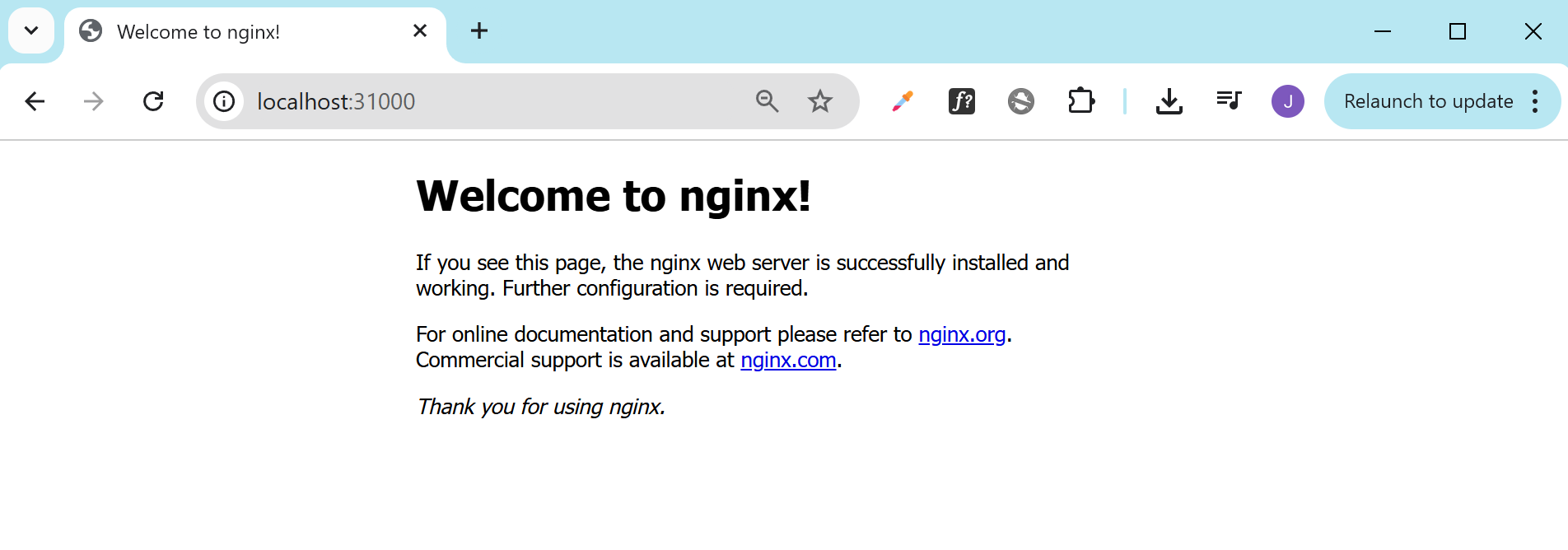
To verify that the configuration actually work, we can do port-fowarding:
kubectl port-forward -n test-labs-2 deploy/nginx-deployment 31000:80
It should return:
Forwarding from 127.0.0.1:31000 -> 80
Forwarding from [::1]:31000 -> 80
Open a browser and navigate to http://localhost:31000/:
Lab 3: ConfigMap with File and Literal
We can also create a ConfigMap using a mix of file and literal values.
Change to the lab directory:
cd labs-kustomize/code-sample/06-generators-configmaps/lab_03_configmap_from_file_and_literal
Inside the directory:
-
kustomization.yaml
namespace: test-labs-3configMapGenerator:- name: app-configbehavior: createfiles:- app.propertiesliterals:- mode=dev -
app.properties
host=example.comport=8080
Create the namespace:
kubectl create ns test-labs-3
Apply the configuration:
kubectl apply -k .
Check the ConfigMap:
kubectl get cm -n test-labs-3
You’ll see a name like this, with a hash suffix added automatically:
NAME DATA AGE
app-config-h4mftk9kcc 2 3s
kube-root-ca.crt 1 14s
Verify that the ConfigMap used both the file and the literal:
kubectl describe cm app-config-h4mftk9kcc -n test-labs-3
Output:
Name: app-config-h4mftk9kcc
Namespace: test-labs-3
Labels: <none>
Annotations: <none>
Data
====
app.properties:
----
host=example.com
port=8080
mode:
----
dev
BinaryData
====
Events: <none>
Lab 4: Multiple ConfigMaps
You can define multiple ConfigMaps in the same kustomization.yaml by specifying multiple configMapGenerator entries.
Change to the lab directory:
cd labs-kustomize/code-sample/06-generators-configmaps/lab_04_multiple_configmaps
Inside this directory:
-
kustomization.yaml
namespace: test-labs-4configMapGenerator:- name: app-configbehavior: createfiles:- app.propertiesliterals:- mode=dev- name: test-configbehavior: createfiles:- test.properties- name: dev-configbehavior: createliterals:- version=1.0.2 -
app.properties
app.name=DemoAppapp.port=8080 -
test.properties
app.name=TestAppapp.port=8081
Create the namespace:
kubectl create ns test-labs-4
Apply the configuration:
kubectl apply -k .
Output:
configmap/app-config-m4th5528b9 created
configmap/dev-config-25f4tgthk6 created
configmap/test-config-97f24mmhb7 created
Check the generated ConfigMaps:
kubectl get cm -n test-labs-4
Output:
app-config-m4th5528b9 2 17s
dev-config-25f4tgthk6 1 17s
kube-root-ca.crt 1 4m4s
test-config-97f24mmhb7 1 17s
Lab 5: Using merge and replace
This lab shows how to modify existing ConfigMaps using the merge and replace behaviors in configMapGenerator to update ConfigMaps created in Lab 4.
We’ll build on the following existing ConfigMaps in namespace test-labs-4:
test-configdev-config
To verify:
$ kubectl get cm -n test-labs-4
NAME DATA AGE
app-config-m4th5528b9 2 17s
dev-config-25f4tgthk6 1 17s
kube-root-ca.crt 1 4m4s
test-config-97f24mmhb7 1 17s
Check the contents of the existing ConfigMaps:
$ kubectl describe -n test-labs-4 cm dev-config-25f4tgthk6
Name: dev-config-25f4tgthk6
Namespace: test-labs-4
Labels: <none>
Annotations: <none>
Data
====
version:
----
1.0.2
$ kubectl describe -n test-labs-4 cm test-config-97f24mmhb7
Name: test-config-97f24mmhb7
Namespace: test-labs-4
Labels: <none>
Annotations: <none>
Data
====
test.properties:
----
app.name=TestApp
app.port=8081
To proceed, change to the lab directory:
cd labs-kustomize/code-sample/06-generators-configmaps/lab_05_using_merge_and_replace
Inside this directory, we have the kustomization.yaml
resources:
  - ../lab_04_multiple_configmaps

configMapGenerator:
  - name: test-config
    behavior: merge
    literals:
      - feature-x=true

  - name: dev-config
    behavior: replace
    literals:
      - version=2.0.0
      - debug=true
Note that we need to reference the previous directory as a base resource since it contains the original ConfigMap definitions we want to modify. By including it under resources, Kustomize first loads the existing configuration from that directory, and then applies the changes defined in the current overlay using the behavior fields (merge or replace).
Apply the configuration:
kubectl apply -k .
Verify the changes:
kubectl get cm -n test-labs-4
Notice that we now have two dev-config and test-config:
NAME                     DATA   AGE
app-config-m4th5528b9    2      25m
dev-config-25f4tgthk6    1      25m
dev-config-k9tg87d4dh    2      10s
kube-root-ca.crt         1      29m
test-config-97f24mmhb7   1      25m
test-config-dt8d8df48d   2      10s
Expected:
test-configwill retain previous keys and now includefeature-x=true(merged).dev-configwill only includeversion=2.0.0anddebug=true(replaced).
Check the contents of the new ConfigMaps to verify:
$ kubectl describe cm -n test-labs-4 dev-config-k9tg87d4dh

Name:         dev-config-k9tg87d4dh
Namespace:    test-labs-4
Labels:       <none>
Annotations:  <none>

Data
====
debug:
----
true

version:
----
2.0.0
$ kubectl describe cm -n test-labs-4 test-config-dt8d8df48d
Name:         test-config-dt8d8df48d
Namespace:    test-labs-4
Labels:       <none>
Annotations:  <none>

Data
====
feature-x:
----
true

test.properties:
----
app.name=TestApp
app.port=8081
Lab 6: Using disableNameSuffixHash
There is an option to disable the automatic name hash suffix that Kustomize appends to configMap and secret resource names. This is useful in scenarios where you want predictable, fixed names for referencing these resources, such as when they are mounted into Pods or referenced by third-party tools.
Navigate to the lab directory inside the repo:
cd labs-kustomize/code-sample/06-generators-configmaps/lab_06_using_disablenamesuffixhash
Inside this directory:
├── base
│   ├── deployment.yml
│   ├── kustomization.yml
│   └── service.yml
├── kustomization.yml
└── mysql
    ├── deployment.yml
    ├── kustomization.yml
    ├── mysql-config.properties
    └── service.yml
The root kustomization.yaml file:
apiVersion: kustomize.config.k8s.io/v1beta1
kind: Kustomization

commonLabels:
  version: test-labs-6

namePrefix: test-labs-6-

resources:
- mysql
- base
This references two subdirectories, mysql and base, which define the deployment and service configurations for MySQL and WordPress.
The ConfigMap generator is defined in the mysql/kustomization.yaml file:
apiVersion: kustomize.config.k8s.io/v1beta1
kind: Kustomization
namespace: test-labs-6

configMapGenerator:
  - name: mysql-config
    envs:
      - mysql-config.properties

generatorOptions:
  disableNameSuffixHash: true
  labels:
    generated: "true"

resources:
- deployment.yml
- service.yml
The configMapGenerator then references the file mysql-config.properties:
MYSQL_ROOT_PASSWORD=admin
MYSQL_DATABASE=wordpress
Before applying the files, create the namespace:
kubectl create ns test-labs-6
Then apply the full Kustomize config:
kubectl apply -k .
Output:
configmap/test-labs-6-mysql-config created
service/test-labs-6-mysql created
service/test-labs-6-wordpress created
deployment.apps/test-labs-6-mysql created
deployment.apps/test-labs-6-wordpress created
Verify the resources are created:
kubectl get all -n test-labs-6
We should see the pods and services for both MySQL and WordPress:
NAME                                         READY   STATUS    RESTARTS   AGE
pod/test-labs-6-mysql-bbdfc966f-qzwsj        1/1     Running   0          87s
pod/test-labs-6-wordpress-7cc596ddd8-66cfn   1/1     Running   0          87s

NAME                            TYPE        CLUSTER-IP     EXTERNAL-IP   PORT(S)        AGE
service/test-labs-6-mysql       ClusterIP   10.43.101.67   <none>        3306/TCP       87s
service/test-labs-6-wordpress   NodePort    10.43.50.233   <none>        80:30001/TCP   87s

NAME                                    READY   UP-TO-DATE   AVAILABLE   AGE
deployment.apps/test-labs-6-mysql       1/1     1            1           87s
deployment.apps/test-labs-6-wordpress   1/1     1            1           87s

NAME                                               DESIRED   CURRENT   READY   AGE
replicaset.apps/test-labs-6-mysql-bbdfc966f        1         1         1       87s
replicaset.apps/test-labs-6-wordpress-7cc596ddd8   1         1         1       87s
Check the ConfigMap:
kubectl get cm -n test-labs-6
Output:
NAME                       DATA   AGE
kube-root-ca.crt           1      29m
test-labs-6-mysql-config   2      2m34s
Verify the contents of the ConfigMap:
kubectl describe cm test-labs-6-mysql-config -n test-labs-6
We can see both the database name and the root password:
Name:         test-labs-6-mysql-config
Namespace:    test-labs-6
Labels:       generated=true
              version=test-labs-6
Annotations:  <none>

Data
====
MYSQL_DATABASE:
----
wordpress

MYSQL_ROOT_PASSWORD:
----
admin
We can also verify that the environment variables exist in the MySQL pod:
kubectl exec -n test-labs-6 <mysql-pod-name> -- printenv | grep ^MYSQL
Output:
MYSQL_MAJOR=8.4
MYSQL_VERSION=8.4.6-1.el9
MYSQL_SHELL_VERSION=8.4.6-1.el9
MYSQL_DATABASE=wordpress
MYSQL_ROOT_PASSWORD=admin
Updating the ConfigMap
Let's say we want to to add a MySQL credentials in the mysql/mysql-config.properties:
MYSQL_ROOT_PASSWORD=admin
MYSQL_DATABASE=wordpress
MYSQL_USER=wordpress
MYSQL_PASSWORD=wordpress
Re-apply the changes:
kubectl apply -k .
If you check the ConfigMaps again, you will see that it will not create another ConfigMap with a new hash. Instead, it will overwrite the existing one:
$ kubectl get cm -n test-labs-6

NAME                       DATA   AGE
kube-root-ca.crt           1      88m
test-labs-6-mysql-config   4      14s
Now, here's the downside of using disableNameSuffixHash:
If you set
disableNameSuffixHash: truein yourconfigMapGenerator, Kustomize generates the ConfigMap with a fixed name that never changes, even if the content updates.Because the ConfigMap name stays the same, your Deployment’s pod spec does not change, so Kubernetes sees no change and won’t restart or recreate pods automatically.
You will need to manually trigger a rollout restart:
kubectl rollout restart deployment test-labs-6-mysql -n test-labs-6
Get the new MySQL pod:
kubectl get pods -n test-labs-6
Then check the environment variables set in the pod:
kubectl exec -n test-labs-6 <mysql-pod-name> -- printenv | grep ^MYSQL
kubectl exec -n test-labs-6 test-labs-6-mysql-7d8c44cdf8-jkmjp  -- printenv | grep ^MYSQL
Output:
MYSQL_MAJOR=5.6
MYSQL_VERSION=5.6.51-1debian9
MYSQL_ROOT_PASSWORD=admin
MYSQL_USER=wordpress
MYSQL_DATABASE=wordpress
MYSQL_PASSWORD=wordpress
Cleanup
To remove the resources across all the created namespaces:
kubectl delete all --all -n test-lab-1
kubectl delete all --all -n test-lab-2
kubectl delete all --all -n test-lab-4
kubectl delete all --all -n test-lab-6
You can then delete the namespaces by repeating the delete all command multiple times, or you can also define the namespaces in this way:
kubectl delete ns test-lab-{1,2,3,4,6}
Output:
namespace "test-lab-1" deleted
namespace "test-lab-2" deleted
namespace "test-lab-3" deleted
namespace "test-lab-4" deleted
namespace "test-lab-6" deleted
Confirm that all the custom namespaces are deleted:
$ kubectl get ns

NAME              STATUS   AGE
default           Active   19h
kube-node-lease   Active   19h
kube-public       Active   19h
kube-system       Active   19h