Error “AADSTS16000” When Logging in
Updated Oct 14, 2021 ·
Problem
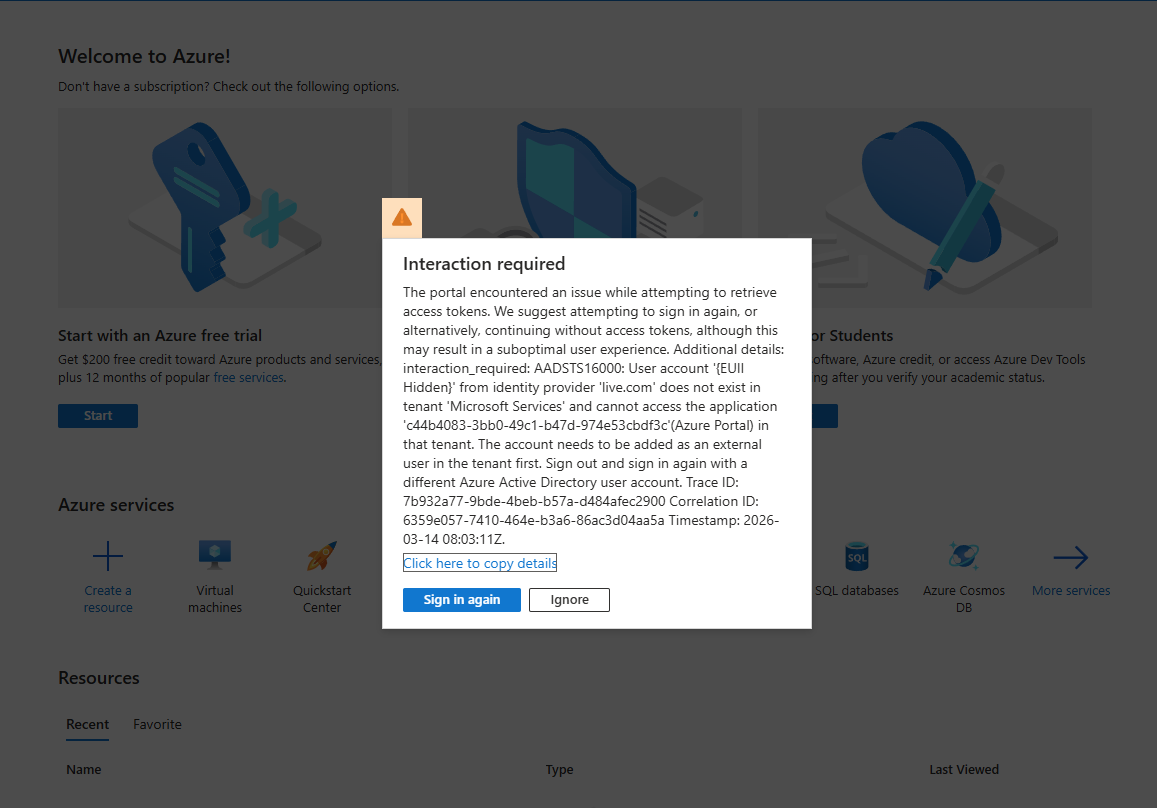
Logging into Azure Portal with a personal Microsoft account (e.g., Gmail) shows:
AADSTS16000: User account from live.com does not exist in tenant <work tenant>...
Causes
Removed from Old Tenant
The personal account was previously added to a work Azure AD tenant. After leaving the role, the account no longer exists in the work tenant, but Azure tries to authenticate against it automatically.
Solution
- Sign out from all Microsoft accounts: https://account.microsoft.com
- Clear browser cache and cookies.
- Use a private/incognito browser window to avoid cached sessions.
- Sign in with your personal account and select “Use another account” if prompted.
- Optional: Remove old tenant references at https://myapps.microsoft.com
No Azure Tenant Created
For error:
User account from identity provider live.com does not exist in tenant Microsoft Services
This could mean your Gmail account is a Microsoft account but it has never created an Azure tenant. Because of that, when you open the Azure portal it tries to access Azure resources, but there is no Azure tenant associated with your account yet.
Solutions
You just need to initialize Azure for your account once.
- Go to https://azure.microsoft.com/free
- Click Start free
- Sign in with your Gmail Microsoft account
- Complete the signup (you may need a phone or card verification).