Version Control Systems
Overview
Version control helps you track changes to files and go back to earlier versions when needed.
- It keeps a history of changes
- It lets you safely edit files without losing originals
- It supports working with others
It solves the problem of manually copying files before editing and keeps everything organized in one place.
Types of Version Control Systems
Version control systems store files and their history in a repository (repo). You work on a local copy, then save changes back to the repo.
- Local
- Centralized
- Distributed
Each type manages storage and collaboration differently, but all aim to track changes reliably.
Local Version Control System
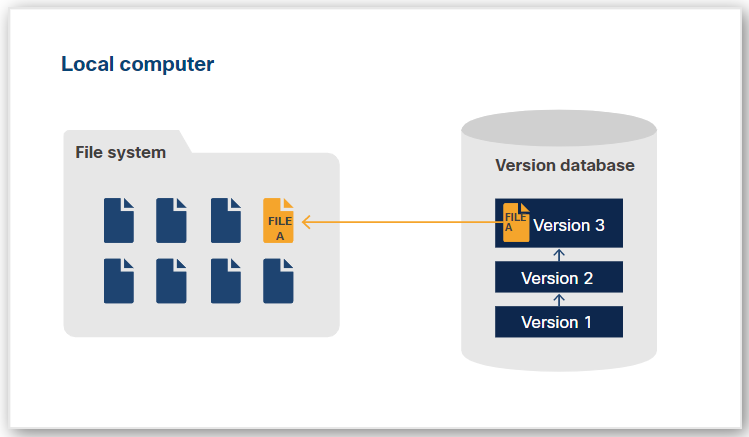
A local version control system works only on your own machine.
- Tracks changes on a single system
- Stores file differences (deltas)
- Lets you revert to older versions
It replaces manual file copying by saving changes in a simple database. When you want an older version, it rebuilds it using stored differences. It is simple but limited to one user.
Centralized Version Control System
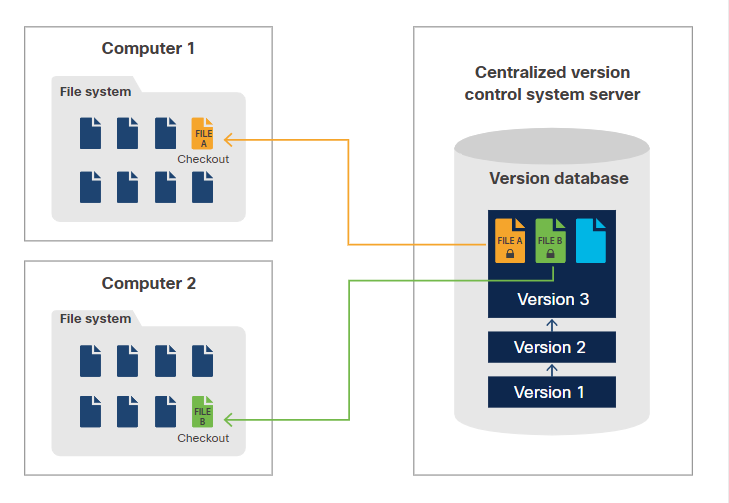
A centralized system uses one main server.
- Stores all files in a central repo
- Requires checkout and checkin
- Locks files to prevent conflicts
You download a working copy, edit files, then upload changes back. Only one person can edit a file at a time because it gets locked. This helps avoid conflicts but slows down teamwork.
Distributed Version Control System
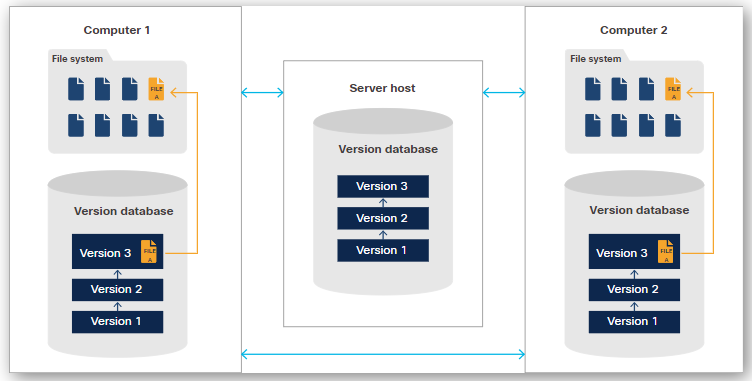
A distributed system gives each user a full copy of the repo.
- Each user clones the full repo
- No file locking is needed
- Multiple users can work at the same time
You make changes locally, then push them to a shared repo. If there are conflicts, the system helps resolve them. Since every user has a full copy, the repo can be restored easily if needed.
Git
Git is the most widely used version control system today.
- It is easy to learn
- It works well for small and large projects
- It is fast and flexible
- It supports team collaboration
- It is free and open source
Git is a distributed system, so every user has a full copy of the repository. It mainly uses the command line, although GUI tools also exist.
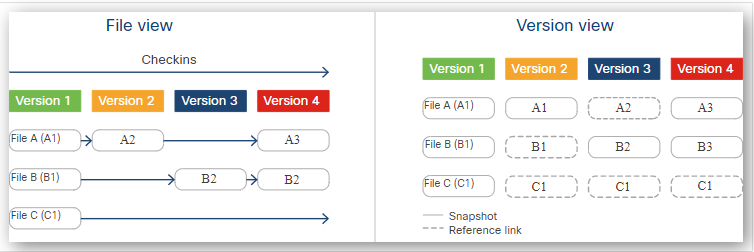
One key idea in Git is how it stores data.
- It saves snapshots of files instead of differences
- If a file does not change, it reuses the previous snapshot
This makes Git fast and efficient while still keeping a full history of changes.
GitHub and Other Git Providers
Git and GitHub are related but not the same. Git is a distributed version control system with a command line interface. GitHub is a service that hosts Git repositories and adds extra features.
- Provides code review, documentation, and project management
- Supports bug tracking and feature requests
- Enables private and public repositories
- Handles open source projects with many contributors
GitHub uses pull requests to let contributors propose changes for review before merging into main branches. This system helps manage collaboration safely and efficiently.
Other Git hosting services with similar repository and collaboration features include:
- GitLab
- Bitbucket
- GitKraken
- SourceForge
- AWS CodeCommit
- Azure DevOps
- Gitea