Hyperparameter Tuning
Overview
Hyperparameters are values set before training starts and they control how a model learns. They have a strong impact on model performance and must be carefully selected.
- Set before training begins
- Control how the model learns
- Strongly affect model performance
Examples include:
- Learning rate
- Number of layers in neural networks
- Tree depth or number of branches in decision trees
- Model architecture choices
Unlike model parameters such as weights and biases, hyperparameters are not learned from data during training.
Hyperparameter tuning improves model performance by testing different parameter combinations. It is usually one of the first steps in model optimization because it helps identify the most effective setup for training.
- Searches across parameter space
- Evaluates multiple configurations
- Selects best-performing model
This process ensures the model is trained under optimal conditions before final training and deployment.
Training Code Adjustments
Instead of hardcoding values, training scripts can load parameters from a file. This allows tuning jobs to update configuration without changing training code.
- Parameters are externalized into files
- Training script consumes config
- Model behavior changes dynamically
This makes training more flexible, reusable, and easier to integrate with automated tuning pipelines.
Hyperparameter Tuning Methods
Different strategies are used depending on compute budget and search complexity.
- Grid Search
- Random Search
- Bayesian Search
Grid Search
Grid search exhaustively tests all combinations of predefined hyperparameter values.It is often combined with cross-validation to ensure stable evaluation.
- Defines a fixed search space (e.g., learning rate, depth, etc.)
- Tries every possible combination
- Uses cross-validation for evaluation
- Computationally expensive but reliable
Each configuration is evaluated using k-fold cross-validation:
- The dataset is split into
kfolds - The model is trained on
k-1folds and validated on the remaining fold - Process is repeated
ktimes, each time using a different validation fold - The final score is computed as the average across all folds
This makes grid search robust but computationally expensive for large search spaces.
Example:
In the example below, we use 5-fold cross-validation (cv=5) to evaluate all hyperparameter combinations. The best configuration is then saved for use in the training stage.
import json
from sklearn.ensemble import RandomForestClassifier
from sklearn.model_selection import GridSearchCV

# Load hyperparameter search space
with open("config/parameters.json", "r") as f:
    param_grid = json.load(f)

# Define model
model = RandomForestClassifier()

# Grid search with 5-fold cross-validation
grid_search = GridSearchCV(estimator=model, param_grid=param_grid, cv=5)
grid_search.fit(X_train, y_train)

# Save best hyperparameters for training stage
best_params = grid_search.best_params_

with open("config/best_parameters.json", "w") as f:
    json.dump(best_params, f)
Random Search
Random search samples hyperparameter combinations randomly from the search space.
- Randomly selects configurations instead of trying all combinations
- More efficient than grid search in large search spaces
- Can discover good configurations faster
- May miss optimal combinations due to randomness
Unlike grid search, it does not guarantee coverage of all parameter combinations, but it is often more practical when the search space is large or continuous.
Example:
Here, RandomizedSearchCV samples a fixed number of hyperparameter combinations (n_iter=20) and evaluates each using 5-fold cross-validation. The best-performing configuration is then selected.
from sklearn.model_selection import RandomizedSearchCV
from sklearn.ensemble import RandomForestClassifier

model = RandomForestClassifier()

random_search = RandomizedSearchCV(
    estimator=model,
    param_distributions=param_grid,
    n_iter=20,
    cv=5,
    random_state=42
)

random_search.fit(X_train, y_train)
best_params = random_search.best_params_
Bayesian Search
Bayesian optimization uses past evaluation results to guide future hyperparameter selection.
- Builds a probabilistic model of performance
- Chooses next parameters based on expected improvement
- Learns from previous trials
- More efficient in high-cost training scenarios
Instead of blindly sampling, it focuses on promising regions of the search space, making it ideal for expensive training workflows.
Example (Optuna-style):
In the example below, Optuna is used to perform Bayesian optimization. The search process learns from previous trials and progressively selects better hyperparameter combinations to maximize model performance under 5-fold cross-validation.
import optuna
from sklearn.ensemble import RandomForestClassifier
from sklearn.model_selection import cross_val_score

def objective(trial):
    n_estimators = trial.suggest_int("n_estimators", 50, 200)
    max_depth = trial.suggest_int("max_depth", 3, 20)

    model = RandomForestClassifier(
        n_estimators=n_estimators,
        max_depth=max_depth
    )

    score = cross_val_score(model, X_train, y_train, cv=5).mean()
    return score

study = optuna.create_study(direction="maximize")
study.optimize(objective, n_trials=30)

best_params = study.best_params
Hyperparameter Tuning in Pipelines (DVC)
In MLOps workflows, hyperparameter tuning is often implemented as a pipeline stage.
- Tuning depends on dataset and config files
- Outputs performance metrics and evaluation results
- Can be reproduced using pipeline commands
- Avoids tracking unnecessary intermediate artifacts
In the example below, hyperparameter tuning results are stored in a tuning_results.md file. We intentionally avoid treating the generated “best parameters” file as a tightly managed pipeline output.
stages:
  preprocessing:
    ...

  training:
    cmd: python train.py
    deps:
      - processed_data/dataset.csv
      - config/best_parameters.yaml
      - scripts/train.py
    metrics:
      - outputs/training_metrics.json:
          cache: false

  tuning:
    cmd: python tuning.py
    deps:
      - processed_data/dataset.csv
      - config/tuning_config.json
      - scripts/tuning.py
    outs:
      - outputs/tuning_results.md:
          cache: false
This keeps the tuning stage loosely coupled from downstream stages. The training stage can depend on best_parameters.yaml, and changes to this file will trigger retraining when needed.
However, because the file is not treated as a formal output of the tuning stage, manual edits to best_parameters.yaml do not implicitly require the tuning stage itself to be rerun.
Hyperparameter File as an Tuning Stage Output
If we specify best_parameters.yaml as an output of the tuning stage, DVC treats it as a generated artifact produced exclusively by tuning.
stages:
  preprocessing:
    ...

  training:
    ...

  tuning:
    cmd: python tuning.py
    deps:
      - processed_data/dataset.csv
      - config/tuning_config.json
      - scripts/tuning.py
    outs:
      - config/best_parameters.yaml
      - outputs/tuning_results.md:
          cache: false
This creates an explicit pipeline dependency:
tuning ➔ config/best_parameters.yaml ➔ training
This setup is valid and commonly used in DVC pipelines, but it introduces tighter coupling between tuning and training.
When best_parameters.yaml is tracked as a tuning output:
- DVC considers it a generated artifact controlled by the tuning stage
- Manual changes to the file will be detected as differences from the last committed state
- Running
dvc repromay cause the tuning stage to rerun and overwrite manual changes - Downstream stages such as training will also be rerun if the parameter file changes
For example, tuning may produce:
learning_rate: 0.01
batch_size: 32
max_depth: 6
If a developer manually modifies it:
learning_rate: 0.005
batch_size: 64
max_depth: 6
This is considered as "tampering with the outputs", and DVC will mark the tuning stage as outdated because the tracked output (best_parameters.yaml) no longer matches the recorded state of the pipeline.
If dvc repro is executed, the tuning stage may be rerun and regenerate the best_parameters.yaml, which potentially overwrites the manual edits.
Hyperparameter Tuning Results and Reporting
Once the hyperparameter tuning job is triggered and completed, it evaluates multiple combinations of parameters and computes performance scores for each configuration.
In the sample tuning.py below, the results can be accessed after the grid search completes via the cv_results_ property of the GridSearchCV object:
from sklearn.model_selection import GridSearchCV
import pandas as pd

# Save resutls of tuning and sort by best score
results = grid_search.cv_results_
results_df = pd.DataFrame(results)
results_df = results_df.sort_values(by="rank_test_score")

# Save as markdown for reporting
results_df.to_markdown("outputs/tuning_results.md", index=False)
This object contains a structured record of all tested hyperparameter combinations along with their corresponding validation metrics, such as:
- Mean test score
- Standard deviation
- Ranking
These results are typically converted into a tabular format (for example, using a pandas DataFrame) and exported as a Markdown report for easier inspection and sharing.
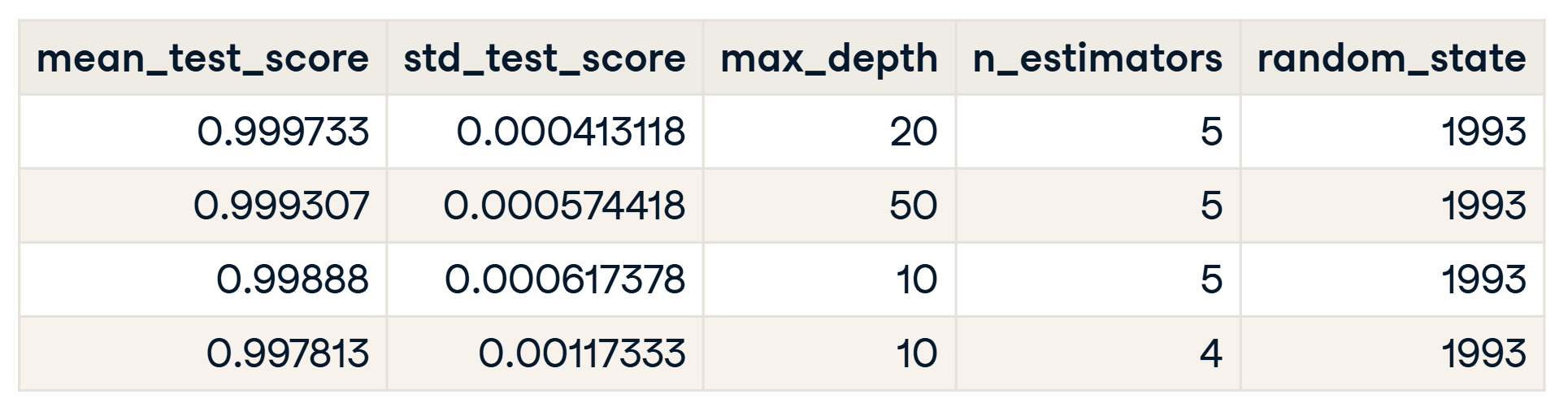
This Markdown report is especially useful in later stages such as code reviews or pull requests (PRs), where reviewers can quickly understand which hyperparameter combinations were evaluated and how the final configuration was selected.
Hyperparameter Tuning in CI Workflows
GitHub Actions can be used to control when hyperparameter tuning or training jobs are executed based on branch naming conventions.
At the start of an experiment, both branches can be created from the same base commit:
tuning/experiment-1
training/experiment-1
The tuning/experiment-1 branch can be used to run hyperparameter tuning for a specific experiment. CI can be configured to trigger the tuning pipeline only when changes are pushed to branches matching the tuning/* pattern.
In some setups, the tuning job can also be manually triggered in isolation when needed, for example during local experimentation or debugging.
dvc repro -f tuning
Once tuning is complete, the best parameters are reviewed and applied to the training branch. The training pipeline is then executed using the selected configuration, which ensures that model training is based on validated hyperparameters.
The workflow typically proceeds as follows:
- Both tuning and training branches are created from the same base commit
- CI triggers the tuning pipeline automatically on push to tuning/*
- Best parameters are selected after tuning completes
- The training branch is updated with the selected configuration
- The training pipeline is executed using the updated parameters
- A pull request is created to review the training results before merging
This approach keeps tuning and training clearly separated while maintaining a controlled and traceable progression from experimentation to model development.
Automated Hyperparameter Tuning
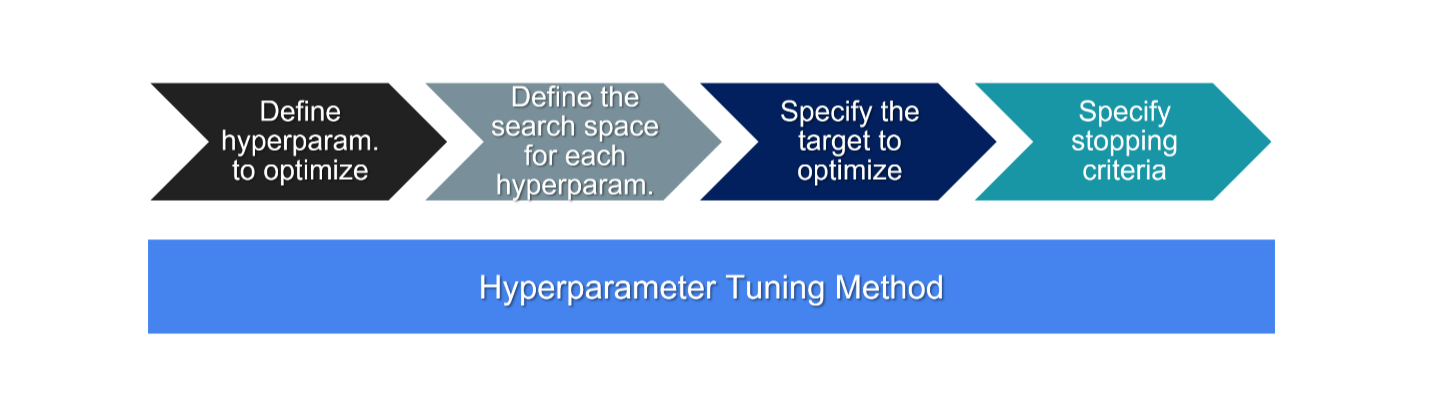
Manually searching for optimal hyperparameter combinations is often slow and inefficient. As a solution, we can use automated hyperparameter tuning, which systematically explores the search space and identifies high-performing configurations.
The process typically follows these steps:
- Define hyperparameters to tune
- Set search space (discrete values or ranges)
- Choose a performance metric (e.g., recall, precision)
- Set stopping criteria (e.g., maximum trials)
This ensures that consistent settings are applied across environments, which ensures model behave consistently and leads to a more reliable model performance.
Tracking Experiments
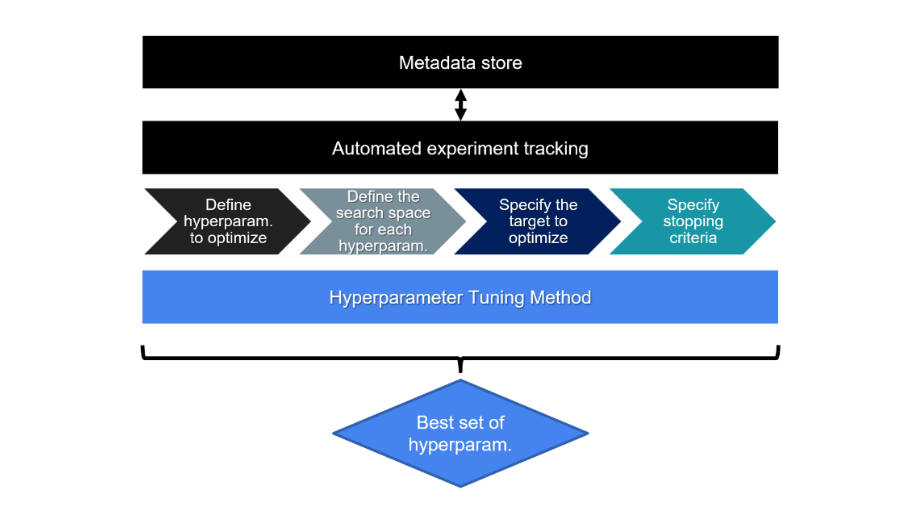
Automated tracking logs all hyperparameter tuning experiments in a structured way, which makes it easier to manage and compare results across different runs.
- Every hyperparameter combination and its evaluation results are recorded
- The full history of experiments is preserved for comparison and review
It also stores metadata such as configuration details, timestamps, and run context, which supports reproducibility and allows experiments to be reviewed or audited at a later stage.
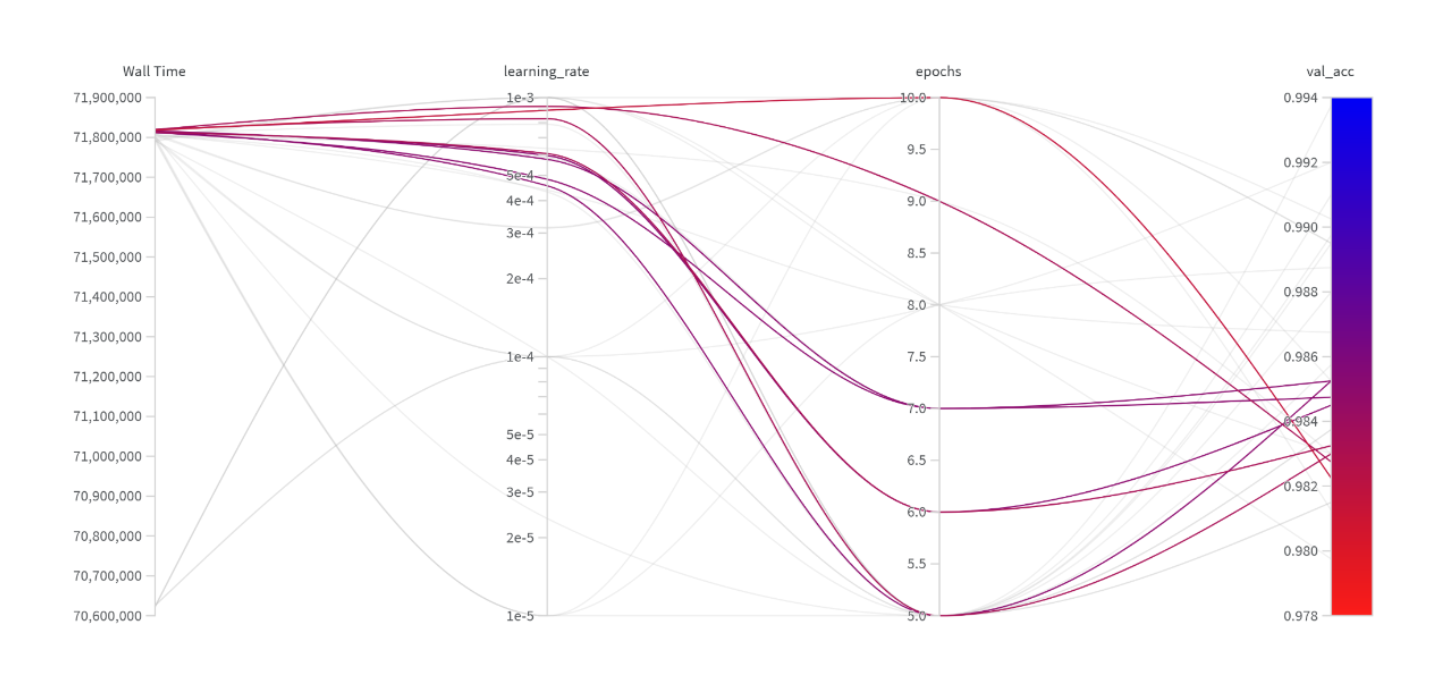
Hyperparameter Visualization
After tuning, results are analyzed to understand how different hyperparameters affect model performance.
- Identifies which parameters have the most impact
- Helps detect performance trends across configurations
- Supports better decision-making for final model selection