Operators
Type Checking
We can use the typeof operator to check the type of a value. As an example, to print the data type of an object:
console.log(typeof true)
When ran in the browser, this will return boolean.
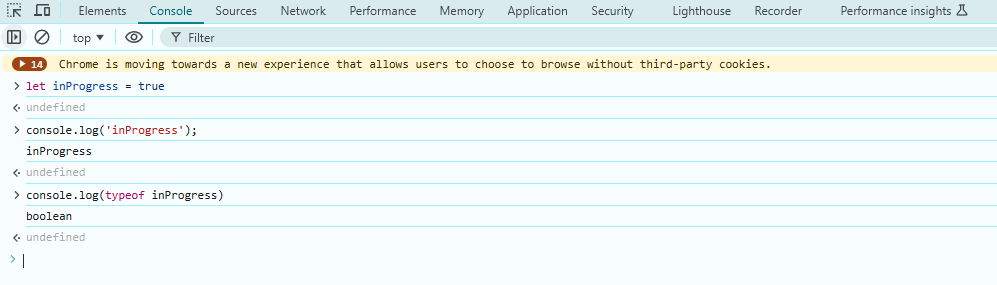
typeof bug
When you run typeof with null, it should return null. But it will evaluate it as an object, which is actually wrong.
This wasn't corrected for legacy reasons, but instead treated as a bug.

Assignment Operators
The = operator assigns values:
let x = 10 + 5;
Another assignment operator is +=, which adds and reassigns a value:
let x = 10 + 5;
x += 10; // Equivalent to x = x + 10
Now x becomes 25.
We can also use post-increment and post-decrement operators which are shorthand for incrementing or decrementing the variable.
x++;    // Equivalent to x = x + 1
x--;    // Equivalent to x = x - 1
Math Operators
Math operators are used to perform arithmetic calculations.
let a = 10;
let b = 5;

console.log(a + b);  // Addition: 15
console.log(a - b);  // Subtraction: 5
console.log(a * b);  // Multiplication: 50
console.log(a / b);  // Division: 2
console.log(a % b);  // Modulo (remainder): 0
console.log(a ** b); // Exponentiation: 100000
Concatenating Strings
Another use case for the + operator is string concatenation, which means joining strings together.
For example, we can create two variables:
let firstName = "John";
let lastName = "Smith";
Then, we can combine them using the + operator:
console.log(firstName + lastName);
To add a space between them, include a space string in the concatenation:
console.log(firstName + " " + lastName);
This results in "John Smith".
Comparison Operators
Comparison operators are used to compare values and return true or false based on the result.
let x = 10;
let y = 5;

console.log(x > y);  // Greater than: true
console.log(x < y);  // Less than: false
console.log(x == y); // Equal to: false
console.log(x != y); // Not equal to: true
console.log(x >= y); // Greater than or equal to: true
console.log(x <= y); // Less than or equal to: false
Equality Operators
In JavaScript, == and === are comparison operators, but they behave differently:
-
==(Loose Equality)- Compares two values after performing type conversion if necessary.
- Converts the operands to a common type before making the comparison.
- Can lead to unexpected results due to implicit coercion.
Example:
console.log(5 == "5"); // true (string "5" is converted to a number)console.log(null == undefined); // true (both are treated as "empty" values)console.log(true == 1); // true (true is converted to 1) -
===(Strict Equality)- Compares two values without type conversion.
- Returns
trueonly if both values and their types are identical. - Recommended for more predictable and bug-free comparisons.
Example:
console.log(5 === "5"); // false (different types: number vs. string)console.log(null === undefined); // false (different types)console.log(true === 1); // false (boolean vs. number)
When to Use Each?
- Use
===whenever possible to avoid unintended type coercion and ensure accurate comparisons. - Use
==only when you specifically want type conversion (e.g., checking fornullorundefinedtogether).
Boolean Operators
Boolean operators are used to combine or manipulate boolean values (true or false).
let a = true;
let b = false;

console.log(a && b);  // AND: false (both must be true)
console.log(a || b);  // OR: true (at least one must be true)
console.log(!a);      // NOT: false (inverts the value)
console.log(!b);      // NOT: true

let c = true;
console.log(a && b && c);  // false
console.log(a && b || c);  // true
console.log(a || b && c);  // true
console.log(a || b || c);  // true
Ternary Operators
The ternary operator is a shorthand for an if-else statement. It evaluates a condition and returns one value if true, and another if false.
const age = 18;
const canVote = age >= 18 ? "Yes, you can vote" : "No, you can't vote";
console.log(canVote);  // Output: Yes, you can vote
In this example, the ternary operator checks if age is greater than or equal to 18. If true, it returns "Yes, you can vote", otherwise, it returns "No, you can't vote".
Operator Precedence
Operator precedence determines the order in which operations are performed in an expression.
let result = 10 + 5 * 2;
console.log(result);  // 20 (Multiplication (*) happens before Addition (+))

let result2 = (10 + 5) * 2;
console.log(result2);  // 30 (Parentheses change the order)
Most commonly used operators in order of precedence:
| Operator | Symbols | Description |
|---|---|---|
| Parentheses | () | Controls execution order, highest precedence |
| Unary | ++ -- ! - | Increment, decrement, logical NOT, negation |
| Multiplication & Division | * / % | Evaluated before addition and subtraction |
| Addition & Subtraction | + - | Evaluated after multiplication and division |
| Comparison | > < >= <= === == | Compares values |
| Logical AND & OR | && ` | |
| Ternary | ? : | Shorthand for if-else conditions |
When operators have the same precedence, JavaScript evaluates them based on associativity:
- Left to Right: Most operators, such as
+,-,*,/,%, etc. - Right to Left: Assignment (
=) and exponentiation (**).