Using Entra ID
OAuth
The OAuth protocol always relies on an Identity Provider (IdP), which handles authentication and authorization for applications.
- IdP validates and issues tokens
- Works the same across different providers
An identity provider acts as a secure gatekeeper for applications.
- Protects sensitive data
- Issues limited-access credentials
- Separates authentication from the app
For example, Entra ID acts as the IdP and the API Manager instance acts as the client. The IdP validates users and issues tokens, while the application never directly handles credentials. This keeps authentication secure and centralized.
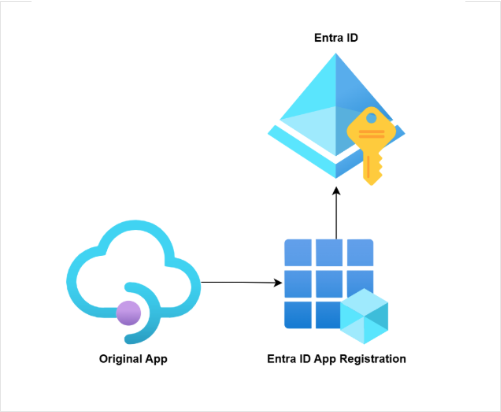
These concepts are consistent whether you use Entra ID or another IdP. The IdP manages who can access an application without exposing sensitive data directly.
Registering an Entra ID Application
Entra ID is accessible through the Azure Portal. You will need high privilege contributor access to manage it.
To use OAuth, you must first register your application in Entra ID.
- Add a new app registration with a custom name
- Provide a valid redirect URL pointing to APIM
The redirect URL ensures that after login, Entra ID knows where to send the authentication response. This registration lets the IdP recognize your application as a trusted client.
Capturing Client Information
After registration, we will need to capture key identifiers and secrets.
- Application (Client) ID and Tenant ID
- Client secret
- Keep secrets secure
The Client ID and Tenant ID identify your app to Entra ID, while the Client Secret acts like a password. Your backend uses this information to authenticate and request access tokens. Never expose the client secret in frontend code.
Obtaining Endpoint URLs
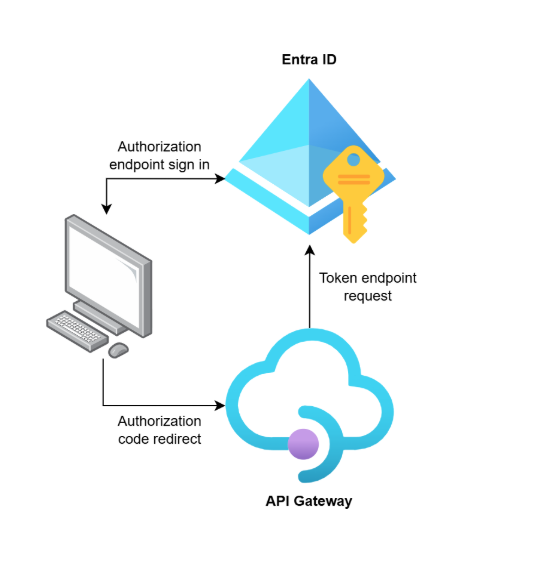
OAuth requires specific URLs from the IdP to complete authentication.
- Authorization endpoint for user sign-in
- Token endpoint for exchanging codes for tokens
In Entra ID, find these under the Endpoints tab of your app registration. Your application redirects users to the authorization endpoint, then uses the token endpoint to get an access token for API calls.
Connecting APIM to Entra ID
Finally, we need to configure API Management to use the IdP.
- Set APIM as a confidential client
- Enter client ID, secret, and endpoints
- Define the scopes your API exposes
This links APIM to Entra ID, which will allow OAuth authentication for your APIs. All API calls are now validated through the IdP, keeping access secure and centralized.