Docker Application Deployment
Overview
Docker is a common way to package and run an application in a container. A Docker image contains the application code, runtime, libraries, and dependencies. A Docker container is a running instance of that image.
For more information, please see Docker Architecture page.
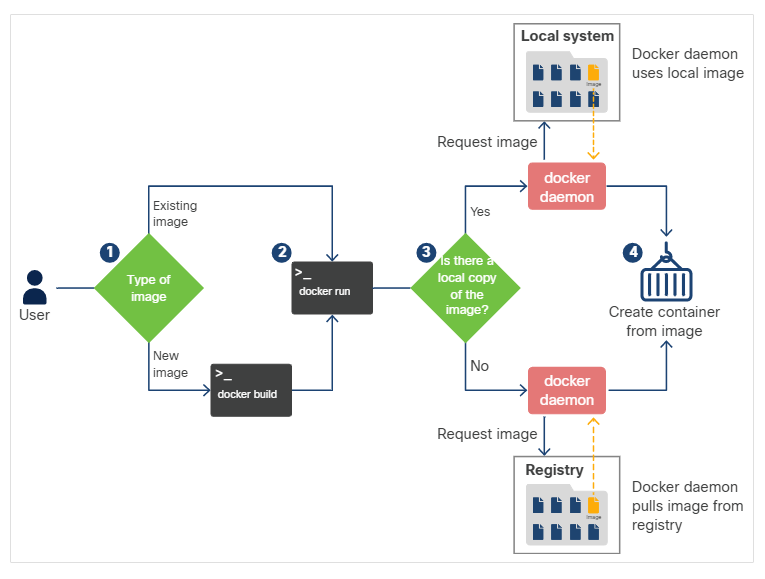
Docker Workflow
A simple Docker workflow usually looks like this:
- Create a Dockerfile or pull an existing image.
- Build an image with
docker build. - Run a container with
docker run. - Test the application locally.
- Tag and push the image to a registry.
Dockerfile
A Dockerfile is a text file named Dockerfile that defines the steps Docker uses to build an image.
FROM python
WORKDIR /home/ubuntu
COPY ./sample-app.py /home/ubuntu/.
RUN pip install flask
CMD python /home/ubuntu/sample-app.py
EXPOSE 8080
| Command | Purpose |
|---|---|
FROM | Selects the base image. |
WORKDIR | Sets the working directory inside the image. |
COPY | Copies files from the build context into the image. |
RUN | Runs a build-time command, such as installing packages. |
CMD | Sets the default command when the container starts. |
EXPOSE | Documents the port the application listens on. |
Build an Image
Build the image from the current directory:
docker build -t sample-app-image .
Docker processes each Dockerfile instruction as a layer. If a layer has not changed, Docker can reuse the cached layer and speed up future builds.
Run a Container
Run the image in the background and publish the exposed port:
docker run -d -P sample-app-image
For a predictable port mapping, map the host port to the container port:
docker run -d -p 8080:8080 --name pythontest sample-app-image
Check running containers:
docker ps
Open a shell in a running container:
docker exec -it pythontest /bin/sh
Stop and remove the container:
docker stop pythontest
docker rm pythontest
Registry Workflow
A registry stores images so other systems can pull and run them.
docker login
docker commit pythontest sample-app
docker tag sample-app devnetstudent/sample-app:v1
docker push devnetstudent/sample-app:v1
Note: In production, prefer repeatable Dockerfile builds over manually committing container state. A committed container can hide changes that are not documented in source control.
Development Environment
A development environment should be convenient for the developer and close enough to production to catch deployment issues early.
- Use small sample databases when full production data is unnecessary.
- Mock external services when a developer does not need the real service.
- Keep scripts, Dockerfiles, and configuration in version control.
- Test network ports and environment variables before promoting the build.