Classes: Basics
Overview
Object-Oriented Programming (OOP) uses objects to organize and manage data.
- Classes: Blueprints or templates for creating objects.
- Objects (Instances): Individual "things" created from a class.
- Attributes: Data (state) stored inside an object.
- Methods: Actions (behaviors) an object can perform.
In the example below, the Car class acts as a template defining attributes like color, brand, and model. Using this class, we can create two separate objects that share the same methods and attribute structure defined by the blueprint.
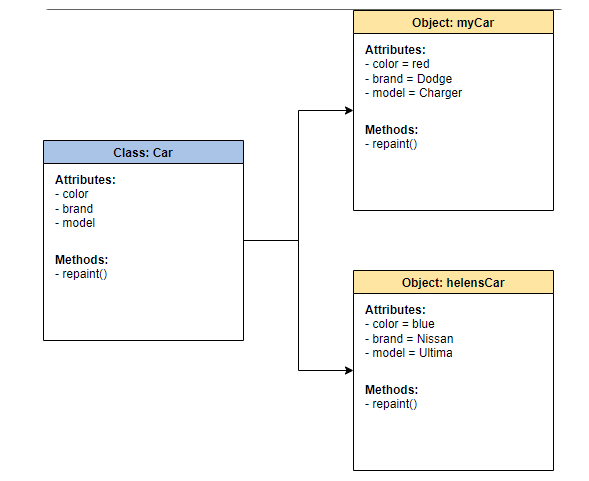
Objects and Classes
A class is a blueprint that defines what an object can do and what data it can hold. While Ruby provides built-in classes like String or Array, you can create custom classes to model real-world items like Books or Users.
Objects created from a class are called instances. Each instance has its own data but shares the same methods defined in the class.
- Classes are the templates.
- Objects are the individual "things" built from those templates.
- Methods manipulate or read the object's state.
Example: The integers 5 and 8 are separate objects, but they both come from the same Integer class. Because they share the same blueprint, comparing their classes returns true.
puts 5.class          # Output: Integer
puts 8.class          # Output: Integer
5.class == 8.class    # Output: True
Different types of objects come from different classes:
puts "Hello".class    # Output: String
puts 3.14.class       # Output: Float
puts [1, 2, 3].class  # Output: Array
puts true.class       # Output: TrueClass
puts nil.class        # Output: NilClass
Creating a Class
To create a custom class, use the class keyword followed by the class name in UpperCamelCase, and finish the definition with end.
class Book
end
A class can be empty or contain methods and state. To create a new instance from the class, provide the class name with the .new:
book1 = Book.new
book2 = Book.new

puts book1
puts book2
Output
#<Book:0x00007d0dae080c30>
#<Book:0x00007d0daddd23f8>
Creating an Object
Empty Class
To create objects from a class, call .new on the class name. Each call creates a separate object that share the same class but are different instances.
class Animal
end

# Create the instances
animal1 = Animal.new
animal2 = Animal.new
animal3 = Animal.new

puts animal1
puts animal2
puts animal3
Output
#<Animal:0x00007c9725b07320>
#<Animal:0x00007c9725b07190>
#<Animal:0x00007c9725b070f0>
Custom Classes
While an empty class is just a shell, a functional class uses instance variables to store state and methods to define what the object can do.
Using the previous example, the Animal class now have several attributes to store specific information. To create an object, simply call the .new method on the class name and pass in the required starting values.
class Animal
  def initialize(species, family, diet)
    @species = species # State 1
    @family = family   # State 2
    @diet = diet       # State 3
  end

  def speak
    puts "The #{@species} is a #{@family} (#{@diet}) and makes a sound!"
  end
end

# Create the instances
animal1 = Animal.new("Lion", "Felidae", "Carnivore")
animal2 = Animal.new("Elephant", "Elephantidae", "Herbivore")

animal1.speak
animal2.speak
Output
The Lion is a Felidae (Carnivore) and makes a sound!
The Elephant is a Elephantidae (Herbivore) and makes a sound!
Built-in Classes
Like custom classes, you can also use the new method to create objects from built-in classes:
Hash.newcreates a new hash objectString.new("text")creates a new string objectArray.new(size)creates a new array with optionalnilelements
The Ruby team designed shorthand notation to make object creation simpler and avoid repeatedly typing full class names, which is why the shortcuts below are commonly used.
[]instead ofArray.new(){}instead ofHash.new()""instead of `String.new("")
Example:
h = Hash.new
puts h.class
# Output: Hash

s = String.new("Boris")
puts s
# Output: Boris

a = Array.new(3)
p a
# Output: [nil, nil, nil]
Instance Variables
Instance variables store data that belongs to a specific object. They always start with @.
class Student
  @first_name
  @last_name
  @email
end
Note: Without the @ prefix, Ruby treats the variable as local to the method it is in, and it will disappear once the method finishes.
At this point, the object is created without any state because we haven't defined the initialized method yet. When initialize is not defined, Ruby still creates the object, but its attributes remain empty.
To skip ahead, go directly to the The initialize Method section.
Custom Output With to_s
By default, when you print an object, Ruby uses the to_s (to string) method. This usually displays the object's class name and its memory address (e.g., #<Student:0x000...>).
## student.rb
class Student
  @first_name
  @last_name
end

student1 = Student.new
puts student1
To run this script from your terminal:
ruby student.rb
Output:
#<Student:0x00007156a0f07e00>
You can override this method to control exactly what gets displayed when you print the object.
class Student
  # Note: Attributes are currently empty
  @first_name
  @last_name

  def to_s
    "Full name: #{@first_name} #{@last_name}"
  end
end

student1 = Student.new
puts student1
Output:
Full name:
Note: At this point, the output will show "Full name: " (empty fields). This is because we haven't assigned any values to the variables yet, This can be solved using the initialize method.
The initialize Method
Instead of creating an empty object and filling it later, we can use the initialize method. This is a constructor that runs automatically whenever you call .new. It allows an object's starting values (attributes) to be set at the moment it is created.
Examples:
-
Simple object setup
In this example, the
initializemethod ensures every new book starts with a title and an author.class Bookdef initialize(title, author)@title = title@author = authorend# Overriding to_s for nowdef to_s"'#{@title}' by #{@author}"endend# Creating the objectmy_book = Book.new("The Hobbit", "J.R.R. Tolkien")puts my_bookOutput:
'The Hobbit' by J.R.R. Tolkien -
Adding multiple parameters at runtime
The same class can produce multiple objects, each with its own values, by passing different arguments to
.new.NOTE: The order of the arguments matters when passing them.
class Studentattr_accessor :first_name, :last_name, :emaildef initialize(first_name, last_name, email)@first_name = first_name@last_name = last_name@email = emailenddef to_s"Full name: #{@first_name} #{@last_name}"endendstudent1 = Student.new("Alex", "Smith", "alex.smith@abc.com")student2 = Student.new("Maria", "Lopez", "maria.lopez@abc.com")student3 = Student.new("Ted", "Mosby", "ted.mosby@abc.com")student4 = Student.new("James", "Dean", "james.dean@abc.com")puts student1puts student2puts student3puts student4Output:
Full name: Alex SmithFull name: Maria LopezFull name: Ted MosbyFull name: James DeanThis example uses
attr_accessor, which automatically creates the methods needed to read and write data to these variables.For more information, see the Attribute Accessors.