Classes: Inheritance
Overview
Inheritance allows one class to reuse methods from another class. It helps reduce duplicated code and makes it easier to model related ideas in a clear hierarchy.
In Ruby, inheritance works with two main roles:
- A parent class (also called a superclass or base class) provides methods
- A child class (also called a subclass) receives them.
A class can inherit from only one parent, but inheritance can extend through multiple levels, with general behavior passed down to more specific classes.
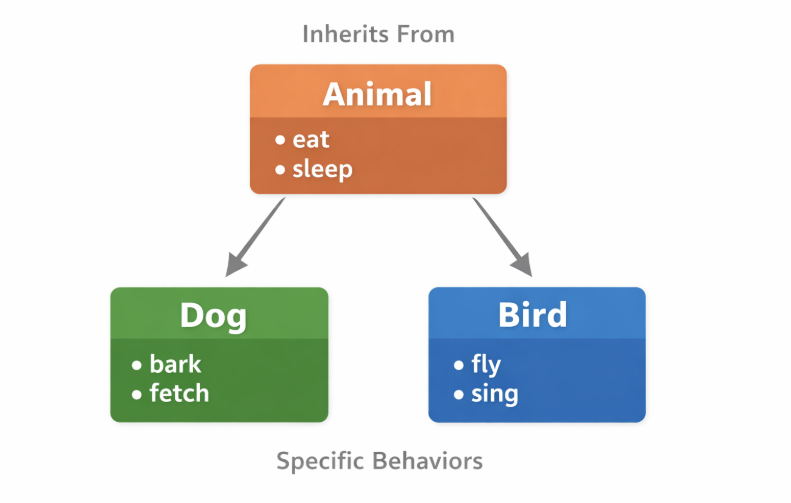
For example, if you model animals, an Animal class can define shared behavior like eating or sleeping, while Dog or Bird classes can add their own specific actions. This keeps common logic in one place and makes the code easier to extend and maintain.
Declaring Subclasses
A subclass gets all the functionality of its parent class and can also add its own unique methods.
To create a subclass, write the subclass name followed by < and the superclass it inherits from. For example, writing Dog < Animal makes Dog inherit from the Animal class.
class Animal
  attr_reader :type, :action

  def initialize(type, action)
    @type = type
    @action = action
  end

  def perform
    "The #{@type} can #{@action}"
  end
end

# Subclass "Dog" inheriting from "Animal"
class Dog < Animal
end

# Subclass "Bird" inheriting from "Animal"
class Bird < Animal
end

# Creating objects
fido = Dog.new("dog", "bark and fetch")
tweety = Bird.new("bird", "fly and sing")

puts fido.perform
puts tweety.perform
Output:
The dog can bark and fetch
The bird can fly and sing
Even though Dog and Bird have no methods defined inside them, they automatically get the initializer, readers, and instance methods from Animal. This avoids repeating code and allows each subclass to be extended with its own behavior later.
superclass and ancestors
Every class can inherit from another class, which forms a hierarchy. The superclass and ancestors methods help you see where a class gets its methods.
superclassshows the immediate parent classancestorslists all classes and modules that provide behavior
Consider the Animal hierarchy below. We can see that the Dog inherits from Mammal, which inherits from Animal, and so on.
class Animal
end

class Mammal < Animal
end

class Dog < Mammal
end

puts Dog.superclass
puts Mammal.superclass
puts Animal.superclass
puts Object.superclass
puts BasicObject.superclass
Output:
Mammal
Animal
Object
BasicObject
The Object class inherits from BasicObject, which is the top-level class in Ruby and does not have a superclass, so calling BasicObject.superclass returns nil or none.
The ancestors method shows the full chain of inheritance for a class, including all the classes and modules. For example:
puts Dog.ancestors.inspect
Output:
[Dog, Mammal, Animal, Object, Kernel, BasicObject]
When the ancestors method is called, it shows the full inheritance chain of a class, including any mixins that have been added to the class or its superclasses.
For more information, please see Mixins.
The classes can also be written in a compact form:
class Animal; end
class Mammal < Animal; end
class Dog < Mammal; end

puts Dog.superclass
puts Mammal.superclass
puts Animal.superclass
puts Object.superclass
puts BasicObject.superclass
Chaining superclass
You can trace a class's inheritance chain by chaining the superclass method. This shows each parent class in the hierarchy. Once you reach BasicObject, calling superclass returns nil, which basically means you've reached the end of the hierarchy.
class Animal
end

class Mammal < Animal
end

class Dog < Mammal
end

puts Dog.superclass                                               # Output: Mammal
puts Dog.superclass.superclass                                    # Output: Animal
puts Dog.superclass.superclass.superclass                         # Output: Object
puts Dog.superclass.superclass.superclass.superclass              # Output: BasicObject
puts Dog.superclass.superclass.superclass.superclass.superclass   # Output: nil
Another good example is chaining superclass on an integer like 27. Since 27 is an object, not a class, we first call class to get its class, and then chain superclass to see the inheritance hierarchy:
puts 27.class                                               # Output: Integer
puts 27.class.superclass                                    # Output: Numeric
puts 27.class.superclass.superclass                         # Output: Object
puts 27.class.superclass.superclass.superclass              # Output: BasicObject
puts 27.class.superclass.superclass.superclass.superclass   # Output: nil
instance_of? and is_a?
You can find out what class an object belongs to and whether it inherits from another class using the instance_of? and is_a? methods. These are instance methods, so you call them on the object itself, not on the class
instance_of?returnstrueif object was created from the class you passis_a?returnstrueif the object is from that class or any class it inherits from.
For example, consider a simple animal hierarchy:
class Animal; end
class Mammal < Animal; end
class Dog < Mammal; end

fido = Dog.new
The instance_of? checks if the object is exactly an instance of the given class:
puts fido.instance_of? Dog     # Output: true
puts fido.instance_of? Mammal  # Output: false
puts fido.instance_of? Animal  # Output: false
The is_a? checks if the object is an instance of the given class or any of its superclasses:
puts fido.is_a? Dog     # true
puts fido.is_a? Mammal  # true
puts fido.is_a? Animal  # true
puts fido.is_a? Object  # true
methods Method
Every object in Ruby has a methods instance method. This returns an array of all the methods available to that object, including those inherited from superclasses. You can also sort this array to view the methods neatly.
Examples:
-
You can call
methodson an integer object and then runsort:num = 5integer_methods = num.methods.sortp integer_methodsOutput:
[:!, :!=, :!~, :%, :*, :**, :+, :+@, :-, :-@, :/, :<, :<=, :<=>, :==, :===, :>, :>=, :Namespace,:TypeName, :__id__, :__send__, :abs, :abs2, :angle, :arg, :between?, :ceil, :clamp, :class, :clone,:coerce, :conj, :conjugate, :define_singleton_method, :denominator, :display, :div, :divmod, :dup,(output truncated) -
For a float object:
flt = 3.5float_methods = flt.methods.sortp float_methodsOutput:
[:!, :!=, :!~, :%, :*, :**, :+, :+@, :-, :-@, :/, :<, :<=, :<=>, :==, :===, :>, :>=, :Namespace,:TypeName, :__id__, :__send__, :abs, :abs2, :angle, :arg, :between?, :ceil, :clamp, :class, :clone,:coerce, :conj, :conjugate, :define_singleton_method, :denominator, :display, :div, :divmod, :dup,(output truncated) -
You can compare objects to see which methods they share or which are unique.
For example, to find common methods between an integer and a float:
num = 5integer_methods = num.methodsflt = 3.5float_methods = flt.methodscommon_methods = integer_methods & float_methodsp common_methodsOutput:
[:abs, :floor, :ceil, :round, :truncate, :-@, :**, :<=>, :>=, :==, :===, :<=,:zero?, :%, :integer?, :*, :+, :numerator, :-, :rationalize, :inspect, :/, :denominator,:<, :>, :to_int, :to_s, :to_i, :to_f, :to_r, :div, :divmod, :fdiv, :coerce, :modulo,(output truncated) -
To find methods unique to a float:
unique_float = 3.5.methods - 3.methodsp unique_float -
To find methods unique to an integer:
unique_integer = 3.methods - 3.5.methodsp unique_integer
Exclusive Methods in Subclasses
A subclass can add its own methods while still keeping everything from its superclass. This lets each subclass be a more specific version of the parent class.
Consider a simple Animal superclass with two subclasses: Dog and Bird. Both share the common behavior from Animal class, but each has its own behavior that only makes sense for that type.
class Animal
  attr_reader :type, :action

  def initialize(type, action)
    @type = type
    @action = action
  end

  def perform
    "The #{@type} can #{@action}"
  end
end

class Dog < Animal
  def bark
    "Woof"
  end
end

class Bird < Animal
  def fly
    "Tweet tweet"
  end
end
Using these classes:
buddy  = Dog.new("Dog", "run and fetch")
tweety = Bird.new("Bird", "fly and sing")

p buddy.bark
p tweety.fly

p buddy.perform
p tweety.perform
Output:
"Woof"
"Tweet tweet"

"The Dog can run and fetch"
"The Bird can fly and sing"
Same method name, different behavior
Different subclasses can also define the same method name but implement it differently.
class Dog < Animal
  def action
    "Run until I get tired"
  end
end

class Bird < Animal
  def action
    "Fly until it rains"
  end
end
Calling the same method on different objects:
p buddy.action
p tweety.action
Output:
"Run until I get tired"
"Fly until it rains"
Even though the method name is the same for both subclasses, each subclass defines its own action, so the behavior depends on the object’s class.
Override Methods in a Subclass
Method overriding happens when a subclass defines a method with the same name as one in its superclass. Ruby will use the subclass version first, and the superclass version is only used if the subclass doesn’t define it.
To see this clearly, consider a simple Animal hierarchy.
class Animal
  def speak
    "The animal makes a sound"
  end
end

class Dog < Animal
  def speak
    "The dog barks"
  end
end

class Bird < Animal
end
Now create objects and call the same method on each one.
dog = Dog.new
bird = Bird.new

puts dog.speak
puts bird.speak
Output:
The dog barks
The animal makes a sound
Even though the speak method exists in Animal, the Dog version is used because it overrides the method in the superclass. Since Bird does not define its own speak method, Ruby moves up the inheritance chain and uses the one from Animal.
This happens because Ruby always looks for a method starting from the object’s class, then checks its parent classes one by one until it finds a match.
Using the super keyword
The super keyword lets a subclass run the same method from its superclass, so you can reuse existing behavior and add extra functionality.
superpasses all arguments to the superclasssuper()passes no argumentssuper(args)passes only the given arguments
Example 1: Simple Subclass
This example shows how a Dog subclass can reuse and extend the behavior of its parent Animal class using the three forms of super.
class Animal
  attr_reader :name

  def initialize(name)
    @name = name
  end

  # Parent's `action`
  def action(activity)
    "#{@name} is #{activity}"
  end

  # Parent's `greet`
  def greet
    "Hi, I'm #{@name}"
  end
end

class Dog < Animal
  attr_reader :breed

  # 1. Using `super(arg)`
  def initialize(name, breed)
    super(name)
    @breed = breed
  end

  # 2. Using `super`
  def action(activity)
    super + " happily in the park"
  end

  # 3. Using `super()`
  def greet
    super() + " and I'm a dog"
  end
end

dog = Dog.new("Buddy", "Beagle")

puts dog.name
puts dog.greet
puts dog.action("running")
Output:
Buddy
Hi, I'm Buddy and I'm a dog
Buddy is running happily in the park
Explanation:
super(name)ininitializereuses parent setup so subclass only handlesbreed.superin action reuses the parent behavior and adds extra text. -super()ingreetcalls parent method without arguments, then adds its own text.
Example 2: Practical Project Scenario
This example shows a project-like scenario where the Bug subclass extends the Task class.
class Task
  attr_reader :title, :priority

  def initialize(title, priority)
    @title = title
    @priority = priority
  end

  # Base status message
  def status
    "#{@title} is in progress"
  end

  # Base description
  def description
    "Task: #{@title}, Priority: #{@priority}"
  end
end

class Bug < Task
  attr_reader :severity

  # 1. Using `super(arg)`
  def initialize(title, priority, severity)
    super(title, priority)
    @severity = severity
  end

  # 2. Using `super` (no parentheses) to extend status
  def status
    super + " and needs attention"
  end

  # 3. Using `super()` (no arguments) to extend description
  def description
    super() + ", Severity: #{@severity}"
  end
end

# Create a bug instance
bug = Bug.new("Login error", "High", "Critical")

puts bug.title
puts bug.priority
puts bug.severity
puts bug.status
puts bug.description
Output:
Login error
High
Critical
Login error is in progress and needs attention
Task: Login error, Priority: High, Severity: Critical
Explanation:
super(title, priority)reuses the parentinitializelogic.superin status extends the parent output with extra information.super()in description calls the parent method without arguments, then adds subclass-specific details.
Defining Equality for Objects
By default, Ruby only considers objects equal if they are the exact same instance. You can override this behavior by defining your own logic for equality.
In the Book class below, we define equality using the == method to compare pages and price.
Both book1 and book2 are considered equal because they have the same pages and price, while book1 and book3 is are not equal because one or both attributes differ.
class Book
  attr_reader :title, :pages, :price

  def initialize(title:, pages:, price:)
    @title = title
    @pages = pages
    @price = price
  end

  def ==(other)
    pages == other.pages && price == other.price
  end
end

book1 = Book.new(title: "Ruby Basics", pages: 200, price: 25)
book2 = Book.new(title: "Advanced Ruby", pages: 200, price: 25)
book3 = Book.new(title: "Learning Rails", pages: 150, price: 20)

puts book1 == book2
puts book1 == book3
Output:
true
false
Duck Typing
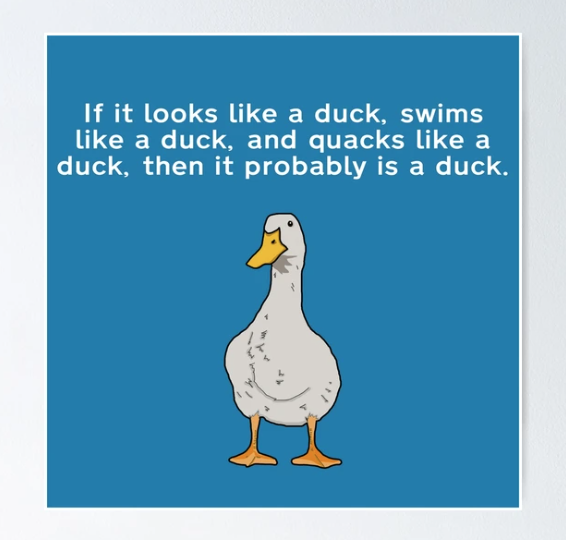
Duck typing is about focusing on what an object can do rather than what class it comes from. Any object that supports the methods you need can be used interchangeably with others that have the same methods.
Duck typing actually comes from the saying:
If it walks like a duck and quacks like a duck, then it must be a duck.
In programming, this means an object doesn’t need to be a specific clas, it just needs the right behavior.
For example, we have a Drink class that defines equality based on volume and price. We can compare a Drink object with a Juice object, even though they are different classes, as long as both have volume and price methods:
class Drink
  attr_reader :name, :volume, :price

  def initialize(name:, volume:, price:)
    @name = name
    @volume = volume
    @price = price
  end

  def ==(other)
    volume == other.volume && price == other.price
  end
end

class Juice
  attr_reader :volume, :price

  def initialize(volume:, price:)
    @volume = volume
    @price = price
  end
end

drink1 = Drink.new(name: "Cola", volume: 500, price: 2)
juice1 = Juice.new(volume: 500, price: 2)
juice2 = Juice.new(volume: 300, price: 1)

puts drink1 == juice1
puts drink1 == juice2
Output:
true
false
Here, drink1 == juice1 is true because both objects have the same volume and price. The class doesn’t matter, only the methods do.