Gems
Overview
A gem is a pre-packaged bundle of code that adds new features to your project.
- Gems provide code written by others
- They solve specific tasks like math or web design
- Download counts show which tools are most reliable
To access the public library of gems, visit the official website at rubygems.org.
Semantic Versioning
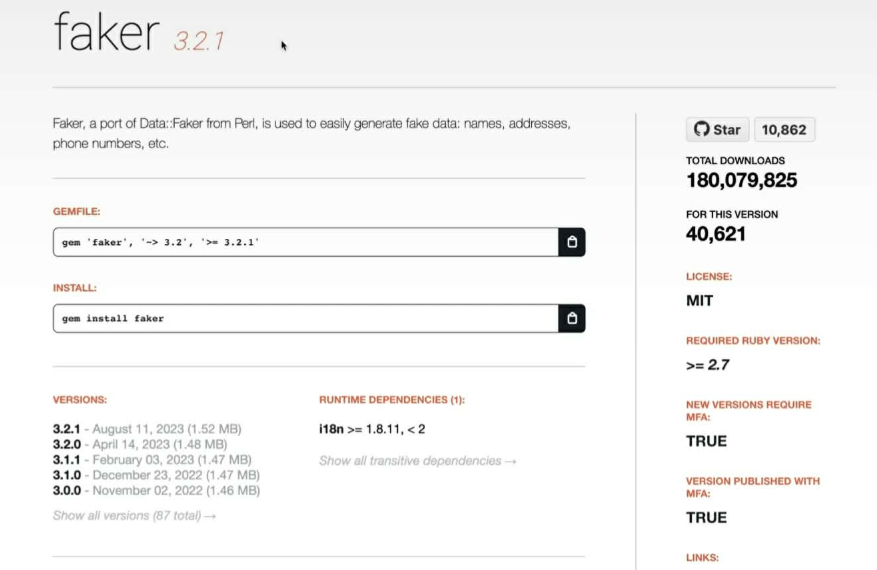
Version numbers use a system called semantic versioning to show how much the code has changed. This helps you decide if an update is safe or if it might break your project.
| Level | Position | Meaning |
|---|---|---|
| Major | First Number | Big changes that may break your current code |
| Minor | Second Number | New features that are safe and compatible |
| Patch | Third Number | Small bug fixes and minor improvements |
For example, the Faker gem has a current version of 3.2.1:
Using the Gem Tool
The gem command comes with your computer's coding environment when you installed Ruby. It is used to download external code packages from the internet.
-
Check the version of your gem manager:
gem -vOutput:
3.4.17 -
To update the gem manager to the latest version:
gem update --system -
To install a gem:
gem install >package-name>For example. to install the Faker gem:
gem install faker
Using the Gemfile and Bundler
Instead of installing tools one by one, you can use a special file called a Gemfile where you can define the exact tools and version numbers that you want to install.
# Where the gems are downloaded
source "https://rubygems.org"

gem "faker", "~> 3.2.0"
gem "rails", "~> 7.1.0"
gem "pg", "~> 1.5"
gem "devise", "~> 4.9"
gem "faker", "~> 3.2.0"
gem "rspec-rails", "~> 6.0.0"
When you specify a version like ~> 3.2.0, you are setting a safety boundary. This syntax allows for small, safe updates (like bug fixes) but blocks major updates that might change how the code works. See Semantic Versioning.
In the example below, the system will only download versions that fall within your specified safety range.
# ~> 3.2.0 allows 3.2.1 or 3.2.5
# ~> 3.2.0 DOES NOT allow 3.3.0
Once your Gemfile is ready, you use a program called Bundler to set up the entire project.
# Run this in your project folder
bundle install
The bundler will calculate all the "sub-tools" needed for the main tools to work. It will then create a Gemfile.lock file to record the exact versions installed.
Sample Gemfile.lock:
GEM
  remote: https://rubygems.org/
  specs:
    actioncable (7.1.6)
      actionpack (= 7.1.6)
      activesupport (= 7.1.6)
      nio4r (~> 2.0)
      websocket-driver (>= 0.6.1)
      zeitwerk (~> 2.6)
    actionmailbox (7.1.6)
      actionpack (= 7.1.6)
      activejob (= 7.1.6)
      ....
PLATFORMS
  aarch64-linux
  aarch64-linux-gnu
  aarch64-linux-musl
  ....

DEPENDENCIES
  devise (~> 4.9)
  faker (~> 3.2.0)
  pg (~> 1.5)
  rails (~> 7.1.0)
  rspec-rails (~> 6.0.0)
Example: Faker Gem
The Faker gem is a popular tool used to create realistic dummy data. It is perfect for testing apps when you need names, addresses, or phone numbers but don't want to use real private information.
You can use the gem tool or a Gemfile to install the Faker gem.
To use the gem, you use the require keyword followed by the gem's name. This tells your program to load the external code from the installed library.
require "faker"

puts Faker::Name.name
puts Faker::Internet.email
puts Faker::Music.instrument
puts Faker::Sports::Football.player
Output:
Mozelle Waters
lucas_runte@padberg-yost.example
Xylophone
Zlatan Ibrahimovic
Here, we used the module's pre-written code such as the Name, Internet, and Music classes to generate random strings.