Starter Notes
Overview
OpenAI, ChatGPT, and the OpenAI API all use the same underlying models, but each one are designed for different levels of usage.
- OpenAI builds AI models
- ChatGPT is a ready-to-use app
- OpenAI API is for building software
When you use the OpenAI API, you will need to have an API key, which is a unique identifier that allows you to access the OpenAI models programmatically. You can obtain an API key by signing up for an account on the OpenAI website and subscribing to a plan.
Once you have your API key, you will need store it securely and load it in your code to authenticate your requests to the OpenAI API.
A common way to do this is by using a .env file to keep your API key out of your codebase.
Note: DO NOT share your API key publicly or commit it to version control, as it can be used by others to access your OpenAI account. Always keep your API key secure and private.
## .env

# Get your key from: https://platform.openai.com/
OPENAI_API_KEY=your_openai_key_here
To run the code examples in this page, make sure to set up your environment before running the code.
See code files here: Github
Making a Request
In the example below, the client object loads the API key from your environment file using python-dotenv, and the messages variable contains the user request sent to the model.
## sample-request.py
import os
from dotenv import load_dotenv
from openai import OpenAI

# Load env vars from .env file
load_dotenv()

client = OpenAI(api_key=os.getenv("OPENAI_API_KEY"))

messages = [
    {"role": "user", "content": "Explain what an API is in simple terms"}
]

response = client.chat.completions.create(
    model="gpt-4o-mini",
    messages=messages
)

print(response.choices[0].message.content)
Run the script:
python sample-request.py
The model returns a simple explanation based on the prompt.
The OpenAI API is a cloud-based service provided by OpenAI that allows developers to integrate advanced AI models into their applications. It provides a way to access OpenAI's powerful language models, such as GPT-4, through a simple API interface. With the OpenAI API, developers can send requests to the models and receive responses that can be used for various applications, including natural language processing, content generation, and more.
Under the hood, the API response actually looks something like this:
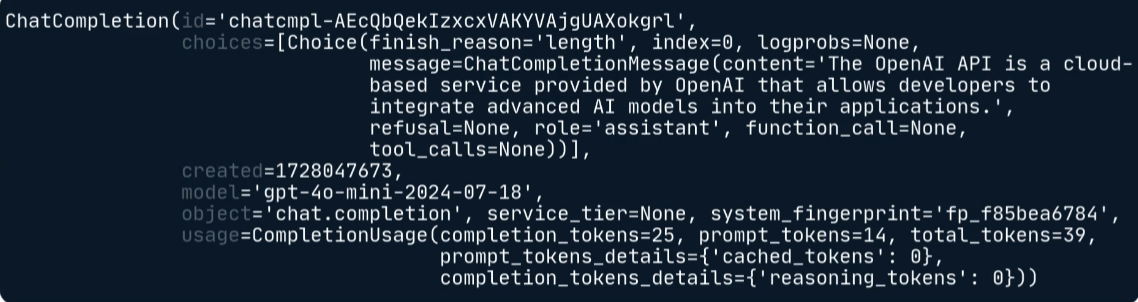
The response object contains the API result, and we access its nested attributes to retrieve the generated text.
- Starting from the
responseobject:
response
- Access the
choicesattribute, which is a list of generated choices:
response.choices
- From the list, access the first choice (index 0):
response.choices[0]
- Finally, access the
message.contentattribute to get the generated text:
response.choices[0].message
- And to get the final content:
response.choices[0].message.content
Roles in Single-Turn Tasks
The role is used to indicate the type of message being sent. This can be seen in the messages variable, where the message is sent with the "user" role.
For single-turn tasks, the user role is typically sufficient.
messages = [
    {"role": "user",
     "content": "Explain what an API is in simple terms"}
]
Here, the "user" role indicates that this message is a user instruction or question for the model. The model will interpret this message as a prompt and generate a response accordingly.
Roles are used in both single-turn (includes all the examples in this page) and multi-turn conversations.
For more information about roles, please see Roles and Multi-Turn Conversations
Tokens and Cost
The APIs typically charge based on the usage (which is measured in tokens).
A token is a small unit of text, which can be as short as one character or as long as one word. For example, “a” is one token, and “apple” is also one token.
The cost can vary depending on several factors:
- Input tokens come from prompts
- Output tokens come from responses
- Model used (different models have different prices)
Larger requests and more powerful models generally cost more than smaller requests and lighter models.
Before deploying AI applications at scale, it is important to estimate costs.
In the example below, the response object provides token usage information and the script estimates request cost.
# sample-compute-cost.py
import os
from dotenv import load_dotenv
from openai import OpenAI

load_dotenv()

client = OpenAI(
    api_key=os.getenv("OPENAI_API_KEY")
)

max_completion_tokens = 500

prompt = """
Summarize the following customer support conversation:

Customer: I cannot log in.
Support: Please reset your password.
Customer: That fixed it.
"""

response = client.chat.completions.create(
    model="gpt-4o-mini",
    messages=[
        {"role": "user", "content": prompt}
    ],
    max_completion_tokens=max_completion_tokens
)

input_token_price = 0.15 / 1_000_000
output_token_price = 0.60 / 1_000_000

input_tokens = response.usage.prompt_tokens
output_tokens = max_completion_tokens

cost = (
    input_tokens * input_token_price
    + output_tokens * output_token_price
)

print(f"Input tokens: {input_tokens}")
print(f"Estimated cost: ${cost:.8f}")
To run the script:
python sample-compute-cost.py
Expected output:
Input tokens: 37
Estimated cost: $0.00030555
The exact token count will vary, but the calculation process remains the same.
Common Use Cases
Chat completion models can do much more than answer questions. They can edit text, summarize content, generate new content, classify information, and follow examples to produce more consistent results.
Text Editing
Text editing allows a model to modify existing text based on instructions.
- Update names or titles
- Change writing style
- Rewrite content
In the example below, the bio_text variable contains a biography and the prompt instructs the model to update specific details.
## sample-text-editing.py
import os
from dotenv import load_dotenv
from openai import OpenAI

load_dotenv()

client = OpenAI(
    api_key=os.getenv("OPENAI_API_KEY")
)

bio_text = """
Alex Smith is a software engineer.
He works as a backend developer.
"""

prompt = f"""
Update the biography.

Change:
- Alex Smith to Jordan Lee
- software engineer to data analyst
- backend developer to business analyst

Biography:
{bio_text}
"""

response = client.chat.completions.create(
    model="gpt-4o-mini",
    messages=[
        {"role": "user", "content": prompt}
    ]
)

print(response.choices[0].message.content)
To run the script:
python sample-text-editing.py
Expected output:
Biography:

Jordan Lee is a data analyst.
He works as a business analyst.
Text editing allows flexible changes without manually replacing every word.
Text Summarization
Summarization helps reduce long content into a shorter and more useful form.
- Shortens long text
- Extracts key points
- Improves readability
In the example below, the chat_transcript variable contains a customer support conversation that will be summarized.
# sample-text-summarization.py
import os
from dotenv import load_dotenv
from openai import OpenAI

load_dotenv()

client = OpenAI(
    api_key=os.getenv("OPENAI_API_KEY")
)

chat_transcript = """
Customer: My order has not arrived.
Support: Let me check the shipment status.
Customer: Thank you.
Support: The package was delayed and will arrive tomorrow.
"""

prompt = f"""
Summarize the following customer support conversation in 2 sentences.

Conversation:
{chat_transcript}
"""

response = client.chat.completions.create(
    model="gpt-4o-mini",
    messages=[
        {"role": "user", "content": prompt}
    ]
)

print(response.choices[0].message.content)
To run the script:
python sample-text-summarization.py
Expected output:
The customer inquired about their order that had not yet arrived, and the support representative checked the shipment status. The representative informed the customer that the package was delayed and would arrive the following day.
Summarization helps extract important information without reading the entire conversation.
Text Generation
Models can also create entirely new content.
- Generate marketing copy
- Create product descriptions
- Produce creative content
In the example below, the prompt variable describes a product and the model generates a product description.
# sample-text-generation.py
import os
from dotenv import load_dotenv
from openai import OpenAI

load_dotenv()

client = OpenAI(
    api_key=os.getenv("OPENAI_API_KEY")
)

prompt = """
Write a product description for SonicPro headphones.

Features:
- Active noise cancellation
- 40-hour battery life
- Foldable design

Tone:
Professional and engaging

Audience:
Travelers and remote workers
"""

response = client.chat.completions.create(
    model="gpt-4o-mini",
    messages=[
        {"role": "user", "content": prompt}
    ],
    max_completion_tokens=400,
    temperature=0.5
)

print(response.choices[0].message.content)
To run the script:
python product_description.py
Expected output:
SonicPro Headphones: Elevate Your Listening Experience
Introducing the SonicPro Headphones, the ultimate audio companion designed for travelers and remote workers seeking unparalleled sound quality and convenience. Engineered with cutting-edge technology, these headphones are your gateway to immersive listening, whether you're on a bustling commute, in a crowded café, or working from the comfort of your home.
Key Features:
Active Noise Cancellation: Immerse yourself in your favorite music or podcasts with our state-of-the-art active noise cancellation technology. Block out distracting ambient noise and create your own oasis of sound, allowing you to focus on what truly matters.
40-Hour Battery Life: Say goodbye to constant charging interruptions. With an impressive 40-hour battery life on a single charge, the SonicPro Headphones are built for long journeys and extended work sessions. Enjoy uninterrupted listening, whether you're flying across the globe or tackling your to-do list from your home office.
Foldable Design: Designed with portability in mind, the SonicPro Headphones feature a sleek, foldable design that makes them easy to store and carry. Slip them into your bag or backpack without the bulk, ensuring you always have your favorite audio experience at your fingertips.
Whether you're traveling to new destinations or navigating your daily work routine, the SonicPro Headphones are your perfect partner. Experience superior sound quality, exceptional comfort, and the freedom to enjoy your audio world without distractions. Elevate your listening experience today with SonicPro—where every sound matters.
Using Parameters for Control
Response Length
The max_completion_tokens parameter controls the maximum size of the response.
- Limits response size
- Controls output cost
- Helps enforce formatting requirements
In the example below, the max_completion_tokens parameter limits how much text the model can generate.
response = client.chat.completions.create(
    model="gpt-4o-mini",
    messages=[
        {"role": "user", "content": "Explain cloud computing"}
    ],
    max_completion_tokens=100
)
Smaller values usually produce shorter responses, while larger values allow more detailed answers.
Temperature
Temperature controls how random or creative the model’s responses are. Lower values make outputs more consistent, while higher values increase variation and creativity.
| Temperature | Behavior | Use case |
|---|---|---|
| 0.0 | Highly predictable | Used for strict tasks like data extraction or factual responses |
| 0.5 | Balanced | Used for general chat and everyday applications |
| 1.0 | Default behavior | Used for normal creative tasks and general-purpose prompting |
| 2.0 | Highly creative | Used for brainstorming, storytelling, or generating diverse ideas |
Shot Prompting
Shot prompting improves results by providing examples.
| Type | Description |
|---|---|
| Zero-shot | Uses no examples |
| One-shot | Uses one example |
| Few-shot | Uses multiple examples |
Note: The concept of levels of prompting is not specific to the OpenAI API and can be applied to any language model.
To see a detailed explanation of shot prompting techniques, see Levels of Prompting