Starter Notes
Overview
The biggest difference between open and closed models is access to the model weights.
| Category | Open LLMs | Proprietary LLMs |
|---|---|---|
| Access to model weights | Weights are publicly available | Weights are not accessible |
| Access to training code | Usually not included | Not available |
| Where you can run it | Locally or on your own servers | Only through provider infrastructure |
| Customization | High flexibility (fine-tuning, quantization, modifications) | Limited to APIs and provided settings |
| Transparency | More transparent (architecture often known) | Low transparency (internal details hidden) |
| Performance control | You control deployment, speed, and hardware | Provider controls performance and scaling |
| Cost model | Free weights, but you pay for compute | Pay-per-use API or subscription |
| Privacy | Data can stay fully local | Data is sent to external servers |
| Examples | Llama, Mistral, Qwen | GPT models from OpenAI |
| Ecosystem | Strong community tooling (Ollama, vLLM, etc.) | Centralized ecosystem controlled by provider |
Open Models
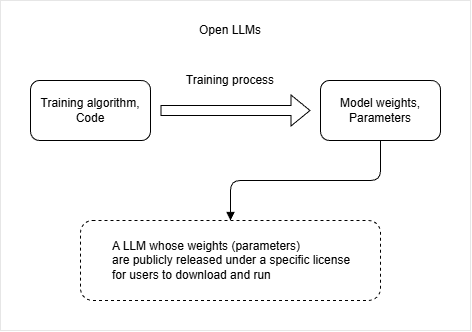
With open models, the model weights are publicly available. This means:
- Weights can be downloaded
- Models can be run locally
- Usage is controlled by a license
In most cases, the training code itself is not public. What is shared is the result of the training process, which is the model weights.
This makes it possible to run the model on your own computer or server.
Closed Models
Closed models are those where the model weights are not publicly available, which also means that the training code is not public.
- Models cannot be downloaded
- Access is provided through an application or API
Examples include models used by OpenAI products such as ChatGPT.
With closed models, you can use the service, but you cannot download the model weights and run them yourself.
Open LLM Examples
Several companies release open models, but they differ in how open or closed their ecosystems are.
- Llama models from Meta
- Gemma models from Google
- DeepSeek models
- Mistral models
The weights for these models are available for download, which allows users to run them locally or on their own servers. This contrasts with closed models, which typically require API access and do not allow local execution.
Meta (Llama)
Meta releases Llama models as open weights.
- Llama models are downloadable
- Can be run locally or on servers
- Widely used in open AI tooling
Llama is one of the most common starting points for open LLM usage.
Google (Gemma vs Gemini)
Google separates open and closed models into two families.
| Model | Type | Key Characteristics | How It Is Used |
|---|---|---|---|
| Gemini | Closed | No access to weights, fully managed by Google | Used in chatbot products and API access |
| Gemma | Open | Downloadable model weights, can run locally | Used for research, experimentation, and local deployment |
DeepSeek Models
DeepSeek released strong open models that gained attention for competing with top closed models.
- Open weights are available
- Can run locally depending on hardware
- Also provided hosted chat versions
- Known for strong performance relative to size
This showed that open models can compete with closed systems in quality.
Mistral Models
Mistral is a European AI company that releases both open and closed models.
- Some models are fully open
- Some are proprietary
- Strong focus on efficiency and performance
- Popular in lightweight deployments
Mistral is often used when smaller, faster models are needed.
Where to Find Open LLMs
Open models are usually hosted in public model repositories.
- Hugging Face model hub
- Official company GitHub releases
- Community model repositories
These platforms allow you to download weights and run models locally or integrate them into applications.
Running Open LLMs Locally
Open LLMs can be run on your own machine or on rented servers. You can download the model and use a tool to run it instead of calling a cloud API.
Common tools include:
- Llma.cpp is the core engine
- LM Studio is a user-friendly app built on top of it
- Ollama is a CLI-based tool built on top of it
There are also some cloud services like Groq that run open models for you.
Llma.cpp (Low-Level Engine)
Llma.cpp is the base tool that actually runs open models on your system. It is powerful but not beginner-friendly.
- Runs models locally using command line tools
- Requires manual setup and model files (GGUF format)
- Often used with terminal commands
- Can also run as a local server
It works, but it feels closer to a developer tool than a normal application. To use it, you need to
- Download a model in GGUF format and run it with a command.
- You also need to pass prompts through the terminal.
Install options:
- Install llama.cpp using brew, nix or winget
- Run with Docker
- Download pre-built binaries from the releases page
- Build from source by cloning this repository
In the example below, model.gguf is a local model file and llama-cli is the command-line tool used to run it.
llama-cli -m model.gguf -p "The sky is"
Expected output:
The sky is blue because of how light scatters in the atmosphere.
LM Studio (GUI-Based Tool)
LM Studio is a beginner-friendly application built on top of Llma.cpp. It removes most of the complexity.
- Provides a graphical interface
- Downloads and manages models easily
- Supports local server mode for applications
It is designed for users who want to run models without dealing with terminal commands or file formats.
In LM Studio, you simply select a model and type a prompt like:
The sky is
Expected output:
The sky is blue and changes color depending on the time of day.
Ollama (CLI-Based but Simple)
Ollama sits between Llma.cpp and LM Studio in terms of complexity. It is command-line based but much easier to use than raw Llma.cpp.
- Simple CLI commands
- Easy model downloading and switching
- No full GUI, but still beginner-friendly
It is designed for users who are comfortable with terminals but do not want low-level setup.
In the example below, llama3 is the model name and the prompt is passed directly in the command.
ollama run llama3 "The sky is"
Expected output:
The sky is blue during the day and dark at night due to Earth's rotation.
Ollama handles downloading, setup, and execution automatically.
Cloud Alternative (Groq Example)
Instead of running models locally, you can also use hosted services that provide access to open models through APIs.
- No local setup required
- Fast inference on remote servers
- Pay-per-use or free tiers depending on service
- Less control compared to local execution
For example, a service like Groq runs models on their infrastructure and exposes them through an API. You send a request and receive a response without managing any hardware.
This is useful when you want speed and simplicity but do not need full local control.
Licenses and Usage Rules
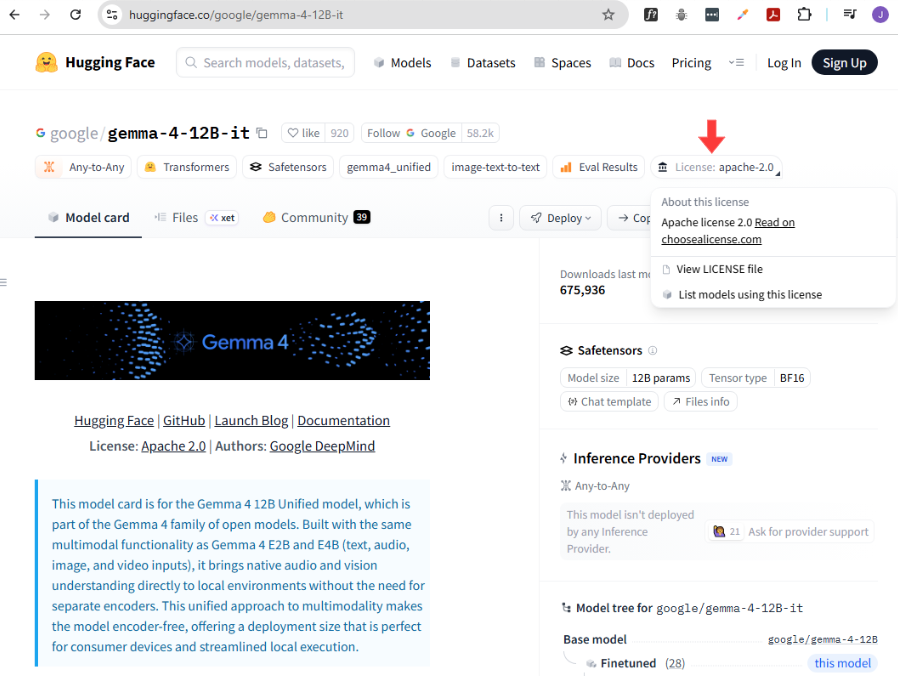
Open LLMs can be used locally or in applications, but each model comes with a license that defines what you are allowed to do with it. These rules become especially important when you use models commercially.
- Some allow full commercial use
- Some include restrictions or limits
Each open model usually has its license listed on its model page. The license badge tells you what rules apply before you download or use the model.
Common License Types
Different models use different licenses, but a few are very common.
| License Type | Commercial Use | Attribution Required | Restrictions | Key Idea |
|---|---|---|---|---|
| MIT License | Allowed | Sometimes recommended but not strictly enforced | Very few restrictions | Very permissive and simple to use |
| Apache 2.0 | Allowed | Yes | Patent and notice requirements | Commercial use allowed with attribution |
| Custom License | Depends on provider | Usually yes | May include usage limits or approval requirements | Rules vary per model provider |
These licenses usually allow you to use the model freely, but may require attribution or basic conditions.
For example, a model using the MIT license can typically be used in commercial apps without major restrictions.
Key rules when using open models:
- Always verify license before deployment
- Check for commercial use permissions
- Look for attribution requirements
- Confirm any restrictions