Starter Notes
Overview
AI workflows and AI agents both use AI to solve problems, but they work differently. The main difference is how much control you have over the process and how decisions are made.
| Feature | AI Workflow | AI Agent |
|---|---|---|
| Control | High | Low to moderate |
| Process | Fixed | Dynamic |
| Planning | Developer defines steps | AI creates plan |
| Tool usage | Predetermined | Chosen by AI |
| Predictability | High | Lower |
| Best for | Known problems | Unknown problems |
AI Workflows
An AI workflow follows a predefined sequence of steps. The process is predictable because every step is already defined by the developer.
- Follows fixed steps
- Produces predictable results
- Gives high control
- Best for known problems
For example, a workflow might:
- Open a file
- Read the content
- Send the content to an AI model
- Transform the content
- Save the result
The workflow always follows the same path. You know exactly what happens at each step, which makes it easier to manage and troubleshoot.
In this example, the workflow reads a file, performs transformations, and saves the result.
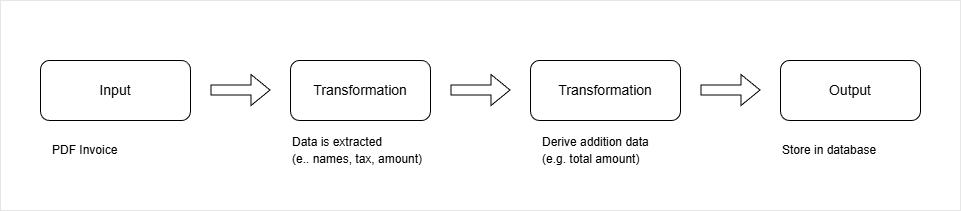
This is a simple workflow because the sequence of actions never changes.
AI Agents
An AI agent is more flexible. Instead of following a fixed path, it receives a goal and decides how to achieve that goal.
- Creates its own plan
- Chooses which tools to use
- Adapts to different inputs
- Gives lower control
- Best for unpredictable problems
The developer provides:
- Instructions
- Available tools
- The overall goal
The AI model then decides which tools to use and in what order.
The important thing to remember is that the AI model never performs actions directly. It can only use tools that the developer makes available.
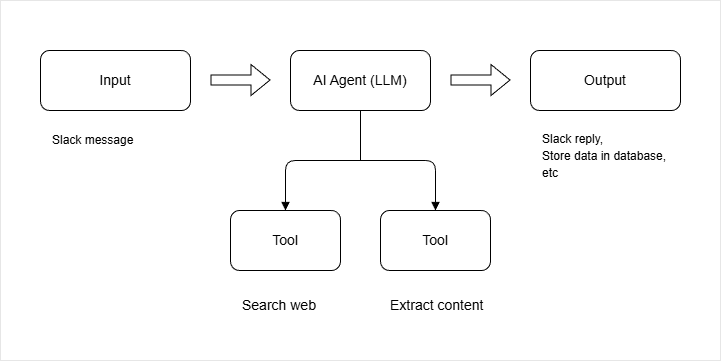
How AI Agents Work
An AI agent generally follows three stages:
- Reasoning
- Planning
- Acting
The agent first understands the goal, then creates a plan, and finally uses tools to execute that plan.
For example, imagine a travel assistant called "Candace".
You say:
I am traveling to Seoul from June 26 to July 12. Please organize my trip.
The agent may:
- Identify the destination and dates
- Check your calendar
- Search for flights
- Compare hotels
- Create a travel plan
- Ask for approval
- Complete bookings
Unlike a workflow, the exact steps are not predefined. The agent decides what to do based on the request.
Agent Components
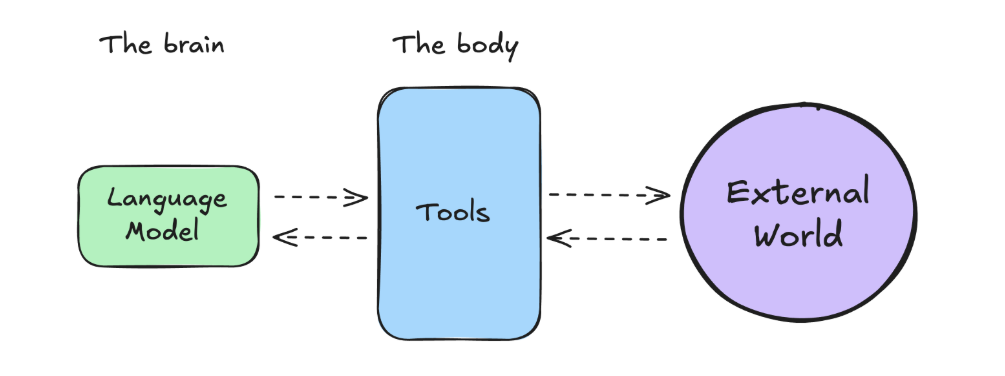
Most AI agents have two main parts.
- The brain handles reasoning and decision making
- The body represents the tools it can use
Examples of tools that an agent can use:
- Web search
- Calendar access
- Email sending
- Database queries
- File operations
Without tools, an AI model can only generate text. Tools allow it to interact with the outside world.
AI Chatbots Are Often Agents
Many modern AI chatbots behave like AI agents because they can use tools when needed.
Examples include:
- ChatGPT
- Google Gemini
- Claude
- Grok
For example, if you ask ChatGPT:
Which AI models were released in the last two weeks?
It may decide to:
- Search the web
- Read recent information
- Summarize the findings
The developer does not know what every user will ask, so a fixed workflow would not work well. Instead, the chatbot chooses tools based on the request.
This is why many people consider modern AI chatbots to be agentic systems.
Agentic Systems
The term agent is often used broadly.
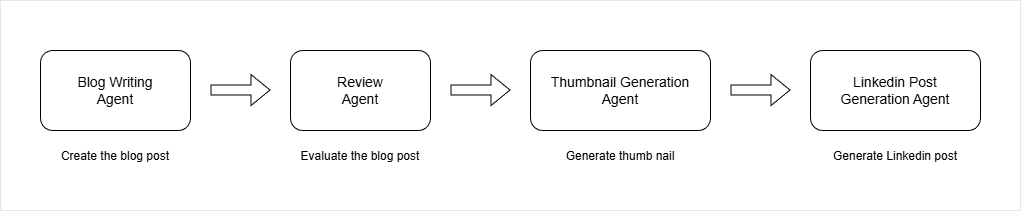
A system might contain several AI-powered components working together.
For example:
- Blog writing agent
- Review agent
- Thumbnail generation agent
- Social media agent
These components work together to produce a final result.
Some people call this an AI workflow because the steps are predefined. Others call it a multi-agent system because multiple AI components are involved.
Both descriptions can be correct depending on how the term "agent" is defined.
When to Use Each
Use an AI workflow when:
- Inputs are predictable
- Outputs are predictable
- Steps are known in advance
- Consistency is important
Use an AI agent when:
- Inputs vary significantly
- Outputs are unknown
- The solution path is unclear
- Flexibility is important
In practice, many real-world applications use workflows with AI inside them. This approach provides more control while still benefiting from AI capabilities.
The key idea is simple: workflows follow predefined steps, while agents decide their own steps using the tools available to them.
The Spectrum of Agency
An AI agent is a system that uses an AI model to reason, plan, and act in order to achieve a user-defined objective.
Different AI systems have different levels of independence. As the levels increases, the system becomes more capable of reasoning, acting, and handling complex tasks.
| Level | Agency | Description | Examples |
|---|---|---|---|
| 0 | No agency | Systems that only respond using trained knowledge or follow fixed predefined rules | Chatbots such as GPT-4, simple workflow automation systems |
| 1 | Basic routing | AI models that classify or route tasks within a workflow | Customer support system that routes tickets to billing or technical support |
| 2 | Tool-using agents | Systems that can use external tools to complete tasks | Travel AI agent that can search and book flights |
| 3 | Autonomous agents | Systems that can perform multiple steps independently | Deep research tools that perform multi-step reasoning and tool usage |
| 4 | Multi agent systems | Systems that coordinate multiple agents to complete complex workflows | Coding assistants that generate, review, and push code to a repository |
As you move from Level 0 to Level 4, the system shifts from simple response generation to fully coordinated, multi-step autonomous execution.
The Agentic Trinity
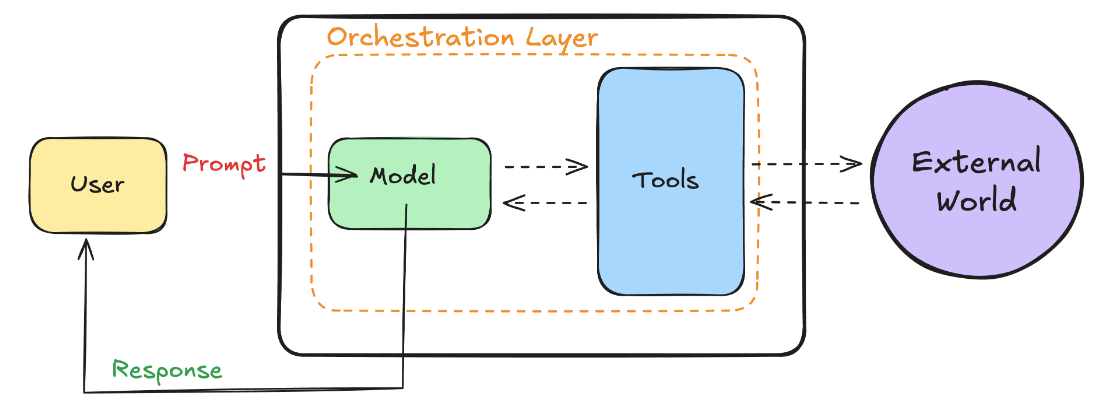
When you ask an AI travel assistant to plan a trip, three core components work together. These components allow the system to reason, act, and continue working until the goal is complete.
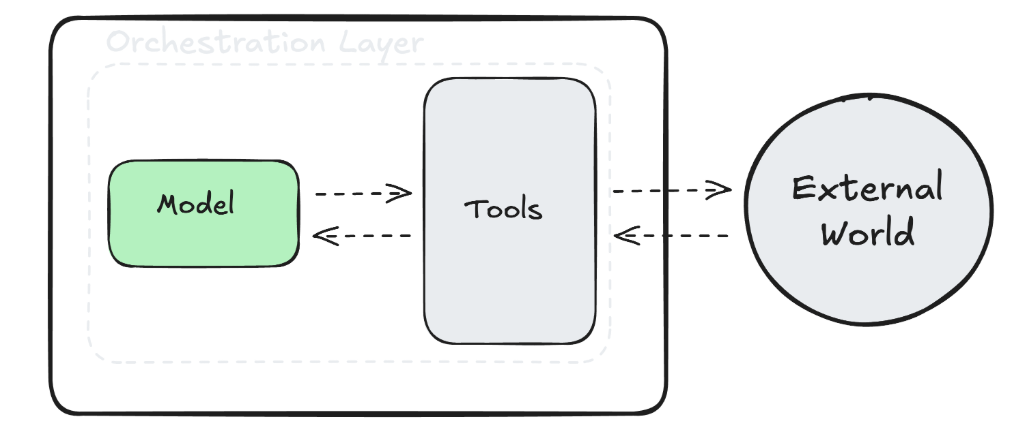
These three parts form the foundation of any AI agent. Without one of them, the system cannot function as a true agent.
- The model is the brain
- The tools connect the system to the outside world
- The orchestration layer controls the decision cycle
The Model As The Brain
The model is usually a large language model. It understands your request and decides what needs to happen.
- It interprets the user’s goal
- It breaks the goal into smaller steps
- It decides what action should happen next
For example, if you request a travel plan, the model identifies the destination and dates. It then determines that it must check availability, search flights, compare hotels, and prepare a proposal.
Without the model, there is no reasoning or planning. The model gives the agent intelligence and direction.
Tools Connect The Agent To The World
Even the smartest model cannot act without tools. Tools allow the agent to gather information and perform actions.
- They retrieve real-time information
- They interact with external systems
- They execute specific tasks
In a travel example, tools might include a calendar API, a company policy document, or a booking website API. The model decides which tool to use, and the tool performs the action.
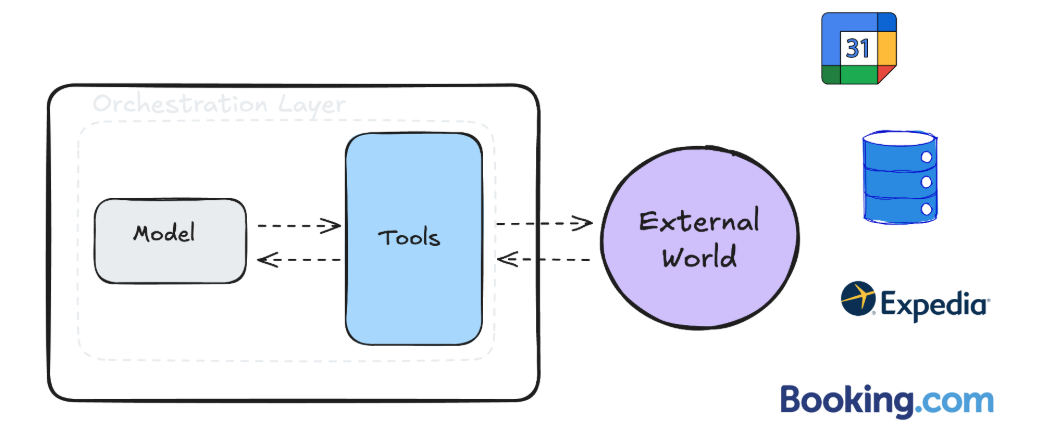
Tools extend the agent’s capabilities beyond text generation. They allow it to interact with real systems.
Orchestration Controls The Loop
The orchestration layer manages how the agent thinks and acts over time. It keeps the process running until the goal is achieved or a stopping condition is met.
- It receives input and passes it to the model
- It tracks memory and past actions
- It decides whether to continue or stop
Orchestration works like a control loop. The agent receives data, the model reasons about it, a tool may be called, and the result is evaluated. This cycle repeats until the objective is completed.
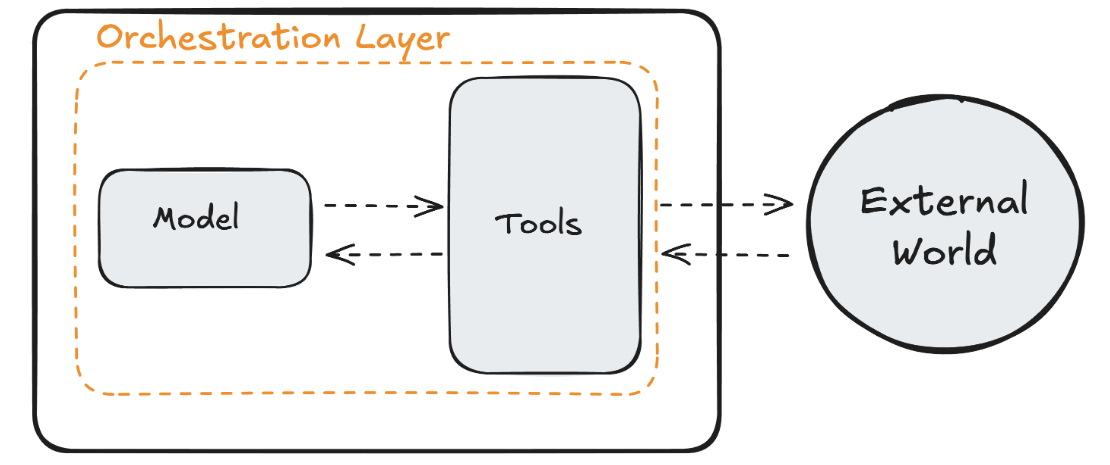
Orchestration can be simple with basic rules, or advanced with complex reasoning chains. Regardless of complexity, it ensures the agent continues working toward the goal.
The AI Agent Tooling Ecosystem
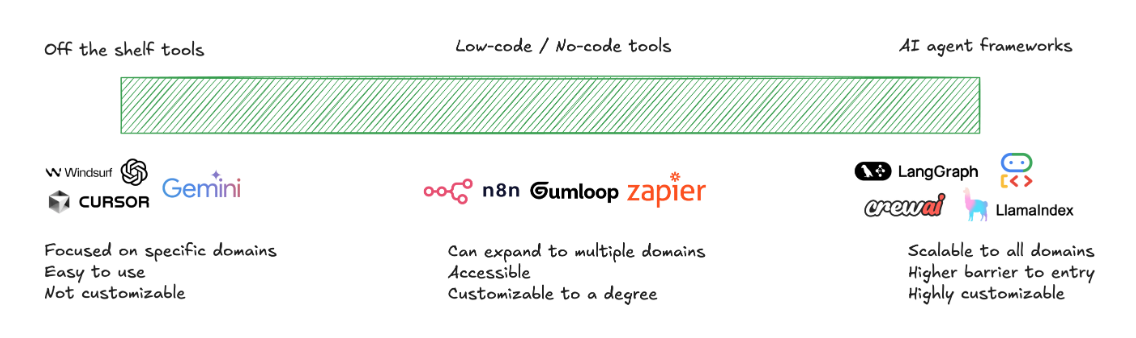
After deciding to use an agent, the next step is choosing the right tooling. The ecosystem ranges from ready-made tools to fully custom frameworks.
| Tool Type | Description | When To Use | Trade-Off |
|---|---|---|---|
| Off-the-shelf tools | Ready-made solutions that solve specific problems | Focused use cases like AI coding assistance or research automation | Quick to adopt but limited customization |
| Low-code platforms | Platforms that allow limited customization through visual or guided configuration | Moderately complex workflows that follow common patterns | Easier for business users but not fully flexible |
| Agent frameworks | Development frameworks for building agents from scratch | Highly specialized systems, sensitive data, or core business logic | Full control but requires more engineering effort |
Note: The more control you need, the more engineering effort is required.
Build Versus Buy Decision
-
Buy when a mature solution already exists
- Ideal if you want fast deployment and low maintenance
- Best when the problem is common and already well solved in the market
-
Use low-code when partial customization is enough
- Use this when you need some flexibility but not full ownership
- Suitable when business users need to modify workflows without heavy engineering
-
Build when full control is required
- When your system must integrate deeply with proprietary systems
- When the agent itself is central to your product
Not every problem requires a fully custom agent. Match the level of investment and control to the complexity and importance of the problem.