Integration Patterns
Overview
Most real cloud systems do not operate alone.
They communicate with external APIs, internal services, partner platforms, identity providers, message buses, data stores, and legacy systems.
The integration pattern determines how these systems communicate and how failures affect the rest of the architecture.
Common approaches include:
- Synchronous request and response
- Asynchronous messaging
- Event-driven integration
- File or batch transfer
- Middleware or adapter layers
The right choice depends on whether an immediate response is required, how tightly the systems should be coupled, who produces the event, and whether legacy protocols need to be supported.
Integration Goals
Good integration design should keep systems secure, reliable, and maintainable.
The main goals are:
- Exchange data safely
- Keep failures isolated
- Avoid unnecessary coupling
- Handle different processing speeds
- Make retries and timeouts predictable
- Prevent duplicate processing where required
- Support authentication and authorization
- Provide logging, metrics, tracing, and alerting
- Leave an audit trail
- Allow individual services to evolve independently
Common Integration Patterns
Different integration requirements call for different patterns.
| Pattern | Best Fit | Why It Helps | Main Trade-off |
|---|---|---|---|
| Synchronous API Call | Caller needs an immediate result | Simple and direct request and response | Caller depends on downstream availability and latency |
| Asynchronous Messaging | Systems operate at different speeds or multiple consumers need the same message | Decouples producers and consumers and isolates failures | Ordering, retries, deduplication, and debugging become more complex |
| Event-Driven Integration | Applications need to react automatically to state changes | Removes polling and provides managed event routing | Requires careful event and handler design |
| File or Batch Transfer | Scheduled exchange or legacy integration | Works when immediate processing is not required | Higher latency and additional file processing logic |
| Middleware or Adapter Layer | Legacy or heterogeneous systems | Isolates protocol and format differences | Adds another component that must be operated and maintained |
The best pattern depends on latency, reliability, data volume, failure behavior, and the level of control you have over the other system.
Synchronous Integration
Synchronous communication follows a simple model:
Call ➜ Wait ➜ Receive Response
A common flow in GCP is:
- The caller sends a request and remains waiting while the downstream service processes it.
- The result then travels back through the same request path.
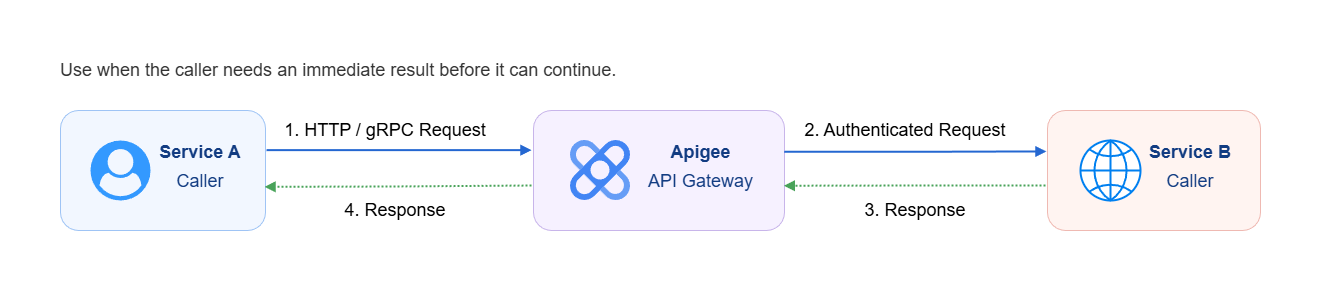
API Gateway with Apigee
Apigee can sit between the caller and the external or internal service and provide centralized API management.
It can handle:
- Authentication
- Rate limiting
- API versioning
- Observability
- Policy enforcement
For example, Service A can call Apigee using HTTP or gRPC. Apigee authenticates and applies policies before forwarding the request to Service B.
When to Use Synchronous Communication
Use synchronous communication when:
- The caller needs the result immediately
- The next operation depends on the response
- The interaction is naturally request and response
- The downstream service normally responds quickly
A typical example is a checkout process:
Checkout ➜ Payment ➜ Order Confirmation
The payment must succeed or fail before the order can be confirmed.
Synchronous Trade-offs
The main disadvantage is that the caller is directly affected by the downstream system.
- If the downstream service becomes slow, the caller waits longer.
- If the downstream service becomes unavailable, the request can fail.
This makes timeout handling particularly important for synchronous integrations.
Asynchronous Messaging
Asynchronous communication follows a different model:
Publish ➜ Do Not Wait ➜ Continue
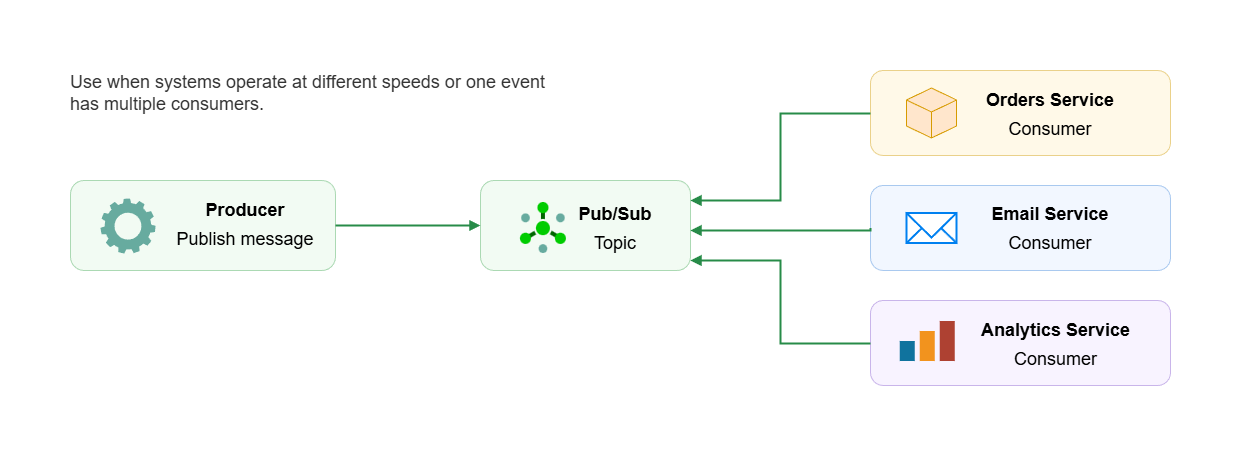
Use asynchronous messaging when systems operate at different speeds or when the same message needs to be processed by multiple consumers.
A typical Pub/Sub flow is:
Producer ➜ Pub/Sub Topic ➜ Consumers
The producer publishes the message without directly calling each consumer.
This provides decoupling because the producer does not need to know how many consumers exist or how quickly they process the message.
Benefits of Asynchronous Messaging
Asynchronous messaging provides several advantages:
- Producer and consumer availability are decoupled
- Consumers can process messages independently
- Different consumers can operate at different speeds
- One event can fan out to multiple consumers
- Temporary downstream failures do not immediately fail the producer
- Consumers can scale independently
- Failures are better isolated
A key benefit is that a downstream failure does not necessarily cascade upstream.
Asynchronous Trade-offs
Asynchronous systems introduce additional concerns:
- Message ordering
- Duplicate delivery
- Idempotency
- Retry behavior
- Consumer failures
- Dead-letter handling
- Eventual consistency
- More difficult end-to-end debugging
The architecture should define what happens when processing succeeds, fails, times out, or receives the same message more than once.
Fan-Out Pattern
A common asynchronous architecture is the fan-out pattern.
A producer publishes one message to a Pub/Sub topic. Multiple independent subscribers can then consume that event.
| Component | Responsibility |
|---|---|
| Producer | Creates and publishes the message |
| Pub/Sub Topic | Receives and distributes the message |
| Orders Service | Processes order-related work |
| Email Service | Sends notifications |
| Analytics Service | Processes analytics data |
This allows new consumers to be added without requiring the producer to directly integrate with each one.
The producer should generally not need to know or care how many consumers exist.
Event-Driven Integration
Event-driven integration is useful when processing should happen automatically because something changed.
Instead of one service explicitly calling another service, an event represents something that has already happened.
Example events include:
- A file was uploaded
- A build completed
- An audit log entry was written
- A resource changed state
- A new user was created
- A new order was placed
The basic model is:
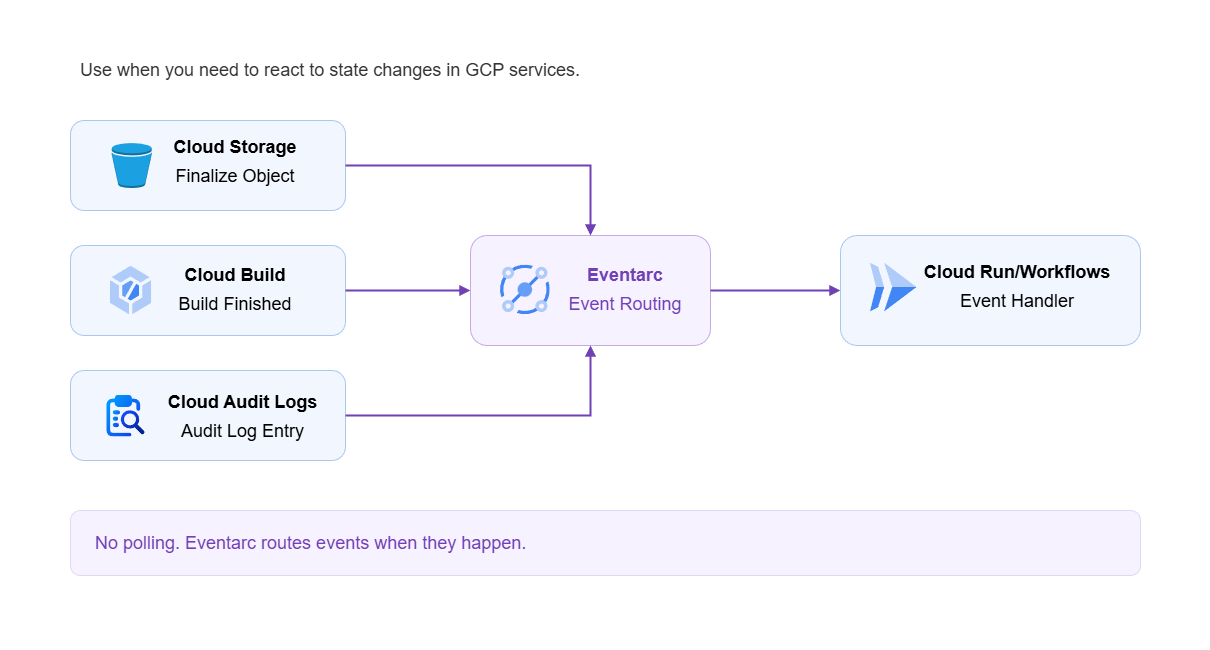
State Change ➜ Eventarc ➜ Handler
There is no need for the application to continuously poll the source to detect the change.
Eventarc
In GCP, Eventarc can listen for supported events and route them to an appropriate handler.
| Event Source | Event | Destination | Action |
|---|---|---|---|
| Cloud Storage | Object finalized | Cloud Run | Process the uploaded file |
| Cloud Build | Build finished | Workflows | Trigger validation |
| Cloud Audit Logs | Audit log entry written | Cloud Run | Run a compliance handler |
The important distinction is that Eventarc reacts to events that already occurred in another system.
Pub/Sub vs. Eventarc
Pub/Sub and Eventarc both support asynchronous architectures, but they solve different integration problems.
| Pub/Sub | Eventarc | |
|---|---|---|
| Typical Source | Your application | GCP service or supported event source |
| Model | Application publishes a message | Service emits an event |
| Purpose | Custom messaging and event distribution | Managed event routing |
| Producer Control | Application controls message publishing | Event originates from the source service |
| Routing | Topics and subscriptions | Eventarc triggers |
| Useful When | You need a message bus and control over messaging behavior | You want to react to GCP state changes |
| Example | Order service publishes an order event | Cloud Storage upload triggers Cloud Run |
A simple way to distinguish them is:
-
Pub/Sub: Your application publishes something.
-
Eventarc: Something happens in a service and your application reacts to it.
Legacy Integration and Adapter Pattern
Legacy systems often use protocols and formats that modern applications do not want to expose throughout the architecture.
Examples include:
- SFTP
- XML
- File-based exchange
- Proprietary protocols
- Systems without REST APIs
- Systems without Pub/Sub support
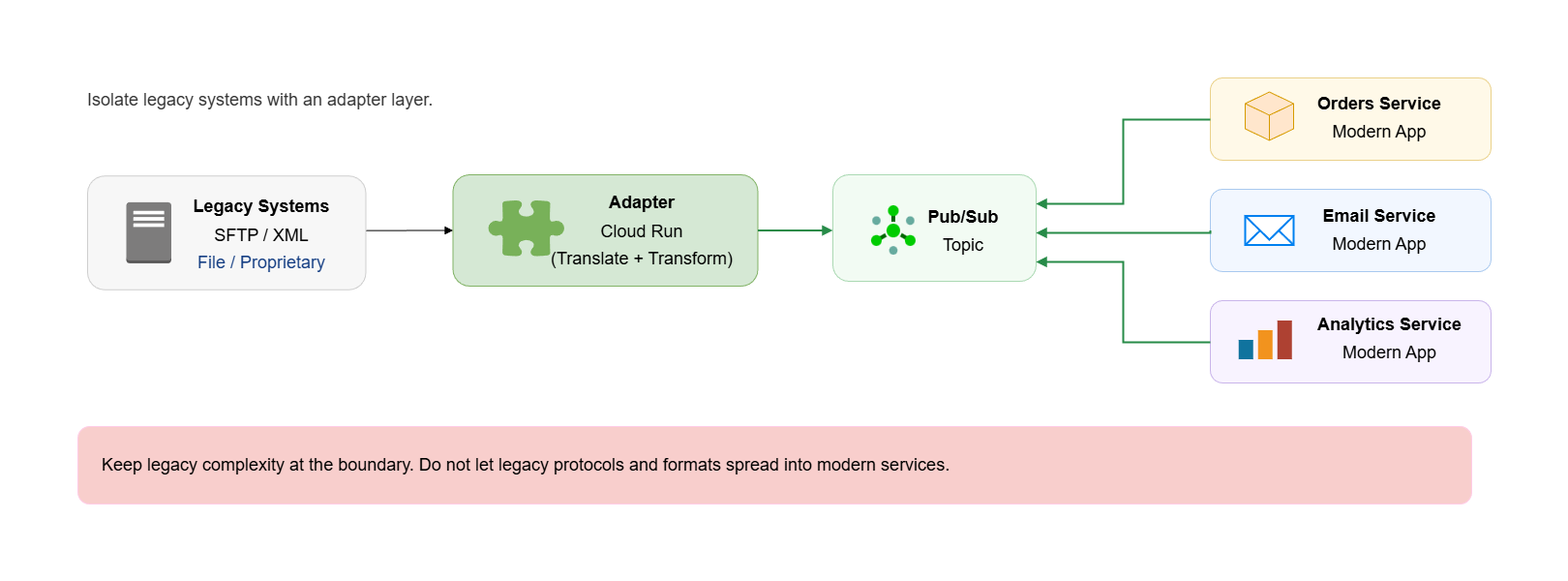
Instead of making every modern service understand the legacy system, introduce an adapter layer at the boundary.
For example:
Legacy SFTP/XML ➜ Adapter on Cloud Run ➜ Pub/Sub ➜ Modern Services
The adapter reads or polls the legacy system, translates its data into a modern format, and publishes it to Pub/Sub.
Modern applications can then consume clean messages without knowing how the legacy system works.
Why Use an Adapter
The adapter isolates legacy complexity.
This provides several benefits:
- Legacy protocols stay at the system boundary
- Modern services remain simpler
- Format conversion happens in one place
- Legacy changes have less impact on downstream services
- Modern consumers can use scalable cloud-native interfaces
The principle is simple:
Do not allow legacy integration requirements to spread throughout the rest of the architecture.
Choosing an Integration Pattern
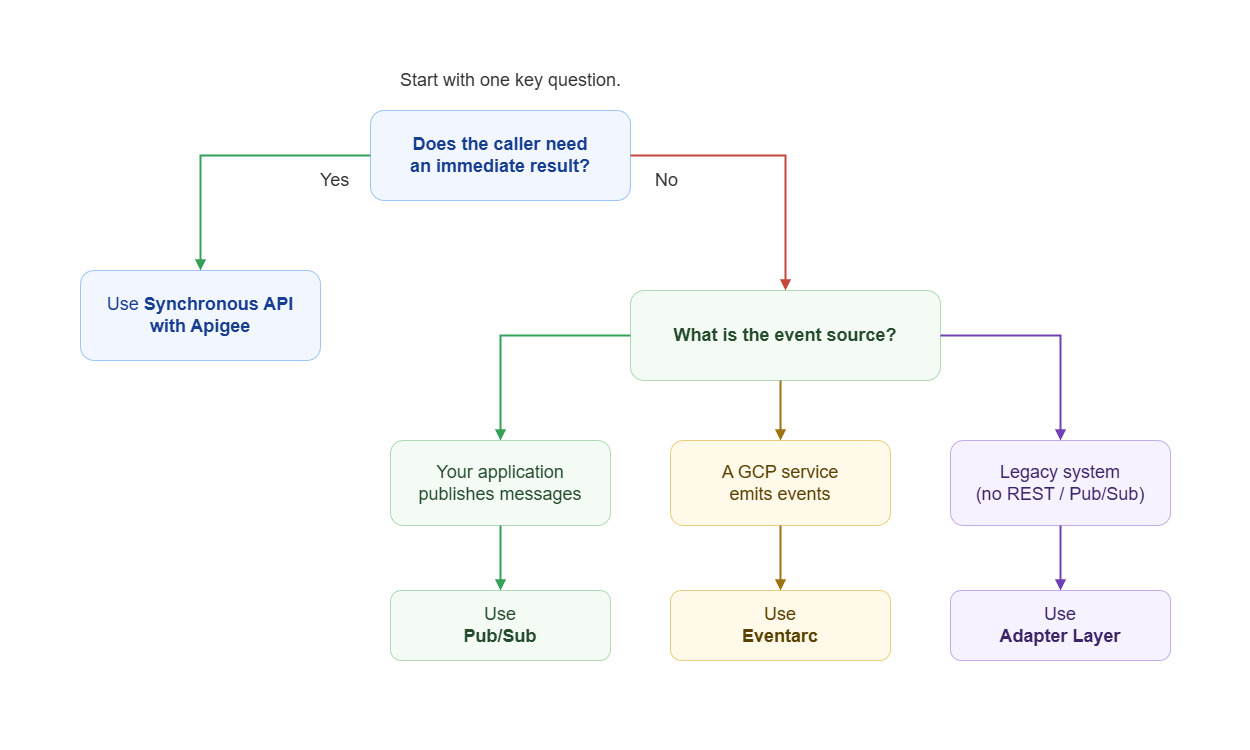
One of the most important questions is:
Does the caller need an immediate response?
| Requirement | Recommended Pattern |
|---|---|
| Caller needs an immediate result | Synchronous API with Apigee |
| No immediate result is required and a custom message bus is needed | Asynchronous Pub/Sub |
| No immediate result is required and the event originates from a GCP service | Eventarc |
| External system is legacy and does not support REST or Pub/Sub | Adapter layer first |
| Data is exchanged periodically and immediate processing is unnecessary | File or batch transfer |
External System Concerns
When you integrate with an external system, you inherit some of its behavior and limitations.
| Concern | Potential Problem | Design Consideration |
|---|---|---|
| Availability | External service becomes unavailable | Retries, fallback behavior, asynchronous processing |
| Latency | Slow downstream responses affect callers | Timeouts, asynchronous processing, caching |
| Authentication | Credentials or tokens expire | Credential rotation and renewal |
| Rate Limits | Requests are throttled | Backoff, queues, rate limiting |
| Data Formats | API or schema changes | Validation, versioning, adapters |
| Retries | Same operation executes multiple times | Idempotency and deduplication |
| Partial Failure | Some operations succeed while others fail | Recovery logic and clear failure states |
| Observability | Failure occurs across several services | Centralized logs, metrics, traces, and correlation IDs |
The important design decision is not simply how two systems connect.
It is also what happens when one of those systems becomes slow, unavailable, or behaves differently than expected.