AI Workflows and APIs
Overview
There are two common ways to build AI workflows and AI agents:
- Using no-code tools
- Using coding languages
No-code tools are easier to start with, while coding gives you more control.
No-Code
No-code tools let you build workflows without writing code.
- Easy to start
- Requires little technical knowledge
- Uses visual interfaces
- Limited to available features
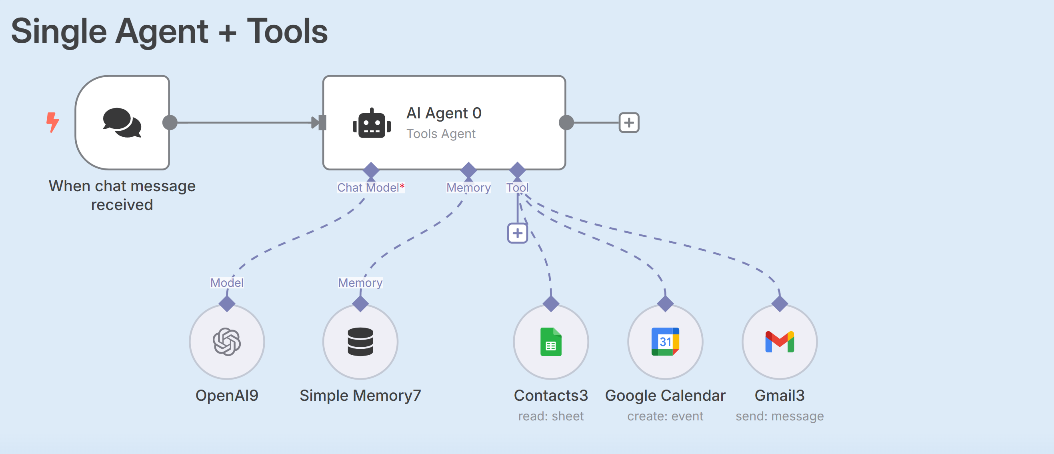
A popular example is n8n.
With no-code tools, you drag and connect blocks together to create workflows and agents. These platforms provide many built-in features, but you can only use what the platform supports.
For many use cases, this is enough. However, more complex requirements may become difficult to implement.
Code-Based
Writing code gives you full control over how your workflow or agent behaves.
- More flexible and customizable
- Requires programming knowledge
- Easier to handle complex requirements
With code, you can build exactly what you need instead of being limited by a visual tool's capabilities.
How AI Applications Work
Most people interact with AI through applications, not directly with AI models.
- Users interact with applications
- Applications interact with AI models
- Models generate responses
For example, when using ChatGPT, you are interacting with the ChatGPT application, not directly with the model itself.
The application handles many tasks such as:
- Managing conversations
- Storing chat history
- Calling external services
- Sending requests to AI models
- Displaying results
The AI model is only one part of the overall application.
AI Application Architecture
A simple AI application usually looks like this:
User ➜ Application ➜ AI Model API ➜ AI Model
The application sits between the user and the model.
This separation is important because your workflow or agent is really an application that uses AI.
Accessing AI Models using APIs
When building AI workflows or agents with code, you need to communicate with AI models programmatically. This involves:
- Sending requests
- Receiving responses
- Processing results
This is done through APIs.
An API allows your application to send requests to a model provider's servers and receive generated responses.
Common providers include:
- OpenAI
- Anthropic
- xAI
Your application sends data to the provider's API, and the provider's infrastructure runs the model and returns the result.
The typical process looks like this:
Application ➜ API Request ➜ AI Provider ➜ Model Response ➜ Application
The application controls the workflow, while the model provides intelligence when needed.
API Documentation and Pricing
Every AI provider offers documentation for its APIs.
Documentation typically includes:
- Available models
- API endpoints
- Request examples
- SDK examples
- Pricing information
- Authentication setup
Most commercial AI models are paid services.
- You pay for input tokens
- You pay for output tokens
- Pricing varies by model
Because of this, understanding pricing is an important part of building AI applications.