Modelfiles
Overview
Ollama lets you create custom versions of existing models.
You can do this with /set and /save, but you can also use a Modelfile.
A Modelfile is a simple text file that defines how your custom model should behave.
- Choose a base model
- Set model parameters
- Add a system prompt
- Add default chat messages
- Build a reusable custom model
This is useful when you want the same settings every time you run a model.
Modelfile
A Modelfile is a file used by Ollama to create a custom model.
It works like a simple configuration file. You can use it to define:
- Base model
- System prompt
- Temperature
- Context size
- Default messages
The file must be named:
Modelfile
It does not need a file extension.
In the example below, the custom model is based on gemma3:4b.
FROM gemma4:e4b
PARAMETER num_ctx 10000
PARAMETER temperature 0.5
SYSTEM You are a friendly customer support assistant. Do not answer questions about other AI tools.
MESSAGE user Hi, this is a question submitted from the website contact form.
MESSAGE assistant Hi, thanks for contacting us. How can I help you today?
This file creates a custom model with a larger context size, lower temperature, a system prompt, and a small starting conversation.
Notes:
-
The
FROMline defines the base model.Here, the custom model will use
gemma3:4bas its base.FROM gemma3:4b -
The
PARAMETERlines change model settings.PARAMETER num_ctx 10000PARAMETER temperature 0.5 -
num_ctxcontrols the context size.temperaturecontrols how creative or predictable the model is. -
The
SYSTEMline sets the default behavior.SYSTEM You are a friendly customer support assistant. Do not answer questions about other AI tools.The system prompt should stay on one line.
-
The
MESSAGElines add default chat history.MESSAGE user Hi, this is a question submitted from the website contact form.MESSAGE assistant Hi, thanks for contacting us. How can I help you today?
These messages are loaded when the custom model starts.
UPDATE: If you need multi-line instructions, you can wrap them in triple quotes:
SYSTEM """
You are a friendly customer support assistant.
Do not answer questions about other AI tools.
"""

MESSAGE user """
Hi, this is a question submitted from the website contact form.
"""

MESSAGE assistant """
Hi, thanks for contacting us. How can I help you today?
"""
Build the Custom Model
Once you have your Modelfile ready, you can create the custom model.
In this example, service-agent is the name of the custom model that will be created using the Modelfile.
ollama create service-agent -f ./Modelfile
Output:
gathering model components
using existing layer sha256:4c27e0f5b5adf02ac956c7322bd2ee7636fe3f45a8512c9aba5385242cb6e09a
using existing layer sha256:7339fa418c9ad3e8e12e74ad0fd26a9cc4be8703f9c110728a992b193be85cb2
creating new layer sha256:1eb02947264e86ec75115164bc0a680725a82a09d071fdaff86f599465f39faf
creating new layer sha256:5fd5aacb3be4dd71b1725d005e3e3077f03d6d42e9cea6f49e90454a70745f33
creating new layer sha256:a56c2489d91c55c6a133bfc0dcedfac3aa022a76dc0088e46bcd361c013f2383
writing manifest
success
This creates a new custom model based on the Modelfile.
After creating the model, list your local models.
ollama list
Output:
NAME                    ID              SIZE      MODIFIED
service-agent:latest    f364fae46838    9.6 GB    26 seconds ago
gemma3:4b               a2af6cc3eb7f    3.3 GB    2 hours ago
gemma4:e4b              c6eb396dbd59    9.6 GB    3 hours ago
minimax-m3:cloud        d03a959f45c0    -         3 hours ago
The custom model should now appear in the list.
Run the Custom Model
Run the custom model using its name.
ollama run service-agent
Output:
>>>
Hi, this is a question submitted from the website contact form.

Hi, thanks for contacting us. How can I help you today?

>>>
The model starts with the settings from the Modelfile.
Inside the running model, check the system prompt.
/show system
Output:
You are a friendly customer support assistant.
Do not answer questions about other AI tools.
This confirms that the system prompt from the Modelfile was applied.
Check Model Information
You can inspect the custom model without running it.
ollama show service-agent
Output:
  Model
    architecture        gemma4
    parameters          8.0B
    context length      131072
    embedding length    2560
    quantization        Q4_K_M
    requires            0.20.0

  Capabilities
    completion
    vision
    audio
    tools
    thinking

  Parameters
    num_ctx        10000
    temperature    0.5
    top_k          64
    top_p          0.95

  System
    You are a friendly customer support assistant.
    Do not answer questions about other AI tools.

  License
    Apache License
    Version 2.0, January 2004
    ...
This helps you understand what the custom model is based on.
Custom Models do not copy the full base model
A custom model does not usually duplicate the full base model.
Ollama reuses the original model files and stores only the custom settings.
For example:
- Base model:
gemma4:34b - Custom model:
service-agent
The custom model uses the same base model, but it adds your system prompt, parameters, and messages.
This helps save disk space.
Share a Modelfile
You can share a Modelfile with someone else or store it in Git.
They can create the same custom model by running the same command with the Modelfile:
ollama create service-agent -f ./Modelfile
Ollama also has a push command which can be used to upload a model to a registry.
ollama push service-agent
For most simple cases, sharing the Modelfile is enough.
Templates
Templates control how Ollama formats messages before sending them to a model.
Most of the time, you do not need to think about templates because Ollama automatically includes the correct one for models in its catalog.
- Format chat messages for the model
- Define user, assistant, and system messages
- Match the structure used during training
Templates become important only when working with advanced setups, such as importing GGUF models manually or using your own trained models.
Message Formatting and Training
Large language models only generate tokens. They do not naturally understand concepts such as:
- User message
- Assistant message
- System prompt
- Start of message
- End of message
Instead, they learn these concepts through specific patterns used during training.
For example, a model may be trained with message markers like:
<start_of_turn>
user
Hello
<end_of_turn>
These markers tell the model where a message starts, who sent it, and where it ends.
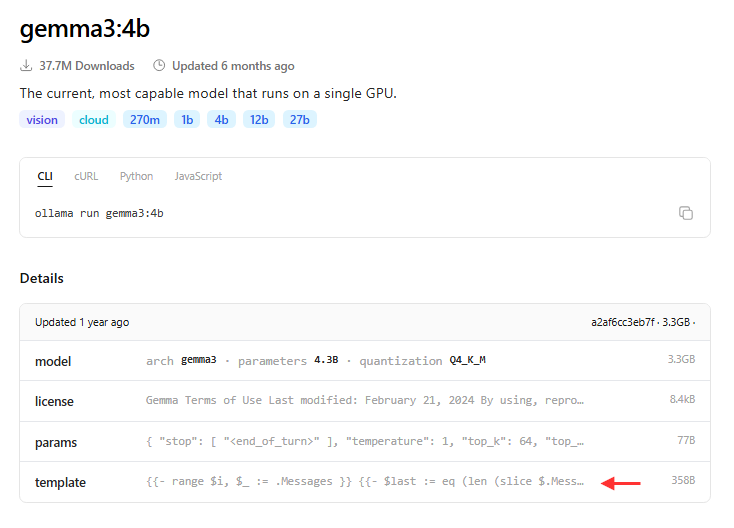
EDIT: When you check Gemma3 models in Ollama, it shows the template used for the model. This helps you understand how the model expects messages to be formatted.
On the other hand, Gemma4 models do not show the template. This is because Ollama already handles the complexities of the chat template for the user.
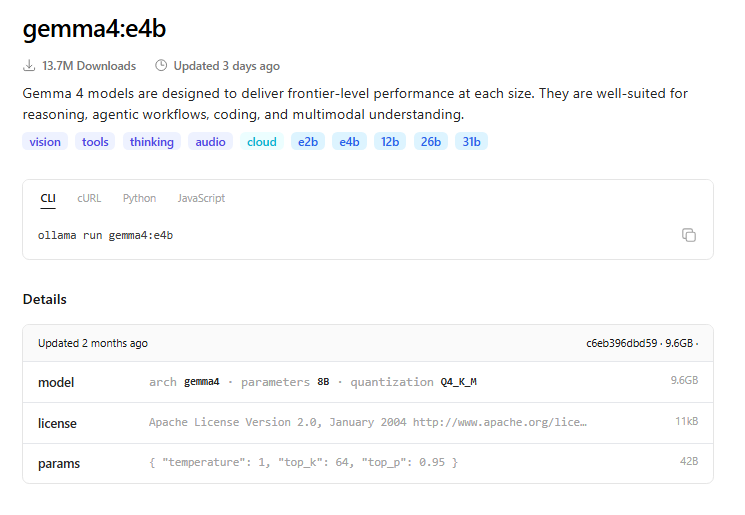
Ollama automatically applies the correct template for supported models.
- Formats chat messages
- Applies system prompts
- Separates user and assistant messages
If the wrong template is used, the model may produce incorrect or confusing responses because the input format does not match its training data.
For models from the Ollama catalog, templates are already included. You typically only need to work with templates when importing GGUF models or creating custom models.
Using a GGUF file
A GGUF file contains model weights and metadata.
You may use a GGUF file when:
- You downloaded a model from Hugging Face
- You trained your own model
- The model is not available in the Ollama catalog
A GGUF file can also be used as the base model in a Modelfile.
In the example below, Qwen3-1.7B-UD-Q3_K_XL.gguf is the downloaded model file.
FROM ./Qwen3-1.7B-UD-Q3_K_XL.gguf
This tells Ollama to create a model from the local GGUF file.
Note: Some models are not visible in the Ollama catalog, but they may still be available as GGUF files on Hugging Face. In this case, you can download the GGUF file from Hugging Face and use it with Ollama.
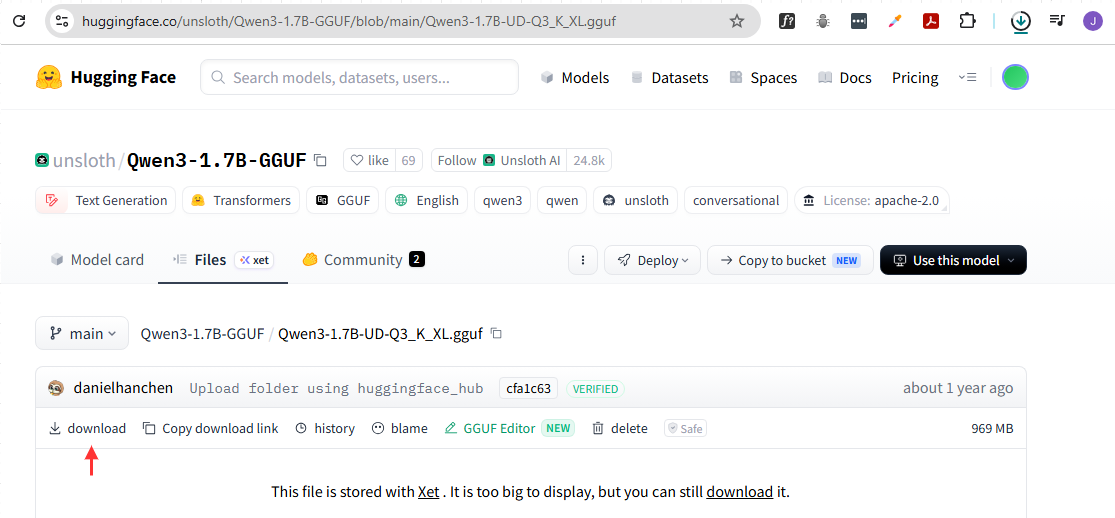
Create a Model from GGUF
Place the Modelfile and the GGUF file in the same folder (optional), or you can use a relative path on the Modelfile.
See codefiles here: Github
Example folder:
ollama
|
├── building-from-gguf
│   └── Modelfile
└── models
    └── Qwen3-1.7B-UD-Q3_K_XL.gguf
The relative path to the GGUF file is used in the Modelfile:
FROM ../models/Qwen3-1.7B-UD-Q3_K_XL.gguf
Create the Ollama model:
ollama create qwen-custom -f ./Modelfile
Output:
gathering model components
copying file sha256:21499d25b4dfc46066caaeef39fff5b43a4bfab80aef7c70d1db1a31ec02ed58 100%
parsing GGUF
verifying conversion
creating new layer sha256:d6110463dbc019d28cb65928d69d9cfa65395d3e1719f1c86b83238bdef01622
writing manifest
success
Run the model:
ollama run qwen-custom
Output:
Thinking... Okay, the user asked "Hi, how are you?" I need to respond appropriately. Let me start by acknowledging their greeting.
I should keep it friendly and open-ended. Maybe say something like "Hello! How's your day going?" to match the user's question. Then offer assistance. Since I'm an AI assistant, I can mention my purpose of helping with information and tasks. Also, maybe add a bit of enthusiasm to make it more engaging.
I should check if there are any cultural nuances or common responses for this type of greeting. Probably keep it simple and positive. Avoid being too formal. Make sure the response is in English and flows naturally. ...done thinking.
Hello! How's your day going? I'm doing well, thanks! 😊 I'm here to help with anything you need—whether it's answering questions, solving problems, or just having a chat. Let me know how I can assist you! 🌟
Since this model is a reasoning model, it tries to think first before responding, hence the "Thinking" message.
Using a Template
Some GGUF models may not work properly without the correct template.
For example, a model may respond with strange text or confusing output.
<|im_start|>assistant
random text random text
This can happen when the model does not receive messages in the format it was trained on. To fix this, you can add a template to the Modelfile. The templates has to use Go template syntax.
Note 1: This model uses a different model (bartowski/Qwen_Qwen3-1.7B-GGUF) as the base.
FROM ../models/Qwen_Qwen3-1.7B-Q4_K_M.gguf

TEMPLATE """
{{ if .System }}System: {{ .System }}{{ end }}
User: {{ .Prompt }}
Assistant:
"""
Create the model:
ollama create qwen-custom-2 -f ./Modelfile
Run the model:
ollama run qwen-custom-2
Expected result:
>>>
The model should now respond more normally if the template matches what the model expects.
Note 2: The template is actually optional if the model already has a default template, which can be seen if you remove the TEMPLATE section and run the model.
If the output is normal, then the default template is working fine. You only need to add a custom template if the default one does not work well.
When to Use Templates
Use templates only for advanced cases.
| Situation | Need to set template |
|---|---|
| Running a model from Ollama catalog | No |
| Creating a custom model from an Ollama catalog model | No |
| Importing a GGUF model manually | Maybe |
| Using a self-trained model | Usually yes |
| Fixing strange model output | Maybe |
For most normal Ollama usage, templates can be ignored.