Hardware Requirements
Overview
When running a large language model (LLM) locally, the hardware requirements can vary based on the size of the model and the type of inference you want to perform.
Inference
Inference is the process of using a trained model to generate output based on your input. This is when a trained model is used to generate text based on your input, instead of being trained from scratch.
- Happens when you send a prompt to a model
- Used in ChatGPT and local open models
- Requires hardware to run the model
GPU v CPU
The model must be executed somewhere before it can respond.
- ChatGPT runs on cloud servers
- Open models can run locally on your machine
- Can also run on rented servers
- Same model, different hosting location
It is recommended to run the open models on GPU for better performance, but it is possible to run them on CPU as well.
| Category | GPU | CPU |
|---|---|---|
| Speed | Very fast for LLMs | Slower for LLMs |
| Processing style | Handles many tasks in parallel | Handles tasks more sequentially |
| Best use case | Running large models efficiently | Running small models or fallback option |
| Strength | Parallel computation | General-purpose computing |
RAM and VRAM
In addition to a good GPU, memory is also an important factor when running LLMs locally.
| Memory Type | Where It Lives | What It Stores | Speed | Used When |
|---|---|---|---|---|
| RAM | System memory | Model data and context | Medium | CPU-based inference or fallback |
| VRAM | GPU memory | Model weights and context | Very fast | GPU-based inference (preferred) |
Why Memory Matters: LLMs need memory because everything must stay loaded during inference.
- Model parameters must stay in memory
- Input and output tokens are stored in context
- Larger models need more memory
- Smaller models can run on limited hardware
If your system does not have enough memory, you will not be able to run large models. However, smaller models will still work.
LLM Weights and Memory
When running a large language model, the most important thing loaded into memory is the model’s weights, also called parameters. These are the learned values that control how the model processes your input and generates output.
- Stored inside neural network connections
- Control how input becomes output
- Must be loaded during inference
These weights are what the model “remembers” after training, and they define how it responds to your prompt.
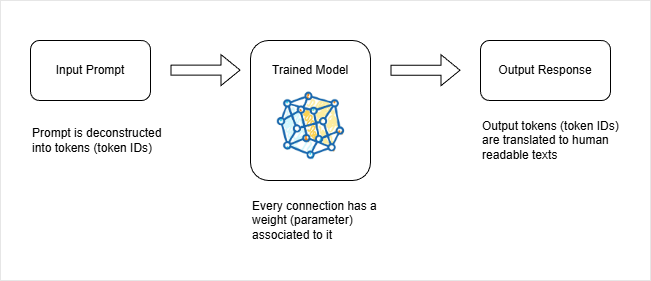
How Input Becomes Output
A prompt is not processed as raw text. It is first broken into tokens, then converted into token IDs before being passed into the model.
- Prompt is split into tokens
- Tokens become numerical IDs
- IDs are fed into the neural network
- Output is generated as new token IDs
Inside the model, these IDs pass through billions of weighted connections. Each weight transforms the data slightly until the model produces new token IDs, which are then converted back into readable text.
This is how a sentence input becomes a generated response.
Parameters and Model Size
Large language models are often described by the number of parameters they contain. These parameters are the learned weights inside the neural network, and they directly affect both model capability and hardware requirements.
- Parameters are model weights
- Each connection in the network has a weight
- More parameters usually means better capability
- Models range from billions to hundreds of billions of parameters
For example, a model like Gemma 3 may have around 27 billion parameters, while larger research models such as DeepSeek R1 can scale into hundreds of billions. As the number of parameters increases, the model becomes more powerful but also requires significantly more memory to run.
Because of this, all parameters must be loaded into memory during inference. This is why hardware plays a critical role when running LLMs locally or on servers.
- Model must be fully loaded into memory
- VRAM is preferred for GPU execution
- RAM is used if no GPU is available
- Context window also consumes memory
How Memory is Calculated
The total memory required depends on how each parameter is stored. Most models use floating-point formats such as float32 or float16, which determine how much space each weight takes.
| Format | Memory per Parameter | Precision | Memory Usage | Common Use |
|---|---|---|---|---|
| Float32 | 4 bytes | High precision | High memory usage | Training and older models |
| Float16 | 2 bytes | Lower precision | Lower memory usage | Modern inference models |
As model size increases, memory requirements grow very quickly because every parameter must be stored in memory at the same time during inference.
- 2B parameter model may need several GB
- 27B parameter model may require tens of GB
- 100B+ models need server-grade GPUs
- Most consumer laptops cannot run very large models
This is why large models are typically run on powerful GPUs or distributed systems rather than standard personal machines.
Estimating If a Model Fits
To know if a model can run, you need to estimate how much memory it requires after quantization. This depends mainly on parameter count and precision.
Considerations:
- Parameters define base model size
- Quantization reduces memory usage
- Context window also uses memory
- System RAM and VRAM can be combined
A simple way to estimate is to start with model size and adjust for quantization.
For example, a 27B model using 4-bit quantization can be roughly estimated by halving the parameter size in gigabytes.
- So 27B becomes roughly 13.5GB
- Add extra memory for context and runtime overhead
- The total brings it closer to around 17GB total
This is why memory estimates are always approximate, not exact.
Check Compatibility
Instead of doing calculations manually, modern tools can estimate whether a model will run on your system.
On Hugging Face, you can sign up for a free account and then set your hardware profile.
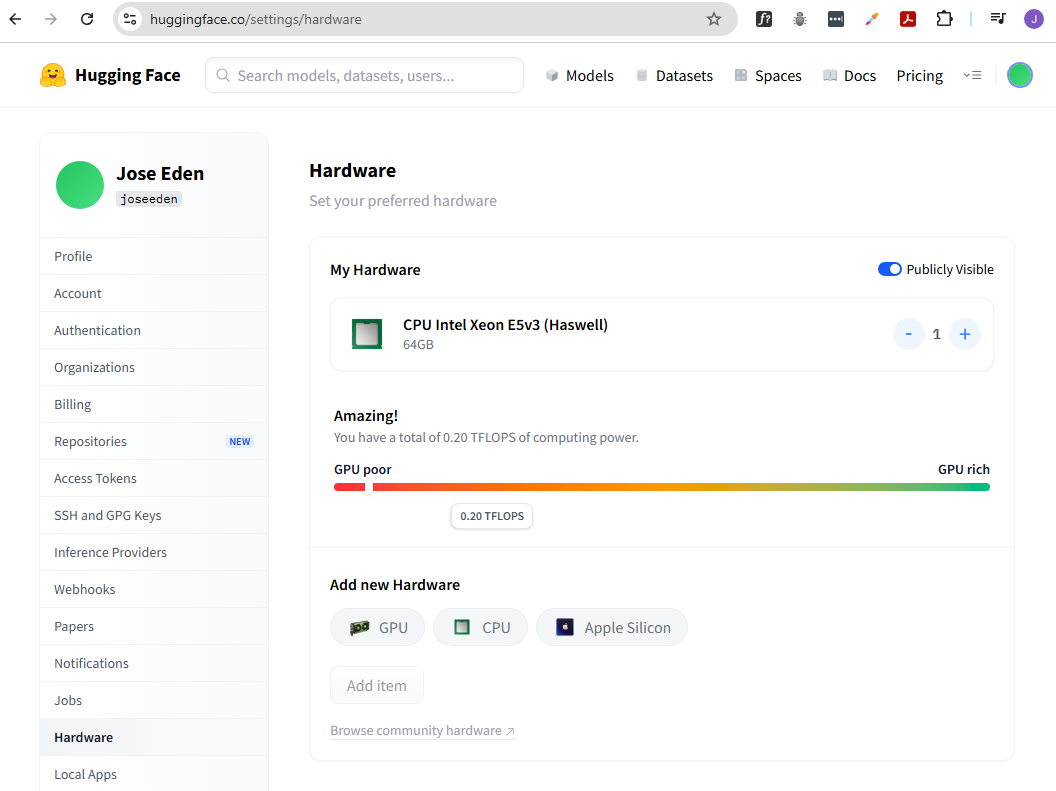
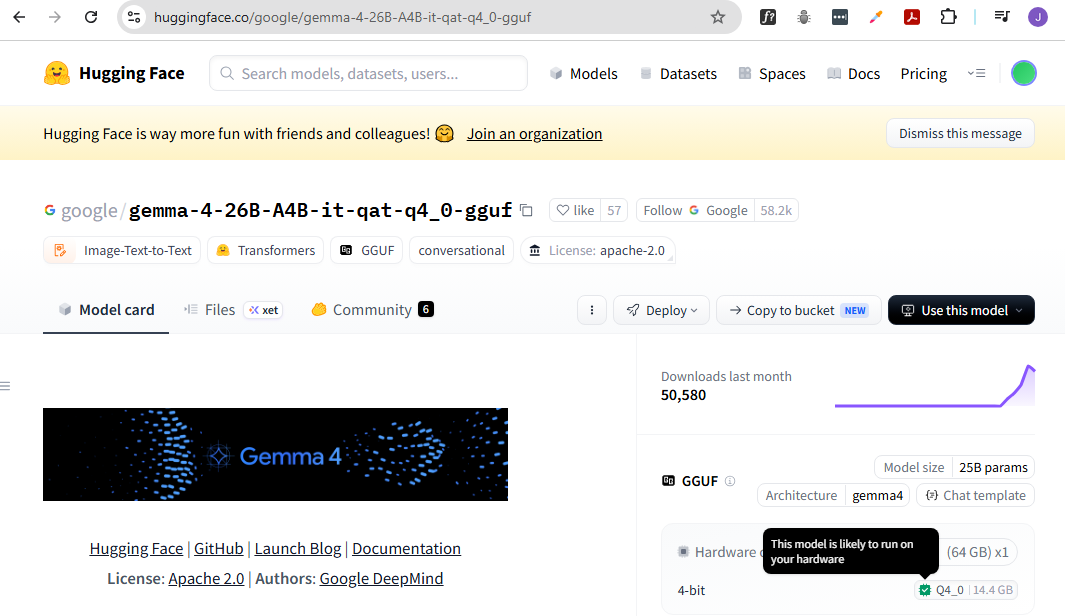
Back in the models page, you can filter for quantized models and see compatibility indicators.
The model details page will show whether a specific quantized version fits your system. A green indicator usually means it will run.
Tools like LM Studio also help by warning you if a model is too large before you download it.
This makes model selection much easier without needing deep hardware knowledge.
Memory Tradeoffs and Model Size
Bigger models are more capable, but they also require more memory. Smaller models are easier to run but may be less powerful depending on the task.
- Larger models need more memory
- Smaller models run on most laptops
- Quality improves with size but not linearly
- Quantization helps reduce memory needs
For example, a 4B or 7B model can run on most machines, while 20B+ models require much more RAM or VRAM.
This is why choosing the right model size is always a balance between capability and hardware limits.
CPU and GPU Together
If your system has limited VRAM, models can be split across CPU and GPU memory.
- Part of model loads into VRAM
- Remaining part uses system RAM
- Works when VRAM is not enough
- Slower than full GPU execution
For example, if a model needs 17GB and your GPU has 8GB VRAM, the remaining 9GB can be handled by system RAM. This still works, but performance will be slower than running fully on GPU.