ML2 Plugin
Overview
The ML2 (Modular Layer 2) plugin is the default Neutron networking plugin. It provides a framework that allows OpenStack to support multiple Layer-2 networking technologies through pluggable drivers.
ML2 separates networking functions into several driver types, which allows OpenStack to work with different virtual switches, overlays, and hardware networks.
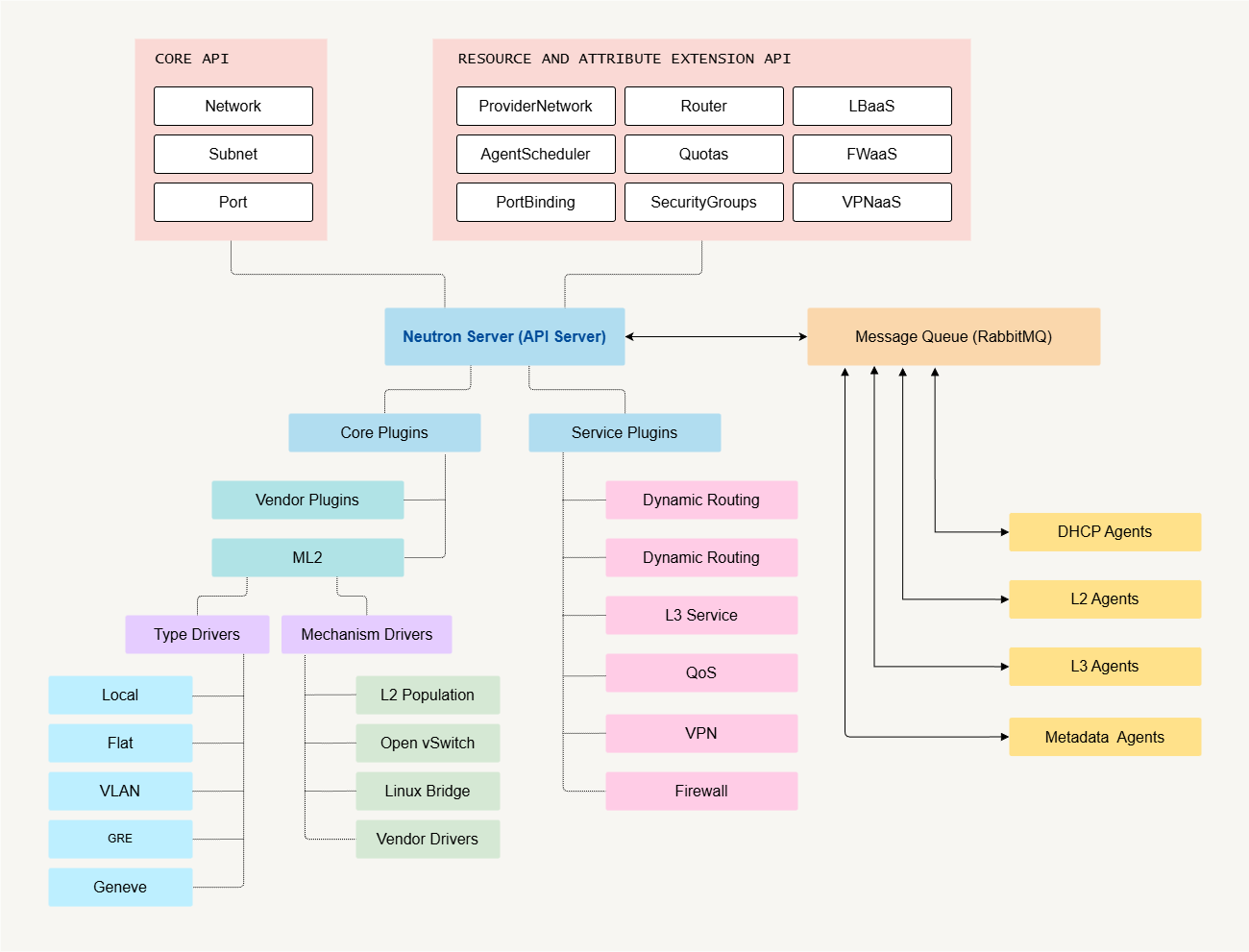
ML2 Key Components
Type Drivers
Type drivers define the network encapsulation type used by Neutron networks.
- Determine how tenant networks are created
- Define segmentation mechanisms such as VLAN or VXLAN
Mechanism Drivers
Mechanism drivers connect Neutron to the actual networking backend. They translate Neutron networking operations into actions performed by the underlying virtual switch or network device.
Mechanism drivers belong inside the ML2 plugin, which itself runs inside the Neutron server. They are usually described as part of the ML2 plugin architecture, not a standalone Neutron component.
Common mechanism drivers:
- Linux Bridge: simple, for small or demo setups
- Open vSwitch: robust, supports complex topologies
- VMware NSX: integrates with VMware virtualization
Mechanism drivers may also integrate with hardware networking platforms such as:
- Cisco
- NEC
- Arista
- Juniper
- Huawei
Open-source SDN controllers may also be used:
- OpenDaylight
- Tungsten Fabric (formerly OpenContrail)
UPDATE: Newer OpenStack releases may introduce additional drivers and configuration options. For more information, please see Neutron Plugins and Drivers
Extension Drivers
Extension drivers add additional networking features.
Examples include:
- Port security
- Quality of Service (QoS)
- DNS integration
ML2 Supported Network Types
| Network Type | Description |
|---|---|
| Local | Network exists only on a single compute node |
| Flat | Untagged Layer-2 network mapped directly to a physical network |
| VLAN | Uses VLAN tags to isolate tenant networks |
| GRE | Overlay tunnel network used for tenant isolation |
| VXLAN | Encapsulated overlay network commonly used in OpenStack |
ML2 Plugin Configuration
ML2 plugin defines virtual network types and mechanism drivers.
type_drivers: flat, VLAN, VXLANtenant_network_types: enables VXLAN for project networksmechanism_drivers: Linux Bridge or Open vSwitchextension_drivers: enable L2 functions, like port security, QoS, etc.
Linux Bridge
For Linux Bridges, below are the files that needs to be configured:
-
plugins/ml2/ml2_conf.iniMaps provider networks and VXLAN ranges to compute node interfaces.
[ml2]type_drivers = flat,vlan,vxlantenant_network_types = vxlanmechanism_drivers = linuxbridge,l2populationextension_drivers = port_security[ml2_type_flat]flat_networks = provider ## name of provider network[ml2_type_vxlan]vni_ranges = 1:1000[securitygroup]enable_ipset = Truefirewall_driver = iptables_hybrid -
plugins/ml2/linuxbridge_Agent.ini:[linux_bridge]physical_interface_mappings = profiver:eth1[vxlan]enable_vxlan = Truelocal_ip = ENTER-OVERLAP-INTERFACE-IPl2_population = true[securitygroup]enable_security_group = truefirewall_driver = neutron.agent.linxu.iptables_firewall.IptablesFirewallDriverNote: Configure agents according to mechanism driver:
- L3 agent: interface driver (Linux Bridge or OVS)
- DHCP agent: interface driver (Linux Bridge or OVS)
- Security group driver defined in agent INI files
Multiple agents can be installed on network nodes to handle heavy workloads.
-
l2_agent.ini[DEFAULT]interface_driver = linuxbridge -
dhcp_agent.iniinterface_driver = linuxbridgedhcp_driver = neutron.agent.linux.dhcp.Dnsmasqenable_isolated_metadata = true
Open vSwitch
For Open vSwitch:
-
plugins/ml2/ml2_conf.ini[ml2]type_drivers = flat,vlna,vxlantenant_network_types = vxlanmechanism_drivers = openvswitch.l2populationvni_ranges = 1:1000To create OVS provider bridge
br-provider:ovs-vsctl add-br br-provider -
plugins/ml2/openvswitch_agent.ini[ovs]bridge_mappings = provider:br-providerlocal_ip = ENTER-INTERFACE-IP[agent]tunnel_types = vxlanl2population = True[securitygroup]firewall_driver = iptables_hybrid -
l3_agent.ini[DEFAULT]interface_driver = openvswitchexternal_network_bridge = -
dhcp_agent.iniinterface_driver = openvswitchdhcp_driver = neutron.agent.linux.dhcp.Dnsmasqenable_isolated_metadata = true