Nova Compute
Overview
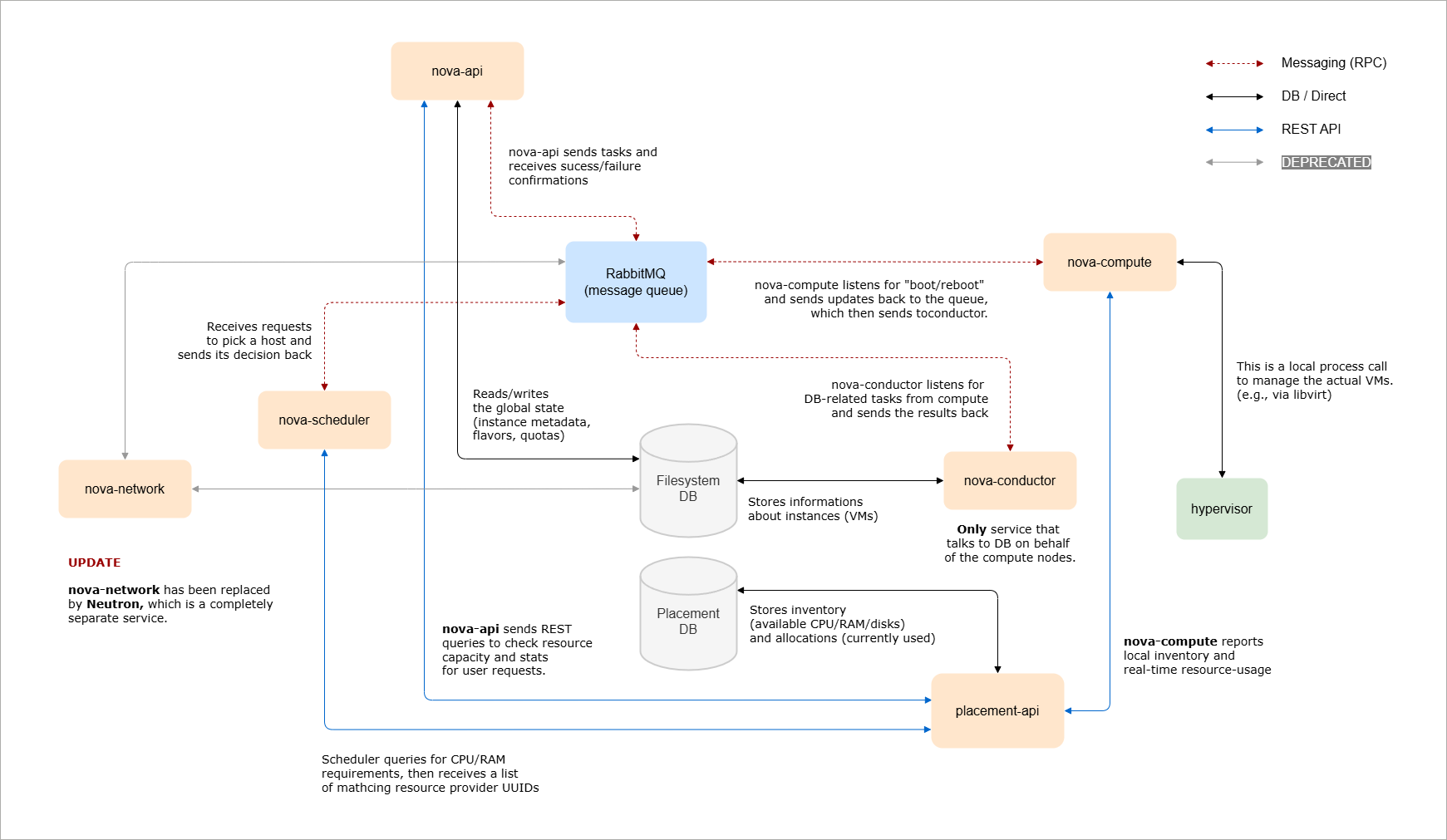
Nova is the compute service in OpenStack. It is more complex than other services because it manages different types of compute resources.
- It creates and manages virtual machines
- It supports Linux containers and bare metal
- It uses control and compute nodes
Control Plane And Compute Nodes
Nova is split into two main parts.
-
Controller nodes
- Control nodes act as the brain of the system
- Decide where instances should run and coordinate operations
- Handle core services like API, scheduler, and conductor
- Process user requests and manage orchestration
-
Compute nodes
- Run the hypervisor and actually host instances
- Provide CPU, memory, and storage for virtual machines.
- Report resource usage back to the control plane
In most deployments, there are only a few controller nodes but many compute nodes. Because of this, compute nodes must be deployed in a standard and repeatable way. This keeps the environment consistent and easier to scale.
Nova Core Components
These components work together to run the compute service.
| Component | Role |
|---|---|
| Nova API |
|
| Nova Scheduler |
|
| Nova Conductor |
|
| Placement |
|
| RabbitMQ |
|
Together, these components allow Nova to receive requests, select compute nodes, manage resources, and communicate securely across the system.
Hypervisor Support
Nova supports multiple hypervisors.
- KVM on Linux (via libvirt)
- LXC Linux Containers (via libvirt)
- Xen on Linux (via libvirt)
- XenServer on Linux (with XAPI)
- Hyper-V on Windows
- PowerVM on IBM Power Platform
- QEMU (Quick Emulator on Linux)
- VMware vSphere 5.1+ vCenter
- Virtuozzo 7.0+ on Linux
Not all features are available on every hypervisor. For example, some hypervisors support instance snapshots, while others do not. Because of these differences, you should always review the hypervisor feature support matrix before selecting one.
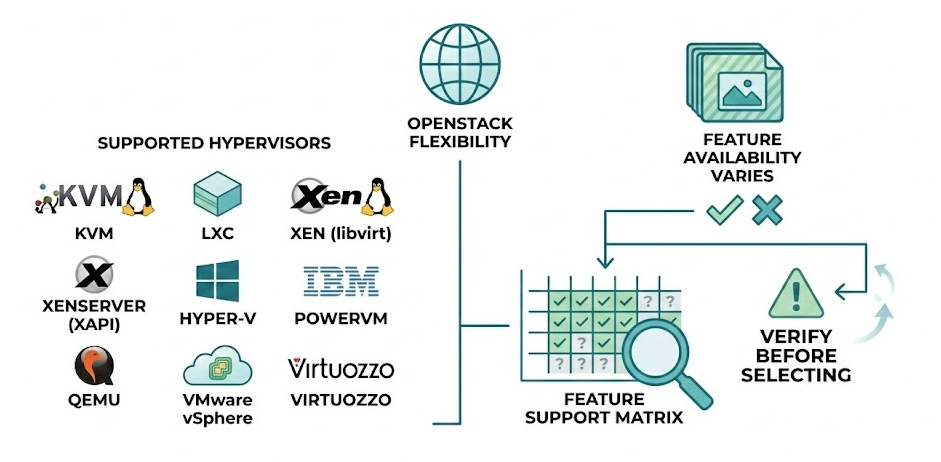
This flexibility allows OpenStack environments to use different virtualization platforms, but feature availability must be verified in advance.
Nova Configurations
Control Plane Configuration
Nova control plane services are mainly configured in the following file:
/etc/nova/nova.conf
This file contains the core settings required for Nova to run properly.
-
Configure database connections
- Nova uses two databases: Nova and Nova API
- Both database connection strings must be defined
- Instance and service data are stored in the databases
-
Configure message queue connection
- The message queue is usually RabbitMQ
- Uses RPC for internal communication between Nova services
- All control plane components depend on this messaging layer
-
Configure Keystone authentication
- Define identity credentials for the Nova service user
- Configure authentication URL and memcached settings
- Ensure Nova can validate tokens and talk with Keystone
-
Configure service integrations
- Define API endpoints for the networking and image service
- They allow Nova to create ports and retrieve images
-
Configure console and Placement
- Enable console access for instances through the dashboard
- Configure Placement service endpoint and credentials
- Placement tracks resource usage and scheduling decisions
-
Configure cells
- Cells organize compute nodes into logical groups
- Each cell has its own message queue and database
After completing these steps, the Nova control plane is properly configured and ready to manage compute resources.
Compute Node Configuration
Compute node setup is simpler than control plane configuration. The compute node is responsible for running virtual machines and communicating with the control plane services.
-
Install nova-compute service
- Install the
nova-computepackage on the compute host - The service runs as a systemd unit
- It does not connect directly to the database
- Database access is handled through Nova Conductor
- Install the
-
Configure basic service parameters
- Configure RabbitMQ connection for RPC communication
- Configure Keystone authentication credentials
- Set the management or local IP address if required
-
Configure hypervisor driver
- Select appropriate driver (e.g. KVM, QEMU, or VMware)
- Define the driver settings in
/etc/nova/nova.conf - Driver determines how instances are created and managed
- Some hypervisors may require additional system packages
After configuration, restart the nova-compute service. Once it registers successfully, the compute node becomes available for instance scheduling.
Sample Configurations
KVM Configuration
If your compute node supports virtualization and KVM is enabled in BIOS, Nova usually detects it automatically and loads the KVM driver by default.
If you want to explicitly configure it, edit /etc/nova/nova.conf.
[DEFAULT]
compute_driver = libvirt.LibvirtDriver

[libvirt]
virt_type = kvm
cpu_mode = host-model
After editing the file, restart the compute service:
systemctl restart nova-compute
Result:
- The service restarts successfully
- The compute node registers in Nova
This confirms that the KVM driver is active and working.
QEMU Configuration
QEMU is commonly used in lab environments where nested virtualization is not supported. For example, if you are running OpenStack inside VirtualBox, nested virtualization is not available, so QEMU is used instead of KVM.
[DEFAULT]
compute_driver = libvirt.LibvirtDriver

[libvirt]
virt_type = qemu
After updating /etc/nova/nova.conf, restart the nova-compute service.
systemctl restart nova-compute
Once restarted, the compute node launches instances using QEMU instead of KVM. This setup allows OpenStack to operate in environments where hardware virtualization is not available.
VMware Configuration
VMware integration is different from KVM or QEMU. Nova does not control host-level placement, which means it does not run directly on individual ESXi hosts. Instead, nova-compute connects to vCenter, and vCenter manages the ESXi hosts.
Because of this design, the ESXi cluster is treated differently during scheduling.
- The ESXi cluster must have DRS enabled
- Cluster is treated as a single hypervisor resource
- Nova Scheduler places instances at the cluster level
- vCenter decides which ESXi host runs the instance
Below is a sample configuration:
[DEFAULT]
compute_driver = vmwareapi.VMwareVCDriver

[vmware]
host_ip = 192.168.10.10
host_username = administrator@vsphere.local
host_password = VMwarePassword
cluster_name = ProductionCluster
datastore_regex = .*
Note that you must also configure the Glance image service to properly integrate with VMware. Without proper image configuration, instance deployment on ESXi hosts may fail.
After updating /etc/nova/nova.conf, restart the nova-compute service so the configuration is applied.
systemctl restart nova-compute
Once restarted, Nova connects to vCenter and treats the entire ESXi cluster as a single compute resource. OpenStack schedules instances at the cluster level, while vCenter manages the actual host placement inside that cluster.
Nova Cells
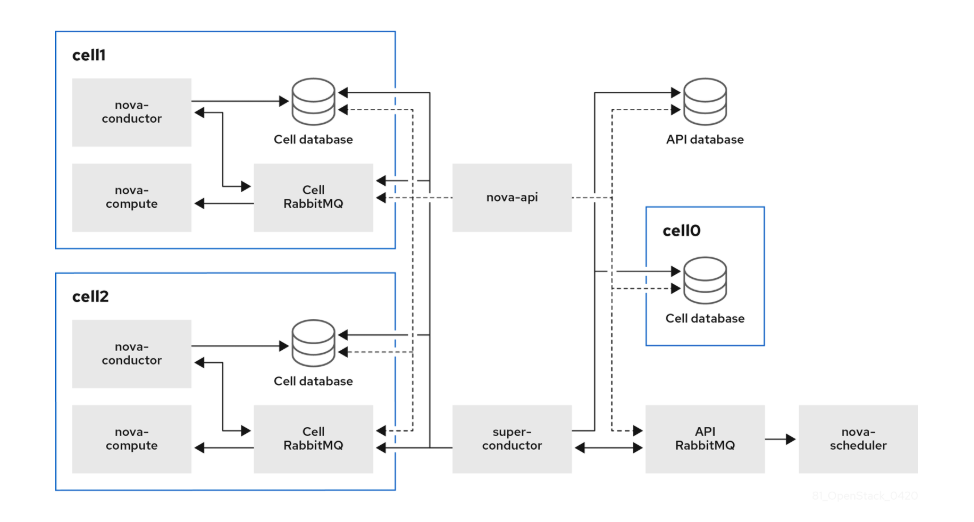
Nova Cells was introduced by the OpenStack community to solve database and message queue performance issues in large compute deployments. It splits compute nodes into multiple “cells” to improve scalability.
- Each Cell has its own SQL database
- Each Cell has its own message queue
- Cells improve performance at scale
In small deployments, there is usually one cell. As the cloud grows, additional cells can be added to prevent database and messaging overload.
In the sample deployment below, compute nodes are divided into multiple units, each with its own conductor, database, and message queue. The global service communicates with each unit using a super conductor, and the global database contains only the information needed for the entire overcloud.
Installation
Installing Nova requires steps on both controller and compute nodes.
On controller nodes:
- Create Nova databases
- Create users and endpoints
- Install Nova services
- Configure
nova.conf - Sync databases
- Restart services
On compute nodes:
- Install nova-compute
- Configure
nova.conf - Configure hypervisor driver
- Restart nova-compute
- Map compute node to cell
After these steps, the compute node becomes available for scheduling instances.
For more information, please see Install Nove Compute.