Glance
Overview
Glance stores, manages, and serves images for OpenStack. These images include virtual machine boot disks and other compute-related images. Compute nodes request images from Glance when launching instances.
- Stores virtual machine and bare metal images
- Provides APIs to manage and retrieve images
- Can cache locally at compute nodes for faster access
Glance handles large image data efficiently and ensures a reliable image management system across OpenStack nodes.
Glance Architecture
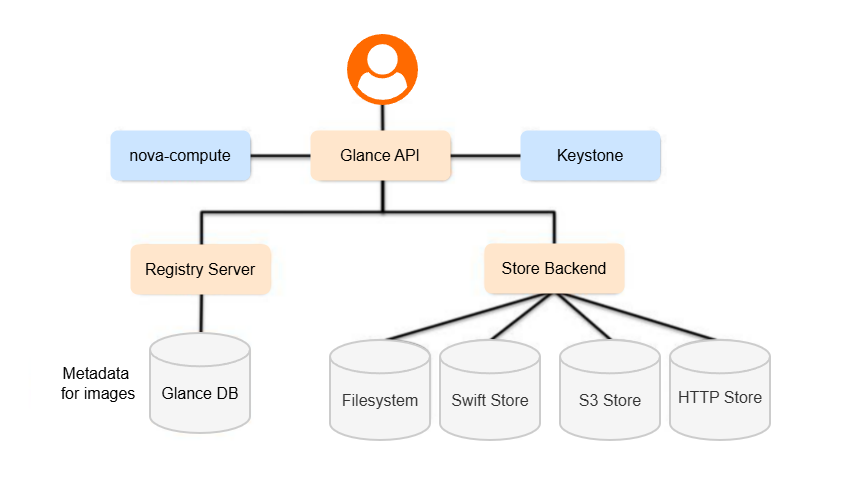
Glance is a standalone service with several key components:
| Component | Description |
|---|---|
| Glance API | Handles all requests to store, retrieve, and manage images |
| Glance Registry | Stores image metadata like size and disk format; private service, not exposed to users |
| Metadata definitions | Allows adding custom metadata to images |
| Database | Stores Glance state; typically MySQL or SQLite |
| Glance Store | Manages the actual image storage with various backends |
Glance can store images for multiple services, including Compute, Magnum, Trove, and Sahara.
Glance Storage Backends
Glance supports different storage backends depending on deployment needs. Vendors may also provide additional storage drivers with optimized features.
Store backend types supported in community version:
- File, Filesystem
- HTTP/HTTPS
- Swift
- Rdb
- Sheepdog
- Cinder
- vSphere
Vendor-supported backend types:
- Amazon S3
- GridFS
- Datera Elastic Data Fabric (EDF)
File Backend
File backend stores images as files on the node, suitable for single-node deployments.
Sample glance-api.conf for setting up default file storage:
[glance_store]
stores = file, http
default_store = file
filesystem_store_datadir = /var/lib/glance/images/
Note:
storesdefines enabled storage driversdefault_storesets the primary backendfilesystem_store_datadiris the directory storing images
External Backends
Glance can use external storage backends like Swift and Ceph to store images. This allows high availability and better performance for large deployments.
Swift Backend Configuration
You configure these settings in /etc/glance/glance-api.conf.
[glance_store]
stores = swift,http
default_store = swift
default_swift_reference = swift_image_store
swift_store_auth_insecure = False
swift_store_auth_address = http://swift.example.com:5000/v3
swift_store_endpoint_type = internalURL
swift_store_container = glance_images
swift_store_config_file = /etc/glance/glance-store.conf
swift_store_user = glance_user
swift_store_key = password123
swift_store_large_object_size = 5120
swift_store_large_object_chunk_size = 200
swift_store_create_container_on_put = True
swift_store_region = RegionOne
swift_store_retry_get_count = 5
Swift Keystone Authentication
Glance can use Keystone credentials to authenticate to Swift. You define these in a separate configuration file, such as /etc/glance/glance-store.conf.
[swift_image_store]
user = service:glance
key = openstack
user_domain_id = default
project_domain_id = default
auth_version = 3
auth_address = http://10.0.0.11:5000/v3
Note:
useris the Keystone user Glance uses to access Swiftkeyis the password for that useruser_domain_idandproject_domain_iddefine the Keystone domain contextauth_versionspecifies the Keystone API versionauth_addressis the Keystone authentication URL
High Availability and Performance
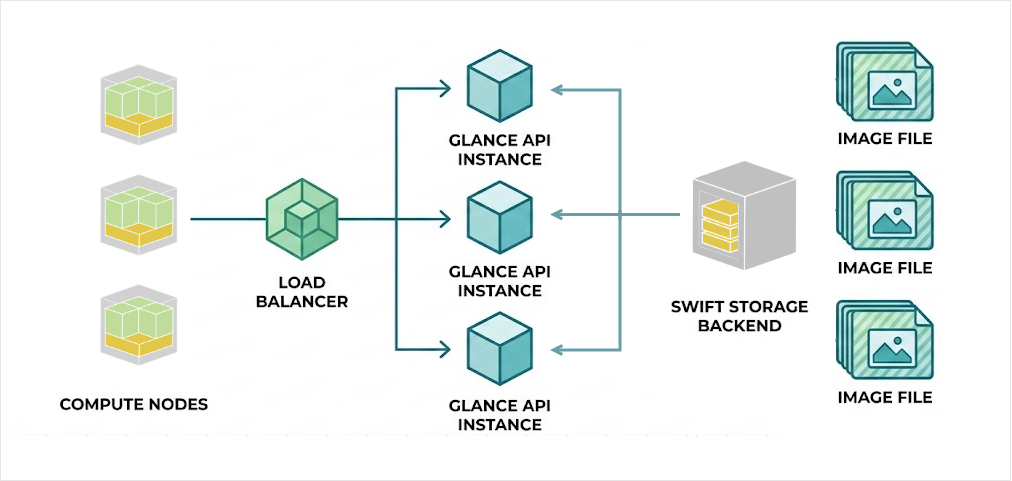
You can also deploy multiple Glance API instances behind a load balancer. This improves availability and performance, as multiple servers can serve large image files to compute nodes simultaneously.
Glance Image Cache
Caching improves performance by storing frequently requested images on the Glance API server.
- Without cache, every request fetches images from the backend
- With cache, the API server serves repeated requests locally
You can enable caching in g;ance-api-paste.imi, and then configure the parameters in glance-api.conf and glance-cache.conf to optimize performance for multiple compute nodes.
[cache]
enabled = true
directory = /var/lib/glance/cache
image_cache_size = 10737418240  # 10 GB cache size
Installation and Configuration
Setting up Glance involves these steps:
- Create a SQL database for Glance (shared MySQL cluster or dedicated instance)
- Create Glance user in Keystone and grant admin privileges
- Register the Glance service and endpoints using OpenStack CLI
- Install and configure the chosen storage backend
- Configure
glance-api.confwith DB, Keystone, store, and cache parameters - Populate the Glance database and restart Glance services
For more information, please see Installing Glance.