Neutron
Overview
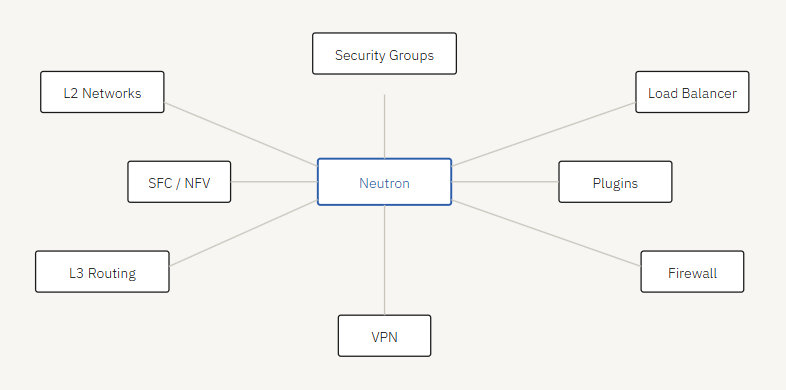
Neutron is a core OpenStack service for networking. It allows users to create and manage virtual networks, routers, and network services.
- Neutron is modular and flexible
- Supports L2 networks, L3 subnets, and virtual routers
- Supports virtual load balancers, firewalls, and VPN as a service
- Enables micro-segmentation using security groups and flow rules
- Supports service function chaining for NFV environments
Neutron complexity affects both deployment design and installation. Its architecture uses plugins, drivers, and agents to manage overlay networks.
Neutron replaced an older OpenStack networking service called Quantum, which was introduced in the Folsom release. Before Quantum, networking for Nova components was handled by Nova Networking, a subcomponent of Nova. The service was later renamed from Quantum to Neutron due to a trademark conflict, as the name “Quantum” was already used by a tape-based backup system.
Networks in OpenStack
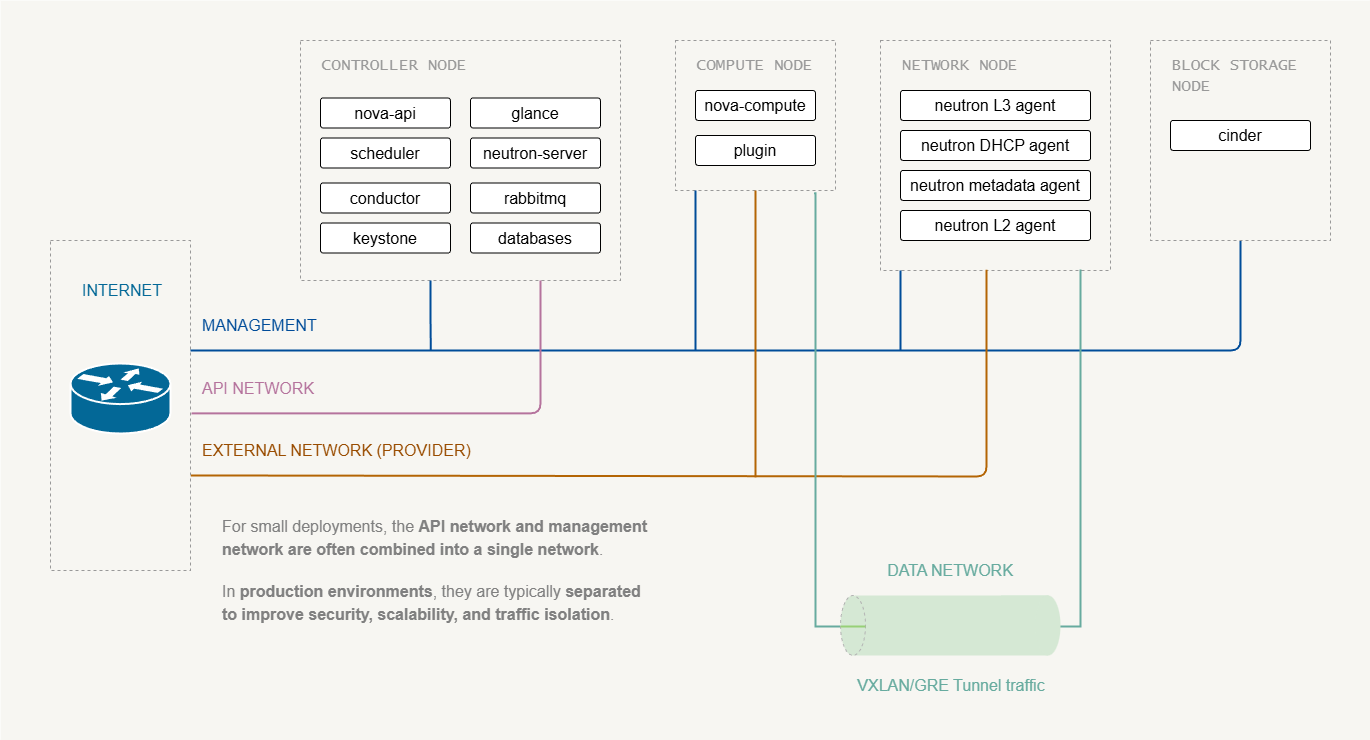
OpenStack networking involves two layers:
- Infrastructure networks – physical networks connecting the OpenStack nodes
- Neutron virtual networks – logical networks used by VMs and tenants
Infrastructure Networks
These networks connect the physical nodes in your OpenStack deployment. These networks are configured on the servers and are not created by Neutron.
Management Network
The management network is used for internal communication between OpenStack services.
- Used for internal service communication
- Connects all nodes (controller, compute, network, storage, etc.)
- Usually private and not exposed to the internet
Used by services such as:
- Nova
- Neutron
- Glance
- Keystone
- RabbitMQ
- Databases
Typical traffic:
- RPC messaging
- Database queries
- service-to-service API calls
API Network
The API network is used for accessing the Openstack APIs.
- Keystone
- Nova API
- Neutron API
- Glance API
Used by:
- OpenStack dashboard
- CLI clients
- automation tools
It can created as a separate network for...
For labs and small deployments, this may be combined with management or external network
Data Network (Tenant/Overlay)
This network is used for VM (tenants) traffic between compute nodes.
- Connects to both compute and network nodes
- Carries overlay network tunnels
- Uses VXLAN, GRE, or VLAN tunnels
Note:
- This network does NOT carry Internet traffic.
- It carries encapsulated VM traffic between hypervisors.
External Network (Internet)
The external network connects the network node to physical router for internet access .
- Used by north-south traffic
- Provides floating IPs and NAT/SNAT
This network is often called:
- External network
- Provider network
- Public network
Neutron Virtual Networks
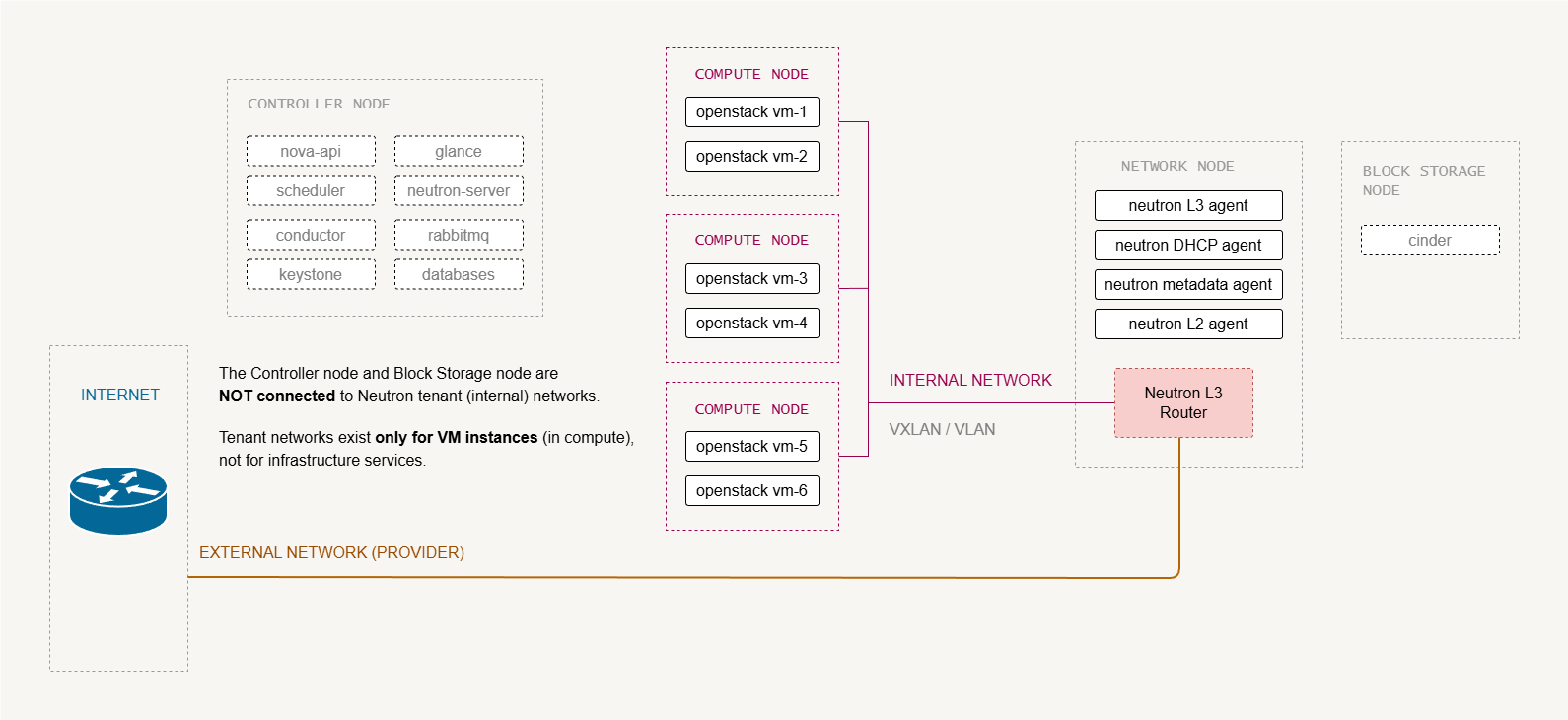
Neutron virtual networks are logical constructs created by NNeutron to connect the tenants to their VMs. They exist on top of the infrastructure networks.
Tenant/Internal Network
This is the network that the VMs actually attach to, amd optionally to external networks via a router.
- Created by projects/tenants
- Isolated L2 segments (from other tenants)
- Uses overlays, such as VSLAN, GRE, VLAN
Example:
VM-1 ---- tenant network ----- VM-2
Here, the traffic stay inside the OpenStack cloud unless routed externally.
External Network (Neutron)
This is a Neutron network that represents the external connectivity for VMs.
- It maps to the physical provider network.
- Maps to provider/external network on network node
- Provides north-south connectivity for VMs
- Used for floating IPs and external connectivity
Example:
VM-1 ---> Router ---> External network ---> Internet
Networking Concepts in Neutron
Below are some basic networking concepts used in Neutron which Allows OpenStack to manage complex networking environments.
-
Network
- Isolated Layer-2 segment, similar to a VLAN
- Provides isolation between tenant networks
- Can contain one or more subnets
-
Subnet
- A block of IP addresses associated with a network.
- Defines IP address ranges and gateway configuration
- Multiple subnets can exist within a single network
-
Port
- A connection point that attaches a device to a network.
- Represents a virtual network interface
- Used by instances, routers, and DHCP services
- Like physical switch ports, but on a virtual switch.
-
Router
- Routes traffic between subnets
- Provides NAT and floating IP functionality
- Allows instances to access external networks
The Basic Neutron Process
The following steps show what happens in Neutron when a new VM is created. These actions occur during the Layer-2 networking stage.
-
VM boot starts
- Nova begins the virtual machine creation process.
- Neutron networking is prepared for the instance.
-
Port is created
- Neutron creates a virtual network port for the VM.
- The DHCP service is notified about the new port.
-
Virtual device is created
- The virtualization layer (such as
libvirt) creates the VM network interface. - The interface represents the VM inside the hypervisor.
- The virtualization layer (such as
-
Port is wired
- The VM interface is connected to the Neutron network.
- The virtual switch links the interface to the correct network segment.
-
VM boot completes
- The instance finishes starting.
- The VM can now obtain an IP address and communicate on the network.
Neutron Architecture
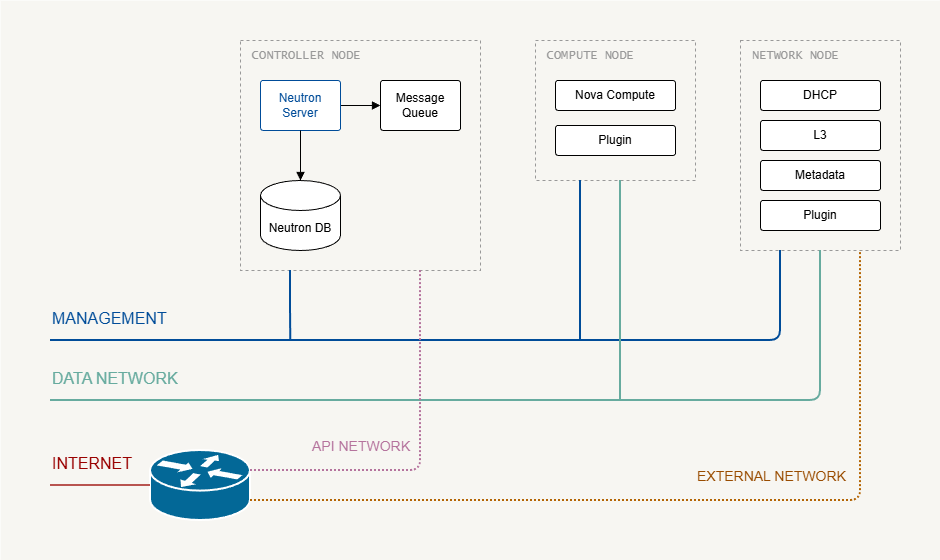
Like Nova, Neutron has control and user plane components. Its key services include:
- API server installed on controller nodes
- SQL database for state and messaging
- Message queue for RPC between components
- L2 plugin and agents for DHCP, metadata, L3, load balancer, and firewall
Network nodes may require high CPU, RAM, and NICs for heavy workloads like virtual routers or load balancers. Small demo setups can combine all components on a single controller.
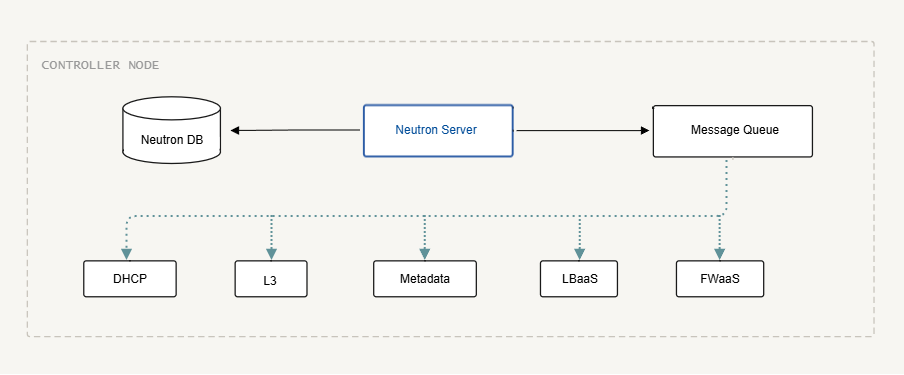
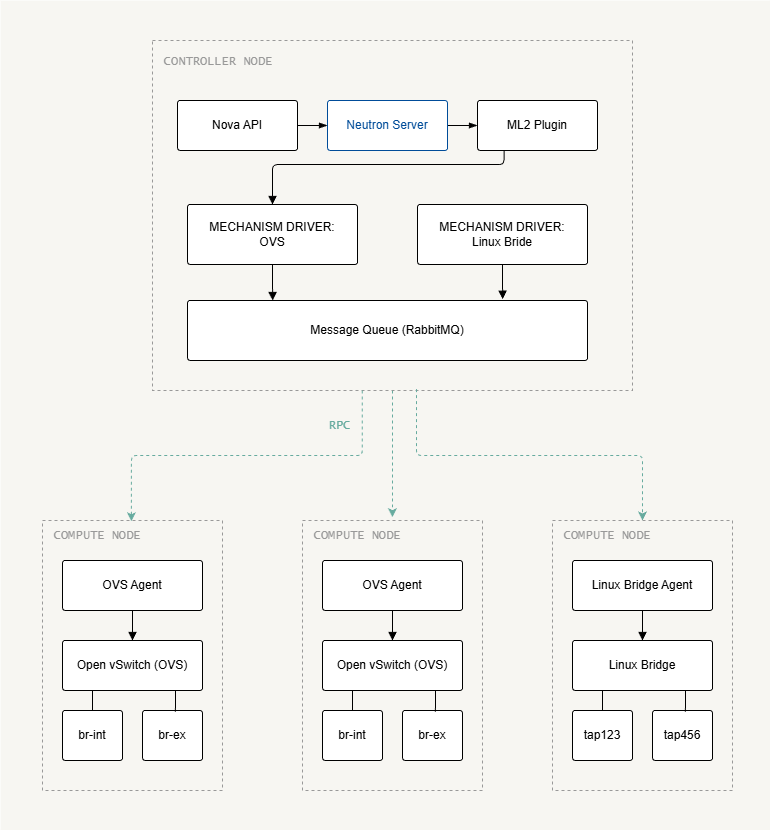
Neutron also runs plugin agents on compute nodes to handle the mechanism driver for the chosen underlay switching technology.
Neutron Components
In most OpenStack documentations, the main Neutron components are:
- Neutron Server
- L2 Agent
- L3 Agent
- DHCP Agent
- Metadata Agent
- Database
- Message Queue
The Neutron server
The Neutron server is the central control service of Neutron. It receives API requests and coordinates networking operations across the environment. It is made up of three modules:
-
REST Service (API)
- Handles incoming API requests from clients
- Validates requests from users and services
- Sends requests to appropriate Neutron modules
- Interacts with the database to store network state
-
RPC Service
- Enables communication between Neutron services and agents
- Uses the message queue to send instructions
- Triggers actions such as port creation or network updates
-
Plugin Framework
- Integrates Neutron with networking backends
- Translates API requests into backend operations
- Loads core plugins and optional service plugins
Plugins are further divided into two types:
-
Core plugins
- Implements the core Neutron API
- Provides Layer-2 networking and IP address management
-
Service plugins
- Provides additional network services
- Examples include load balancing and firewall services
A common implementation is the ML2 (Modular Layer 2) plugin, which allows Neutron to support multiple Layer-2 networking technologies used in datacenters through pluggable drivers.
For more information, please see ML2 Plugin.
Layer-2 Agent
The Layer-2 agent runs on the hypervisor (compute nodes) and manages virtual networking for instances.
- Connects virtual machines to Neutron networks
- Configures virtual switches on the hypervisor
- Notifies Neutron when ports are created or removed
Layer-3 Agent
The Layer-3 agent runs on the network node and provides routing services between Neutron networks.
- Manages virtual routers
- Performs NAT between internal and external networks
- Handles floating IP address routing
The L3 agent allows instances to communicate with external networks such as the internet.
DHCP Agent
The DHCP agent runs on the network node and provides DHCP services to instances.
- Assigns IP addresses to instances
- Configures DNS and gateway information
- Manages DHCP leases for Neutron ports
Metadata Agent
The metadata agent runs on the network node and provides instance metadata services.
- Provides instance metadata to VMs via the metadata API
- Talk to Nova to retrieve instance information
Network Node and Interfaces
Before configuration:
- Ensure network nodes can access management and provider networks
- Provider networks connect floating IPs and external routers
- Compute nodes may run L3 agents for distributed routing
In production environments, it is recommended to separate management traffic from tenant traffic for better security and performance. DNS resolution can also be implemented to further simplify network operations and management.
Neutron Server Deployment
Neutron does not require a separate server. In most deployments, the Neutron server runs on the controller node together with other OpenStack control services.
- Neutron API/server runs on the controller node
- Network agents may run on separate network nodes
- Large deployments often use dedicated network nodes
In small environments or demo labs, all Neutron components can run on the controller node.
- Neutron server
- L3 agent
- DHCP agent
- Metadata agent
- ML2 plugin
- Mechanism driver (Linux Bridge or Open vSwitch)
In larger deployments, Neutron services are distributed across multiple nodes.
- Controller nodes run the Neutron API server
- Network nodes run L3, DHCP, and metadata agents
- Compute nodes run the mechanism driver agent
For more information, please see Installing Neutron.
Control Plane
On the controller:
- Create SQL database for Neutron
- Create OpenStack user, service, and endpoints
- Install Neutron packages (server, ML2 plugin, L3, DHCP, metadata agents)
- Configure mechanism driver (Linux Bridge or Open vSwitch)
Configuration is stored in /etc/neutron/neutron.conf and plugin/agent INI files.
User Plane
On compute nodes:
- Configure network interfaces and DNS
- Install ML2 plugin agent
- Configure
neutron.confwith authentication and control plane settings - Configure mechanism driver agent (Linux Bridge or OVS)
Key Neutron Parameters
In neutron.conf:
| Parameter | Description |
|---|---|
core_plugin | Typically ml2 |
service_plugins | Additional services such as routers, load balancer, firewall |
allow_overlapping_ips | true or false |
transport_url | Connection string for the message queue |
auth_strategy | Usually keystone |
notify_nova_on_port_changes | Sends notifications to Nova when a port is created, deleted, or updated. |
notify_nova_on_status_changes | Sends notifications to Nova when a port’s operational status changes (e.g., up/down). |
In metadata_agent.ini:
| Configuration | Description |
|---|---|
metadata_host | Hostname or IP of the metadata service, usually the controller or a load balancer virtual IP. |
metadata_proxy_shared_secret | Shared secret used between Neutron metadata agent and Nova metadata service for secure communication. |
In /etc/nova/nova.conf (neutron section):
| Configuration | Description |
|---|---|
url | Endpoint URL for the Neutron service. |
auth_url | Keystone authentication URL used for service authentication. |
auth_type | Authentication method, typically password. |
project_domain_name | Keystone domain name of the service project. |
user_domain_name | Keystone domain name of the service user. |
project_name | Name of the service project used for authentication. |
region_name | OpenStack region where the service is located. |
username | Service account username used by Nova to authenticate with Neutron. |
password | Password for the service account. |
service_metadata_proxy | Enables Nova to act as a metadata proxy service for instances. |
metadata_proxy_shared_secret | Same shared secret configured in Neutron metadata agent to secure metada_ |
UPDATE: Parameter names may vary slightly in newer OpenStack releases (e.g., Yoga, Zed).