Blog Post Page Implementation
Overview
This KB documents the implementation of the blog post page customization for /writings/* pages.
TODO:
- Keep changes scoped to blog post pages only
- Remove the side columns (
Recent postsandOn this page/TOC) - Align post page width and spacing with the Writings list view
- Hide author block on post pages
- Add a top navigation affordance (
Back to Writings) for mobile and non-navbar flows - Set blog body text color (excluding the title) to
#2c3b49
Before
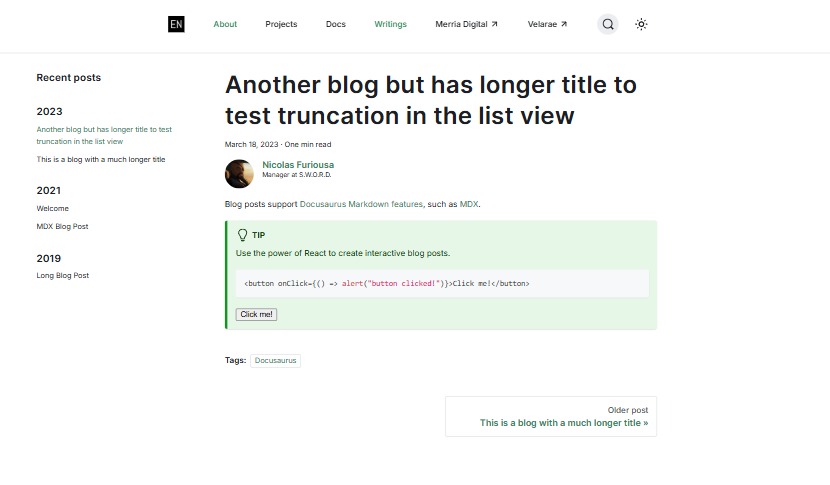
Before this implementation, blog post pages used default Docusaurus post layout behavior:
- 3-column structure on post pages
- Author block rendered under the post title/date
- No quick in-content way to return to
/writings(especially inconvenient on mobile when navbar is collapsed) - Post page body text color inherited default theme color values
The 3-column structure:
- Left sidebar:
Recent posts - Center: blog content
- Right: table of contents (when present)
Note: The screenshot below only showed two columns because the post did not have a a TOC (table of contents), which would normally appear if there are sections in the blog post. The TOC column would normally appear on the right (3rd column), and adds to the clutter on blog post pages.
After
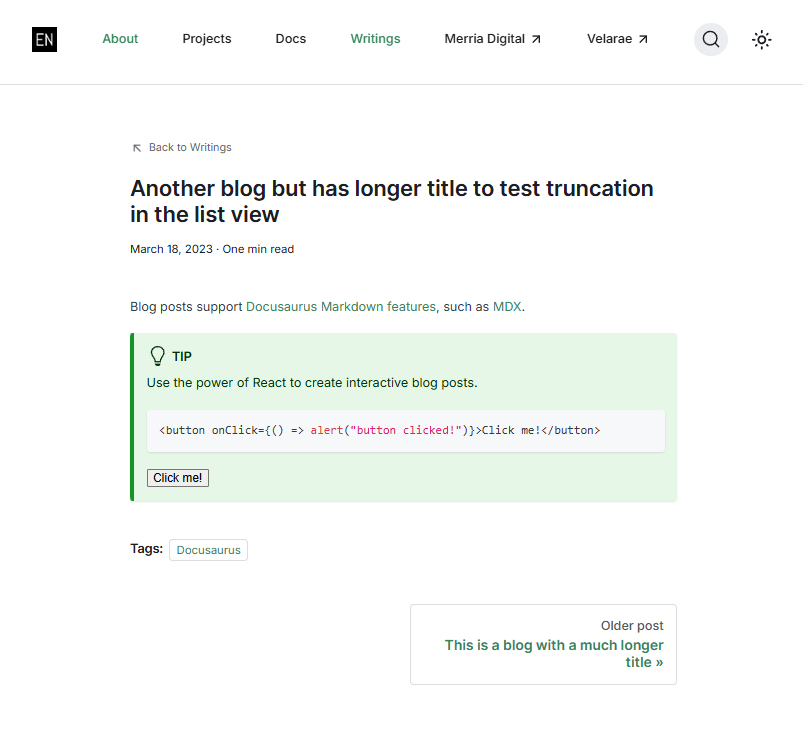
After implementation, blog post pages now behave as a focused reading layout:
- Single-column content experience for blog post pages only
- Left and right side columns are hidden on post pages
- Container width and spacing tuned to match the Writings list style direction
- Author block is not rendered on blog post pages
- A top
Back to Writingslink appears above the title with an inline SVG icon - Blog body text is scoped via
#__blog-post-containerand set to#2c3b49
See screenshot of the updated blog post page below:
Implementation
1. Global CSS approach (with script-injected navigation)
The initial implementation used global CSS rules (in src/css/custom.scss) scoped by page classes:
html.blog-wrapper.blog-post-page ...
This proved effective but made custom.scss longer than desired, so I decided to extract blog-post-page-specific styles into a dedicated CSS file.
2. Dedicated blog CSS file
The styles were extracted into a dedicated file (src/css/blog-pages.css) and wired through customCss in docusaurus.config.ts.
This improved organization, but navigation enhancement (Back to Writings) was still handled with a runtime script.
3. Theme-driven final implementation (current)
The final version migrated behavior into theme overrides:
- Swizzled header override using
src/theme/BlogPostItem/Header/index.tsx - Header/style rules in
src/theme/BlogPostItem/Header/blogpostitem.module.css
The previous script-based injection approach was removed.
Final Changes (Current State)
Added/Customized:
-
src/theme/BlogPostItem/Header/index.tsx- Adds
Back to Writingslink forisBlogPostPage - Uses
useBaseUrl('/writings')for consistent routing - Renders provided SVG icon inline
- Skips
BlogPostItemHeaderAuthorswhenisBlogPostPageis true
- Adds
-
src/theme/BlogPostItem/Header/blogpostitem.module.css- Styles back link/icon
- Scopes post-page-only layout overrides through
:global(...) - Hides side columns on blog post pages
- Sets post title size (
24px) - Sets blog body text color:
Code:
:global(html.blog-wrapper.blog-post-page article #__blog-post-container) {
  color: #2c3b49;
}
Removed the legacy interim approach:
static/js/blog-post-nav.js(script injection approach)src/css/blog-pages.css(intermediate extracted stylesheet)- Config wiring for removed script/CSS from
docusaurus.config.ts
Notes:
-
This KB is specifically for blog post page customization and complements 041-Writings-Landing-Page-Customization.md
-
If future enhancements are needed (breadcrumbs, next/previous prominence, reading progress), they should be implemented in
src/themefirst to stay consistent with this approach.
Additional:
-
Scope by page class -
html.blog-wrapper.blog-post-pageensures styling only affects blog post pages, not docs/home/projects. -
Theme override over DOM mutation - Replacing script injection with
src/themeoverride is cleaner, more maintainable, and less fragile. -
Render-level author removal - Authors are not rendered in post-page mode (instead of only hidden by CSS), reducing unnecessary DOM output.
-
Container-scoped text color - Applying color to
#__blog-post-containerkeeps header/title styling independent.
Validation
- Open any
/writings/<slug>page. - Confirm
Back to Writingsappears above the title. - Confirm SVG arrow icon renders and inherits current text color.
- Confirm clicking the link routes to
/writings. - Confirm left
Recent postssidebar is hidden. - Confirm right TOC/column is hidden.
- Confirm author block is absent on blog post pages.
- Confirm title remains readable and unchanged in style intent.
- Confirm blog body text color in
#__blog-post-containeris#2c3b49. - Verify behavior on mobile (
<= 600px) spacing and readability.