Configuration-Driven Development
Overview
Configuration-driven development is an approach where application logic stays in code while runtime behavior is controlled through external configuration files.
- Code defines what the system does
- Configuration defines how it behaves
In this model, application code handles execution logic, while configuration files control parameters such as retries, timeouts, or feature toggles. This makes systems easier to maintain, update, and extend.
Where does AI fit in?
AI can further enhance configuration-driven development in several ways. It can assist in:
- Design configuration structures
- Validate schemas
- Suggest safe migration strategies during system changes
Sample Codebase
For this lab, we'll use a simple project that simulates a configurable execution pipeline. It does not do heavy computation, but it demonstrates this engineering pattern:
Running the same logic while changing behavior through configuration instead of code changes.
Examples in real systems:
- Data pipelines (ETL jobs in analytics systems)
- CI/CD pipelines (build, test, deploy steps)
- ML training pipelines (hyperparameters, retries, datasets)
- Background job workers (queue processing systems)
In all of these, the core logic stays stable, but behavior changes frequently.
The code files can be found here: Github
Project structure:
├── initial
│   ├── config.yaml
│   ├── main.py
│   └── pipeline.py
│
├── modular
│   ├── config.yaml
│   ├── main.py
│   └── pipeline.py
│
└── validation-layer
    ├── config.yaml
    ├── main.py
    ├── pipeline.py
    └── validator.py
The original files stored in ("initial" folder):
-
pipeline.pycontains the core logicThe pipeline contains only execution logic and reads all variable settings from configuration.
See code
# pipeline.pyimport timedef run_pipeline(config):name = config["pipeline"]["name"]retries = config["pipeline"]["retries"]print(f"Starting pipeline: {name}")for attempt in range(retries):print(f"Running attempt", attempt + 1)time.sleep(1)print("Pipeline completed successfully")return {"status": "success", "pipeline": name}The goal is to avoid hardcoding values so behavior can be changed externally
-
config.yamldefines runtime settingsThe configuration defines runtime behavior without touching code.
See code
pipeline:name: tourism_pipelineretries: 3timeout: 120 -
main.pyruns the applicationThe entry point loads configuration and passes it into the pipeline.
This cleanly separates execution from configuration.
See code
# main.pyimport yamlfrom pipeline import run_pipelinewith open("config.yaml", "r") as file:config = yaml.safe_load(file)result = run_pipeline(config)print(result)
Before running the code, create a Python virtual environment and activate it.
python3 -m venv ~/venv
source ~/venv/bin/activate
Install the required dependencies.
pip install pyyaml
Go to the initial folder and run the program.
cd initial
python main.py
Output:
Starting pipeline: tourism_pipeline
Running attempt 1
Running attempt 2
Running attempt 3
Pipeline completed successfully
{'status': 'success', 'pipeline': 'tourism_pipeline'}
The program prints the pipeline execution steps, then returns a final result dictionary.
Using AI to Design the Configuration Approach
AI can help define what should be configurable versus what should remain in code.
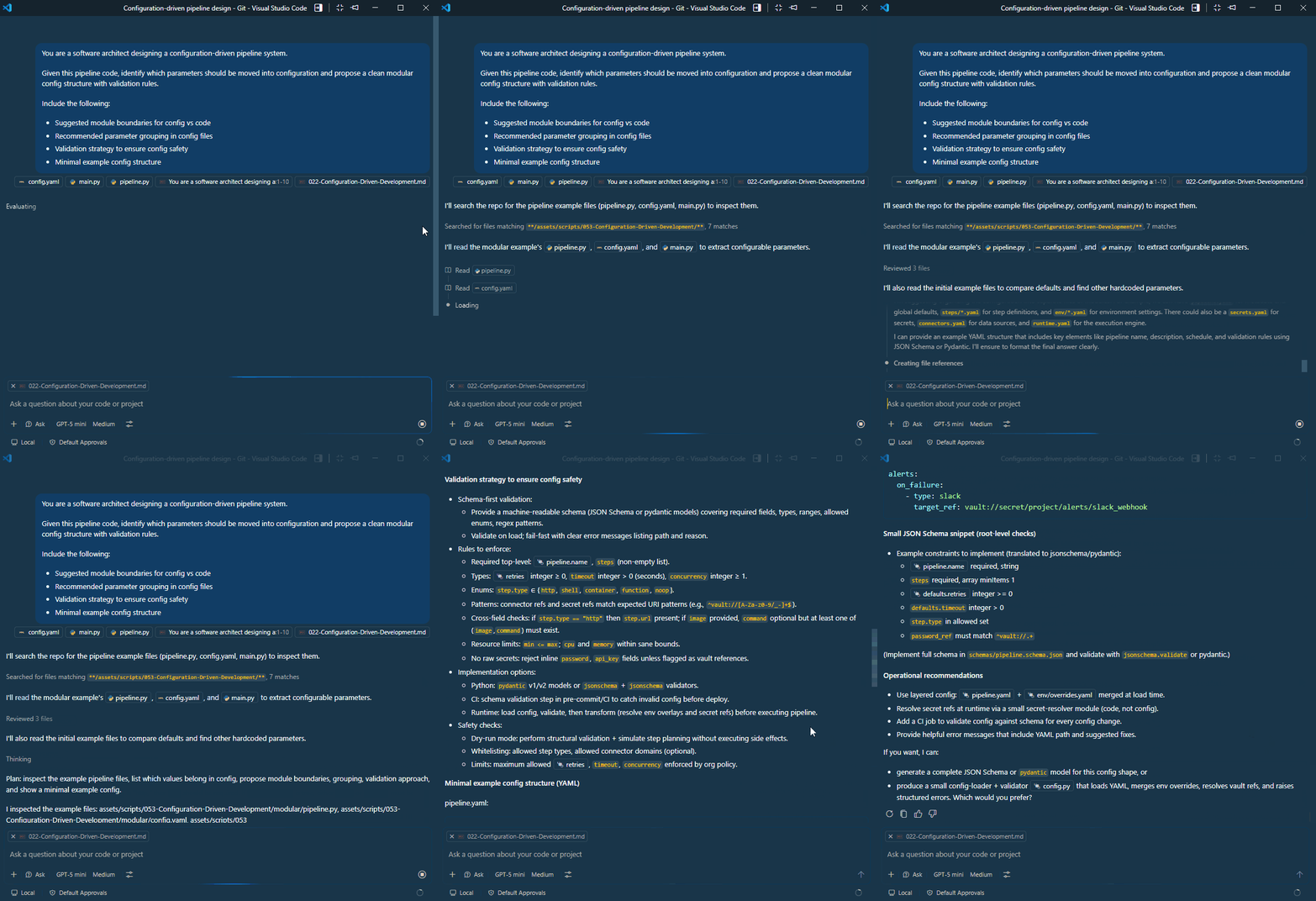
Sample prompt:
You are a software architect designing a configuration-driven pipeline system.
Given this pipeline code, identify which parameters should be moved into configuration and propose a clean modular config structure with validation rules.
Include the following:
- Suggested module boundaries for config vs code
- Recommended parameter grouping in config files
- Validation strategy to ensure config safety
- Minimal example config structure
AI will respond with a proposal that includes clear guidelines on what belongs in code (core logic) versus config (parameters), how to group parameters, and how to validate them.
Choosing a Config Format
After defining the config structure, we need to choose a file format. This choice impacts readability, tooling support, and long-term maintainability. We can use AI to compare popular formats like YAML, JSON, and TOML based on our specific use case.
Sample prompt:
You are a software architect designing a configuration-driven pipeline system.
Given this Python pipeline system that will be used by multiple teams, choose a configuration file format that balances readability, tooling support, and validation capabilities.
Compare YAML, JSON, and TOML for a Python pipeline system and recommend the best option based on these criteria. Provide reasoning for your choice.
Explain why and when each format might be preferred, and suggest any libraries or tools that would help with validation and parsing in Python.

As we can see, the model recommends YAML as the best option for our use case due to its readability and strong support for complex data structures.
It also provides suggestions for libraries like PyYAML for parsing and pydantic for validation, which can help ensure our configuration files are both easy to read and robust against errors.
Preventing Configuration Drift
Configuration drift occurs when configuration files become inconsistent over time. Some common examples include:
- Renamed keys that are not updated everywhere
- Incorrect data types being introduced
- Required fields being missing in certain environments
These issues can cause unexpected failures even when the application code itself has not changed.
To prevent this, we can ask the model to generate a validation layer that checks configuration files before execution. The validator ensures that required settings exist and that values have the expected format.
Sample prompt:
You are a software architect designing a configuration-driven pipeline system.
Given this YAML configuration structure, generate a Python validation function that checks for the following:
- Required fields
- Correct data types
- Overall consistency before the pipeline runs.
The validator should raise clear errors if any issues are found in the configuration file.
The example below validates that the pipeline section exists and that the retries setting is an integer.
# validator.py

def validate_config(config):
    if "pipeline" not in config:
        raise ValueError("Missing pipeline section")

    pipeline = config["pipeline"]

    if "defaults" not in pipeline:
        raise ValueError("Missing defaults section")

    defaults = pipeline["defaults"]

    if not isinstance(defaults["retries"], int):
        raise ValueError("retries must be an integer")

    return True
The validation step can then be added to the application startup process. Before running the pipeline, the configuration is loaded and validated.
# main.py

import yaml
from pipeline import run_pipeline
from validator import validate_config

with open("config.yaml", "r") as file:
    config = yaml.safe_load(file)

validate_config(config)
result = run_pipeline(config)
print(result)
By validating configuration before execution, only valid and consistent settings are allowed to reach the pipeline. This reduces the risk of failures caused by configuration drift.
We can test if the code still work by running the main.py file.
EDIT: The updated files are stored in the validation-layer folder. You can run the program from there to see the validation in action.
cd validation-layer
python main.py
Output:
Starting pipeline: tourism_pipeline
Running attempt 1
Running attempt 2
Running attempt 3
Pipeline completed successfully
{'status': 'success', 'pipeline': 'tourism_pipeline'}
To test if the validation works, try changing the retries value in config.yaml to a non-integer value (e.g., "three") and run the program again.
pipeline:
  name: tourism_pipeline
  ...
  defaults:
    retries: three
    # retries: 3
Output:
ValueError: retries must be an integer
It returns a clear error message indicating that retries must be an integer. This ensures that invalid configurations are caught early and prevents them from causing runtime errors.
CI/CD Integration for Config Safety
Once we have a validation layer in place, we can integrate it into our CI/CD pipeline to automatically check configuration changes before they are deployed to production.
AI can help generate CI/CD workflows that automatically validate configuration files during pull requests and deployments.
Sample prompt:
Given this Python validator and YAML configuration structure, generate a CI/CD workflow that:
- Runs configuration validation automatically
- Fails the pipeline if validation errors are found
- Prevents invalid configuration changes from being deployed
AI responds with a sample GitHub Actions workflow that runs the validator on every pull request and deployment. If the validation fails, the workflow will stop and prevent the changes from being merged or deployed.
name: Config Validation

on:
  pull_request:

jobs:
  validate-config:
    runs-on: ubuntu-latest

    steps:
      - name: Checkout code
        uses: actions/checkout@v4

      - name: Setup Python
        uses: actions/setup-python@v5
        with:
          python-version: "3.10"

      - name: Install dependencies
        run: pip install pyyaml

      - name: Validate config
        run: python validator.py