Micro-Partitions
Overview
Large tables in Snowflake can contain billions of rows, so queries need a way to avoid scanning everything. Instead of traditional indexes, Snowflake avoids full table scans by splitting data into micro-partitions and using metadata to skip unnecessary reads.
- Only needed columns are read
- Metadata is used to skip data
- No manual indexing is required
This design helps Snowflake decide what data to read before scanning anything, which keeps large queries efficient.
Micro-Partitions
Snowflake automatically breaks data into small storage chunks when it is loaded.
- Data is split into 50 to 500 MB chunks
- Each column is stored separately
- Compression is applied automatically
Micro-partitions allow Snowflake to read only the exact data needed for a query instead of scanning full rows. This makes large table queries faster and more efficient without manual tuning.
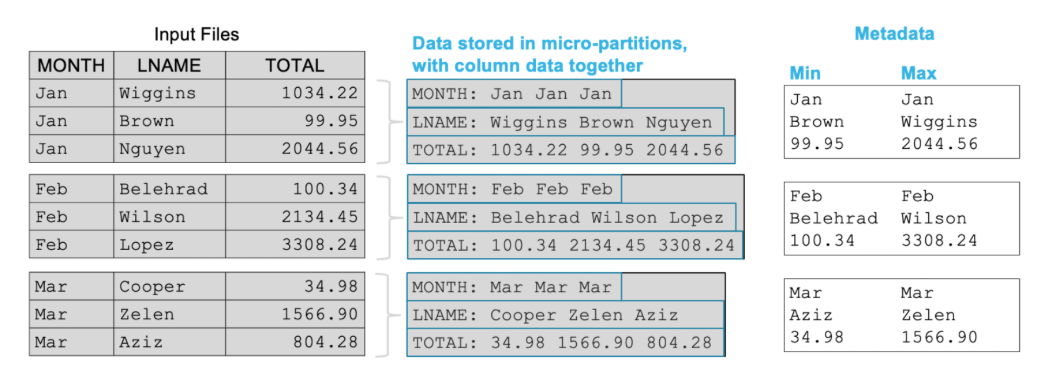
Each micro-partition stores summary information ("metadata") about its data.
- Stores min and max values
- Tracks row counts
- Tracks null and distinct values
This metadata is managed automatically by Snowflake and is stored in the cloud services layer. It is used to quickly decide whether a partition should be scanned or skipped.
Partition Pruning
Snowflake uses metadata to skip unnecessary partitions during queries. This process is called partition pruning and it improves query performance.
- Checks min and max values per partition
- Skips partitions outside filter range
- Reduces data scanned
In the example below, a query filters sales data for the month of May.
SELECT *
FROM sales
WHERE order_date BETWEEN '2022-05-01' AND '2022-05-31';
Snowflake evaluates each partition before scanning it and skips any partition that does not contain May data. Here, only partition P5 is scanned because its date range matches May. All other partitions are skipped based on metadata.
Note: Each row below represents a micro-partition, not individual rows.
| Partition | Min Date | Max Date | Total Rows | Region | Remarks |
|---|---|---|---|---|---|
| P1 | 2022-01-01 | 2022-01-31 | 120,000 | East | Skipped if filtering May |
| P2 | 2022-02-01 | 2022-02-28 | 115,000 | West | Skipped if filtering May |
| P3 | 2022-03-01 | 2022-03-31 | 130,000 | North | Skipped if filtering May |
| P4 | 2022-04-01 | 2022-04-30 | 125,000 | South | Skipped if filtering May |
| P5 | 2022-05-01 | 2022-05-31 | 140,000 | East | Selected for query |
| P6 | 2022-06-01 | 2022-06-30 | 110,000 | West | Skipped if filtering May |
| P7 | 2022-07-01 | 2022-07-31 | 118,000 | North | Skipped if filtering May |
| P8 | 2022-08-01 | 2022-08-31 | 122,000 | South | Skipped if filtering May |
| P9 | 2022-09-01 | 2022-09-30 | 119,000 | East | Skipped if filtering May |
| P10 | 2022-10-01 | 2022-10-31 | 121,000 | West | Skipped if filtering May |
| P11 | 2022-11-01 | 2022-11-30 | 117,000 | North | Skipped if filtering May |
| P12 | 2022-12-01 | 2022-12-31 | 123,000 | South | Skipped if filtering May |
Clustering
Clustering improves pruning by organizing how data is stored across partitions.
- Similar values are grouped together
- Improves filter performance
- Works best on frequently queried columns
If data is loaded in order, such as by date, pruning works naturally. If values are scattered, pruning becomes less effective.
We can also define a clustering key to optimize future queries on specific columns. This is especially useful when the column is not naturally clustered and pruning is inefficient.
When to Use a Clustering Key
A clustering key should only be used in the following scenarios:
- Table is very large (100GB+)
- Queries frequently filter the same column
- Existing pruning is inefficient
Clustering is not useful for small tables or rarely queried columns. It should be applied only when it clearly improves performance.
The sweet spot for a clustering key is moderate cardinality: enough distinct values to create meaningful partition boundaries, but not so many that every row lands in its own group. Columns like dates and country codes hit that balance.
Cardinality and Cost Considerations
Note that not all columns are good clustering candidates.
- Low distinct values reduce effectiveness
- High cardinality improves clustering results
- Re-clustering adds compute cost
Snowflake automatically maintains clustering in the background using its own compute resources.
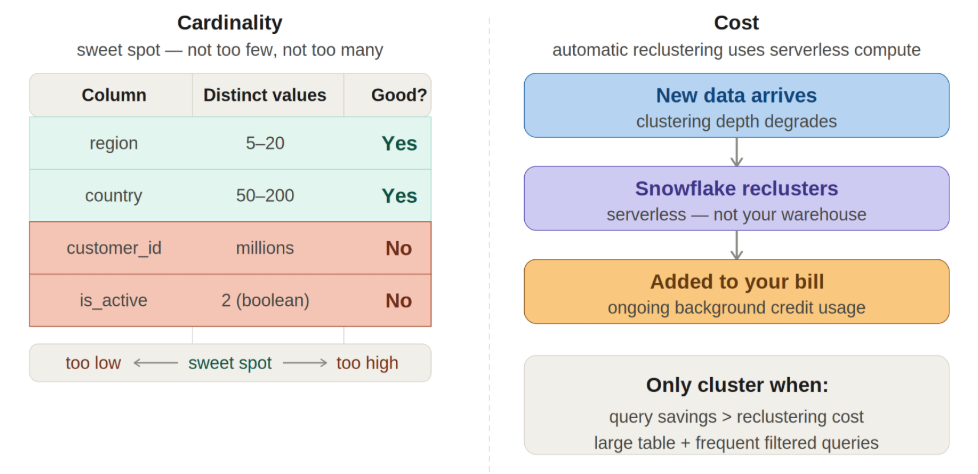
This improves performance over time but also adds cost, so clustering should be used intentionally rather than by default.