Virtual Warehouses
Overview
If multiple teams use the same warehouse, queries may start to queue and slow down.
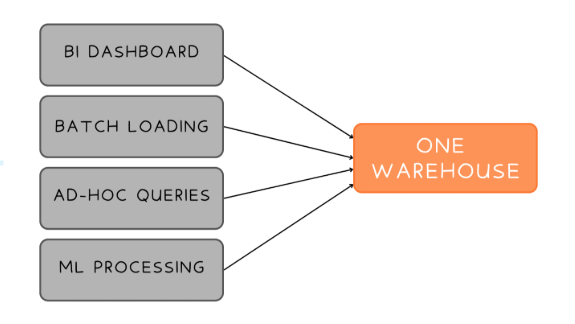
The solution is to create separate warehouses for different teams or workloads. This way, there is no contention and each workload can run independently without blocking others.
Warehouse Types
Snowflake provides different warehouse types depending on workload requirements.
| Warehouse Type | Description | Common Use Cases |
|---|---|---|
| Standard | General-purpose warehouse for most workloads | SQL queries, BI dashboards, and data loading |
| Snowpark-Optimized | Higher memory and compute configuration | Machine learning and memory-intensive processing |
Standard warehouses work for most environments while Snowpark-optimized warehouses are mainly used for workloads that require additional memory and compute flexibility.
Warehouse Sizes
Warehouses come in multiple sizes depending on workload demand.
| Size | Typical Usage |
|---|---|
| X-Small | Development and light queries |
| Small | General analytics and testing |
| Medium | Moderate production workloads |
| Large | Heavy analytics and reporting |
| XL and Above | Very large or complex processing |
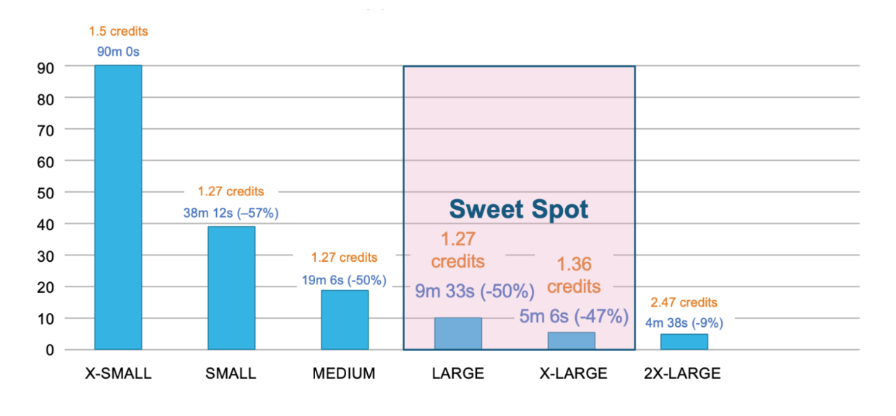
Larger warehouses are not always more expensive overall. A larger warehouse may complete the same query faster, resulting in similar total credit usage.
- Small warehouses run longer
- Larger warehouses complete faster
- Cost may stay similar depending on runtime
The goal is to find the smallest warehouse that delivers acceptable performance without wasting resources.
This is commonly called the "sweet spot" for warehouse sizing.
Auto-Suspend and Auto-Resume
Snowflake warehouses can automatically stop and start to reduce costs. There are two key settings:
AUTO_SUSPENDstops idle warehousesAUTO_RESUMEstarts warehouses automatically
In the example below, the warehouse automatically suspends after 5 minutes of inactivity.
CREATE WAREHOUSE analyst_wh
AUTO_SUSPEND = 300
AUTO_RESUME = TRUE;
These settings are important because warehouses continue consuming credits while running, even if no queries are active.
Multi-Cluster Warehouses
Multi-cluster warehouses help handle high concurrency workloads. When demand spikes, additional clusters automatically start. When demand drops, they stop.
You can set the minimum and maximum number of clusters, and Snowflake manages the rest. This is especially useful when many users or applications run queries simultaneously.
CREATE WAREHOUSE engineering
  WAREHOUSE_SIZE = 'LARGE'
  MIN_CLUSTER_COUNT = 1
  MAX_CLUSTER_COUNT = 3
  SCALING_POLICY = 'STANDARD';
NOTE: Multi-cluster warehouses are available in Enterprise Edition and above.
Scaling Warehouses
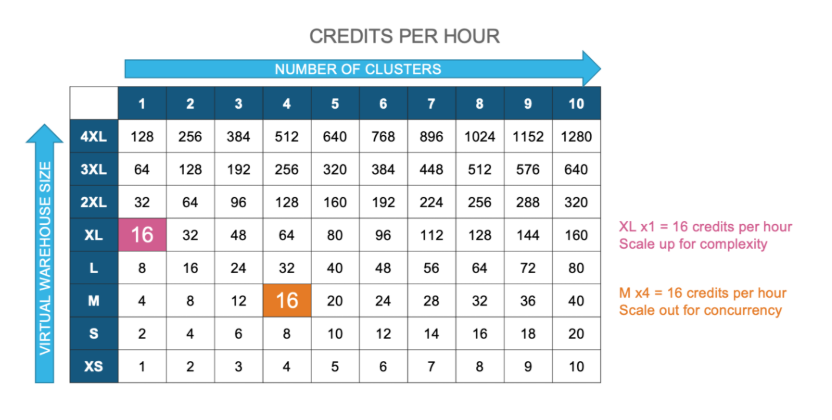
Snowflake supports two ways to improve performance.
| Scaling Method | Purpose |
|---|---|
| Scaling Up | Increase warehouse size for heavy queries |
| Scaling Out | Add clusters for many concurrent queries |
Scaling up helps a single large query run faster. Scaling out helps many users run workloads at the same time without queueing.
Once multi-cluster warehouses are set up, you can choose between two scaling policies:
| Policy | Behavior | Best For |
|---|---|---|
| Standard | Adds clusters immediately when queries queue | Unpredictable workloads |
| Economy | Adds clusters only if demand stays high | Stable and predictable workloads |