Object Hierarchy
Overview
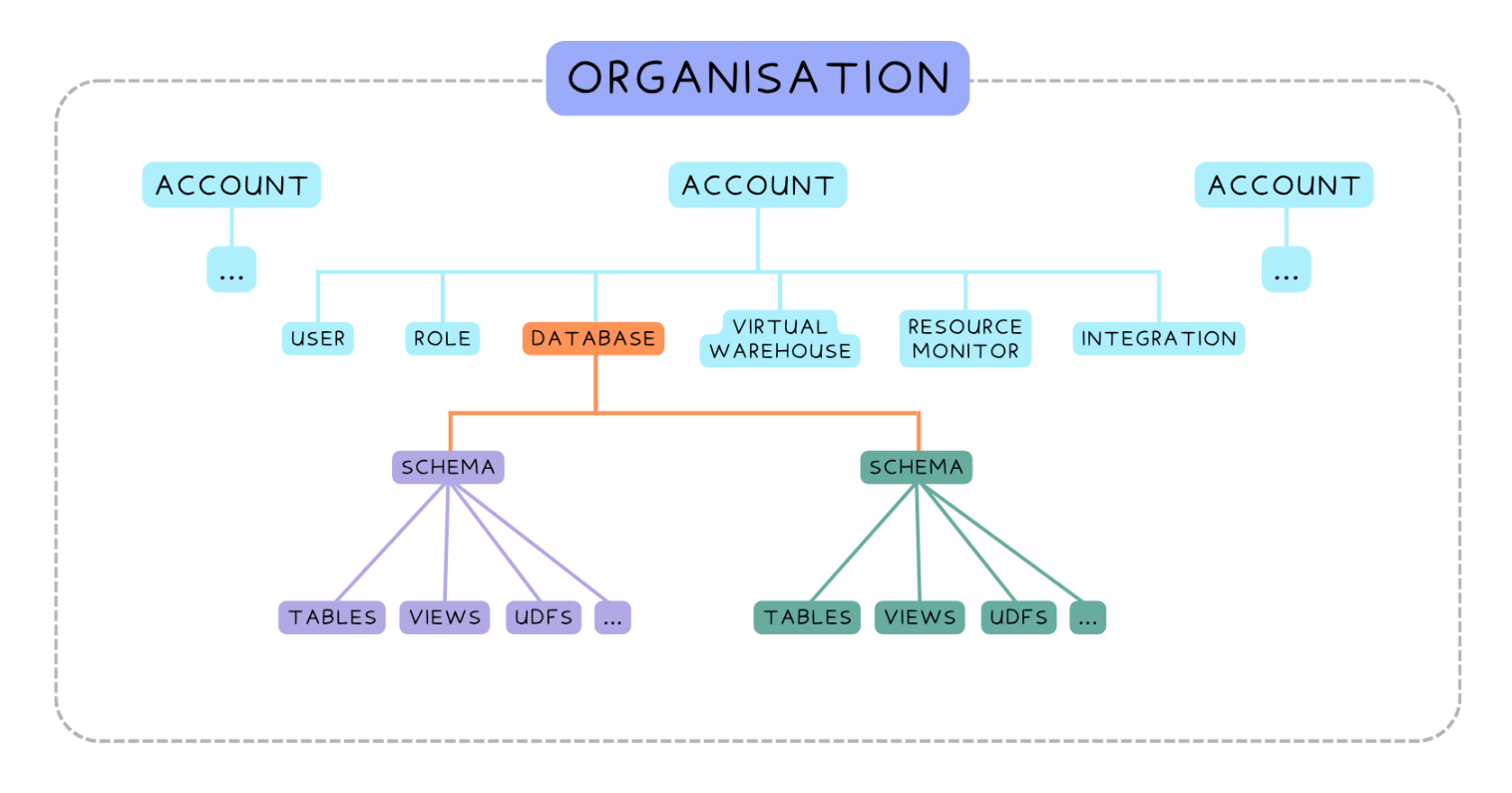
Snowflake organizes everything into layers so objects are easier to manage, secure, and query. Each level controls what sits below it.
- Organization Level
- Account Level
- Database and Schema Level
- Object Level
This structure ensures data, access, and compute are all clearly separated.
Hierarchy
Organization Level
The organization is the highest layer and is used mainly for enterprise management.
- Groups multiple Snowflake accounts
- Handles centralized billing
- Supports cross-account setup and replication
This level is mostly used by large companies managing many environments. It acts like the top container for everything.
Account Level
The account is your main Snowflake environment.
- Bound to a cloud provider and region
- Defines the Snowflake edition you are using
- Contains all users, roles, warehouses, and integrations
Everything you work with exists inside this boundary. When people say “our Snowflake account,” they are referring to this level.
Note that some objects exist globally inside the account and are not tied to a database.
- Users
- Roles
- Virtual Warehouses
- Resource Monitors
- Integrations
- Databases
These objects control access, compute, and system behavior across the entire environment. They are shared across all databases.
Database and Schema Level
Databases organize data into logical containers, and schemas organize structure inside each database.
- Databases group related data together
- Schemas split data into logical areas like
RAW,STAGING, andMARTS - Helps separate different stages of data processing
For example, a database called ANALYTICS might contain schemas for raw data, cleaned data, and reporting data. This makes data easier to manage and understand.
Object Level
Objects are the actual data structures you work with.
- Tables
- Views
- User Defined Functions
- Stored Procedures
These live inside schemas and represent the real data and logic used in queries. Knowing where each object sits helps with permissions and querying.
Account vs Database Objects
Not all objects live in a database. Some exist at the account level while others live inside databases.
- Account-level objects control system-wide behavior
- Database-level objects store and transform data
- Warehouses can be shared across databases
- Tables belong to a single schema
This separation is important because access rules change depending on where the object exists. Compute is shared, but data is scoped.
Context Setup Before Queries
Before running queries, Snowflake needs a working context so it knows what to use. This includes:
- Role
- Warehouse
- Database
- Schema
These define what you can access and where queries run. If the context is wrong, queries may fail even if the SQL is correct.
In the example below, the variables are the role, warehouse, database, and schema used for the session.
USE ROLE ANALYST;
USE WAREHOUSE COMPUTE_WH;
USE DATABASE ANALYTICS;
USE SCHEMA MARTS;
This sets the session context so all queries run with the correct permissions and access. You can check the current context at any time using:
SELECT CURRENT_ROLE(), CURRENT_WAREHOUSE(), CURRENT_DATABASE(), CURRENT_SCHEMA();
Session Variables
Session variables let you store temporary values during a session. They are used only within the current session and are useful for simplifying repeated logic.
In the example below, the variable min_users stores a numeric threshold used in queries.
SET min_users = 100;
To use the variable in a query, reference it with a dollar sign:
SELECT *
FROM users
WHERE user_count > $min_users;
Expected result: Filtered rows where user count is greater than 100.
Parameter Hierarchy
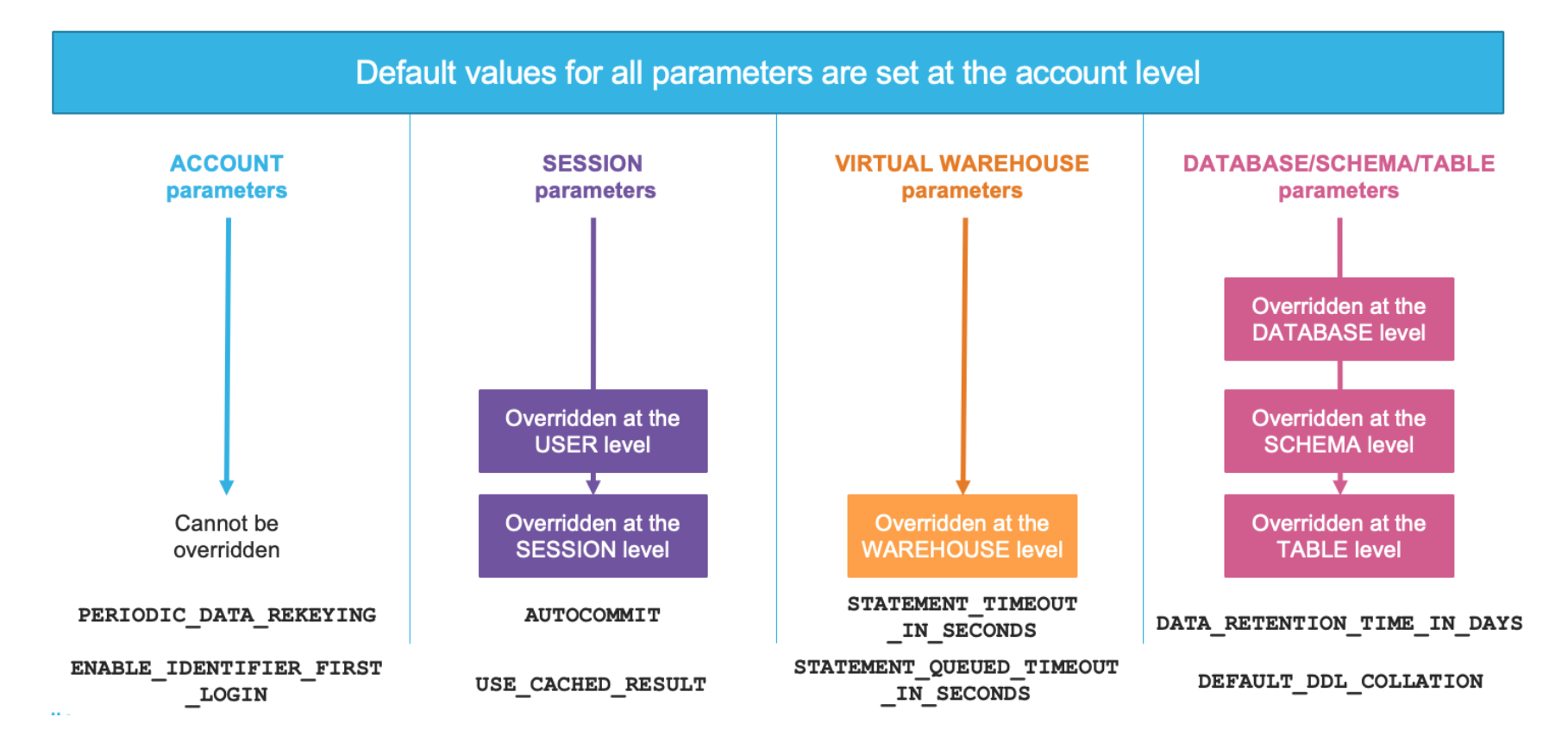
Snowflake settings follow a hierarchy where lower levels override higher ones.
- Account parameters apply globally
- Session parameters can override account defaults
- Warehouse parameters control compute behavior
- Table parameters control data-level behavior
For example, a retention setting might be defined at the account level but overridden for important tables. The lowest applied level always wins, so configuration becomes more precise as you go deeper in the hierarchy.
Metadata Views
INFORMATION_SCHEMA
Every database in Snowflake includes a system schema called INFORMATION_SCHEMA. It is read-only and contains metadata about database objects.
- Shows tables and views in a database
- Helps you understand structure before querying
- Provides safe access to metadata only
For example, you can query table information using system views like TABLES.
SELECT *
FROM INFORMATION_SCHEMA.TABLES;
This helps you see what objects exist before running any business logic queries.
To list all schemas in the current database, you can use:
SELECT schema_name FROM INFORMATION_SCHEMA.SCHEMATA;
INFORMATION_SCHEMA.COLUMNS
INFORMATION_SCHEMA.COLUMNS gives detailed information about table columns. It helps you understand how data is structured inside tables. It shows the following:
- Column names
- Data types
- Nullability rules
This is useful when joining tables or building pipelines because you need to ensure data types match correctly.
For example, the query below checks column structure for a specific table stored in the variable table_name.
SELECT *
FROM INFORMATION_SCHEMA.COLUMNS
WHERE TABLE_NAME = 'users';
This helps you understand table structure without opening the table directly, which makes development safer and more efficient.
RBAC (Role-Based Access Control)
Snowflake uses Role-Based Access Control (RBAC) to manage permissions. Every object is controlled through roles, not users.
- Roles own objects and define permissions
- Users inherit permissions through roles
- Access is controlled using privileges like
SELECTorUSAGE
Common privileges include:
SELECTfor reading dataINSERT,UPDATE,DELETEfor modifying dataUSAGEfor accessing databases, schemas, and warehousesOWNERSHIPfor full control of objects
To access data in Snowflake, a role must have the correct privileges at each level. Missing one level can block access even if others are correct.
- Grant
USAGEon database first - Grant
USAGEon schema next - Grant
SELECTon tables last
In the example below, access is granted step by step using a role called ANALYST_ROLE.
GRANT USAGE ON DATABASE analytics_db TO ROLE ANALYST_ROLE;
GRANT USAGE ON SCHEMA analytics_db.public TO ROLE ANALYST_ROLE;
GRANT SELECT ON TABLE analytics_db.public.users TO ROLE ANALYST_ROLE;
This ensures the role can access and read data correctly while still following the principle of least privilege.