GPU Optimization
Overview
Modern AI training uses large amounts of compute, and small inefficiencies can increase cost quickly.
- Lower efficiency means longer training time.
- Longer training time means higher spend.
- Repeated interruptions reduce useful work.
ML Productivity Goodput is a practical way to measure how much real training progress you get from allocated GPU resources.
For machine family selection and provisioning context, see:
Goodput
Historically, goodput was a networking term that measured useful application-level throughput.
In ML training, goodput means useful training progress, not just raw data processing.
- Throughput asks, "How much work is being processed?"
- Goodput asks, "How much of that work actually advances training?"
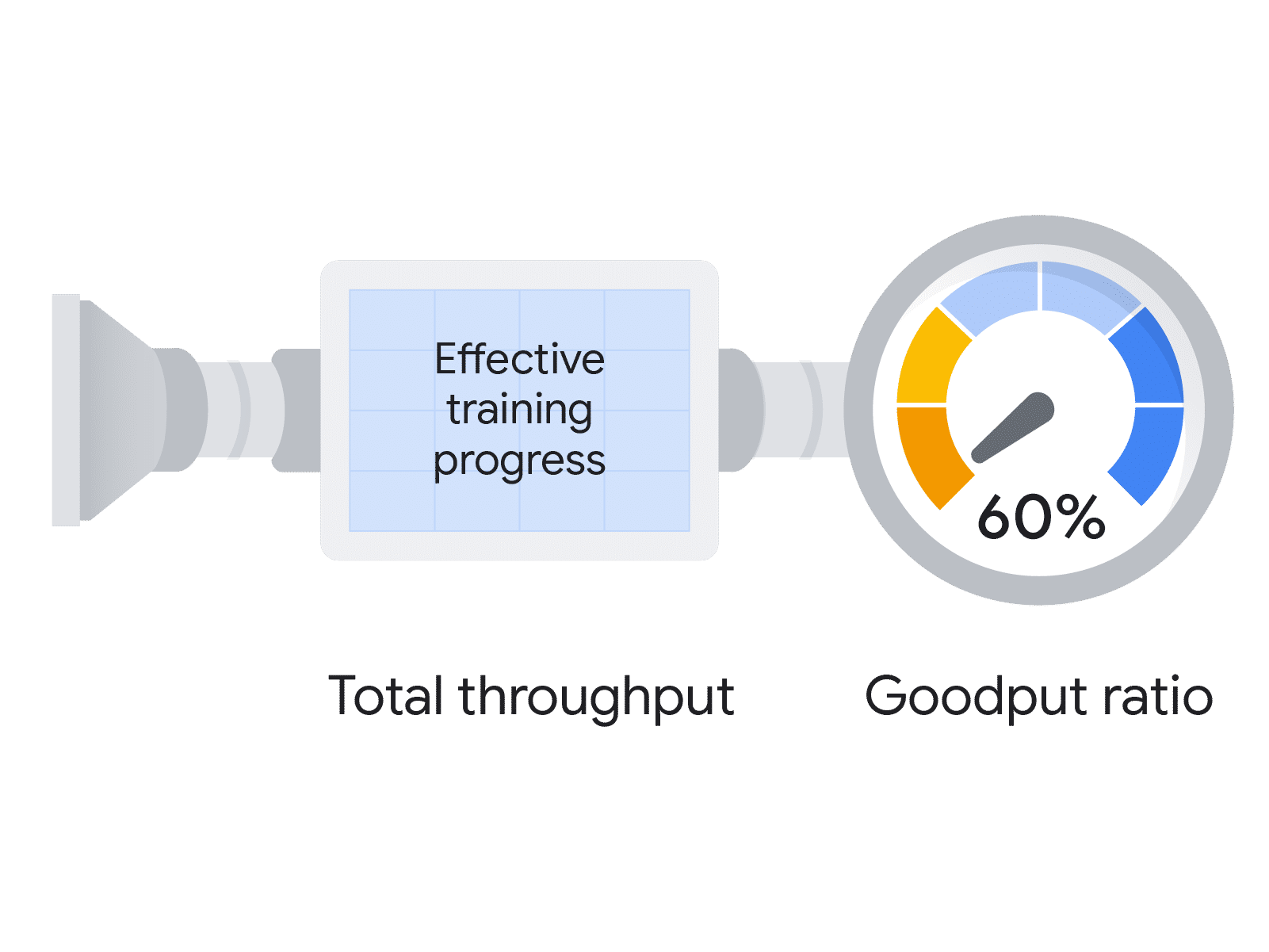
The goodput ratio is a unitless efficiency metric.
- Numerator: effective training progress.
- Denominator: total potential throughput.
This gives a clear percentage-like signal for training efficiency.
For large clusters, interruption and recovery costs scale quickly, so goodput directly affects project cost and delivery time.
ML Productivity Goodput
ML Productivity Goodput is commonly broken into three components.
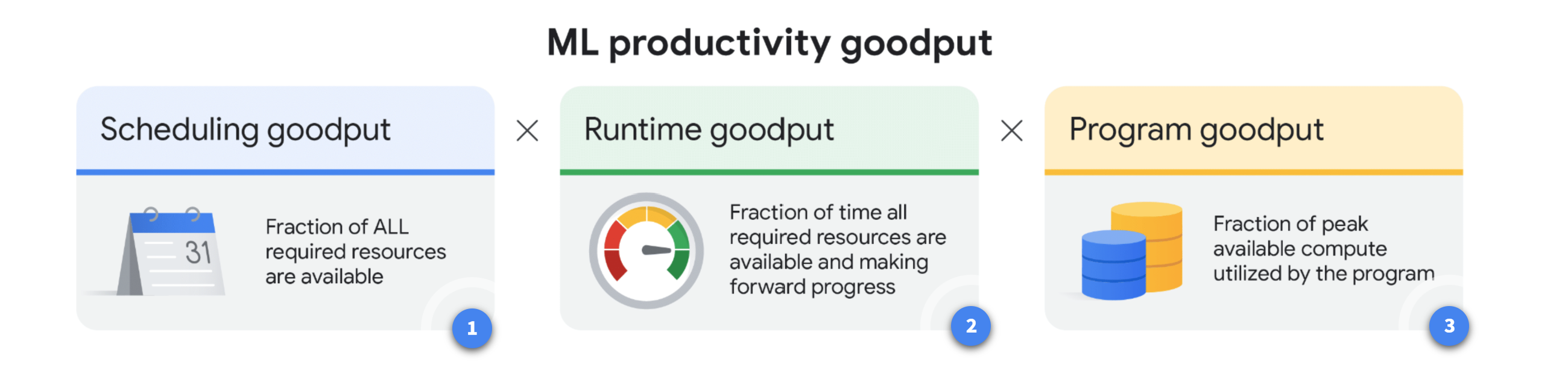
AI Hypercomputer, a supercomputing architecture from Google, is designed with these goodput metrics in mind. It integrates specific capabilities to optimize program and runtime goodput across the framework, runtime, and orchestration layers.
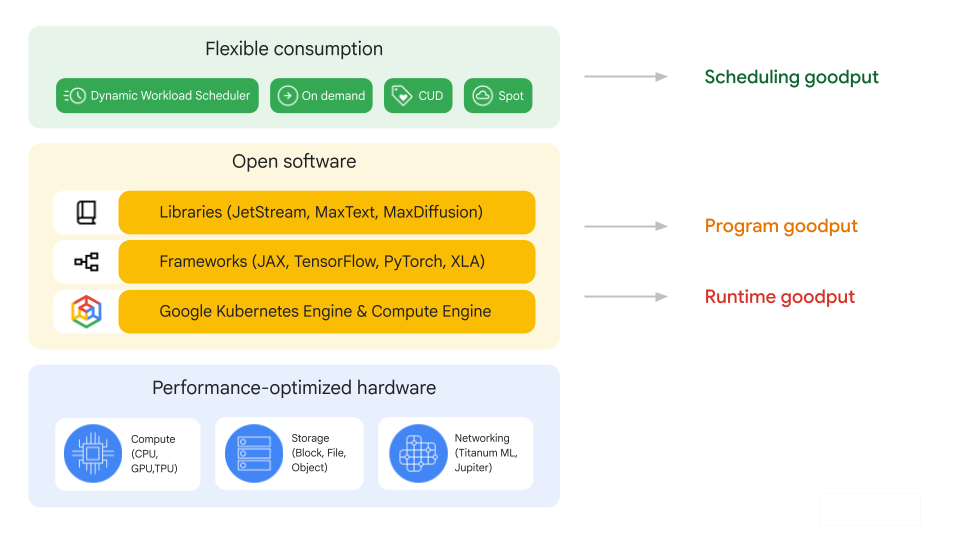
Scheduling Goodput
Scheduling goodput measures the fraction of time that all required resources are available for the training job.
Stockouts and preemptions can reduce this value, especially with on-demand or preemptible capacity.
To improve scheduling goodput:
| Technique | Practical Effect |
|---|---|
| Resource reservation | Improves availability by reserving capacity ahead of time, such as DWS calendar mode. |
| DWS flex mode | Starts jobs when the full required resource set is available. |
| Hot spares | Keeps pre-provisioned standby resources to reduce restart scheduling delays. |
Runtime Goodput
Runtime goodput measures forward-progress time as a fraction of time when resources are available.
- Higher runtime goodput means less time lost to interruption overhead.
- Main loss factors are checkpoint loss and resume delay.
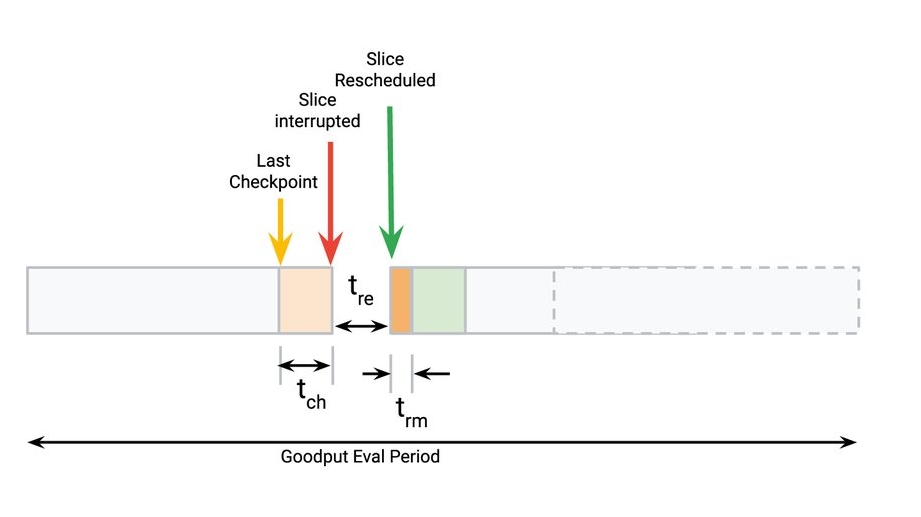
Estimating Runtime Goodput
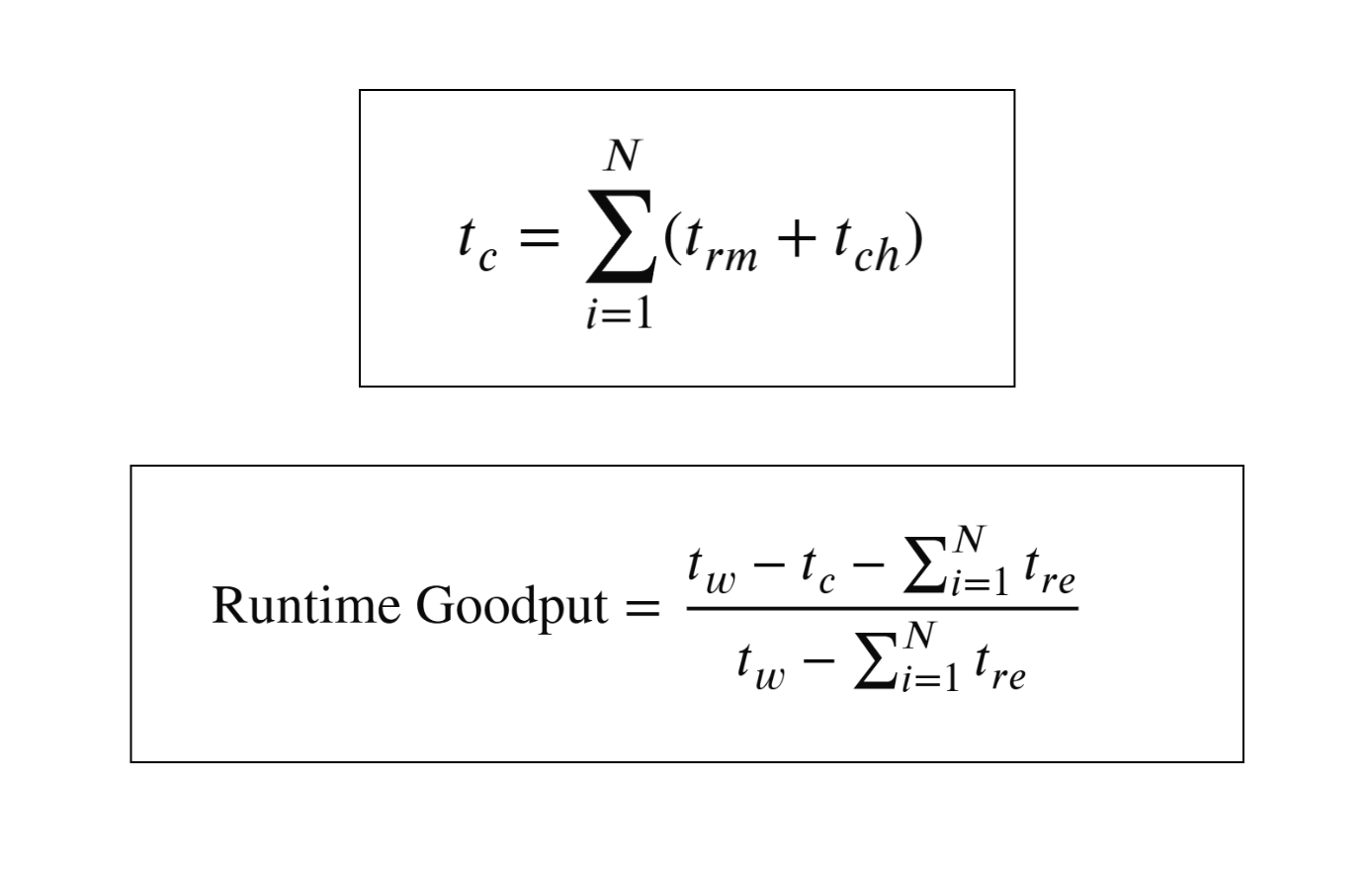
An analytical model can be written as:
tc = Σ(i=1 to N) (trm + tch)

Runtime Goodput = (tw - tc - Σ(i=1 to N) tre) / (tw - Σ(i=1 to N) tre)
EDIT: How they actually look like:
Notes:
| Variable | Description |
|---|---|
tch | Time since last checkpoint when a failure occurs. |
trm | Time to resume training after interruption. |
tre | Time to reschedule the slice. |
tw | Goodput evaluation period. |
N | Number of interruptions. |
tc | Total interruption cost (badput) in the period. |
In practice, improving runtime goodput means reducing tch and trm, while scheduling improvements mostly reduce tre.
Runtime Goodput Optimization Techniques
-
Enable auto-checkpointing
Auto-checkpointing can trigger a save on
SIGTERM, which helps when interruption is imminent from maintenance or preemption.- Reduces lost progress since the previous checkpoint.
- Helps lower
tch. - Available in tools such as Orbax and MaxText.
-
Use container pre-loading
Container and model pre-loading can reduce restart delay.
- In GKE, pre-loading from a secondary boot disk can make large image startup much faster than pulling from registry each time.
- Reduces
trmby shortening the time to recover node execution state.
Program Goodput
Program goodput is also described as Model FLOP Utilization (MFU).
It measures how much of peak hardware capability your training job actually uses.
- Better compute and communication overlap improves MFU.
- Better data partitioning and sharding strategies improve MFU.
- Compiler optimizations can improve MFU without changing model goals.
XLA helps improve program goodput through built-in optimizations and scalable APIs such as GSPMD.
Program Goodput Optimization Techniques
-
Custom kernels with XLA (JAX/Pallas)
For complex hotspots, custom kernels can increase performance.
- Useful for operations such as flash attention and block-sparse kernels.
- Can improve efficiency for large sequence lengths.
-
Host offload
Host offload uses host DRAM for selected intermediate states.
- Reduces accelerator memory pressure.
- Can reduce recomputation in backward passes.
- Can increase effective program goodput for memory-constrained workloads.
-
Int8 mixed-precision with AQT
Accurately Quantized Training (AQT) can map selected matrix operations to int8.
- Improves arithmetic efficiency.
- Can increase program goodput while preserving convergence when applied carefully.
GPU Decision Tree
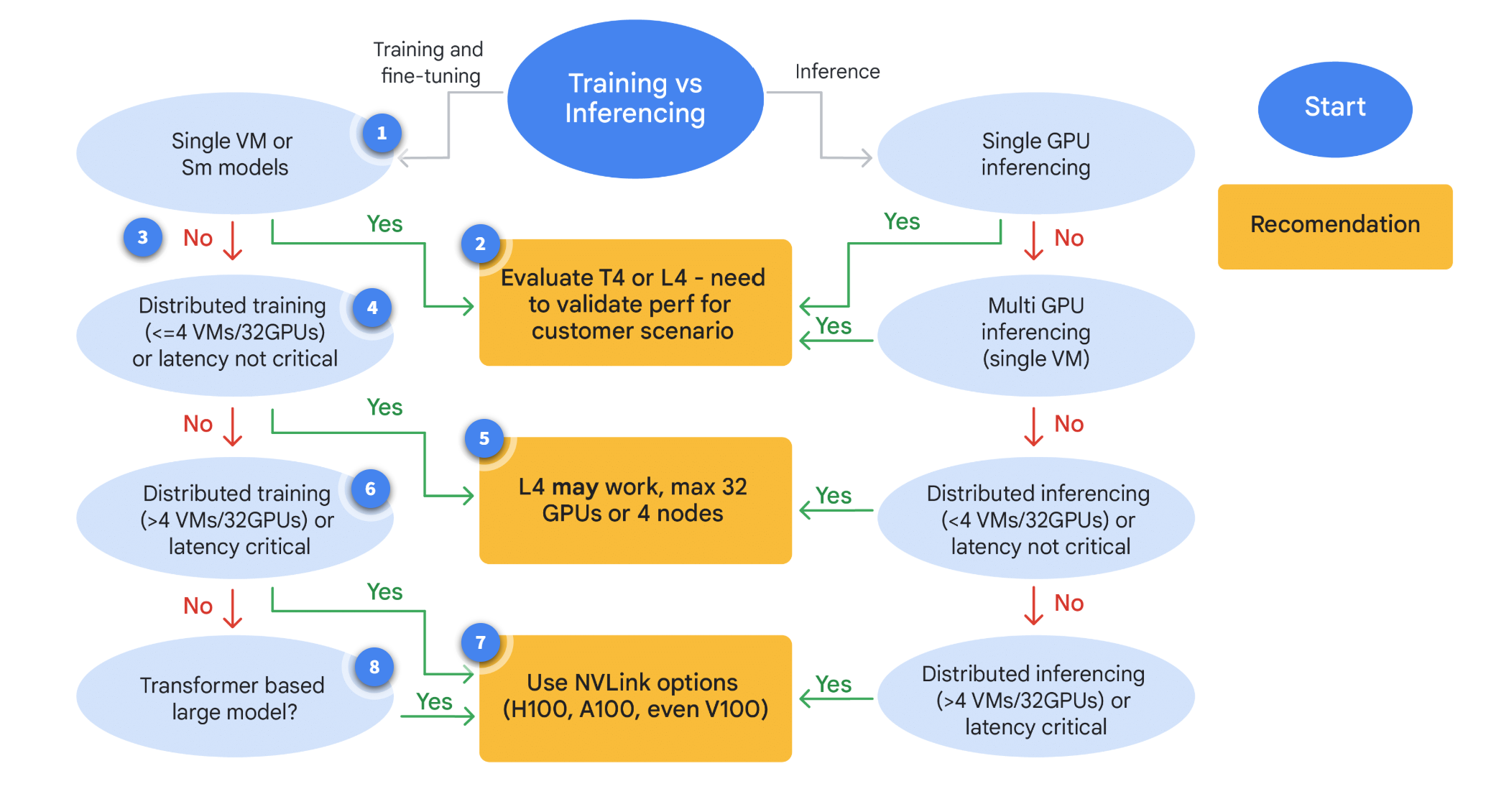
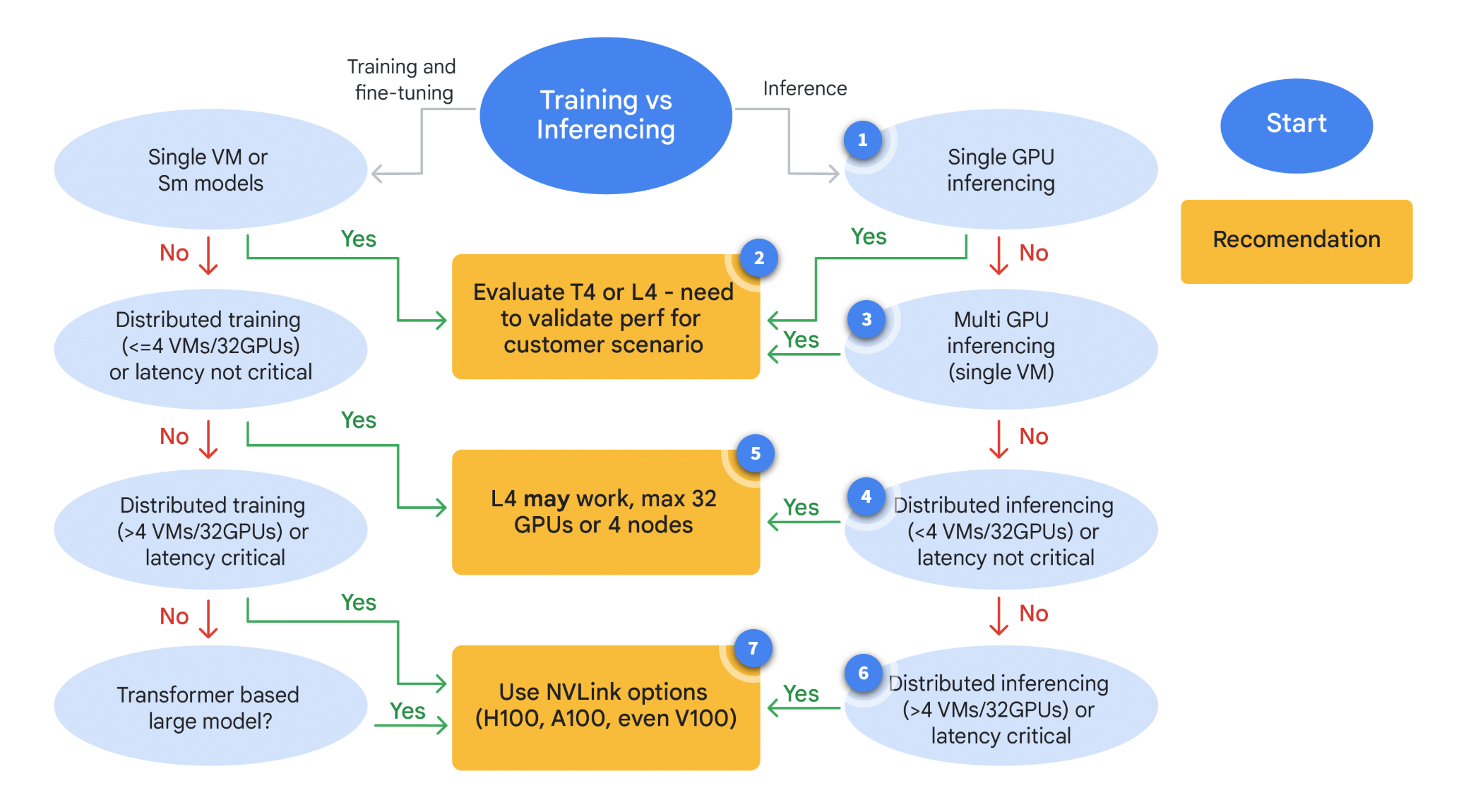
A practical GPU decision process starts with one question: are you training or serving inference?
- Training and fine-tuning usually require higher sustained compute and memory.
- Inference usually prioritizes latency, throughput, and serving cost.
Path 1: Training or Fine-Tuning
Use this path when your goal is to train a new model or adapt an existing model to new domain data.
- Prioritize memory capacity, interconnect speed, and distributed scaling.
- Evaluate model size, batch strategy, and checkpoint behavior.
- Select GPU classes aligned with long-running compute-heavy jobs.
If your requirements do not match common large-scale training profiles, re-evaluate model and infrastructure constraints before selecting hardware.
Path 2: Inference
Use this path when your model is already trained and needs production serving.
- Prioritize latency targets and request throughput.
- Match GPU size to model footprint and concurrency profile.
Choosing the Right GPU
Use flowcharts as decision support for cost, efficiency, and training-time tradeoffs.
Optimizing Cost and Efficiency
This flow focuses on improving value from high-performance GPUs such as A100-class and newer accelerators.
- Start with utilization and interruption analysis.
- Apply checkpointing, scheduling, and memory optimizations.
- Re-check whether migration paths, including TPU migration, are feasible.
If migration is not feasible, reassess model fit and optimization limits on current hardware.
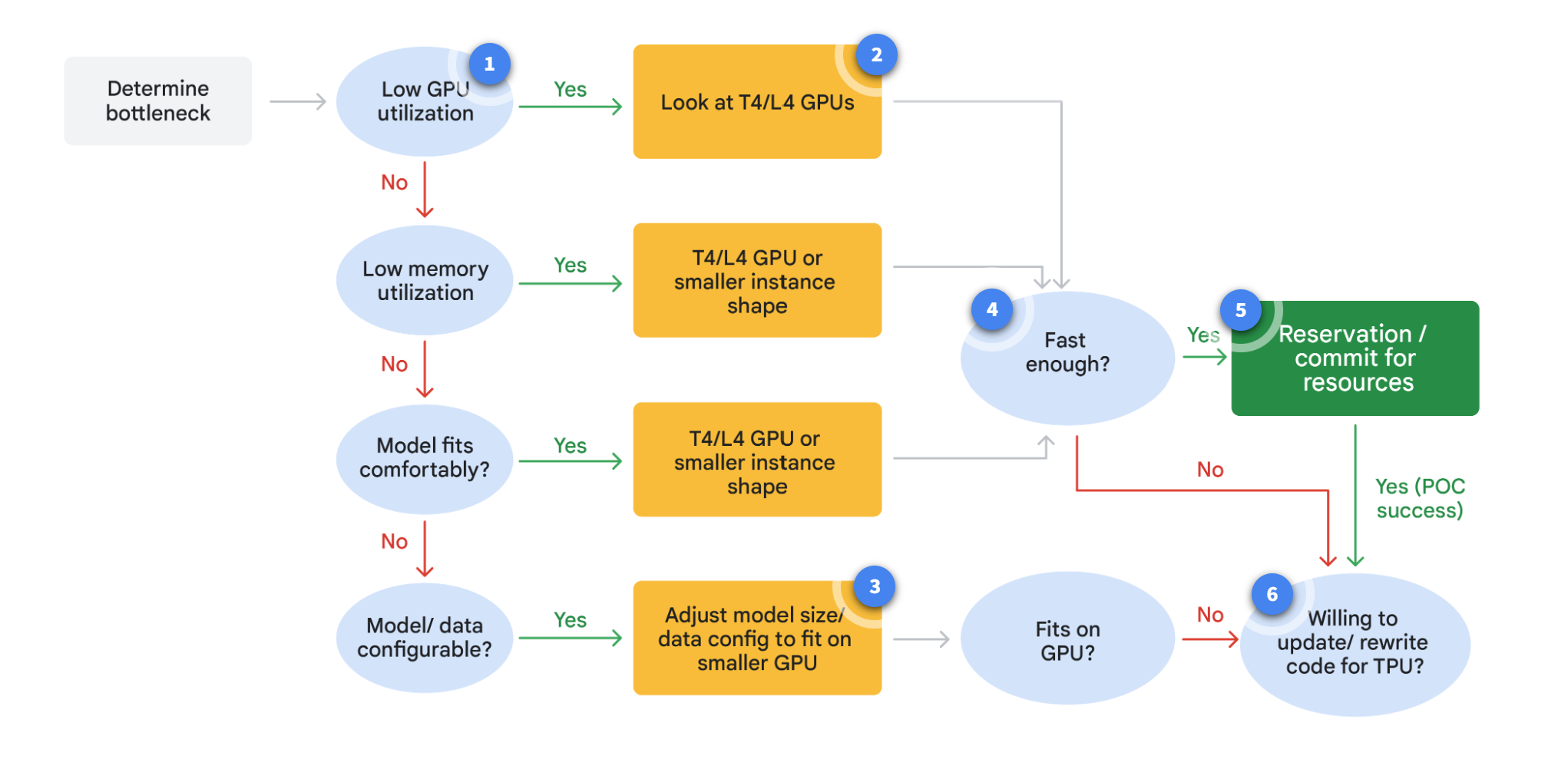
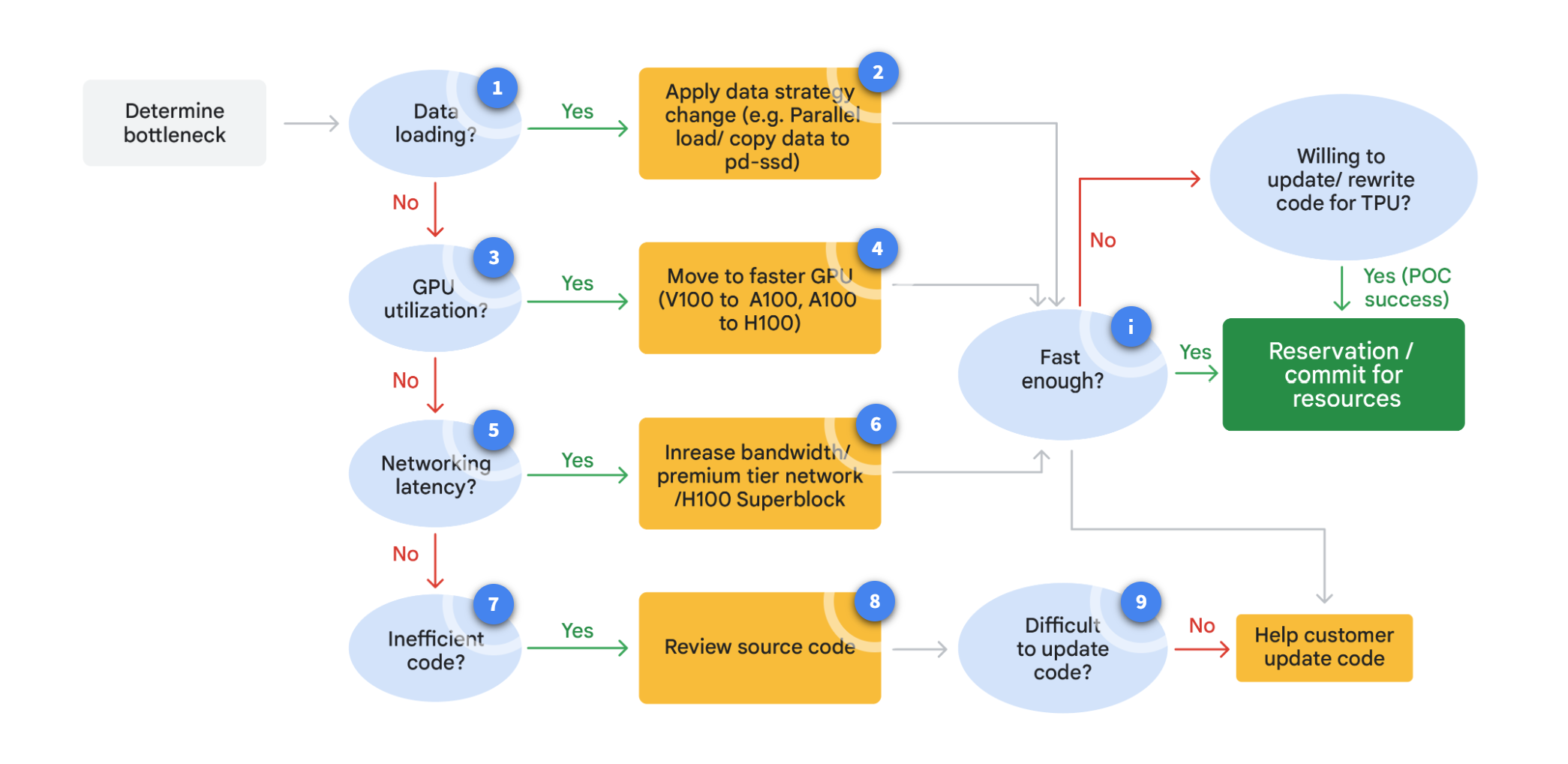
Optimizing GPU Training Time
This flow focuses on reducing wall-clock training time.
- Identify current bottlenecks.
- Map bottlenecks to hardware, runtime, and program-level levers.
- Select GPU and cluster settings that improve the dominant bottleneck first.
Following this structure helps make hardware choices that improve training velocity and cost efficiency together.
Goodput is most useful when tracked continuously through the full training lifecycle, not only after failures.
A regular goodput review helps catch hidden inefficiencies before they become major cost drivers.