Error: Failed to load model
Overview
LM Studio may fail to load or run a model with a generic error such as:
(Exit code: 18446744072635810000). Unknown error.
In some cases, the model actually loads successfully and the real issue only becomes visible in the logs.
For older NVIDIA GPUs, the root cause may be:
CUDA error: no kernel image is available for execution on the device
This usually means the GPU architecture is too old for the CUDA version or llama.cpp build being used.
Example Environment
Hardware used during troubleshooting:
| Component | Specification |
|---|---|
| CPU | Dual Intel Xeon E5-2670 v3 |
| Cores | 24 Physical / 48 Logical |
| Memory | 64 GB RAM |
| GPU | NVIDIA Quadro K2000 |
| VRAM | 2 GB |
Troubleshooting Checklist
-
Look for generated tokens:
n_decoded = ...If tokens are generated, the model loaded successfully.
-
Search the logs for:
CUDA erroror
no kernel image is available for execution on the device -
Disable GPU Acceleration
GPU Offload = 0and retry.
-
Use a Smaller Model
Llama-3.2-1B-Instructor
Qwen2.5-1.5B-Instruct -
Reduce Parallelism
Max Concurrent Predictions = 1
Investigation
When LM Studio fails to load a model, the first step is to check the logs for more detailed error messages.
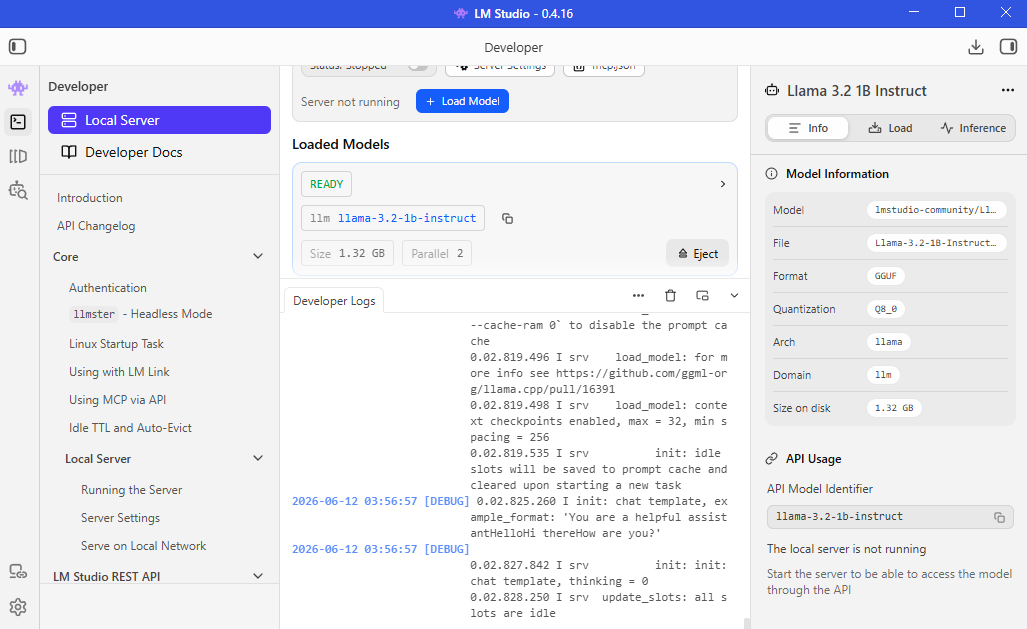
LM Studio reports a generic model loading error:
(Exit code: 18446744072635810000). Unknown error.
Logs may contain:
LMSCore.getAvailableVRAMByDevice failed:
Could not find or load NVML library
and later:
CUDA error: no kernel image is available for execution on the device
The important thing to verify is whether the model actually loaded before the crash.
In the example below, the model successfully generated tokens:
n_decoded = 384
eval = 20.65 t/s
This indicates:
- The GGUF file is valid
- The model loaded correctly
- The CPU inference engine is working
The failure occurred afterward when CUDA attempted to execute on the GPU.
Root Cause
The NVIDIA Quadro K2000 uses an older CUDA architecture.
Modern CUDA builds used by the following tool may no longer support this GPU generation.
- LM Studio
- llama.cpp
- GGML CUDA backends
When CUDA attempts to launch kernels on unsupported hardware, the following error appears:
CUDA error: no kernel image is available for execution on the device
This means the GPU cannot run the CUDA code because it was compiled for newer architectures.
Recommended Solution
For older GPUs such as the Quadro K2000, the simplest and most reliable solution is to disable GPU acceleration and run models using CPU inference only. This avoids CUDA compatibility issues while still providing acceptable performance for smaller GGUF models.
Run the model using CPU only.
-
Disable GPU acceleration:
GPU Offload: 0 -
If text is available:
CUDA: DisabledVulkan: DisabledGPU Acceleration: Disabled
Recommended LM Studio configuration
For a system with:
- 64 GB RAM
- Dual Xeon CPUs
- Older NVIDIA GPU
Start with:
CPU Thread Pool Size: 24
Eval Batch Size: 128
Physical Batch Size: 128
Max Concurrent Predictions: 1
Context Length: 2048
GPU Offload: 0
Parallelism Configuration
The logs showed:
n_parallel = 2
For CPU-only inference, start with:
n_parallel = 1
In LM Studio this typically means:
Max Concurrent Predictions: 1
This reduces resource contention and simplifies troubleshooting.
Example Small Models
When running entirely on CPU, smaller GGUF models are recommended.
Examples:
- Llama 3.2 1B Instruct
- Qwen 2.5 1.5B Instruct
- TinyLlama 1.1B Chat
Recommended quantizations:
Q4_K_M
Q4_0
Q5_K_M
A Q8 model can still run, but uses more RAM and may provide little practical benefit compared to Q4 or Q5 quantizations.
Additional: NVML Warning
You may also see:
Could not find or load NVML library
This warning indicates LM Studio cannot query NVIDIA GPU statistics.
It is usually not the primary cause of model loading failures.
The more important error is:
CUDA error: no kernel image is available for execution on the device