Model Parameters
Overview
Most default settings are already good when we start testing LM Studio, but we can adjust them to have a more predictable output.
| Setting | Purpose | Effect |
|---|---|---|
| Temperature | Controls randomness in output generation | Lower values produce more predictable responses, while higher values produce more varied and creative responses |
| Sampling (Top K, Top P, Min P) | Controls which token candidates are considered | Limits or filters possible next tokens before one is selected |
| Repeat Penalty | Reduces repeated words or phrases | Discourages the model from generating the same tokens repeatedly |
| CPU Threads | Controls CPU usage during inference | Determines how many CPU threads are used when generating responses |
| w | ||
| These settings affect how the model chooses the next word or token in its response. |
Recap: Token Generation
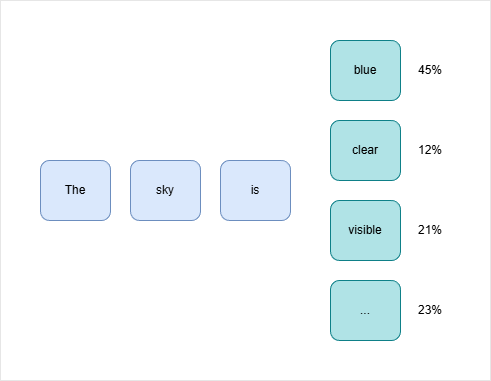
A model generates text one token at a time. A token can be a word, part of a word, or a symbol.
For example, if the prompt is:
The sky is
The model may consider outputs like:
blue
clear
visible
bright
Each possible token has a probability. The model then chooses from those possible tokens based on the generation settings.
Temperature
Temperature controls how random or predictable the output is.
| Temperature | Behavior | Result |
|---|---|---|
0 | No randomness | Same output every time |
0.1 | Very predictable | Mostly safe and consistent |
1 | More random | More varied and creative |
| Higher values | Very random | Less predictable output |
Low temperature makes the model choose the most likely tokens more often. High temperature makes the model consider more varied tokens.
Top K
Top K limits how many token choices are considered.
| Top K value | Meaning |
|---|---|
1 | Only the most likely token is used |
5 | Only the top 5 tokens are considered |
40 | The top 40 tokens are considered |
If Top K is set to 1, the model becomes very predictable because it always chooses the most likely token.
Top P
Top P considers tokens based on combined probability.
| Top P value | Meaning |
|---|---|
0.5 | Only enough tokens to reach 50% probability are considered |
0.9 | More tokens are considered |
0.95 | Even more token options are included |
Top P is also called nucleus sampling. It helps balance quality and variety.
Min P
Min P removes tokens that are too unlikely.
- Low probability tokens are ignored
- Helps reduce strange outputs
- Works together with Top K and Top P
For example, if a token has only a very small chance of being useful, Min P can remove it from the list of possible choices.
Repeat Penalty
Repeat penalty discourages the model from repeating the same words or phrases too much.
- Helps avoid repeated text
- Useful for longer responses
- Default value is usually fine
Most of the time, you do not need to change repeat penalty.
Example: Using Temperature
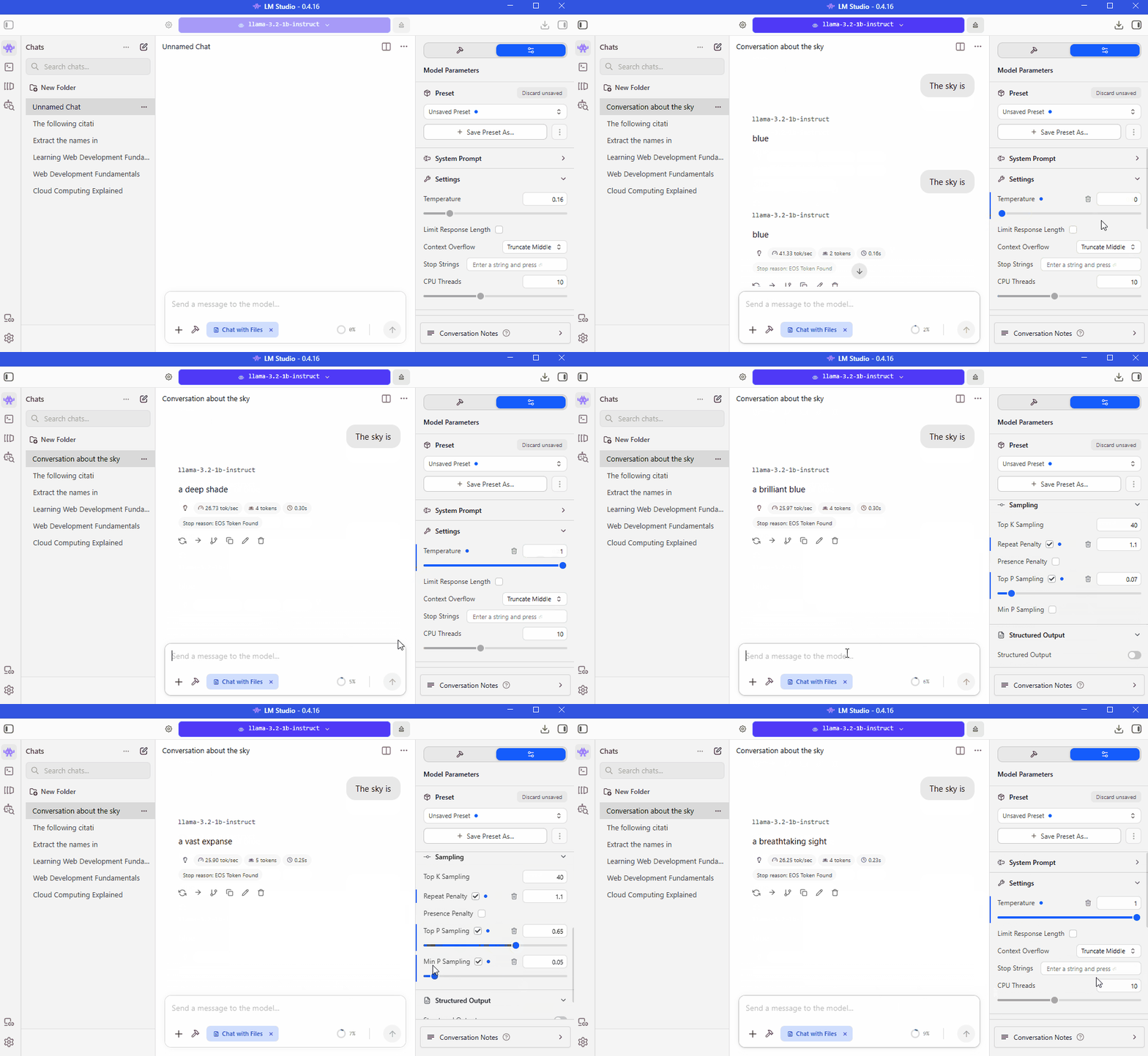
In the example below, the same prompt is tested with different temperature values.
Prompt:
The sky is
Expected output with temperature 0:
The sky is blue.
If you run the same prompt again with temperature 0, you should usually get the same result.
If you increase the temperature to 1, you might get a different response because higher temperature allows more variation.
Simple Settings Guide
| Goal | Recommendation |
|---|---|
| Predictable answers | Lower temperature |
| Creative writing | Higher temperature |
| Consistent testing | Temperature 0 or Top K 1 |
| Balanced output | Use defaults |
| Less repetition | Keep repeat penalty enabled |
For most use cases, the default settings are already good. Change them only when you need a specific behavior.