Creating Users with Conditionals and Variables
Overview
This lab uses variables and conditionals to control which user-management tasks run on each host.
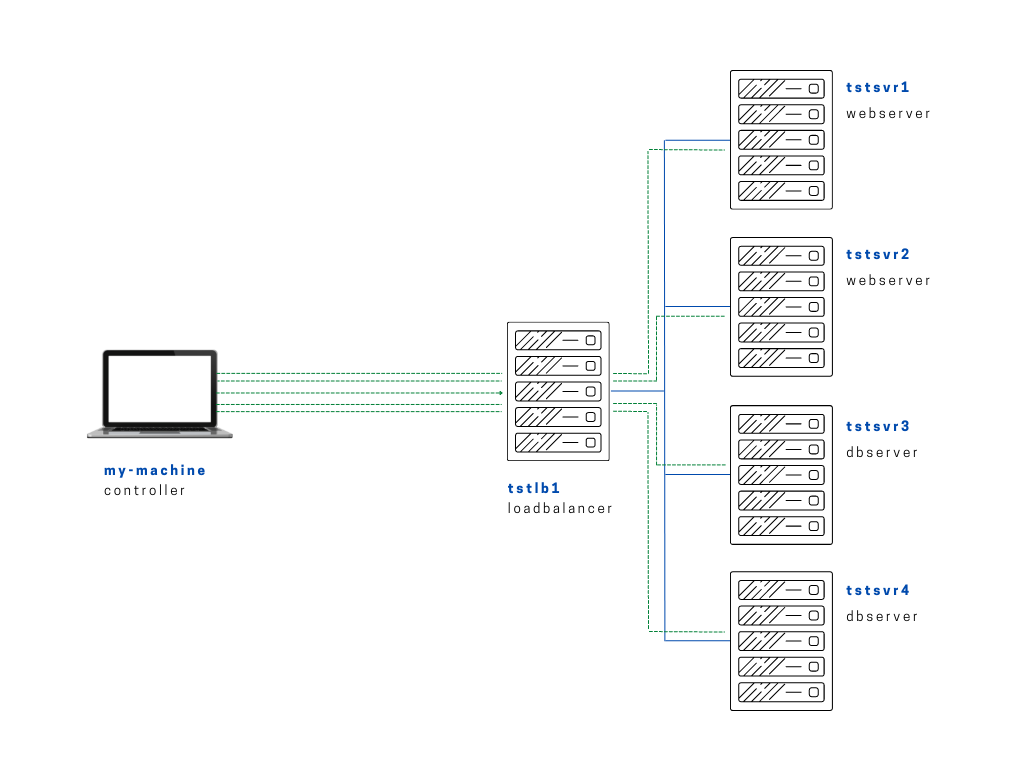
Diagram:
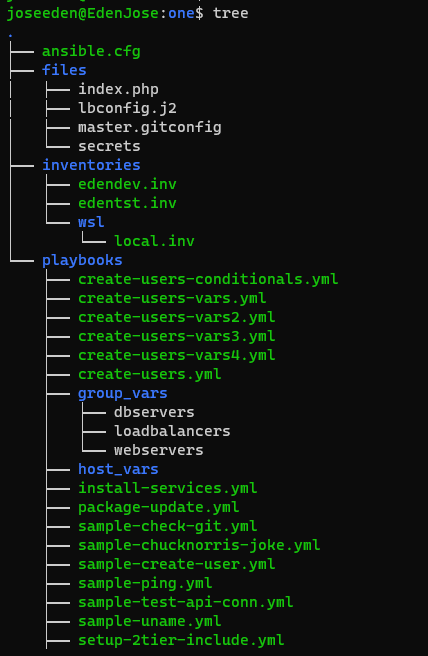
The tree-structure of our Project One currently looks like this. Don't worry if you see that there's already a lot of files in the directory. These are the files from the previous labs in this series. The only ones we'll really need are also provided below.
Project One
ansible.cfg
 [defaults]
# E: variables for my personal lab
inventory = ~/proj-ansible-1/one/inventories/edendev.inv
remote_user = eden
private_key_file = ~/.ssh/id_rsa
host_key_checking = False
retry_files_enabled = False
timeout = 24
gather_facts = smart

#ansible_managed = "# This file is managed by Ansible, all local changes will be lost !"
#allow_world_readable_tmpfiles = True
#precedence = all_plugins_play, all_inventory, groups_plugins_play, groups_inventory, all_plugins_inventory, groups_plugins_inventory
#any_errors_fatal = True
#timeout = 24

[privilege_escalation]
#become_method = sudo
#become=True
#become_user=root
#become_ask_pass=False

[paramiko_connection]
#record_host_keys = False

[ssh_connection]
scp_if_ssh = True
pipelining = True
symlink in root directory pointing to projects folder
$ ls -la | grep "\->"
lrwxrwxrwx  1 joseeden joseeden    70 Jan 14 23:03 proj-ansible-1 -> /mnt/c/Users/Eden Jose/4-Projects
We'll change our setup a bit for this lab. As a recap, we have four testservers serving as webservers behind a loadbalancer. All of these are managed nodes and we automate deployments to these servers through our controller machine which is our local laptop where ansible is installed.
For this lab, we'll have two webservers and two dbservers. Recall that we used a default edendev.inv inventory file for the previous labs. We'll be using a different inventory file for this lab and instead of changing the ansible.cfg, we'll just specify this new inventory file when we run the playbook.
edentst.inv
# edentst.inv

[webservers]
app1    ansible_host=13.251.146.254
app2    ansible_host=122.248.203.239

[dbservers]
db1    ansible_host=52.76.189.254
db2    ansible_host=54.255.28.202

[loadbalancers]
lb1     ansible_host=13.228.99.157

[local]
localhost   ansible_connection=local
We'll also be using variables in two ways. The variables for the dbservers group are defined in the playbooks/group_vars/dbservers file.
On the other hand, the variables for the webservers group are defined in the playbook.
#---------------------------------------
# group_vars/dbservers
#---------------------------------------

db_users:
    - tstdbmember
    - tstdbadmin
    - tstdbdeveloper
The playbook we'll use is below. Notice that we want to run the playbook across all the webservers and dbservers but we don't want to run it on our localhost. To do this, we specify the ":" to signify another group, followed by "!localhost" to tell Ansible to exclude the localhost.
Also notice the when condition we used for both tasks in the play. It'll be looking for dbservers and webservers in the group_names. This is the list of all groups defined in your inventory file. This is gathered during the Gathering facts phase when you execute your playbook.
create-users-conditionals-vars.yml
# create-users-conditionals.yml
---

- name: Create users on the webservers
  hosts: all:!localhost
  become: true

  vars:
    web_users:
      - tstmember
      - tstadmin
      - tstdeveloper

  tasks:
  # Iterate on the web_users list defined above
  - name: Create the webserver users
    user:
      name: "{{ item }}"
      state: present
    loop: "{{ web_users }}"
    when: "'webservers' in group_names"

  # Iterate on the db_users list defined in the group_vars/dbservers file
  - name: Create the database users
    user:
      name: "{{ item }}"
      state: present
    loop: "{{ db_users }}"
    when: "'dbservers' in group_names"
To run the playbook,
$ ansible-playbook playbooks/create-users-conditionals-vars.yml -i inventories/edentst.inv
Notice that when the first task was ran, it skipped over app3, app4, and lb1. This is because the first task was only ran on the webservers groups which includes only app3 and app4.
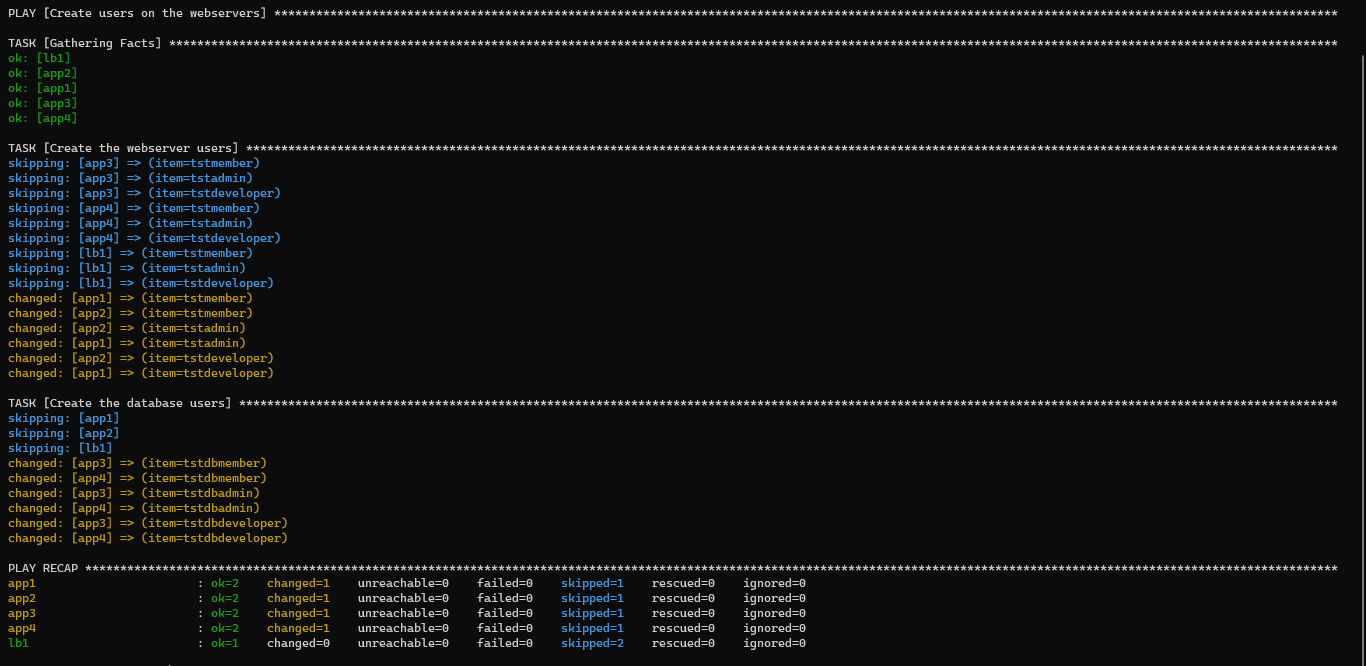
Similarly, app1 and app2 from webservers group are skipped over on the next task.
Since Ansible practices idempotency, the users won't be duplicated when the playbook is ran several more times. To test this, we run the playbook again. There won't be any more 'yellow texts' that shows something was changed on the servers because Ansible already knows that these users exist on the servers.
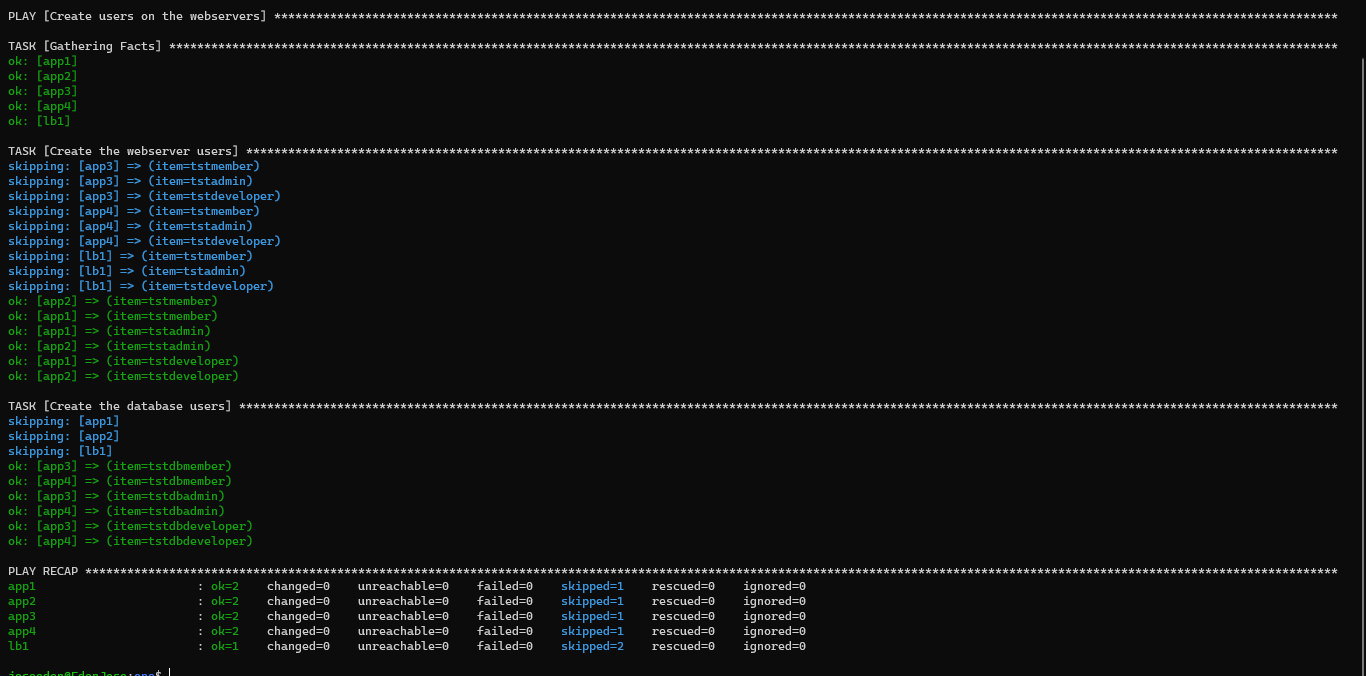
Lastly, let's see if the users were indeed created on the servers. We'll ssh to app1 (webservers) and app3 (dbservers).
$ ssh eden@tstsvr1
Last login: Fri Jan 14 23:12:23 2022 from 1.2.3.4
[eden@tstsvr1 ~]$
[eden@tstsvr1 ~]$ tail -3 /etc/passwd
tstmember:x:1006:1006::/home/tstmember:/bin/bash
tstadmin:x:1007:1007::/home/tstadmin:/bin/bash
tstdeveloper:x:1008:1008::/home/tstdeveloper:/bin/bash
$ ssh eden@tstsvr3
Last login: Fri Jan 14 23:12:53 2022 from 1.2.3.4
[eden@tstsvr3 ~]$
[eden@tstsvr3 ~]$ tail -3 /etc/passwd
tstdbmember:x:1006:1006::/home/tstdbmember:/bin/bash
tstdbadmin:x:1007:1007::/home/tstdbadmin:/bin/bash
tstdbdeveloper:x:1008:1008::/home/tstdbdeveloper:/bin/bash