Deploying a Web Application (TBC)
Overview
This lab deploys a web application with Ansible and captures the supporting application configuration.
Diagram:
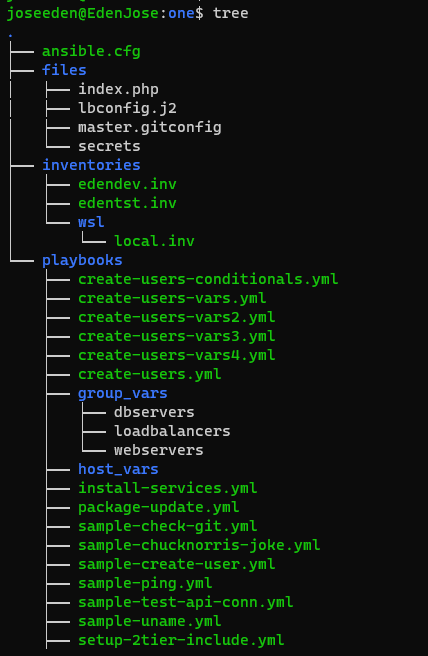
The tree-structure of our Project One currently looks like this. Don't worry if you see that there's already a lot of files in the directory. These are the files from the previous labs in this series. The only ones we'll really really need are also provided below.
Note that we also enabled the privilege escalation section of our ansible.cfg file by uncommenting them.
Project One
ansible.cfg
 [defaults]
# E: variables for my personal lab
inventory = ~/proj-ansible-1/one/inventories/edendev.inv
remote_user = eden
private_key_file = ~/.ssh/id_rsa
host_key_checking = False
retry_files_enabled = False
timeout = 24
gather_facts = smart

[privilege_escalation]
become_method = sudo
become=True
become_user=root
become_ask_pass=True

#ansible_managed = "# This file is managed by Ansible, all local changes will be lost !"
#allow_world_readable_tmpfiles = True
#precedence = all_plugins_play, all_inventory, groups_plugins_play, groups_inventory, all_plugins_inventory, groups_plugins_inventory
#any_errors_fatal = True
#timeout = 24

[paramiko_connection]
#record_host_keys = False

[ssh_connection]
scp_if_ssh = True
pipelining = True
symlink in root directory pointing to projects folder
$ ls -la | grep "\->"
lrwxrwxrwx  1 joseeden joseeden    70 Jan 14 23:03 proj-ansible-1 -> /mnt/c/Users/Eden Jose/4-Projects
For this lab, we'll assume that it's a monolothic application thus we will only deploy both the web application and database server on the same set of nodes. We will use two servers to deploy on.
Recall that we used a default edendev.inv inventory file for the previous labs. We also created another edentst.inv in some of our other previous labs.
For this one, we'll be using a different inventory file and instead of changing the ansible.cfg, we'll just specify this new inventory file when we run the playbook. Lastly, we included the password in the inventory file.
Note: Sensitive information should never be stored in the files. They should be stored in a vault and pulled during runtime. Below is for lab purposes only and should not be practiced on production.
edenmultinode.inv
# edenmultinode.inv

[db_web]
app1    ansible_host=13.251.146.254     ansible_ssh_pass=admin123
app2    ansible_host=122.248.203.239    ansible_ssh_pass=admin123

[local]
localhost   ansible_connection=local
Before we proceed, it's important to lay down the steps that we'll be automating. Here's an outlline of the tasks that we need.
deploy-web-app.yml
# deploy-web-app.yml
#-------------------------------------
# playbook outline
#-------------------------------------
---

- name: Deploy the web application
  hosts: db_web
  tasks:

  - name: Install dependencies

  - name: Install MySQL database

  - name: Start MySQL Service

  - name: Create Application Database

  - name: Create Application DB User

  - name: Install Python Flask dependencies

  - name: Copy web-server code

  - Run web server
Testing Connectivity
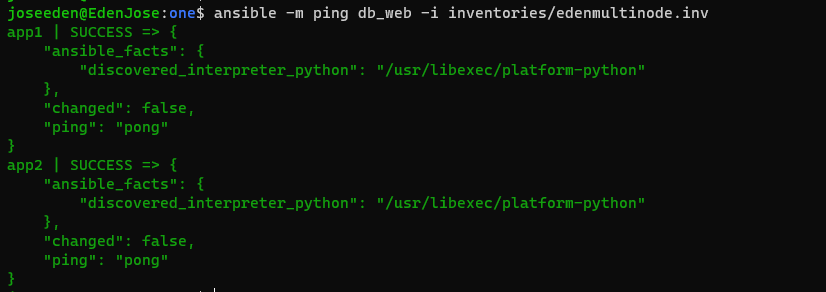
As always, it's good to test if our controller machine is able to talk to the managed hosts before proceeding with the tasks.
$ ansible -m ping db_web -i inventories/edenmultinode.inv
Inside our files folder, let's create our app.py.
app.py
import os
from flask import Flask
from flaskext.mysql import MySQL      # For newer versions of flask-mysql
# from flask.ext.mysql import MySQL   # For older versions of flask-mysql
app = Flask(__name__)

mysql = MySQL()

mysql_database_host = 'MYSQL_DATABASE_HOST' in os.environ and os.environ['MYSQL_DATABASE_HOST'] or  'localhost'

# MySQL configurations
app.config['MYSQL_DATABASE_USER'] = 'db_user'
app.config['MYSQL_DATABASE_PASSWORD'] = 'Passw0rd'
app.config['MYSQL_DATABASE_DB'] = 'employee_db'
app.config['MYSQL_DATABASE_HOST'] = mysql_database_host
mysql.init_app(app)

conn = mysql.connect()

cursor = conn.cursor()

@app.route("/")
def main():
    return "Welcome!"

@app.route('/how are you')
def hello():
    return 'I am good, how about you?'

@app.route('/read from database')
def read():
    cursor.execute("SELECT * FROM employees")
    row = cursor.fetchone()
    result = []
    while row is not None:
      result.append(row[0])
      row = cursor.fetchone()

    return ",".join(result)

if __name__ == "__main__":
    app.run()
Inside our playbooks folder, let's create our deploy-web-app.yml. Notice that we separated the play for installing the dependencies and deploying the web application. They were initially inside a single play, but I was having issues with the step on installing the dependencies so I isolated it on a separate play.
Also, it is important to note that pip should not be run as root as recommended by a lot of the resources I found online. I've attached the resources in the References section.
It is recommended to always test on contained environments such as virtual environments or containers so that they won't mess with any global settings that we may have on the system.
For the sake of keeping the lab simple, I ran pip as root since I can easily destroy and spin up new instances for this lab any time.
deploy-web-app.yml
Before we run the the playbook, we can do some initial syntax check and dry-run check to see if there'll be any error before we actually run it.
$ ansible-playbook playbooks/deploy-web-app.yml -i inventories/edenmultinode.inv --syntax-check

playbook: playbooks/deploy-web-app.yml
$ ansible-playbook playbooks/deploy-web-app.yml -i inventories/edenmultinode.inv --check
So, I actually run into some blockers here, specifically on the task where the database is being created.
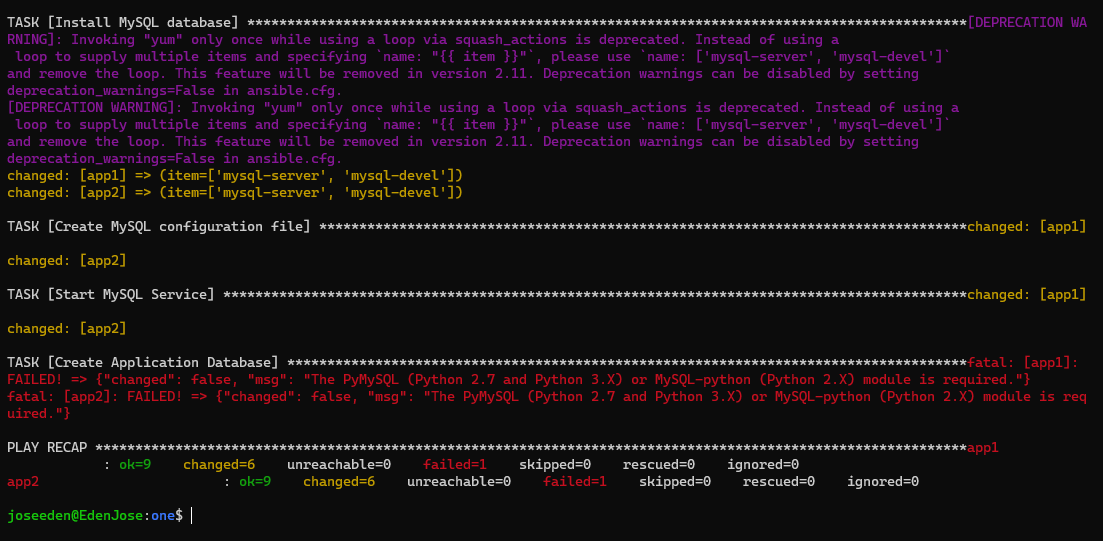
Been searching online and trying stuff but still none of it worked. The Ansible code has been quite messy and will need some cleaning up once I'm able to run this.
messy deploy-web-app.yml
# deploy-web-app.yml
#-------------------------------------
---

- name: Install dependencies
  become: true
  hosts: db_web
  tasks:

  - name: Install pip
    yum:
      name: "python3-pip"
      state: present

  - name: Install all required dependencies
    yum:
      name: "{{ item }}"
      state: present
    with_items:
      - "https://dl.fedoraproject.org/pub/epel/epel-release-latest-8.noarch.rpm"

  - name: Install Python Flask + MySQL dependencies
    pip:
      name: "{{ item }}"
      state: present
    with_items:
      - "python3-pip"
      - "python-pip"
      - "python-devel"
      - "python-setuptools"
      - "python-dev"
      - "build essential"
      - "flask"
      - "flask-mysql"
      - "PyMySQL"
      - "MySQL-python"
      - "MySQLdb"

- name: Deploy a web application
  become: true
  hosts: db_web
  tasks:

  - name: Install MySQL community repository
    yum:
      name: "http://repo.mysql.com/mysql-community-release-el7-5.noarch.rpm"
      state: present

  - name: Install MySQL database
    yum:
      name: "{{ item }}"
      state: present
    with_items:
      - "mysql-server"
      - "mysql-devel"

  - name: Create MySQL configuration file
    copy:
      content: |
        [client]
        user=root
        password="admin123"
      dest: "/etc/.my.cnf"

  - name: Start MySQL Service
    service:
      name: mysqld
      state: started
      enabled: yes

  - name: Create Application Database
    mysql_db:
      name: admin
      state: present

  - name: Create Database user
    mysql_user:
      name: admin
      password: admin123
      priv: '*.*:ALL'
      state: present

  - name: Copy source code
    copy:
      src: ../files/app.py
      dest: /opt/app.py

  - name: Start web server
    shell: FLASK_APP=/opt/app.py nohup flask run --host=0.0.0.0 &
To be continued...