Deploying a LAMP Stack and Python Application
Overview
This lab deploys a LAMP stack and a Python application using Ansible roles.
The work is split into two roles:
- The first role installs and configures the LAMP stack.
- The second role installs the web application on the LAMP host.
This builds on the previous playbook lab and moves the workflow into reusable role structure.
Start by connecting to the launched EC2 instance. You can connect through browser-based Instance Connect or by downloading the key files and connecting from a terminal.
$ ssh -i "491311302393.pem" ubuntu@54.201.215.21
Setting up the Ansible Role
We'll first create a directory called Roles and then use ansible-galaxy to initialize our "directory structure".
mkdir roles
$ ansible-galaxy init lamp
- lamp was created successfully
This will create a lamp directory inside roles. Our lamp folder now has this directory structure created and initialized for us.
tree-output of lamp folder
~/roles/lamp$ tree
.
├── defaults
│   └── main.yml
├── files
├── handlers
│   └── main.yml
├── meta
│   └── main.yml
├── README.md
├── tasks
│   └── main.yml
├── templates
├── tests
│   ├── inventory
│   └── test.yml
└── vars
    └── main.yml

8 directories, 8 files
These are actually parts of a playbook but instead of crowding a single playbook, we break the parts into separate reusable pieces and place them inside their own respective folders. They can then be called or referenced in our playbooks.
As an example, instead of defining all the tasks in a single playbook, we'll put the tasks in tasks/main.yml.
tasks/main.yml
- name: Install our packages
  apt:
    name: "{{ packages }}"
    state: present
    update_cache: true

- name: Confirm services are running
  service:
    name: "{{ item }}"
    state: started
  with_items: "{{ services }}"

- name: Enable Apache2 modssl
  shell: a2enmod ssl

- name: Enable Apache2 Default HTTPS site
  shell: a2ensite default-ssl
  notify: Restart Apache
Leverage notifications and variables
If you did the previous lab, you'll notice that we utilize the exact same playbook but this time, we leverage roles and we've shorten our playbook by "distributing" its bits and pieces on separate folders.
Now, the last two tasks needs restarting of HTTPD service for changes to reflect. We can simply define a final task which does exactly that but the proper way is to define it as a handler. A handler is a task that only gets run when notified. In this case, Apache will only be restarted when something has changed.
handler/main.yml
- name: Restart Apache
  service:
    name: apache2
    state: restarted
Next, we'll call both our tasks and handler in our ~/app.yml playbook. We'll also define the packages needed to install for the LAMP stack.
app.yml
---
- hosts: localhost
  gather_facts: false
  connection: local
  become: yes
  vars:
    packages:
      - apache2
      - mysql-server
      - mysql-common
      - mysql-client
      - libapache2-mod-wsgi
    services:
      - apache2
      - mysql
  roles:
    - lamp
Now this is still way too crowded. So let's take out the variables and put them in defaults/main.yml.
defaults/main.yml
---
# defaults file for lamp

packages:
  - apache2
  - mysql-server
  - mysql-common
  - mysql-client
services:
  - apache2
  - mysql
Cleaning up our playbook, we're now left with a much shorter one.
~/app.yml
---
- hosts: localhost
  gather_facts: false
  connection: local
  become: yes
  roles:
    - lamp
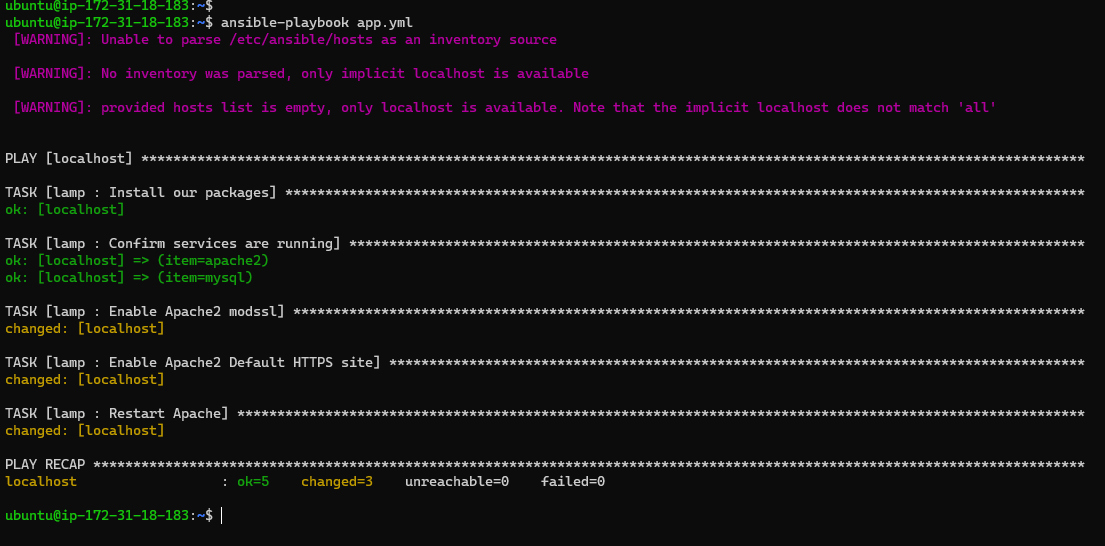
Now let's run our playbook.
$ ansible-playbook app.yml
Deploy the Web Application
Inside the same roles, we'll initialize a second role - webapp.
$ ansible-galaxy init webapp
- webapp was created successfully
~/roles$ ll
total 16
drwxrwxr-x  4 ubuntu ubuntu 4096 Jan 29 07:54 ./
drwxr-xr-x  6 ubuntu ubuntu 4096 Jan 29 07:48 ../
drwxrwxr-x 10 ubuntu ubuntu 4096 Jan 29 07:35 lamp/
drwxrwxr-x 10 ubuntu ubuntu 4096 Jan 29 07:54 webapp/
We'll first define the default variables for the directories which store the source code of our application.
webapp/defaults/main.yml
---
app_download_dest: /tmp/webapp
app_dest: /var/www/webapp
app_repo: https://github.com/example/ansible-demo.git
Next is we create two separate tasks for the database and the application.
webapp/tasks/database.yml
- apt: name=python-mysqldb state=present
- mysql_user: name=appuser password=94nfsUl7 priv=*.*:ALL state=present
- mysql_db: name=appdata state=present
webapp/tasks/app.yml
- apt: name=libmysqlclient-dev state=present
- apt: name=python-pip state=present
- git: repo={{app_repo}} dest="{{app_download_dest}}"
- pip: requirements={{app_download_dest}}/app/requirements.txt
- copy: src={{app_download_dest}}/app/ dest={{app_dest}}
We'll then create the template that will serve as our application page.
webapp/templates/apache.conf
<VirtualHost *>
    ServerName {{inventory_hostname}}

    WSGIDaemonProcess webapp user=ubuntu group=ubuntu threads=5
    WSGIScriptAlias / {{app_dest}}/wsgi.py

    <Directory {{app_dest}}>
        WSGIProcessGroup webapp
        WSGIApplicationGroup %{GLOBAL}
        Order deny,allow
        Allow from all
    </Directory>
</VirtualHost>
After creating the Apache template file, we have to make sure that it is copied to the correct directory in the remote machine. To do this, we define a third file inside tasks.
webapp/tasks/site.yml
- apt: name=libapache2-mod-wsgi state=present
- name: Copy the apache configuration file
  template:
    src: apache.conf
    dest: /etc/apache2/sites-available/000-default.conf
  notify: Restart Apache
At this point, we now have three custom YAML files inside our tasks folder that we just created, along with the default main.yml.
$ ll webapp/tasks/
total 24
drwxrwxr-x  2 ubuntu ubuntu 4096 Jan 29 08:18 ./
drwxrwxr-x 10 ubuntu ubuntu 4096 Jan 29 08:11 ../
-rw-rw-r--  1 ubuntu ubuntu  257 Jan 29 08:12 app.yml
-rw-rw-r--  1 ubuntu ubuntu  153 Jan 29 08:12 database.yml
-rw-rw-r--  1 ubuntu ubuntu   27 Jan 29 08:11 main.yml
-rw-rw-r--  1 ubuntu ubuntu  204 Jan 29 08:16 site.yml
We will now take all three custom YAML files and invoke them inside the tasks/main.yml file.
tasks/main.yml
---
# tasks file for webapp
- include: database.yml
- include: app.yml
- include: site.yml
Finally, let's edit our main ansible playbook and invoke the roles.
~/app.yml
---
- hosts: localhost
  gather_facts: false
  connection: local
  become: yes
  roles:
   - lamp
   - webapp
To run the playbook,
$ ansible-playbook ~/app.yml
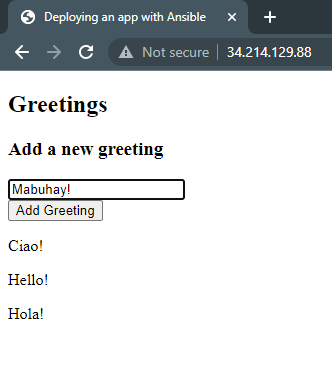
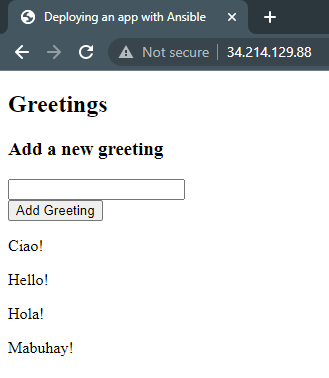
Once it's done running, let's retrieve the IP of the instance through the terminal and open it up in our browser.
$ curl checkip.amazonaws.com
34.214.129.88