Installing CentOS Apache Role from Ansible Galaxy
Overview
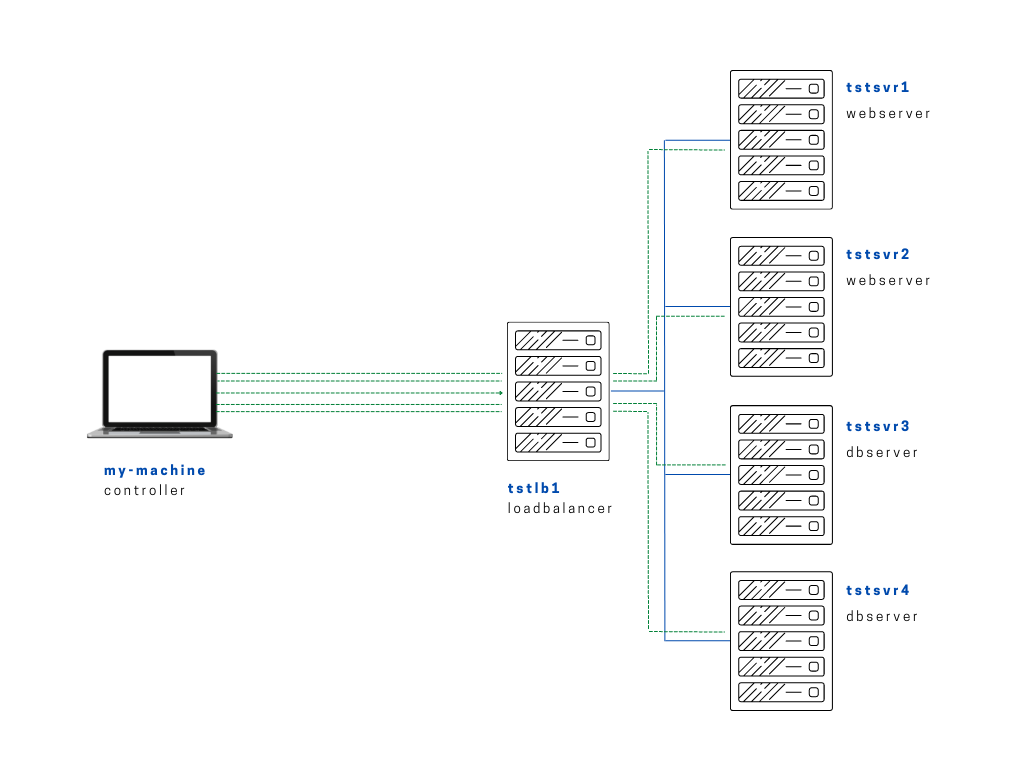
This lab installs and applies an Apache role for CentOS-based web server configuration.
Diagram:
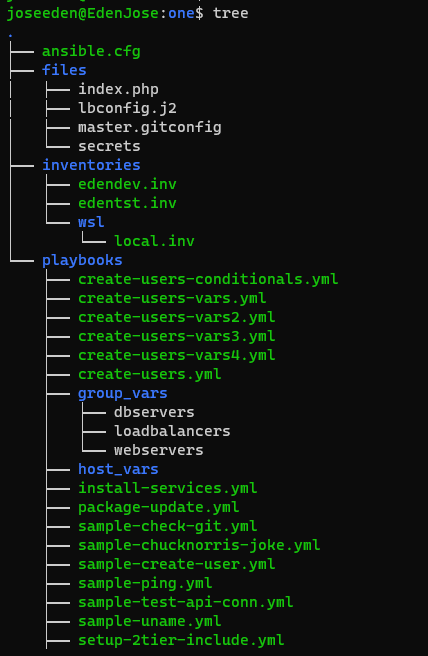
The tree-structure of our Project One currently looks like this. Don't worry if you see that there's already a lot of files in the directory. These are the files from the previous labs in this series. The only ones we'll really really need are also provided below.
Project One
ansible.cfg
 [defaults]
# E: variables for my personal lab
inventory = ~/proj-ansible-1/one/inventories/edendev.inv
remote_user = eden
private_key_file = ~/.ssh/id_rsa
host_key_checking = False
retry_files_enabled = False
timeout = 24
gather_facts = smart

#ansible_managed = "# This file is managed by Ansible, all local changes will be lost !"
#allow_world_readable_tmpfiles = True
#precedence = all_plugins_play, all_inventory, groups_plugins_play, groups_inventory, all_plugins_inventory, groups_plugins_inventory
#any_errors_fatal = True
#timeout = 24

[privilege_escalation]
#become_method = sudo
#become=True
#become_user=root
#become_ask_pass=False

[paramiko_connection]
#record_host_keys = False

[ssh_connection]
scp_if_ssh = True
pipelining = True
symlink in root directory pointing to projects folder
$ ls -la | grep "\->"
lrwxrwxrwx  1 joseeden joseeden    70 Jan 14 23:03 proj-ansible-1 -> /mnt/c/Users/Eden Jose/4-Projects
For this lab, we'll have two webservers and two dbservers. Recall that we used a default edendev.inv inventory file for the previous labs. We'll be using a different inventory file for this lab and instead of changing the ansible.cfg, we'll just specify this new inventory file when we run the playbook.
edentst.inv
# edentst.inv

[webservers]
app1    ansible_host=13.251.146.254
app2    ansible_host=122.248.203.239

[dbservers]
db1    ansible_host=52.76.189.254
db2    ansible_host=54.255.28.202

[loadbalancers]
lb1     ansible_host=13.228.99.157

[local]
localhost   ansible_connection=local
For this lab, we'll be installing the CentOS Apache role from Ansible Galaxy. Before anything else, it's also helpful and recommended to always check the Github repo. By doing this, we can check if the role has some dependencies that when installed, may break our system.
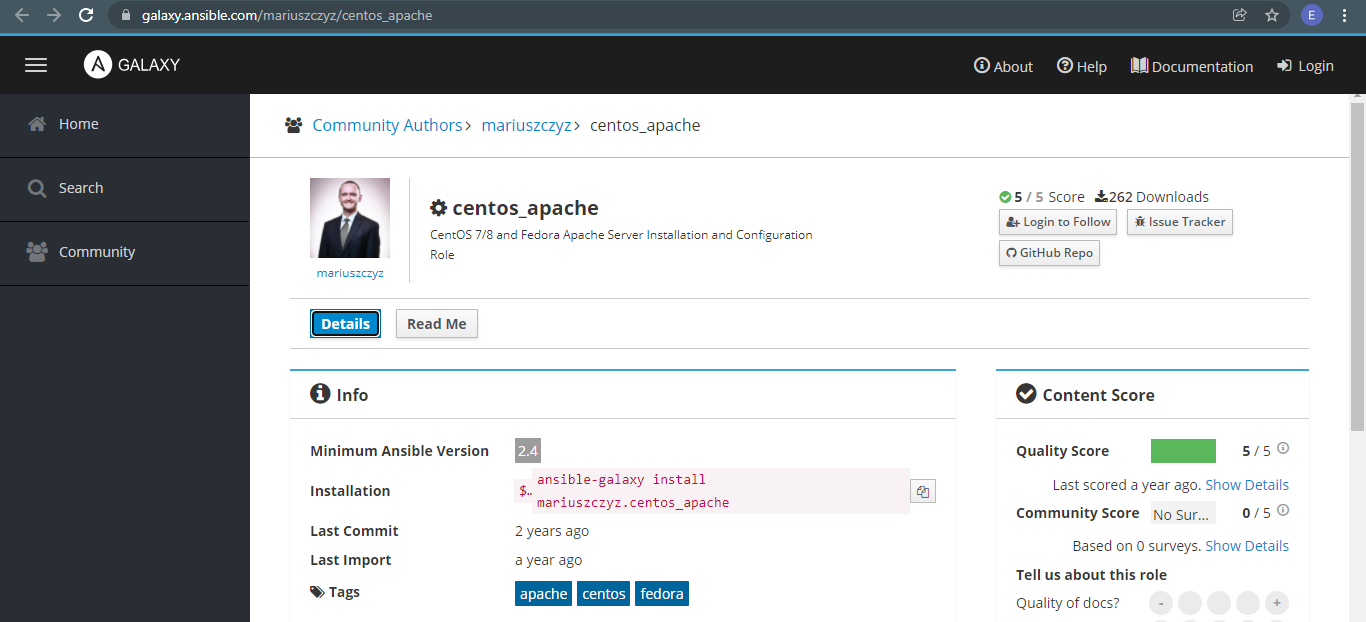
Once we've checked the Github repo and confirmed that the role is safe, we can proceed to installing it on our controller machine.
$ ansible-galaxy install mariuszczyz.centos_apache

- downloading role 'centos_apache', owned by mariuszczyz
- downloading role from https://github.com/mariuszczyz/centos_apache/archive/master.tar.gz
- extracting mariuszczyz.centos_apache to /home/joseeden/.ansible/roles/mariuszczyz.centos_apache
- mariuszczyz.centos_apache (master) was installed successfully
Note that when we installed the role, it will be placed in the default ~/.ansible/roles directory. Here's a tree-output of the directory.
tree-output, centos-apache
$ tree ~/.ansible/roles/mariuszczyz.centos_apache/
/home/joseeden/.ansible/roles/mariuszczyz.centos_apache/
├── README.md
├── defaults
│   └── main.yml
├── files
│   └── custom.conf
├── handlers
│   └── main.yml
├── meta
│   └── main.yml
├── tasks
│   └── main.yml
├── templates
│   └── custom.conf.j2
└── vars
    └── main.yml

7 directories, 8 files
To ensure that all our roles are stored in one place for practice, we'll copy this to our Project One folder, specifically under the roles folder.
one$ cp -r ~/.ansible/roles/mariuszczyz.centos_apache/ roles/
As a recap, the tasks in a playbook are broken down into reusable piece and are place inside the role's tasks folder.
tasks/main.yml
---
# tasks file for mariuszczyz.centos-apache

- name: Install the latest Apache 2.4 for CentOS
  yum:
    name: httpd
    state: latest

- name: Install custom Apache configuration file
  template:
    src: custom.conf.j2
    dest: /etc/httpd/conf.d/custom.conf
    mode: 0644
    owner: root
    group: root
  notify: restart apache

- name: Remove default Apache configuration files
  file:
    path: "/etc/httpd/conf.d/{{ item }}"
    state: absent
  with_items:
    - welcome.conf
    - userdir.conf
    - README
  notify: restart apache

- name: Start and enable Apache
  service:
    name: httpd
    state: started
    enabled: yes
One file that will be deployed to the webservers is the templates/custom.conf. Upon checking, we see that this file is used to set variable parameters.
templates/custom.conf
KeepAlive Off

<IfModule prefork.c>
    StartServers        {{ START_SERVERS }}
    MinSpareServers     {{ MIN_SPARE_SERVERS }}
    MaxSpareServers     {{ MAX_SPARE_SERVERS }}
    MaxClients          {{ MAX_CLIENTS }}
    MaxRequestsPerChild {{ MAX_REQUEST_PER_CHILD }}
</IfModule>
Of course, we will also need to check what are the values that will be used for this parameters. We can find that in the defaults/main.yml. We can make adjustments on this values over time.
defaults/main.yml
---
# defaults file for mariuszczyz.centos-apache

# initial number of threads to spawn on service restart
START_SERVERS: 4

# number of threads to keep warm
MIN_SPARE_SERVERS: 20

# max number of threads to keep warm following a traffic spike
MAX_SPARE_SERVERS: 40

# maximum number of connections
MAX_CLIENTS: 200

# max number of request to handle per thread before killing it
MAX_REQUEST_PER_CHILD: 4500
Lastly, let's look at the handlers/main.yml.
handlers/main.yml
---
# handlers file for mariuszczyz.centos-apache

- name: restart apache
  service:
    name: httpd
    state: restarted
  listen: restart apache
Now that we examined the files and found that they are safe to deploy, the next step is to incorporate this role in a playbook.
From the Github repo, we see some instructions on how to use the role in a playbook. We'll follow this guide.
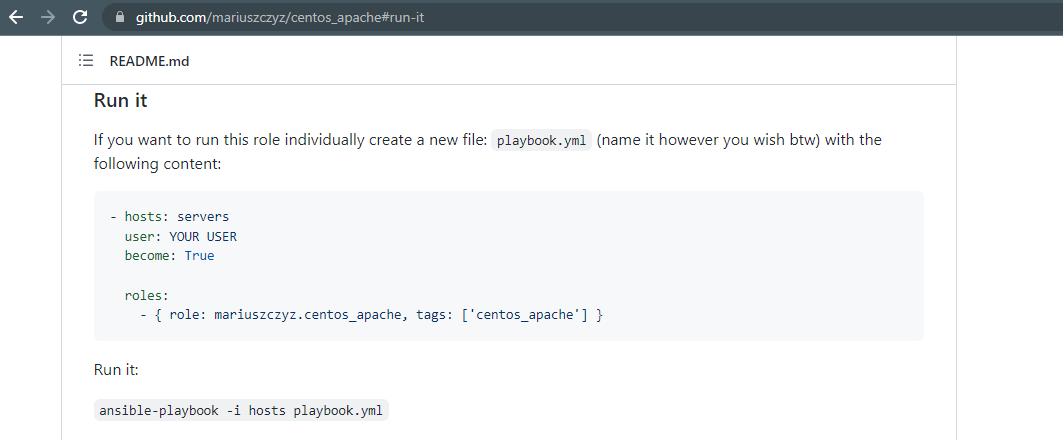
We'll create a new playbook in our playbooks directory. For our first attempt, we'll run it first on one of the webservers.
playbooks/role-centos-apache.yml
# role-centos-apache.yml
---

- name: Install apache on our webservers
  hosts: app1
  # user: YOUR USER
  become: True

  roles:
    - { role: ../roles/mariuszczyz.centos_apache, tags: ['centos_apache'] }
To run the playbook,
$ ansible-playbook playbooks/role-centos-apache.yml -i inventories/edentst.inv
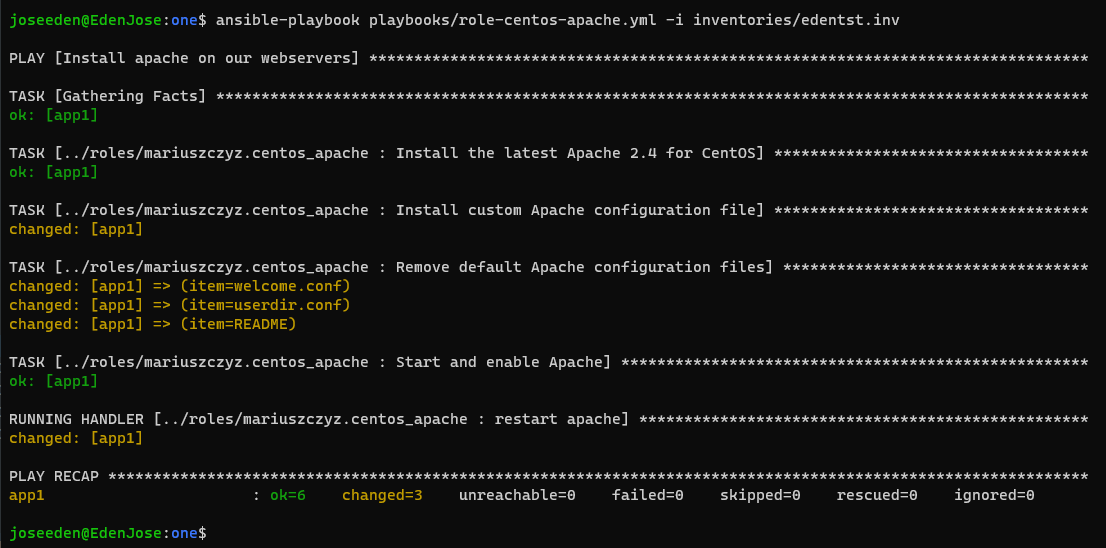
Logging-in to the app1 (tstsvr1), we see that httpd has been started.
[eden@tstsvr1 ~]$ sudo systemctl status httpd
● httpd.service - The Apache HTTP Server
   Loaded: loaded (/usr/lib/systemd/system/httpd.service; enabled; vendor preset: disabled)
  Drop-In: /usr/lib/systemd/system/httpd.service.d
           └─php-fpm.conf
   Active: active (running) since Mon 2022-01-17 14:16:06 UTC; 4min 10s ago
Cleaning Up Now that we're done with this lab, we can remove the role from our machine. Note that the original role is in the default ~/.ansible/roles folder and the one we used is in our Project One folder.
We will need to specify both path when we remove the role.
$ ansible-galaxy role remove ~/.ansible/roles/mariuszczyz.centos_apache
- successfully removed /home/joseeden/.ansible/roles/mariuszczyz.centos_apache
$ ansible-galaxy role remove ~/proj-ansible-1/one/roles/mariuszczyz.centos_apache/
- successfully removed /home/joseeden/proj-ansible-1/one/roles/mariuszczyz.centos_apache/